
- Posts: 383
- Thank you received: 135
Can the OPI5 be Configured to Run LCNC?
- royka
- Offline
- Platinum Member
-

Less
More
3 years 8 months ago - 3 years 8 months ago #264166
by royka
Replied by royka on topic Can the OPI5 be Configured to Run LCNC?
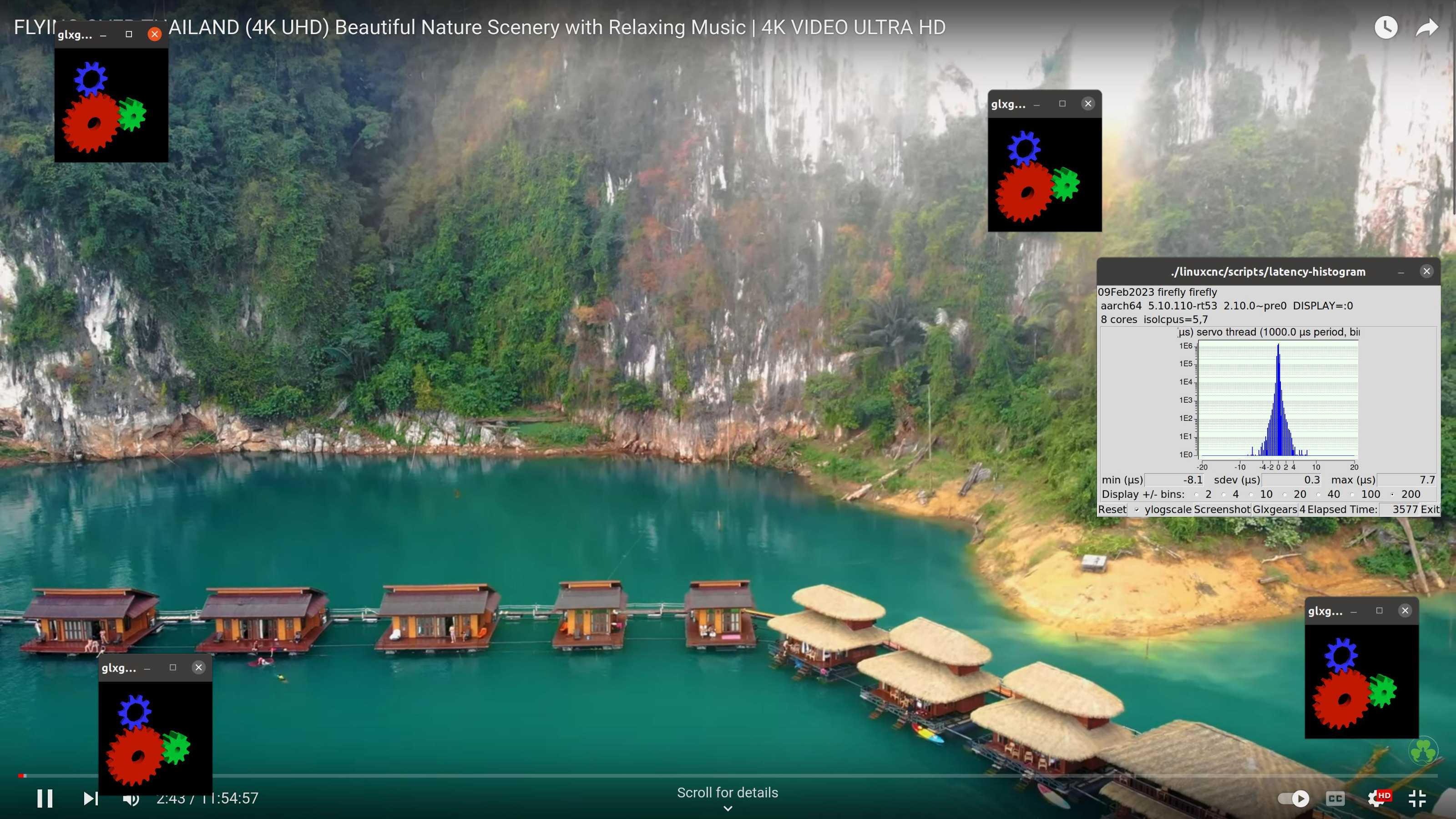
Found a Preempt_RT image, but had to change the bootloader. Unfortunately no source code available. But it works great. After about an hour a max jitter of 8.1us, assuming the biggest number is the max jitter (-8.1). Either way for Mesa/Remora this is perfect.
The base-thread is still going up to 100us somehow, so it's not good for software stepping yet. I've isolated 2 cores and only 1 core is getting used, so I assume the base thread is on the same core as the servo thread? What could be the reason for the the base thread latency getting so high? Would it be possible to make that a separate process on the second (first) isolated core?
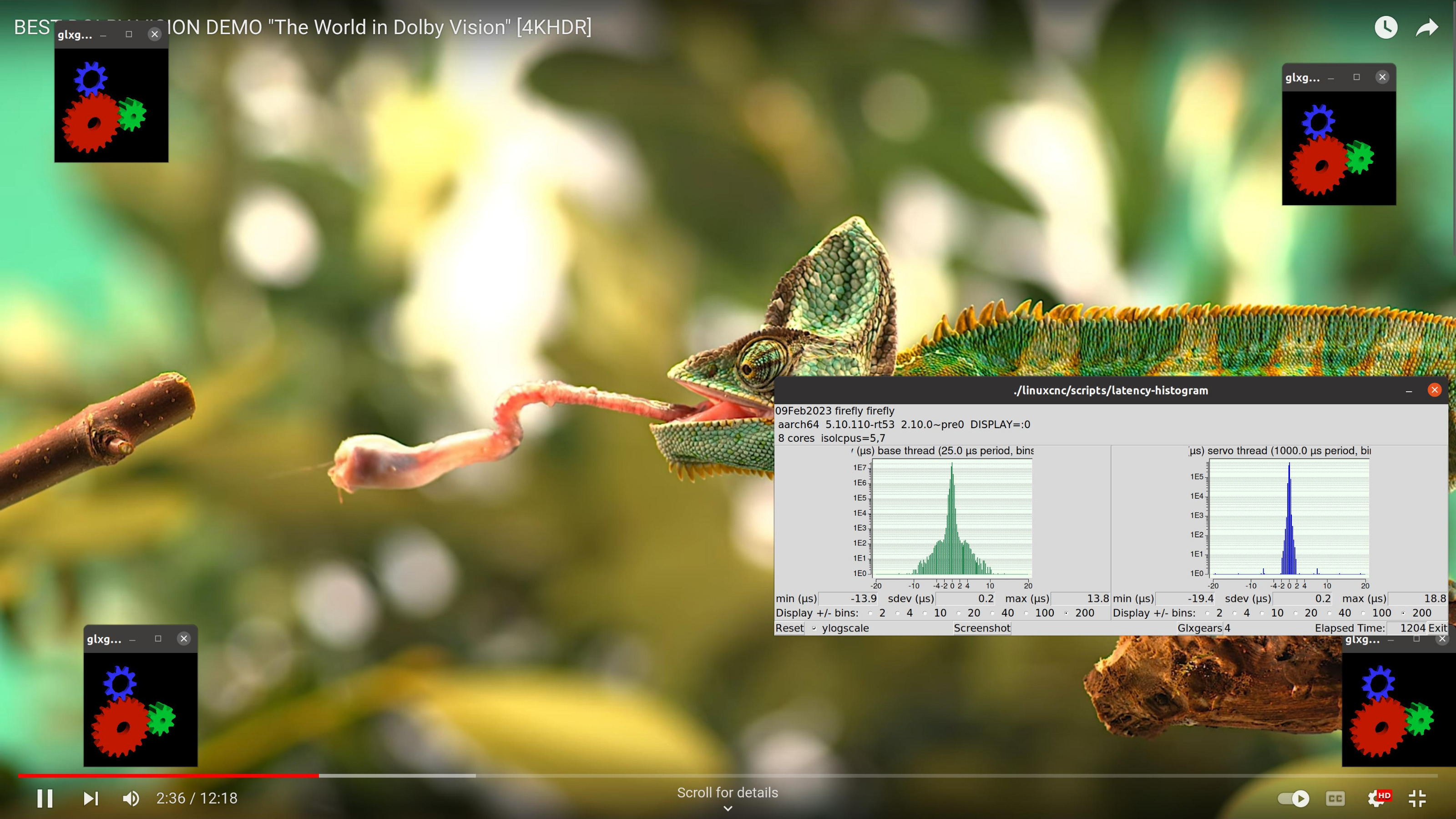
Correction, actually not bad at all, didn't test the base-thread after my last change in the boot parameters. Now has max jitter of 13.9us on base and 19.4us on the thread after a quick test of 20min, I expect it stays stable since it also did with only the servo thread for an hour.
Since the image is meant for another board and I had to install another bootloader to make it work on the OPI5, is it allowed to post an image or howto, if there is any interest?
Correction, actually not bad at all, didn't test the base-thread after my last change in the boot parameters. Now has max jitter of 13.9us on base and 19.4us on the thread after a quick test of 20min, I expect it stays stable since it also did with only the servo thread for an hour.
Since the image is meant for another board and I had to install another bootloader to make it work on the OPI5, is it allowed to post an image or howto, if there is any interest?
Last edit: 3 years 8 months ago by royka. Reason: Base thread also good
The following user(s) said Thank You: Bari
Please Log in or Create an account to join the conversation.
- Bari
- Offline
- Platinum Member
-
Less
More
- Posts: 639
- Thank you received: 234
3 years 8 months ago - 3 years 8 months ago #264169
by Bari
Replied by Bari on topic Can the OPI5 be Configured to Run LCNC?
The requirement for a base thread is only for software stepping on the main core processors and using GPIO for Step/Dir.
Mesa and Remora only require a Servo thread. The 8.1uS jitter is well beyond the <100-200uS jitter required.
If the integrated Cortex M0 microcontrollers can be used for software stepping they would be accessed with a Servo thread and have their own firmware similar to Remora or OrangeCNC for Step/Dir generation.
Mesa and Remora only require a Servo thread. The 8.1uS jitter is well beyond the <100-200uS jitter required.
If the integrated Cortex M0 microcontrollers can be used for software stepping they would be accessed with a Servo thread and have their own firmware similar to Remora or OrangeCNC for Step/Dir generation.
Last edit: 3 years 8 months ago by Bari. Reason: editor
Please Log in or Create an account to join the conversation.
- royka
- Offline
- Platinum Member
-
Less
More
- Posts: 383
- Thank you received: 135
3 years 8 months ago #264171
by royka
Replied by royka on topic Can the OPI5 be Configured to Run LCNC?
The base thread is actually not bad at all, at the moment running the test for 45min and still 13.9us on the base thread and 19.4us on the servo thread. So even software stepping is possible.
I've seen on the website of the manufacturer a page about the rt kernel that they mention to use the mcu's when you need even less latency, but that's all the information they give.
Maybe I will look at the MCU later if it's easy to port/copy to this board. Actually just bought a micro desktop for LinuxCNC which work well, although not as good as the OPI5.
I've seen on the website of the manufacturer a page about the rt kernel that they mention to use the mcu's when you need even less latency, but that's all the information they give.
Maybe I will look at the MCU later if it's easy to port/copy to this board. Actually just bought a micro desktop for LinuxCNC which work well, although not as good as the OPI5.
The following user(s) said Thank You: Bari
Please Log in or Create an account to join the conversation.
- Bari
- Offline
- Platinum Member
-
Less
More
- Posts: 639
- Thank you received: 234
3 years 8 months ago #264172
by Bari
Replied by Bari on topic Can the OPI5 be Configured to Run LCNC?
Please post the link to the kernel and patches tested here along with your boot parameters so others can follow.
Thank you again!
Thank you again!
Please Log in or Create an account to join the conversation.
- royka
- Offline
- Platinum Member
-
Less
More
- Posts: 383
- Thank you received: 135
3 years 8 months ago - 3 years 8 months ago #264184
by royka
Replied by royka on topic Can the OPI5 be Configured to Run LCNC?
I'd downloaded the image with rt-kernel (...rtlinux...) from:
drive.google.com/drive/folders/1tlyMGSqB...yWGSXBo6CVWPw7jkJ0sy
The image has a tool included to write the image to a SD. In the config.ini file you could set the language to English. In the tool you've to choose for upgrade, then write to the SD.
The SD card now has about 7 partitions. Copy from the third partition "boot" the kernel files to a local folder: Image-5.10.110-rt53 System.map-5.10.110-rt53 initrd-5.10.110-rt53 and lib directory (which I forgot and not missed them yet)
Then delete from the SD card all partitions except the 6th (rootfs) partition. On Linux it's easy to use Disks for that, however with Gparted you'll see all the partition labels. Create a new partition at the beginning, filesystem doesn't matter.
For the bootloader, download the Reborn OS image:
github.com/RebornOS-Developers/lxqt-opi5-image/releases
Mount the image and dd the mounted BOOT partition to the first partition of the SD.
For example: sudo dd if=/dev/loop0p1 of=/dev/mmcblk1p2
Copy the rt kernel files to the BOOT partition of the SD card
Copy the dtb file (I used the one from Armbian) for the OPI5 to boot/dtbs/rockchip
Then edit the extlinux/extlinux.conf file:
Check if all the filenames are correct, somehow it didn't find the UUID so had to put the /dev/ name, in armbian the name was mmcblk1... but now it was mmcblk0...
From the rootfs partition edit the etc/fstab to
UUID=f5b6bbae-4757-4154-963f-8f787f9b3df6 / ext4 defaults,noatime,commit=600,errors=remount-ro 0 1
UUID=B6ED-9ADC /boot vfat defaults 0 2 /boot vfat defaults 0 2
The UUID you'll see when you type: blkid
Then check if the boot partition has the right flags with gparted: boot, esp
Now you should be able to boot the system.
To be able to use glx in wayland I installed the following packages, probably not all of them are needed:
sudo apt install libwayland-egl1-mesa libgl1-mesa-glx libglx-mesa0 libgl1-mesa-dri xwayland-hwe-18.04
Now everything should work.
After 2,5hrs testing still the same low latency as at the beginning.
drive.google.com/drive/folders/1tlyMGSqB...yWGSXBo6CVWPw7jkJ0sy
The image has a tool included to write the image to a SD. In the config.ini file you could set the language to English. In the tool you've to choose for upgrade, then write to the SD.
The SD card now has about 7 partitions. Copy from the third partition "boot" the kernel files to a local folder: Image-5.10.110-rt53 System.map-5.10.110-rt53 initrd-5.10.110-rt53 and lib directory (which I forgot and not missed them yet)
Then delete from the SD card all partitions except the 6th (rootfs) partition. On Linux it's easy to use Disks for that, however with Gparted you'll see all the partition labels. Create a new partition at the beginning, filesystem doesn't matter.
For the bootloader, download the Reborn OS image:
github.com/RebornOS-Developers/lxqt-opi5-image/releases
Mount the image and dd the mounted BOOT partition to the first partition of the SD.
For example: sudo dd if=/dev/loop0p1 of=/dev/mmcblk1p2
Copy the rt kernel files to the BOOT partition of the SD card
Copy the dtb file (I used the one from Armbian) for the OPI5 to boot/dtbs/rockchip
Then edit the extlinux/extlinux.conf file:
Code:
label RebornOS ARM
kernel /Image-5.10.110-rt53
initrd /initrd-5.10.110-rt53
fdt /dtbs/rockchip/rk3588s-orangepi-5.dtb
append root=/dev/mmcblk0p6 earlycon=uart8250,mmio32,0xfeb50000 console=ttyFIQ0 console=tty1 numa=off idle=poll isolcpus=5,7 consoleblank=0 loglevel=0 rootwait rw init=/sbin/init rootfstype=ext4 swapaccount=1 irqchip.gicv3_pseudo_nmi=0 switolb=1 coherent_pool=2M quiet
From the rootfs partition edit the etc/fstab to
UUID=f5b6bbae-4757-4154-963f-8f787f9b3df6 / ext4 defaults,noatime,commit=600,errors=remount-ro 0 1
UUID=B6ED-9ADC /boot vfat defaults 0 2 /boot vfat defaults 0 2
The UUID you'll see when you type: blkid
Then check if the boot partition has the right flags with gparted: boot, esp
Now you should be able to boot the system.
To be able to use glx in wayland I installed the following packages, probably not all of them are needed:
sudo apt install libwayland-egl1-mesa libgl1-mesa-glx libglx-mesa0 libgl1-mesa-dri xwayland-hwe-18.04
Now everything should work.
After 2,5hrs testing still the same low latency as at the beginning.
Last edit: 3 years 8 months ago by royka. Reason: Nice editor
The following user(s) said Thank You: Bari
Please Log in or Create an account to join the conversation.
- kanuboy13b
- Offline
- Junior Member
-

Less
More
- Posts: 21
- Thank you received: 7
3 years 7 months ago #267699
by kanuboy13b
Replied by kanuboy13b on topic Can the OPI5 be Configured to Run LCNC?
Hello, This thread has me very intrigued and after reading this thread a couple of times, it has convinced me to try and pursue this approach. I have already purchased a OPI5 and am looking to attempt to set the board up exactly as describe by royka.
Now I realize this isn't the typical SD image burn one would do for a Rasberry Pi and is more of a hack, so there would be some hiccups along the way.
Right off the bat though I ran into a hiccup and wanted to get some clarification on the first step. Using the update tool, I realize you have to connect your OPi5 to a host computer and write the image using the update tool. I am using the linux approach as my laptop is running Manjaro and figured it would be more straight forward approach via command line. However when I try to use the update_tool, I get a segmentation fault error. I was wondering if I need to prepare the SD card prior to running the tool. Or is there any specific thing I have to do when powering up the OPi5 like entering a loader or maskrom mode. I was reading the wiki page that was included in the readme.txt file and seems to be the case for the dev board explained on the wiki, I wasn't sure if it was the same for the OPi5. A little clarification could help on this step.
Cheers
Now I realize this isn't the typical SD image burn one would do for a Rasberry Pi and is more of a hack, so there would be some hiccups along the way.
Right off the bat though I ran into a hiccup and wanted to get some clarification on the first step. Using the update tool, I realize you have to connect your OPi5 to a host computer and write the image using the update tool. I am using the linux approach as my laptop is running Manjaro and figured it would be more straight forward approach via command line. However when I try to use the update_tool, I get a segmentation fault error. I was wondering if I need to prepare the SD card prior to running the tool. Or is there any specific thing I have to do when powering up the OPi5 like entering a loader or maskrom mode. I was reading the wiki page that was included in the readme.txt file and seems to be the case for the dev board explained on the wiki, I wasn't sure if it was the same for the OPi5. A little clarification could help on this step.
Cheers
Please Log in or Create an account to join the conversation.
Time to create page: 0.140 seconds