

4-Gang 1-Way Switch To Control 3 Power Supplies and a Router Independently

More
1 year 6 months ago #325744 by tommylight
Yeah, i would not use light switches...
-
Take the "unknown" idea and combine it with mine, that would be the best solution possible.
Total cost would be under 20$ and provide actual safety, something you do not seem interested in.
The following user(s) said Thank You: behai

Please Log in or Create an account to join the conversation.
More
1 year 6 months ago #325747 by behai

Yeah, i would not use light switches...
-
Take the "unknown" idea and combine it with mine, that would be the best solution possible.
Total cost would be under 20$ and provide actual safety, something you do not seem interested in.
 

Hi tommylight ,

Thank you. I am learning bit by bit, these are over my head. I understand that we should have fuses or circuit breakers to protect the circuits.

Best regards,

...behai.
The following user(s) said Thank You: tommylight

Please Log in or Create an account to join the conversation.
More
1 year 6 months ago #325751 by rodw
I would do this a but differently
Let the mains power come in and use some DIN rail terminals from Ocean controls. They have some Bus bar connectors to join a few together so that are all common. you'll need some green earth terminals as well
Grab something like this industrial power point but seperate the two pieces and flush mount to your enclosuere
www.tropac.com.au/10-AMP-250V-3-Flat-Pin-Switched-Socket
Use the switch as your main power switch and the power point for your router. Put a household breaker on a Din rail for circuit protection
So now you need to switch your router from your 7i96s.
You could use a Jaycar SSR (you also need the heat sink on this page)
www.jaycar.com.au/solid-state-relay-4-32...a-switching/p/SY4084
Or you could use a contractor from tropac but make sure it will switch with 24v DC (some are AC), you may end up with a 3 phase one
www.tropac.com.au/search?keywords=contactor
Between your mains power and the 7i96s, use an EMI filter  www.jaycar.com.au/240v-ac-emi-filter/p/MS4001 . Then run the mains power to your 5v and 24v power and 36 volt power.
For your estop, Jaycar's one has  1 x NO and 1 x NC contactor. set it up so that the NO side switches 24v to an input and the NC side is on the mains power to your stepper motor supply and your router power point. The goal is that hitting estop will turn the router off and disable motion. We also want to send a signal back to the 7i96s so it knows estop has been pressed. the 7i96s will be powered on all the time.

Hope you have followed thaf!

 
The following user(s) said Thank You: behai

Please Log in or Create an account to join the conversation.

More
1 year 6 months ago #325753 by rodw
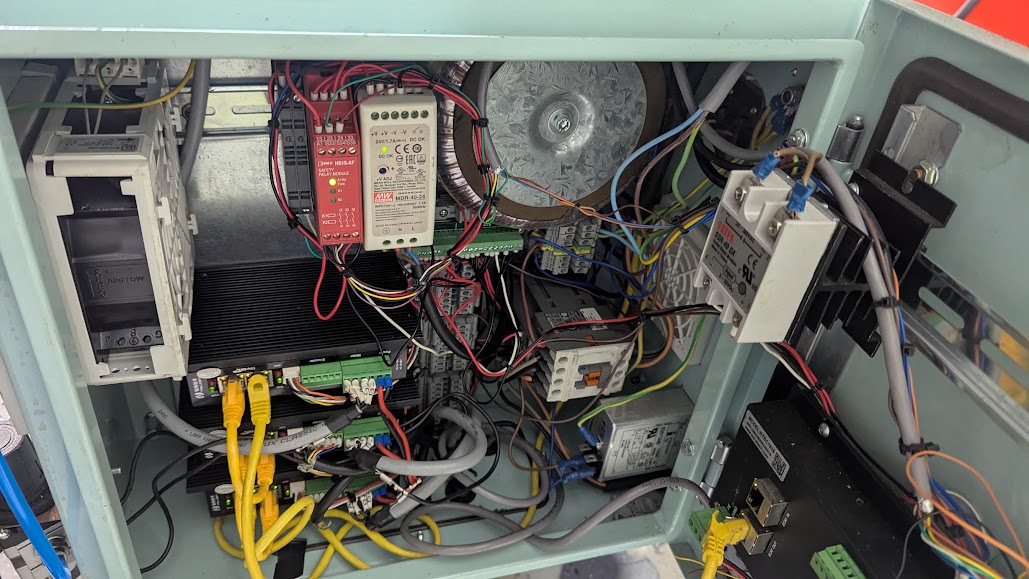
This is what I am trying to get you to build.
This is Ethercat so there is no Mesa card
I have also used a safety relay but that will add $400 or more so get the estop wired right to avoid it
   
The power comes in at bottom right through an IEC connector with switch and EMI filter built in. We can't use this for your router as I wanted to keep it out of the filtered power.
Above that is the filtered power and above that are some Ocean Controls DIN tail terminals with the green earth one in the middle. 
Above that is the round 60v AC toroids power supply for the stepper motors
Beside that is the 24 volt field power supply, red estop safety relay and a couple of slimline relays
At the right is a enclosure fan.
Below the 24v power supply is a tiny Mesa commx2 bus bar for field power. These are very cool.
and also a bunch of DIN rail terminals

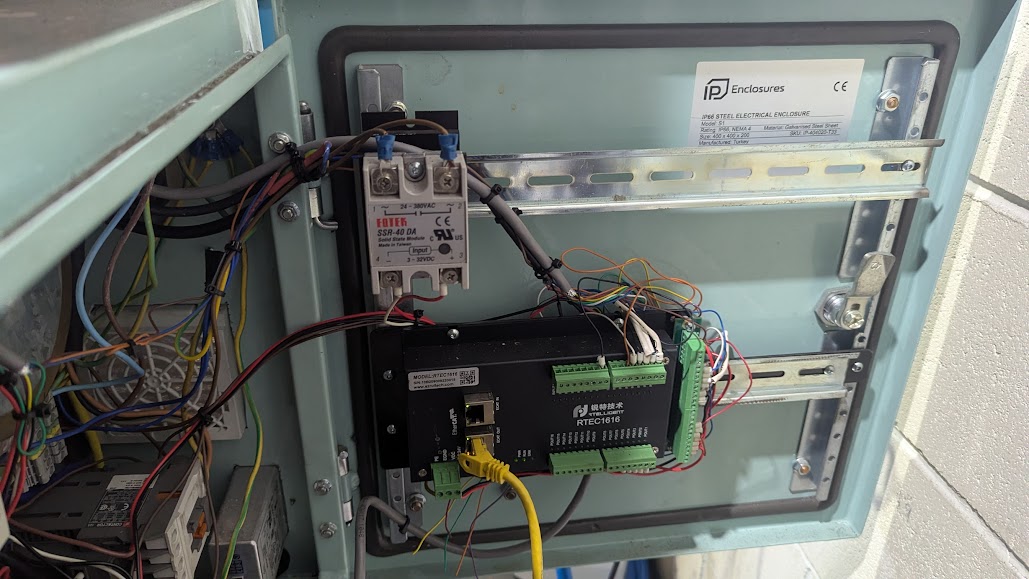
On the door is a SSR the same as I suggested for you mounted to  a DIN rail heat sink
And a Ethercat 16 input and 16 outputs module
Good luck! 
The following user(s) said Thank You: behai

Please Log in or Create an account to join the conversation.

More
1 year 6 months ago #325754 by rodw
Forgot to mention the SSR is used to enable the coolant pump which uses the same Power Point I suggested for you
The following user(s) said Thank You: behai

Please Log in or Create an account to join the conversation.

More
1 year 6 months ago #325759 by tommylight
The following user(s) said Thank You: behai

Please Log in or Create an account to join the conversation.

Time to create page: 0.086 seconds
Powered by Kunena Forum