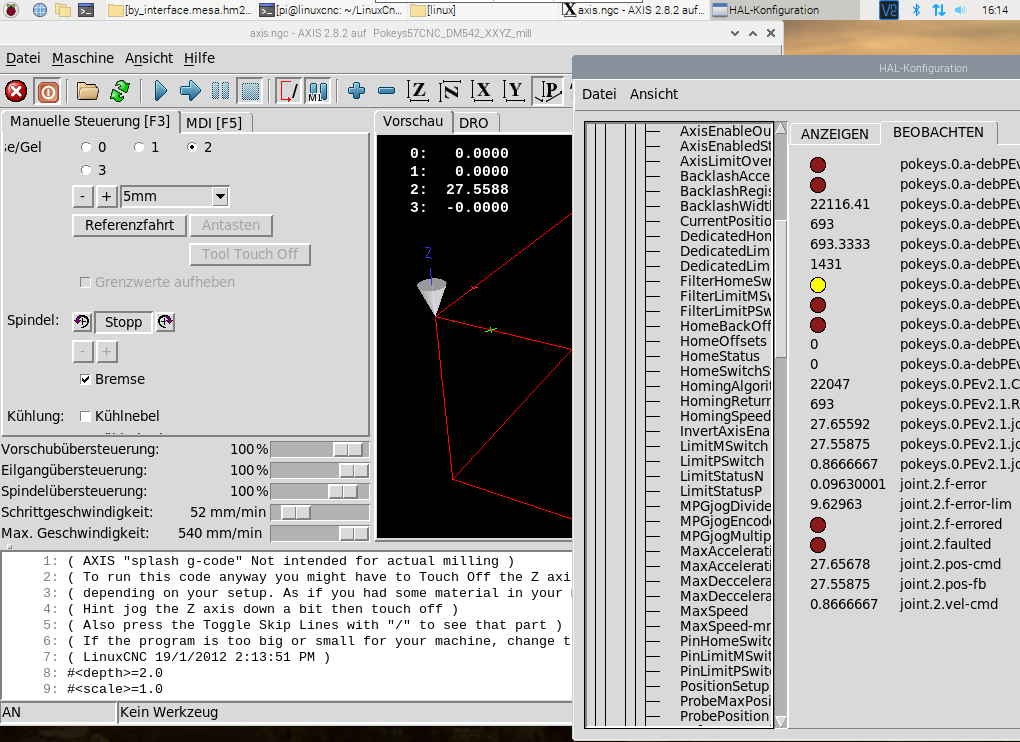
Pokeys_homecomp EncoderSearch / Encoder Arm Topic: Pos_Fb Following errors

More
4 years 7 months ago - 4 years 7 months ago #238915 by zarfld
Replied by zarfld on topic Pokeys ethernet
Hi

i want to thank you for all the work and investigations done so far on this topic.i'm currently running a RasPi4 on latest build of LinuxCnc and added the pokeys.comp attached to this thread.

To contribute i'm currently extending that comp-file ( github.com/zarfld/LinuxCnc_PokeysLibComp.git )
- i already use the info parametrized on the dev, to see if the Pin is used as DIN, DOUT or AIN
- it should work with both USB and NET devices (i could test with 57E only)
- RTC is being read  
- to be able to use the pokeys PulseEngine instead of Dir/Pulse signals (due to limitations of updatefrequency ). as a sideeffect i can also use PEv2 channels for E-Stop,Enable,Limit

has anyone already tried to use the pulseengine directly?

i assume as a first step i would need to somehow translate the stepgen interface 
Code:
setp stepgen.0.position-scale [JOINT_0]SCALE setp stepgen.0.steplen 1 setp stepgen.0.stepspace 0 setp stepgen.0.dirhold 35000 setp stepgen.0.dirsetup 35000 setp stepgen.0.maxaccel [JOINT_0]STEPGEN_MAXACCEL net xpos-cmd joint.0.motor-pos-cmd => stepgen.0.position-cmd net xpos-fb stepgen.0.position-fb => joint.0.motor-pos-fb

to PEv2 
Code:
   int32_t         CurrentPosition[8];        // Current position     int32_t         PositionSetup[8];          // Position to be set as current position     int32_t         ReferencePositionSpeed[8]; // Reference position or speed (position or pulses/s)     int8_t          InvertAxisEnable[8];       // Invert axis enable signal     int32_t         SoftLimitMaximum[8];       // Soft limit maximum position     int32_t         SoftLimitMinimum[8];       // Soft limit minimum position     uint8_t         HomingSpeed[8];            // Homing speed per axis (in %)     uint8_t         HomingReturnSpeed[8];      // Homing return speed per axis (in % of the homing speed)     int32_t         HomeOffsets[8];            // Home position offset     uint8_t            HomingAlgorithm[8];           // Homing algorithm configuration     uint8_t            FilterLimitMSwitch[8];       // Digital filter for limit- switch     uint8_t            FilterLimitPSwitch[8];       // Digital filter for limit+ switch     uint8_t            FilterHomeSwitch[8];       // Digital filter for home switch     int32_t         ProbePosition[8];          // Position where probe detected change     int32_t         ProbeMaxPosition[8];       // Maximum position to travel to until stopping and returning error     float           MaxSpeed[8];               // Maximum axis speed (in pulses per ms)     float           MaxAcceleration[8];        // Maximum axis acceleration (in pulses/ms/ms)     float           MaxDecceleration[8];       // Maximum axis deceleration (in pulses/ms/ms)     int32_t         MPGjogMultiplier[8];       // MPG jog multiplier value     uint8_t         MPGjogEncoder[8];          // MPG jog encoder ID     uint8_t         PinHomeSwitch[8];          // Home switch pin (0 for external dedicated input)     uint8_t         PinLimitMSwitch[8];        // Limit- switch pin (0 for external dedicated input)     uint8_t         PinLimitPSwitch[8];        // Limit+ switch pin (0 for external dedicated input)     uint8_t         AxisEnableOutputPins[8];   // Axis enabled output pin (0 for external dedicated output)     uint32_t        HomeBackOffDistance[8];       // Back-off distance after homing     uint16_t        MPGjogDivider[8];          // Divider for the MPG jogging (enhanced encoder resolution)     uint8_t         reserved[8];               // Motion buffer entries - moved further down...     uint8_t         ReservedSafety[8];     uint8_t         PulseEngineEnabled;        // Pulse engine enabled status, also number of enabled axes     uint8_t         PulseGeneratorType;        // Pulse engine generator type (0: external, 1: internal 3ch)     uint8_t         AxisEnabledStatesMask;     // Bit-mapped states, where axis enabled and charge pump signals are active     uint8_t         PulseEngineStateSetup;     // Pulse engine new state configuration     uint8_t         PulseEngineBufferSize;     // Buffer size information...     uint8_t         motionBufferEntriesAccepted;     uint8_t         newMotionBufferEntries;     uint8_t         HomingStartMaskSetup;      // Bit-mapped axes indexes to be homed     uint8_t         ProbeStartMaskSetup;       // Bit-mapped axis indexes for probing        float           ProbeSpeed;                // Probe speed (ratio of the maximum speed)    uint16_t        BacklashWidth[8];            // half of real backlash width     int16_t            BacklashRegister[8];        // current value of the backlash register     uint8_t            BacklashAcceleration[8];    // in pulses per ms^2     uint8_t            BacklashCompensationEnabled;     uint8_t            reserved_back[3];  

these channels are available (1:1) already in the comp, but besides the pins i'm currently investigating on how to use them.
some parts might be just a kind of unitconversion [m/s] to [pulses per ms], others might be more complicated (eg. until now i did not find any good explanation how to use MotionBuffer correctly).

Any tips, hints suggestions are welcome.

BR
Dominik

Last edit: 4 years 7 months ago by zarfld. Reason: formating
The following user(s) said Thank You: LAUSCH

Please Log in or Create an account to join the conversation.

More
4 years 7 months ago #238919 by andypugh
Replied by andypugh on topic Pokeys ethernet

has anyone already tried to use the pulseengine directly?

i assume as a first step i would need to somehow translate the stepgen interface 
A simpler way to do this might be to only support velocity mode from a position PID in the HAL. This is actually currently the preferred way to drive the Mesa stepgens as it better compensates for variations in thread timing. 

In that case all that is needed is a HAL pin to set the velocity command and another to feed back the current step counts. 

Though reading through the register map, it might be that there is no velocity mode. 
 
The following user(s) said Thank You: zarfld, LAUSCH

Please Log in or Create an account to join the conversation.

More
4 years 5 months ago #244373 by zarfld
Replied by zarfld on topic Pokeys ethernet
Hi

axis are finally moving ...
there is both PositionMode and VelocityMode...

i can get pos-fb based on "CurrentPosition" (divided by [JOINT*] STEPSCALE)
DemandValues for both modes share the same variable "ReferencePositionSpeed"

so first i was using Position-Mode which worked quite well, but without of adjustement of velocity

then i also changed to velocity mode - where i first thought i would need additional encoders to provide velocityfeedback for each axis.
but havinf vel-cmd and pos-fb signals active this seems fine also - besides a small deviation in pos-fb<->pos-cmd in 4th decimal.

so in the end i tried to switch to position-mode for the last move to ensure that the pos-fb is exact to pos-fb. but then the move was not fluent anymore.

so i removed that. I think the PID that you mentioned would also need vel-fb from encoders, right?

i tried to ensure a constant loopfrequency by counting the number of loops done every second (using realtime-clock signals of pokeys), and based on that adjusting the duration used in usleep(sleepduration). i found that "Device load status" on pokeys device kept the lowest if we keep around 10Hz, and the maximum frequency which seemed somehow stable was around 40Hz.


->kbd48CNC observed some latency issues if it is connected using Pokeys57E and PoNet-extensionBoard. This does ius not observed if on Pokeys57CNC (and CAN-operation enabled)

Please Log in or Create an account to join the conversation.

More
4 years 4 months ago #244427 by andypugh
Replied by andypugh on topic Pokeys ethernet
I am not going to try to use the editor on a phone…

No, I don’t think you need encoders. You can use steps-actually-made back from the hardware as feedback.
The following user(s) said Thank You: zarfld

Please Log in or Create an account to join the conversation.

More
4 years 2 months ago #249369 by MATZE-ATZE-SCH
Replied by MATZE-ATZE-SCH on topic Pokeys
Hello,

I have now on the Pokeys 2 Potis for Spindel Override and Feed Override.
I want to change the potis to rotary encoders with push button,
to set the value to 100% with the push  button.
Have tried to connect the rotary switch to the Pokeys, but the update rate with 15Hz seems to slow to correctly
use a rotary switch with 20 impuls/rev.
If I turn the switch slow, it works fine, but at faster speed it get stock.
Is there a solution for this, to increase the update rate at 4 IOs of the Pokeys?
Have tried with the Pokeys Software to set the Inputs to Encoders, under Windows it works, but Linux seems to Ignore all settings.
In the 5th post in this Topic, the user "fixer" wrote:

yes, digital IO, HW encoder counters and analog inputs are supported in HAL component from first post. The board can also decode matrix keyboard and PWM outputs. It can also emulate USB HID keyboard and joystick buttons and pots.

Maybe I just dont need to use
"pokeys.0.in-XX" but another thing?

The Hardware I use is a  5i20, 7i37 and 7i33

Best regards
Marcel

Please Log in or Create an account to join the conversation.

More
4 years 2 months ago - 4 years 2 months ago #249380 by zarfld
Replied by zarfld on topic Pokeys - Counters
Hello Marcel,

you are right "pokeys.0.in-XX" will just provide a bit (true/false 0/1), for parametrized counters a different pin needs to be created which provides the counter-value already counted by pokeys. Otherwise you will be restricted to loopfrequency of your HAL-component.

in the component i have implemented it as shown below - but not tested yet (anyway MPG-CounterWheel and rotary encoders for axis are waiting for installation on my mill).

 
Code:
// pin name pin out unsigned counter.#.value[55]; ... // read values             if (dev->info.iDigitalCounters > 0)             {                 if (PK_DigitalCounterGet(dev) == PK_OK)                 {                     DigitalCounterGet = true;                     loopPins = true;                 }             } // map values to pin             for(i=0;i<info_PinCount-1;i++)             { ...                     if(dev->Pins[i].DigitalCounterAvailable)                     {                         counter_value(i) = dev->Pins[i].DigitalCounterValue;                         //Pins_CounterOptions(i) = dev->Pins[i].CounterOptions;                     } ...[/i][/i][/i]             [i][i][i]} i would be glad if you could give it a try, as during vacation i have no acces to my mill to check it by myself.[/i][/i][/i]
Last edit: 4 years 2 months ago by zarfld.
The following user(s) said Thank You: MATZE-ATZE-SCH

Please Log in or Create an account to join the conversation.

Time to create page: 0.543 seconds
Powered by Kunena Forum