Toma/Proma HAL for Mesa Board -Basics

More
8 years 3 months ago - 8 years 3 months ago #114844 by PCW
Basically on pretty much _any_ system those will be the hardware pins connected to motions commanded and feedback positions

On a servo system the commanded and feedback positions (from an encoder) are connected to motion and the PID component

On a Mesa (or Pico Systems) stepgen they connect similarly except the feedback comes from the stepgen instead of the encoder
Last edit: 8 years 3 months ago by PCW.

Please Log in or Create an account to join the conversation.
More
8 years 3 months ago - 8 years 3 months ago #114846 by Grotius
@Hi Tommy,

It works. I forgot to make the component coupled to a timer. I was searching some time before i knew the qlue... :woohoo:
So now you know how to make your own thc function. Add some stuff to it and give it a go !!

In custom postgui.hal :
loadrt position
addf position servo-thread
It is recommended to make your z axis signals in the same file, i used the postgui file for this.


File Attachment:

File Name: position_2...-25.comp
File Size:462 B


Okey motor z-axis is tested today. Here the motor connections to extract the offset :
Code:
net 1 joint.3.motor-pos-cmd position.in net 2 position.out stepgen.3.position-cmd net 3 stepgen.3.position-fb => joint.3.motor-pos-fb

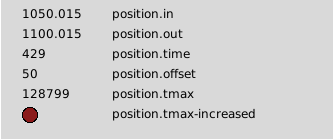
so if we set the offset parameter in halshow with : setp position.offset 5
The motor is turning 5mm, and the screen dro is still the same. The offset is working !!
Last edit: 8 years 3 months ago by Grotius.
The following user(s) said Thank You: tommylight

Please Log in or Create an account to join the conversation.

More
8 years 3 months ago #114895 by Grotius
Hi this code works very smooth on proma thc, the thc speed is about 10% during testing with motors.
I will try to adapt a 0-100% speed and auto configure this speed on 35% wich is perfect.

Code:
component position "offset control between commanded position and postion feedback"; description """ Postgui.hal connections net 1 joint.3.motor-pos-cmd position.in net 2 position.out stepgen.3.position-cmd net 3 stepgen.3.position-fb => joint.3.motor-pos-fb """; author "Grotius CNC Machines"; license "GPLv2 or greater"; option singleton yes; // Input Pins pin in float in "input value connected to joint.3.motor-pos-cmd"; pin in bit torch_up "Connect to Proma up signal"; pin in bit torch_down "Connect to Proma down signal"; pin in bit arc_ok "Connect to Proma arc-ok signal"; // Output Pins pin out float out "output value connected to stepgen.3.position-cmd "; // Parameter //param rw float speed; // Global Variables variable float loop; function _; ;; #include "rtapi_math.h" FUNCTION(_) { if(!arc_ok){ out = in; loop = 0;} if(arc_ok){ if(arc_ok && torch_up){ out = in + loop; loop = loop + 0.001; } // substract value if(arc_ok && torch_down){ out = in + loop; loop = loop - 0.001;} // extract value } }
The following user(s) said Thank You: tommylight, snugglylovemuffin

Please Log in or Create an account to join the conversation.

More
8 years 3 months ago - 8 years 3 months ago #114903 by Grotius
Hi,

This THC component works good.

it works on a real time calculation instead of calculating the deviation percent from planned velocity and velocity to move Z to correct.
Some times you see on forums double value's are confusing. This is clear value !!

So one parameter for thc speed in milliseconds servo thread, super easy to understand !

File Attachment:

File Name: position_2...-26.comp
File Size:1.18 KB


I tested this within the position.time 0.001 and 0.01 milliseconds. It works super good. In future it must have a time limiter, but that is not the fact at this moment. :woohoo:
Last edit: 8 years 3 months ago by Grotius.
The following user(s) said Thank You: snugglylovemuffin

Please Log in or Create an account to join the conversation.

More
8 years 3 months ago #114905 by snugglylovemuffin
Linuxcnc opens right up but won't let me jog the machine to test my motors out. I'm using the Axis gui and I can't seems to enable the jog function. Neither can I load and run a simple gcode file. I swear, it's just one thing after another...

I can't verify that my config works; so I can't begin adding in the Toma HAL components.

@PCW the CR11 (INIT) led is red and won't turn off, I posted on the previous "boards" thread.

Please Log in or Create an account to join the conversation.

More
8 years 3 months ago #114906 by Grotius
The following user(s) said Thank You: snugglylovemuffin

Please Log in or Create an account to join the conversation.

Time to create page: 0.158 seconds
Powered by Kunena Forum
