Mesa 7i76e - Joint 0/2 following error

More
9 years 3 months ago #95849 by PCW
This is _not_ a hal/ini file issue, this is a latency issue our your PC which can likely
be resolved by BIOS setup

Try running the latency-test or latency-histogram with the base thread disabled
as the stock base thread period will cause issues on your relatively slow PC
preventing accurate latency measurement

For the latency histogram you do this with:

latency-histogram --nobase

for the latency test:

latency-test 1ms 1ms

Please Log in or Create an account to join the conversation.

More
9 years 3 months ago - 9 years 3 months ago #95850 by JackBerkhout
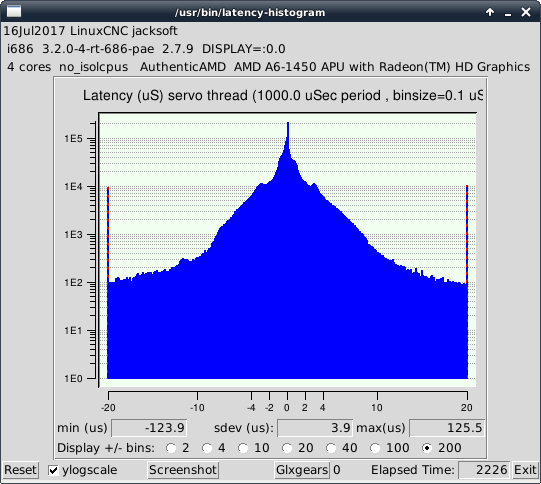
Hi PCW, it's running...

So far, after 20 minutes, to give an impression.
I have no clue if it looks good.

Regards,
Jack.
Last edit: 9 years 3 months ago by JackBerkhout.

Please Log in or Create an account to join the conversation.
More
9 years 3 months ago - 9 years 3 months ago #95851 by PCW
That looks OK though not great
Have you disabled all power management options in the BIOS?

Have you tried running normal PC applications, moving windows around, playing videos etc while the latency test is running?

Also what Ethernet hardware is used on your PC? (may need the results of dmesg to check)

Also as rodw mentioned ,disable any internal WIFI cards as some of those are notoriously bad for latency
(Broadcom anything is a disaster)
Last edit: 9 years 3 months ago by PCW.

Please Log in or Create an account to join the conversation.

More
9 years 3 months ago - 9 years 3 months ago #95852 by JackBerkhout
Thank you very much PCW!!!

Maybe I found something.
The Ethernet interface in the barebone didn't work after LinuxCNC installation, so I used a USB-to-Ethernet adapter.
I removed it and tried the Ethernet port again and it now works, probably because of updates.
Such an adapter is far from ideal, I guess.
I disabled the power options in the BIOS, but could not find the WiFi disable option.

Testing sofar, that seems to make the difference!

Kind regards,
Jack.
Last edit: 9 years 3 months ago by JackBerkhout.

Please Log in or Create an account to join the conversation.

More
9 years 3 months ago #95853 by PCW
Yeah, a USB/Ethernet adapter will not work for realtime Ethernet
(though its fine for normal Internet access so you could use it for that if your WIFI has issues)

Enabling/Disabling WIFI is done in Linux with the network manager

Please Log in or Create an account to join the conversation.

More
9 years 3 months ago #95857 by JackBerkhout
Hi, I couldn't find the 'network manager', but did found
'Applications Menu' -> 'Settings' -> 'Network Connections', however I didn't find a way to disable WiFi.
Am I overlooking a menu item?

Please Log in or Create an account to join the conversation.

Moderators: PCW, jmelson
Time to create page: 0.322 seconds
Powered by Kunena Forum
