
- Posts: 18115
- Thank you received: 5334
Lagunmatic 3516-SX Retrofit
- PCW
- Offline
- Moderator
-

Less
More
8 years 6 months ago #108373
by PCW
Replied by PCW on topic Lagunmatic 3516-SX Retrofit
Have you checked that the drives work?
That is, even before you use LinuxCNC or the connect the 7I77 you should make sure that the motors
can be moved by enabling the drives and applying with a small command voltage (say with a 1.5V battery)
That is, even before you use LinuxCNC or the connect the 7I77 you should make sure that the motors
can be moved by enabling the drives and applying with a small command voltage (say with a 1.5V battery)
Please Log in or Create an account to join the conversation.
- giz
- Offline
- Premium Member
-

Less
More
- Posts: 126
- Thank you received: 11
8 years 6 months ago - 8 years 6 months ago #108375
by giz
Thanks for the suggestion. All 3 drives were working when I removed the old control in December. Prior to that, I had cut a couple parts using just the control knobs to jog the machine. But I do think it would be a good test to do because I'm not even sure if I am sending signal.
I need to research Halscope and Hal Meter a little more so I can troubleshoot. It would be nice to command a voltage in LinuxCNC and check my output for example but I'm not sure that is possible...
Last night I thought maybe the machine was seized but then I realized I should get an overcurrent alarm on the servo drive. I had experienced that in the past when I discovered by Z ballscrew was seized.
Replied by giz on topic Lagunmatic 3516-SX Retrofit
PCW wrote: Have you checked that the drives work?
That is, even before you use LinuxCNC or the connect the 7I77 you should make sure that the motors
can be moved by enabling the drives and applying with a small command voltage (say with a 1.5V battery)
Thanks for the suggestion. All 3 drives were working when I removed the old control in December. Prior to that, I had cut a couple parts using just the control knobs to jog the machine. But I do think it would be a good test to do because I'm not even sure if I am sending signal.
I need to research Halscope and Hal Meter a little more so I can troubleshoot. It would be nice to command a voltage in LinuxCNC and check my output for example but I'm not sure that is possible...
Last night I thought maybe the machine was seized but then I realized I should get an overcurrent alarm on the servo drive. I had experienced that in the past when I discovered by Z ballscrew was seized.
Last edit: 8 years 6 months ago by giz.
Please Log in or Create an account to join the conversation.
- PCW
- Offline
- Moderator
-
Less
More
- Posts: 18115
- Thank you received: 5334
8 years 6 months ago #108380
by PCW
Replied by PCW on topic Lagunmatic 3516-SX Retrofit
Pncconf can set output voltages in its open loop test tab
Did you look at this servo tuning tutorial:
gnipsel.com/linuxcnc/tuning/servo.html
it has a pretty good list of what's needed and the step by step order to get velocity mode servos moving
Did you look at this servo tuning tutorial:
gnipsel.com/linuxcnc/tuning/servo.html
it has a pretty good list of what's needed and the step by step order to get velocity mode servos moving
Please Log in or Create an account to join the conversation.
- giz
- Offline
- Premium Member
-
Less
More
- Posts: 126
- Thank you received: 11
8 years 6 months ago #108382
by giz
I hadn't seen this page - thank you!!
Replied by giz on topic Lagunmatic 3516-SX Retrofit
PCW wrote: Pncconf can set output voltages in its open loop test tab
Did you look at this servo tuning tutorial:
gnipsel.com/linuxcnc/tuning/servo.html
it has a pretty good list of what's needed and the step by step order to get velocity mode servos moving
I hadn't seen this page - thank you!!
Please Log in or Create an account to join the conversation.
- giz
- Offline
- Premium Member
-
Less
More
- Posts: 126
- Thank you received: 11
8 years 6 months ago #108417
by giz
Replied by giz on topic Lagunmatic 3516-SX Retrofit
Learned a little more tonight.
I widened the F error and opened up Halscope hoping to adjust the P value for the servos and and see some movement.
No such luck - I went as high as 200 didn't see movement on X or Y (didn't try Z)
So I figured I'd try Peter's suggestion and manually apply a signal voltage to see what happens. To my surprise as soon as I disconnected the plug that carries the signal and tach the table quickly jumped 5-6" in the X+ direction before the control stopped it due to F error.
That caught me by surprise!
I tried unplugging the Y card and the same thing happened only it moved about an inch before stopping.
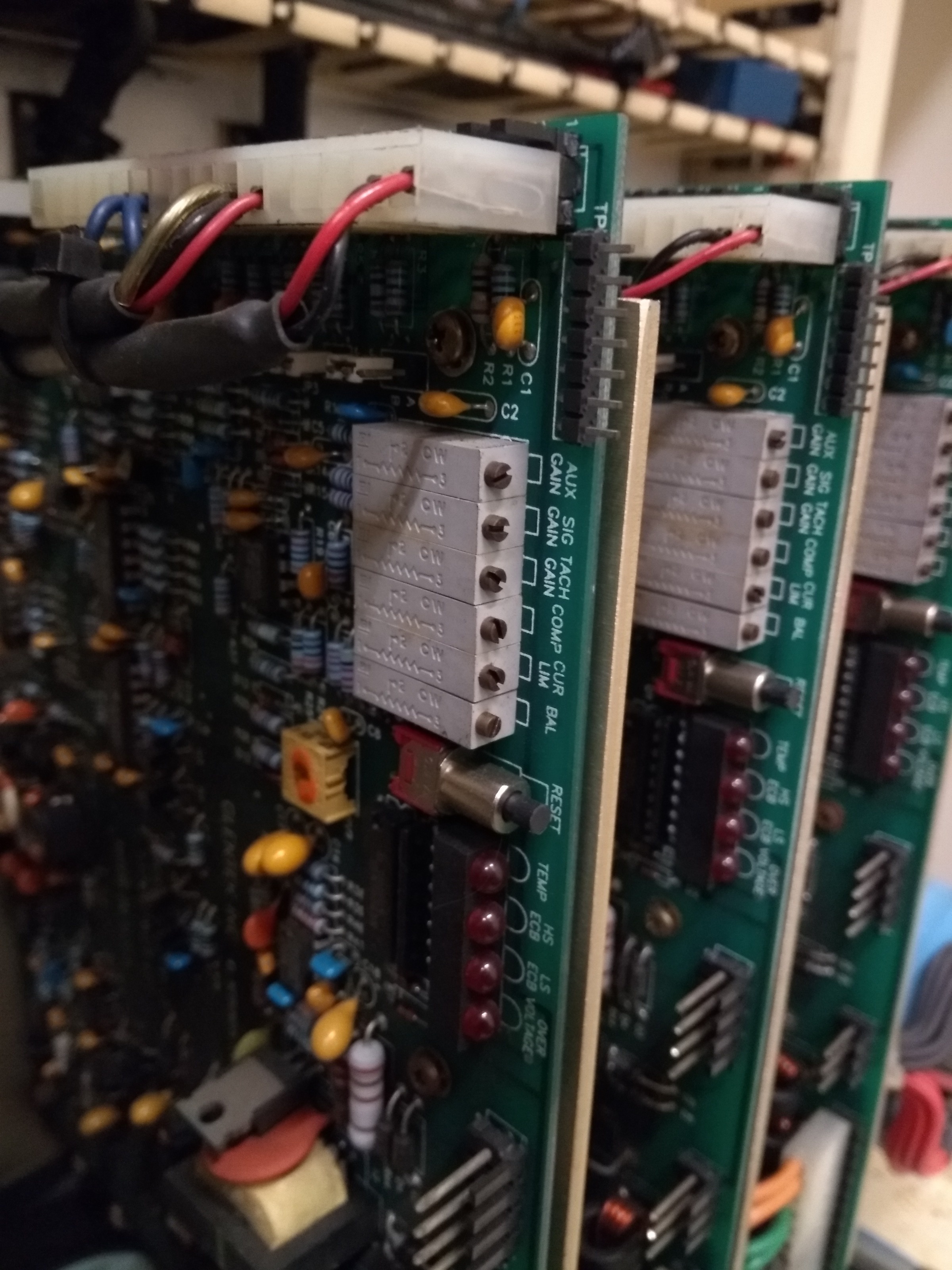
When I unplugged Z nothing happened. Hmmmm.. with it unplugged, I adjusted the Balance pot on the card (see attached photo) and was able to very reliably move the spindle up/down. Cool!
When I plugged the card back in, the spindle would no longer react to the Balance pot and it still did not move when I tried to jog it through the control. I did not try adjusting the P value.
I thought maybe if I adjusted the Balance in X I could keep it from running away when unplugged. I turned it CCW a few times and unplugged... the table oscillated. I turned the Signal Gain CCW and it didn't oscillated any longer but the Balance was too sensitive to control the table.
At this point I called it a night knowing I was lucky I hadn't already broke something and need to read more.
I widened the F error and opened up Halscope hoping to adjust the P value for the servos and and see some movement.
No such luck - I went as high as 200 didn't see movement on X or Y (didn't try Z)
So I figured I'd try Peter's suggestion and manually apply a signal voltage to see what happens. To my surprise as soon as I disconnected the plug that carries the signal and tach the table quickly jumped 5-6" in the X+ direction before the control stopped it due to F error.
That caught me by surprise!
I tried unplugging the Y card and the same thing happened only it moved about an inch before stopping.
When I unplugged Z nothing happened. Hmmmm.. with it unplugged, I adjusted the Balance pot on the card (see attached photo) and was able to very reliably move the spindle up/down. Cool!
When I plugged the card back in, the spindle would no longer react to the Balance pot and it still did not move when I tried to jog it through the control. I did not try adjusting the P value.
I thought maybe if I adjusted the Balance in X I could keep it from running away when unplugged. I turned it CCW a few times and unplugged... the table oscillated. I turned the Signal Gain CCW and it didn't oscillated any longer but the Balance was too sensitive to control the table.
At this point I called it a night knowing I was lucky I hadn't already broke something and need to read more.
Please Log in or Create an account to join the conversation.
- PCW
- Offline
- Moderator
-
Less
More
- Posts: 18115
- Thank you received: 5334
8 years 6 months ago #108418
by PCW
Replied by PCW on topic Lagunmatic 3516-SX Retrofit
You really should never unplug servo interface connections live nor should you operate
the drives without tachometer feedback..
the drives without tachometer feedback..
Please Log in or Create an account to join the conversation.
Time to create page: 2.535 seconds