
- Posts: 4793
- Thank you received: 1480
C coded dxf to g-code converter, the building process...
- Todd Zuercher
- Offline
- Platinum Member
-

Less
More
7 years 8 months ago #126395
by Todd Zuercher
Replied by Todd Zuercher on topic C coded dxf to g-code converter, the building process...
At what point are you better off just using an actual CAM package?
The following user(s) said Thank You: Grotius
Please Log in or Create an account to join the conversation.
- Grotius
- Offline
- Platinum Member
-
Less
More
- Posts: 2419
- Thank you received: 2349
7 years 8 months ago - 7 years 8 months ago #126398
by Grotius
Replied by Grotius on topic C coded dxf to g-code converter, the building process...
Only the idea of making a powerfull open source C coded G-code converter gives me a boost.
I never thought i could make this. If i look at a 2-5mb dxf file, i think where to start making a converter.... :lol:
Dxf2gcode can not do this because it's written in a very slow coding style i think. Or it is a problem of python.
C coding is so super fast. Wow.. Python is written in C. And don't have to be compiled, therefor it's too slow i think.
If the linuxcnc gui was written in c, it was problably to difficult to start with to make your own user gui. In python 1 line can do 1000 lines of C-code. Look at Opencv. A powerfull based python code.
Dxf2gcode is not good enough to use for me. So i want to make much faster program, Rod told me how to add terminal command's into the c program. So the linux gui can open a dxf instead of a ngc. User can do some hal commando's (connected buttons) to optimize cam.
You will see when it's finished, it get's around the world. I hope to make a fully integrated c coded linuxcnc cam package.
The goal is to connect the gremlin screen to it (opengl) then user can click on the line to edit start point's.
If you look at the richest companies of the world. Autodesk is one of them. The only reason to provide Draftsight for free is to stop development. They are smart. But it's what Mr. Musk of Tesla told us. Open source patent's. Let distubing high priced health care medecine's be available for everyone around.
I never thought i could make this. If i look at a 2-5mb dxf file, i think where to start making a converter.... :lol:
Dxf2gcode can not do this because it's written in a very slow coding style i think. Or it is a problem of python.
C coding is so super fast. Wow.. Python is written in C. And don't have to be compiled, therefor it's too slow i think.
If the linuxcnc gui was written in c, it was problably to difficult to start with to make your own user gui. In python 1 line can do 1000 lines of C-code. Look at Opencv. A powerfull based python code.
Dxf2gcode is not good enough to use for me. So i want to make much faster program, Rod told me how to add terminal command's into the c program. So the linux gui can open a dxf instead of a ngc. User can do some hal commando's (connected buttons) to optimize cam.
You will see when it's finished, it get's around the world. I hope to make a fully integrated c coded linuxcnc cam package.
The goal is to connect the gremlin screen to it (opengl) then user can click on the line to edit start point's.
If you look at the richest companies of the world. Autodesk is one of them. The only reason to provide Draftsight for free is to stop development. They are smart. But it's what Mr. Musk of Tesla told us. Open source patent's. Let distubing high priced health care medecine's be available for everyone around.

Last edit: 7 years 8 months ago by Grotius.
Please Log in or Create an account to join the conversation.
- Grotius
- Offline
- Platinum Member
-
Less
More
- Posts: 2419
- Thank you received: 2349
7 years 8 months ago - 7 years 8 months ago #126671
by Grotius
Replied by Grotius on topic C coded dxf to g-code converter, the building process...
Hi,
It looks like there is no interest for a C coded Dxf to G-code converter. The only input i got is why do you do it? And there is a python coded dxf2gcode already. I think people undervalue the power of this program. When it's finished it goes around the world.
I made some progress. Had to solve a difficult item. Recognize open en closed contours. But i solved it. It took me 2 day's.
This step is the step to make the G40, G41 & G42 module possible and it's the first step for autonesting. Autonesting i will try also in C when my program is almost finished.
I have a example below of how the C code works to recognize open en closed contours cleared with a few pictures, and how the program flow works. First I started at the wrong way. :silly:
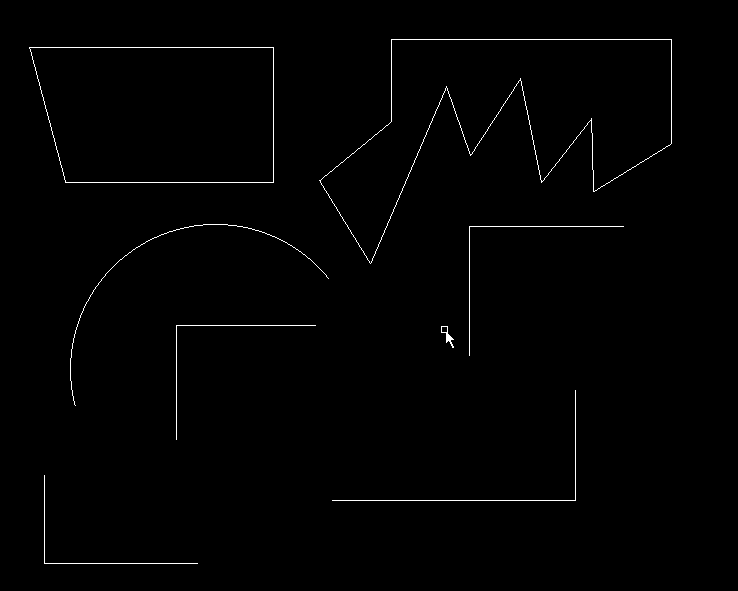
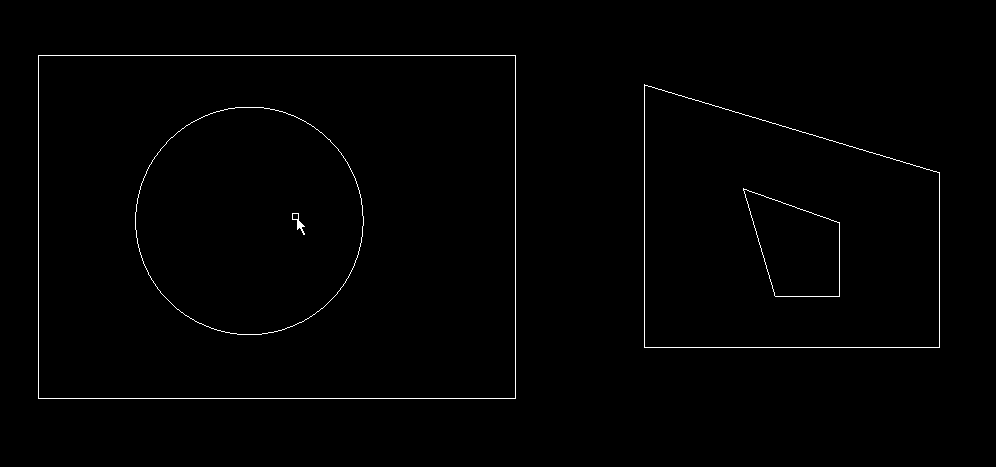
The dxf drawing. File type is R2013 ASCII type. It has open en closed contours, and it contain's an arc for the fun.
If you look at the drawing you can see 7 objects. In a dxf text file you can not see this. There is no logic about closed or open contours in a raw dxf file. So we have to find it ourselfs.
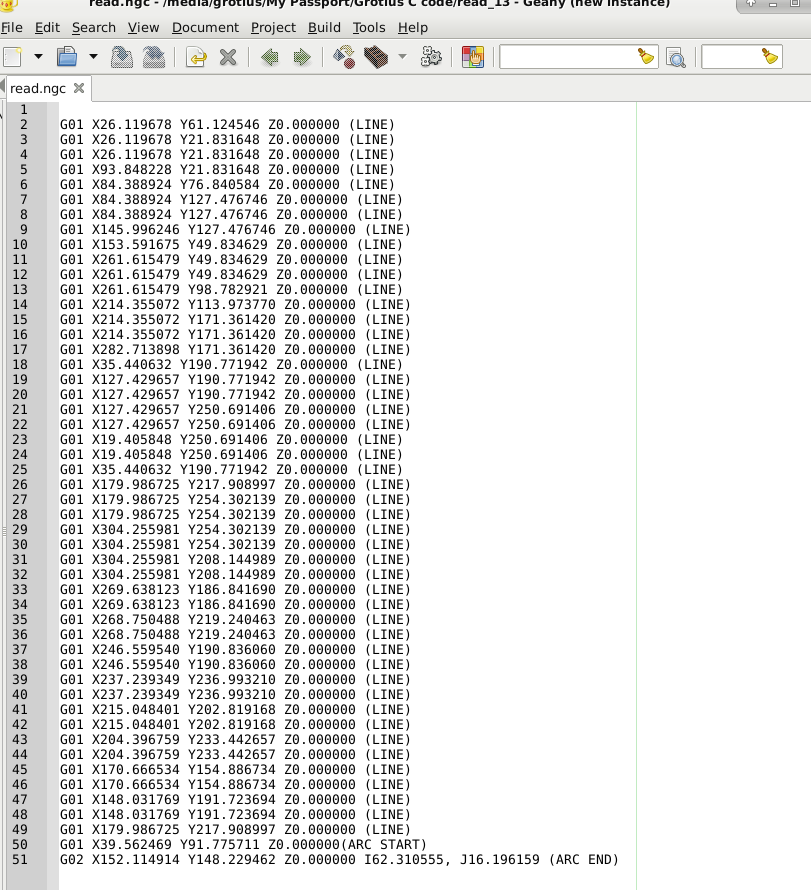
Okey in previous post i made a converter for a raw dxf file to a raw g-code output. The file "read.ngc" is the raw g-code output file.
This function works nice. This is the first piece of the program flow diagram.
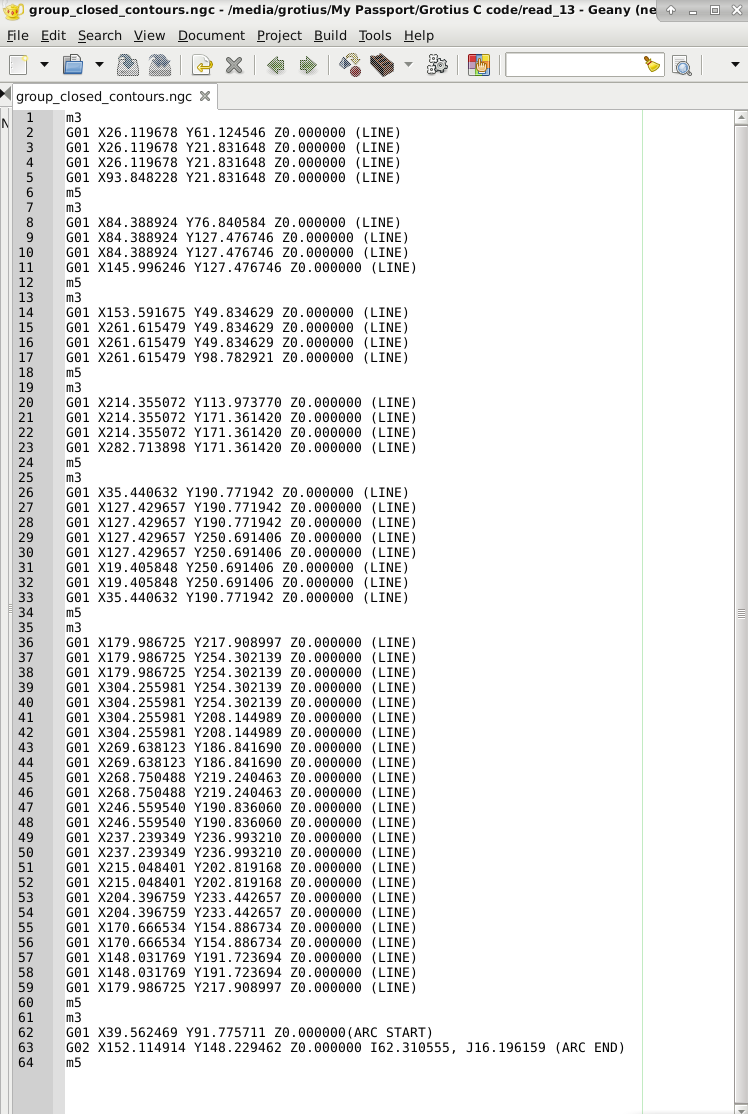
Now comes the difficult part. Recognize open and closed contours. Output file "group_closed_contours" makes profit of a
function that read's in 5 text lines into 5 linebuffers. After that the pointer shift's the line buffer 1 one line and compare's the previous buffers to the new one's. There is also a logic adapted to compare the 5 different line's to find the open or closed contour. This code tooks me 2 day's include testing. But after all i am happy with this output.
Okey in this file we have double lines... We delete them easy with a small function. Output file "clean_double_lines" is the
file without double g-code lines.

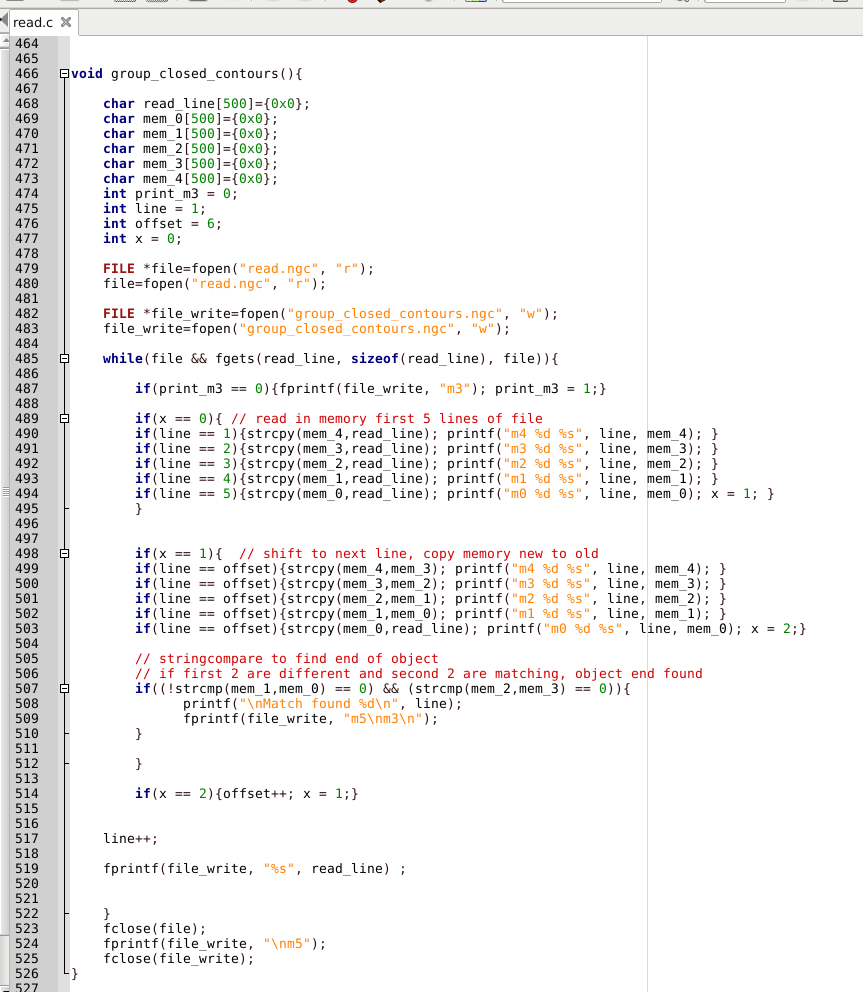
The function to recognize closed or open contours :
The function to delete double g-code lines :
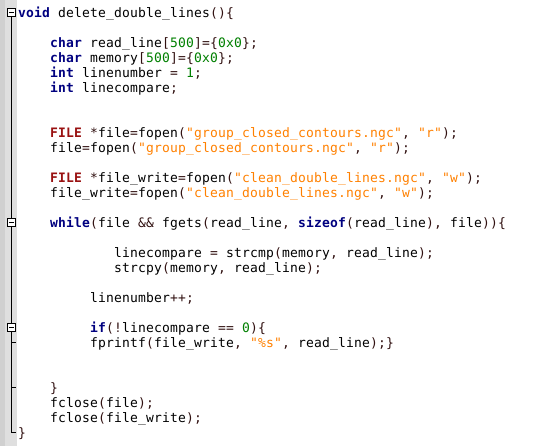
Okey at this moment i will try to see for automatic outside and inside offset recognize. So then i can add the G40, G41 & G42
to the g-code output file.
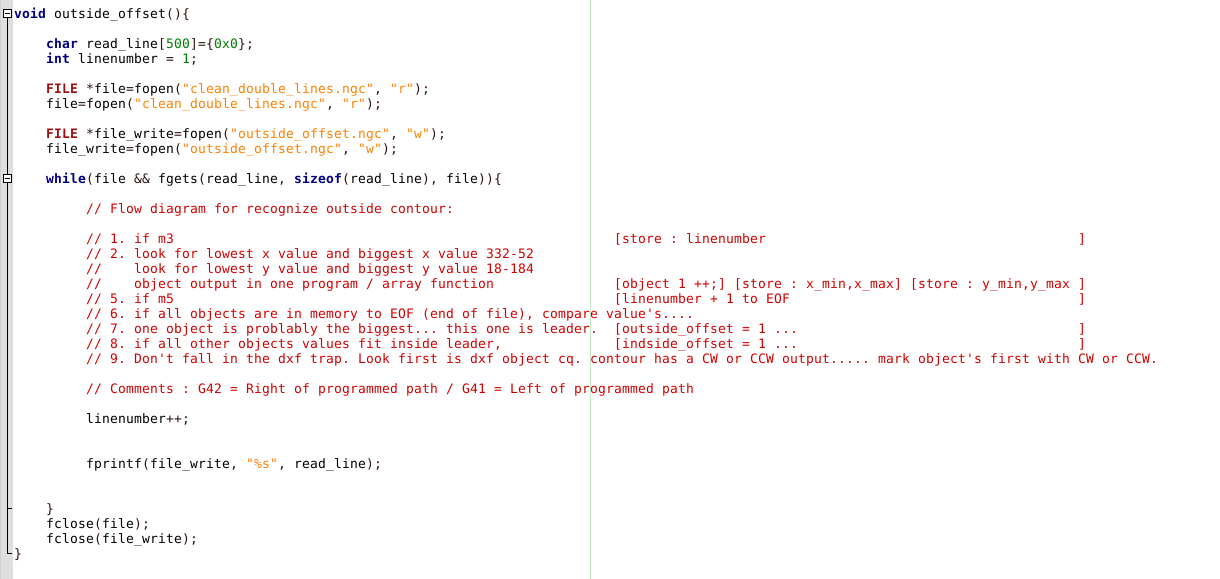
This is my start for coding the outside contour recognize. It's for now just a flow diagram in red text how i will code the stuff.
I think and write down about how i think it would be working.
If you not have a plan, like a flow diagram, it could be working for a simple function.
With a flow diagram you can concentrate yourself on your todo programming step's.
I learned this myself in about 2 weeks. Without this it's for some people very difficult to code your next few line's, in fact you are thinking about your target, but you problably you will miss a crusial step, or your program has a bug in the end.
It looks like there is no interest for a C coded Dxf to G-code converter. The only input i got is why do you do it? And there is a python coded dxf2gcode already. I think people undervalue the power of this program. When it's finished it goes around the world.
I made some progress. Had to solve a difficult item. Recognize open en closed contours. But i solved it. It took me 2 day's.
This step is the step to make the G40, G41 & G42 module possible and it's the first step for autonesting. Autonesting i will try also in C when my program is almost finished.
I have a example below of how the C code works to recognize open en closed contours cleared with a few pictures, and how the program flow works. First I started at the wrong way. :silly:
The dxf drawing. File type is R2013 ASCII type. It has open en closed contours, and it contain's an arc for the fun.
If you look at the drawing you can see 7 objects. In a dxf text file you can not see this. There is no logic about closed or open contours in a raw dxf file. So we have to find it ourselfs.
Okey in previous post i made a converter for a raw dxf file to a raw g-code output. The file "read.ngc" is the raw g-code output file.
This function works nice. This is the first piece of the program flow diagram.
Now comes the difficult part. Recognize open and closed contours. Output file "group_closed_contours" makes profit of a
function that read's in 5 text lines into 5 linebuffers. After that the pointer shift's the line buffer 1 one line and compare's the previous buffers to the new one's. There is also a logic adapted to compare the 5 different line's to find the open or closed contour. This code tooks me 2 day's include testing. But after all i am happy with this output.
Okey in this file we have double lines... We delete them easy with a small function. Output file "clean_double_lines" is the
file without double g-code lines.
The function to recognize closed or open contours :
The function to delete double g-code lines :
Okey at this moment i will try to see for automatic outside and inside offset recognize. So then i can add the G40, G41 & G42
to the g-code output file.
This is my start for coding the outside contour recognize. It's for now just a flow diagram in red text how i will code the stuff.
I think and write down about how i think it would be working.
If you not have a plan, like a flow diagram, it could be working for a simple function.
With a flow diagram you can concentrate yourself on your todo programming step's.
I learned this myself in about 2 weeks. Without this it's for some people very difficult to code your next few line's, in fact you are thinking about your target, but you problably you will miss a crusial step, or your program has a bug in the end.
Last edit: 7 years 8 months ago by Grotius.
The following user(s) said Thank You: chimeno, tommylight
Please Log in or Create an account to join the conversation.
- tommylight
- Offline
- Moderator
-

Less
More
- Posts: 22011
- Thank you received: 7491
7 years 8 months ago #126682
by tommylight
Replied by tommylight on topic C coded dxf to g-code converter, the building process...
That is looking very nice so far.
Please Log in or Create an account to join the conversation.
- Grotius
- Offline
- Platinum Member
-
Less
More
- Posts: 2419
- Thank you received: 2349
7 years 8 months ago - 7 years 8 months ago #126687
by Grotius
Replied by Grotius on topic C coded dxf to g-code converter, the building process...
Hi Tom,
The code does not look nice... :woohoo:
But i think when everything is working and code is at the stage to be finalized, it still looks the same for the most people.
A gui say's more then only straight boring c code.
But thanks for your reply. At least two members are interested in what i want to try.
The beginning code i wrote has no gui at the moment. So people can be confused how it will work in the future.
But i have thought about that.
Soon i will make connection's for automated linuxcnc input. It has 2 user option's.
1 -->
Now i say something technically :
It can be used and integrated with terminal commando's with linuxcnc for loading a dxf right into the gremlin !!
( see how gphoto2 works...) Its almost the same.
2. -->
Users can load a dxf straight into the axis gui or gscreen, maybe it even will be adapted to the gmocappy gui if i ask Norbert.
Trough the terminal command's it's for Mr. Morley, Mr. Gmocappy a kind of diamont to integrate.
Later on i will make a Opengl connenction, but first let's code for a few weeks. I like autonesting. So i am thinking about that option.
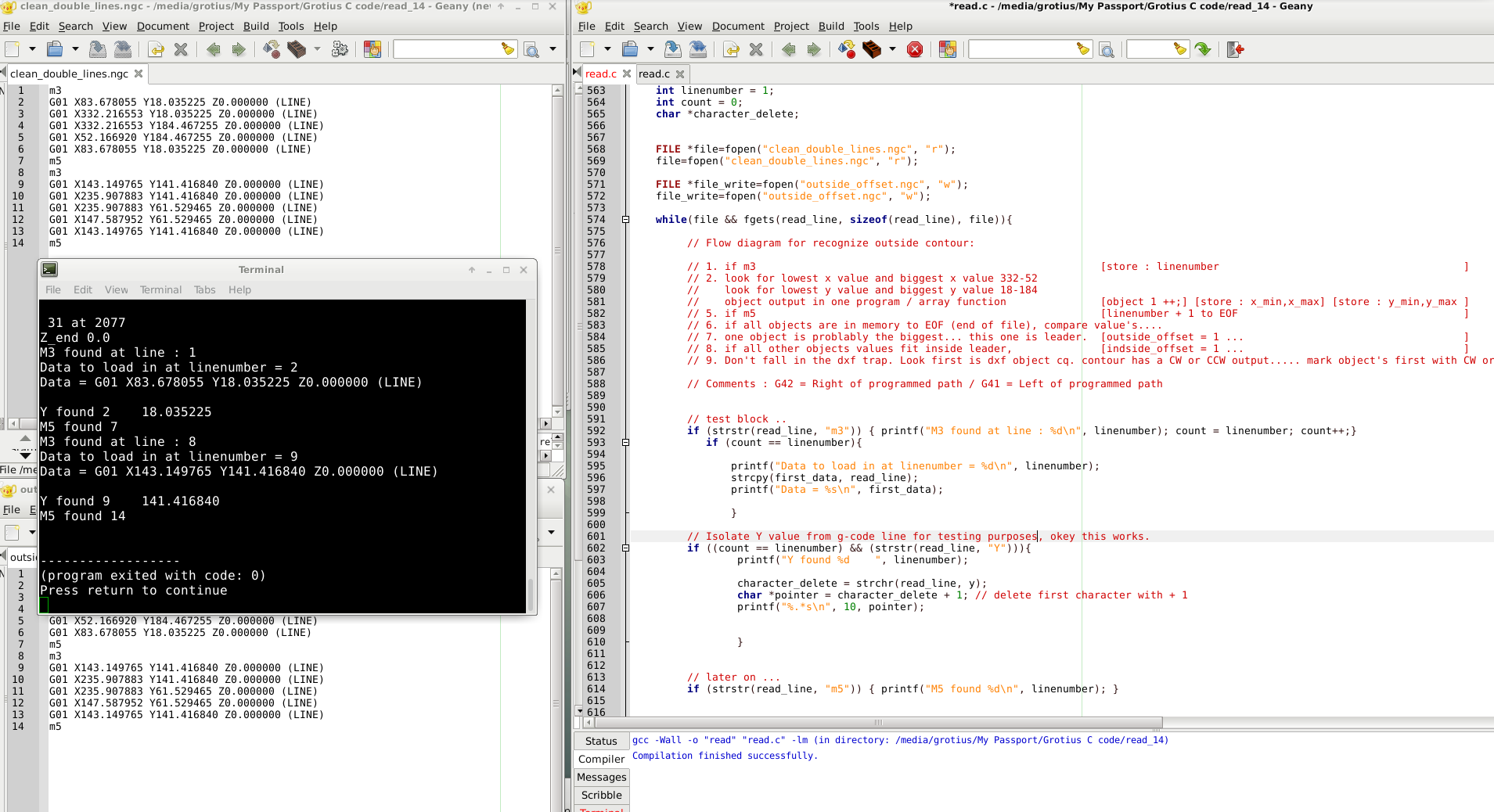
Tonight i made some progress. I can now read in a Y value of a certain g-code line. That's the start checking the biggest object's of the dxf drawing for automated inner and outside contours.
Coding takes much time.... But if there is progess and the programm is stable.... It's fun. I now have used *pointers for the first time.
It's like magic. If you want to see the picture, focus on character_delete and *pointer. This was my work for tonight. Output was perfect.
I forgot to say. When you use it staight into the gremlin gui, like gscreen, you can add a user button for kerf width, speed, spindlespeed etc. Lead in or lead out, Outside offset or inside offset or no offset, Every possible parameter of the program is related to a button cq terminal commando behind the screen. Ethercat is working principle in the same way.
The code does not look nice... :woohoo:
But i think when everything is working and code is at the stage to be finalized, it still looks the same for the most people.
A gui say's more then only straight boring c code.
But thanks for your reply. At least two members are interested in what i want to try.
The beginning code i wrote has no gui at the moment. So people can be confused how it will work in the future.
But i have thought about that.
Soon i will make connection's for automated linuxcnc input. It has 2 user option's.
1 -->
Now i say something technically :
It can be used and integrated with terminal commando's with linuxcnc for loading a dxf right into the gremlin !!
( see how gphoto2 works...) Its almost the same.
2. -->
Users can load a dxf straight into the axis gui or gscreen, maybe it even will be adapted to the gmocappy gui if i ask Norbert.
Trough the terminal command's it's for Mr. Morley, Mr. Gmocappy a kind of diamont to integrate.
Later on i will make a Opengl connenction, but first let's code for a few weeks. I like autonesting. So i am thinking about that option.
Tonight i made some progress. I can now read in a Y value of a certain g-code line. That's the start checking the biggest object's of the dxf drawing for automated inner and outside contours.
Coding takes much time.... But if there is progess and the programm is stable.... It's fun. I now have used *pointers for the first time.
It's like magic. If you want to see the picture, focus on character_delete and *pointer. This was my work for tonight. Output was perfect.
I forgot to say. When you use it staight into the gremlin gui, like gscreen, you can add a user button for kerf width, speed, spindlespeed etc. Lead in or lead out, Outside offset or inside offset or no offset, Every possible parameter of the program is related to a button cq terminal commando behind the screen. Ethercat is working principle in the same way.
Last edit: 7 years 8 months ago by Grotius.
The following user(s) said Thank You: tommylight
Please Log in or Create an account to join the conversation.
- tommylight
- Offline
- Moderator
-
Less
More
- Posts: 22011
- Thank you received: 7491
7 years 8 months ago #126691
by tommylight
Replied by tommylight on topic C coded dxf to g-code converter, the building process...
While you're at it, can we make some requests? Since we are not helping you, at least we can bother you with such nuisances, right ?
As RodW pointed out in another thread, as we use plasma cutters ( i do not use them much to do actual cutting ), we know that there is an inherent drawback to cutting small circles and radius's, so if you can think of a way to put lower feed rates for such instances, that would be very usable. That is supposedly what Hypertherm refers to as TruHole technology and they do use much better torches, for sure.
My idea is anything smaller than 50mm should be done at half the speed, from 50 to 100mm at 75% of the speed, and above that it is all good.
Thank you,
Tom.
As RodW pointed out in another thread, as we use plasma cutters ( i do not use them much to do actual cutting ), we know that there is an inherent drawback to cutting small circles and radius's, so if you can think of a way to put lower feed rates for such instances, that would be very usable. That is supposedly what Hypertherm refers to as TruHole technology and they do use much better torches, for sure.
My idea is anything smaller than 50mm should be done at half the speed, from 50 to 100mm at 75% of the speed, and above that it is all good.
Thank you,
Tom.
The following user(s) said Thank You: Grotius
Please Log in or Create an account to join the conversation.
Time to create page: 1.775 seconds