
- Posts: 757
- Thank you received: 216
FPGA (field programmable gate array) programmed for linuxcnc motion
- islander261
- Offline
- Platinum Member
-

Less
More
8 years 3 months ago #113824
by islander261
Replied by islander261 on topic FPGA (field programmable gate array) programmed for linuxcnc motion
Rod
Thanks for putting in the time to put the arc voltage linearity question to bed.
All
I think that the most of the THCs that operate successfully actually generate a velocity command from the arc voltage error. With eoffset_pid we are creating a position error correction command that is then put into the hal pid which operates in a bang bang fashion (look at the gains and clipping used)to get a velocity command for the step generator (this is for Mesa hardware). I will try and get my current configurations drawn up and posted in the plasma section later this week.
I must admit that even when I used the features of the External Offsets branch to keep the following error to a minimum while using regular hal components to correct the arc voltage error I didn't
about not using the eoffset_pid componenet.
John
Thanks for putting in the time to put the arc voltage linearity question to bed.
All
I think that the most of the THCs that operate successfully actually generate a velocity command from the arc voltage error. With eoffset_pid we are creating a position error correction command that is then put into the hal pid which operates in a bang bang fashion (look at the gains and clipping used)to get a velocity command for the step generator (this is for Mesa hardware). I will try and get my current configurations drawn up and posted in the plasma section later this week.
I must admit that even when I used the features of the External Offsets branch to keep the following error to a minimum while using regular hal components to correct the arc voltage error I didn't
about not using the eoffset_pid componenet.
John
Please Log in or Create an account to join the conversation.
- Grotius
- Offline
- Platinum Member
-
Less
More
- Posts: 2419
- Thank you received: 2349
8 years 3 months ago - 8 years 3 months ago #113967
by Grotius
Replied by Grotius on topic FPGA (field programmable gate array) programmed for linuxcnc motion
Hi,
This is what i get on a 10mm mild steel plate with linuxcnc. The tiny hole is 10mm. The plate is cut at 100x100mm.
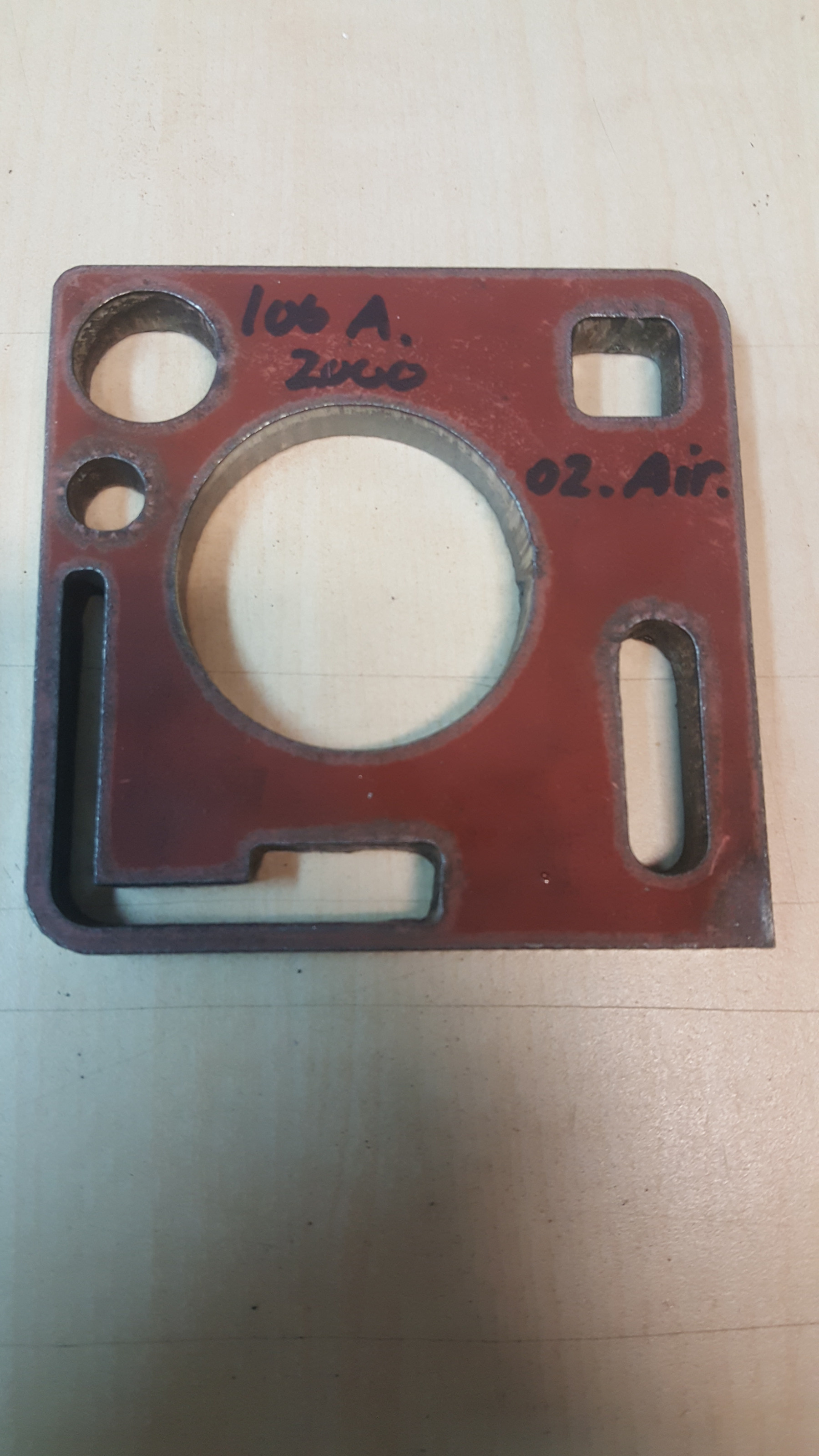
Plasma source : Thermal Dynamics ultracut 100xt
Material : mild steel 10mm
Speed 2000 mm/min
Power 100 amp
Cutting gas : Oxygen
Shield : Compressed air
Cutting angle : less 1 degrees
This is the test machine with the linuxcnc hard disk. Accuracy machine 0.1mm in movement, stepper + 2x ltp1 machine.
Okey now turn your monitor 90 degrees :dry:
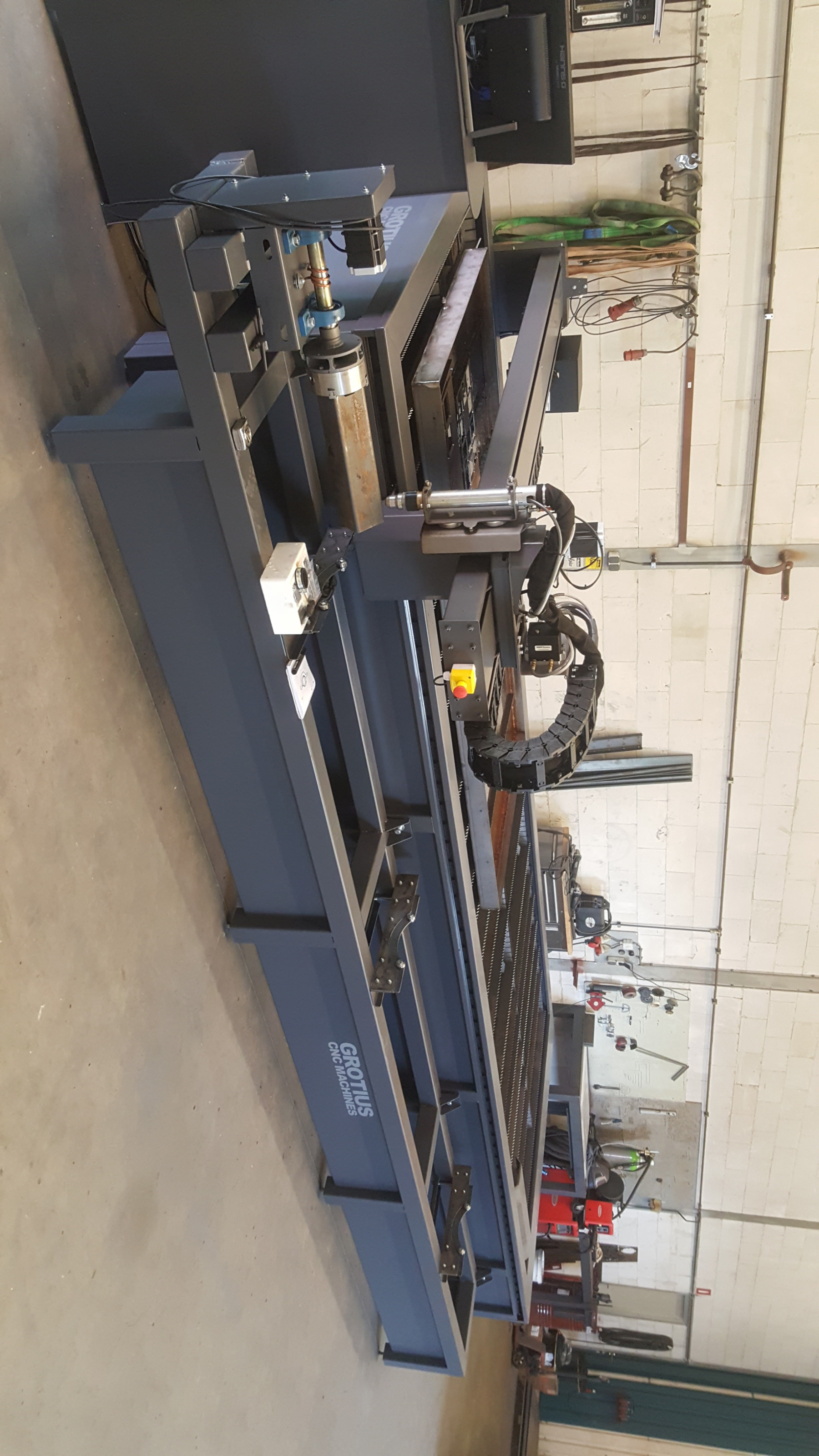
Okey now turn your monitor back in orginal direction.
Plasma inverter :
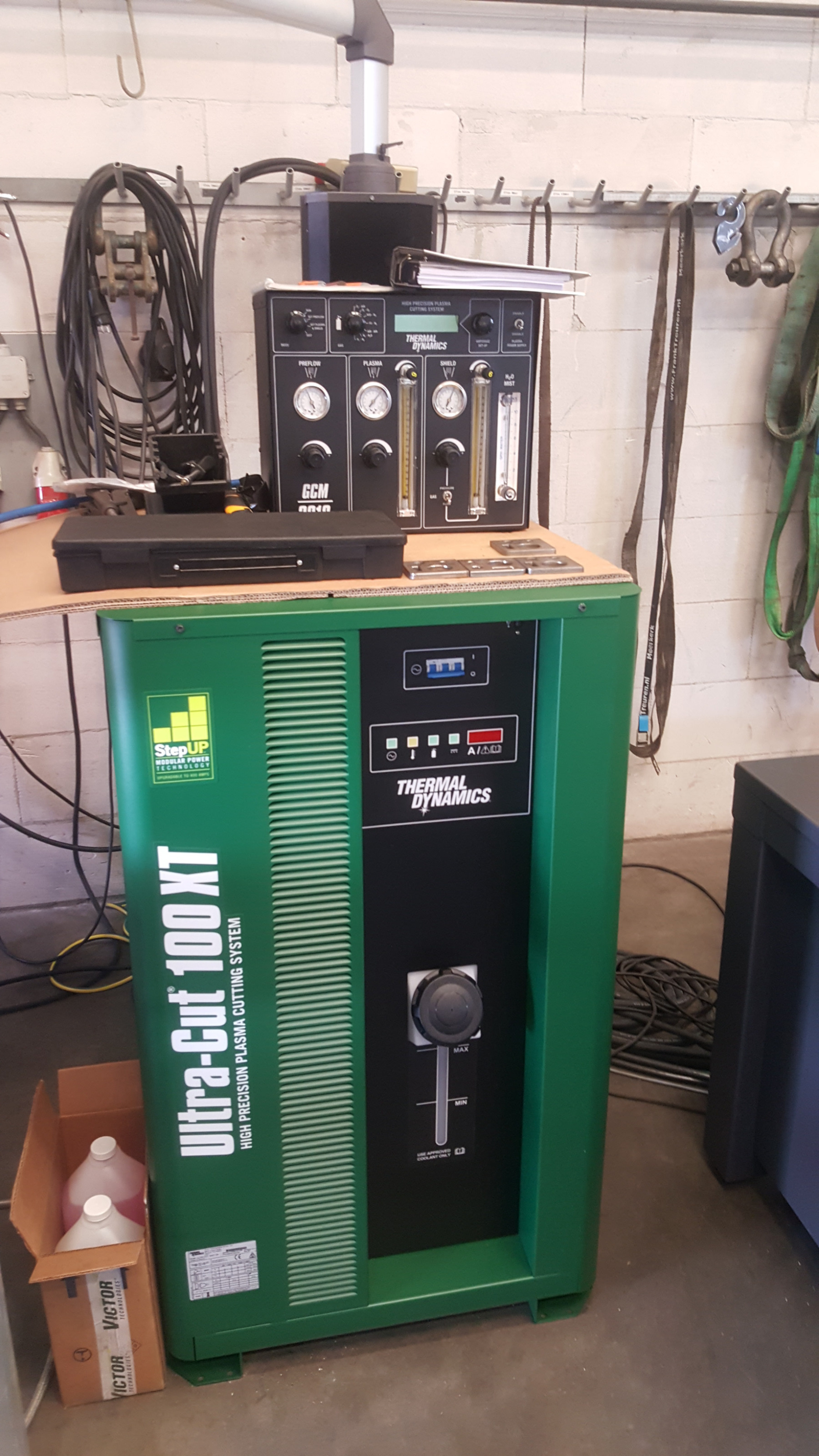
So be conviedent. Linuxcnc is almost master kenobi with plasma....
There are a few little things to solve for linuxcnc. No problem. It is free, open source !!
I will read your last post's carefully. islander, rodw, andy, in coming time.
It will be great to have an add on FPGA chip for a simple ltp1 superport card.
For islander, if you use a non chinese or non italian plasma source, normally you can use a pci slot without burning your pc.
Cebora is italian and very bad. There is a italian ellettro source, that can be used. But for both countries, for me the same rule. They are all cheap copy masters.
This is what i get on a 10mm mild steel plate with linuxcnc. The tiny hole is 10mm. The plate is cut at 100x100mm.
Plasma source : Thermal Dynamics ultracut 100xt
Material : mild steel 10mm
Speed 2000 mm/min
Power 100 amp
Cutting gas : Oxygen
Shield : Compressed air
Cutting angle : less 1 degrees
This is the test machine with the linuxcnc hard disk. Accuracy machine 0.1mm in movement, stepper + 2x ltp1 machine.
Okey now turn your monitor 90 degrees :dry:
Okey now turn your monitor back in orginal direction.
Plasma inverter :
So be conviedent. Linuxcnc is almost master kenobi with plasma....
There are a few little things to solve for linuxcnc. No problem. It is free, open source !!
I will read your last post's carefully. islander, rodw, andy, in coming time.
It will be great to have an add on FPGA chip for a simple ltp1 superport card.
For islander, if you use a non chinese or non italian plasma source, normally you can use a pci slot without burning your pc.
Cebora is italian and very bad. There is a italian ellettro source, that can be used. But for both countries, for me the same rule. They are all cheap copy masters.
Last edit: 8 years 3 months ago by Grotius.
Please Log in or Create an account to join the conversation.
- rodw
- Offline
- Platinum Member
-
Less
More
- Posts: 12170
- Thank you received: 4153
8 years 3 months ago #113982
by rodw
Replied by rodw on topic FPGA (field programmable gate array) programmed for linuxcnc motion
Sorry. I had a sore neck!
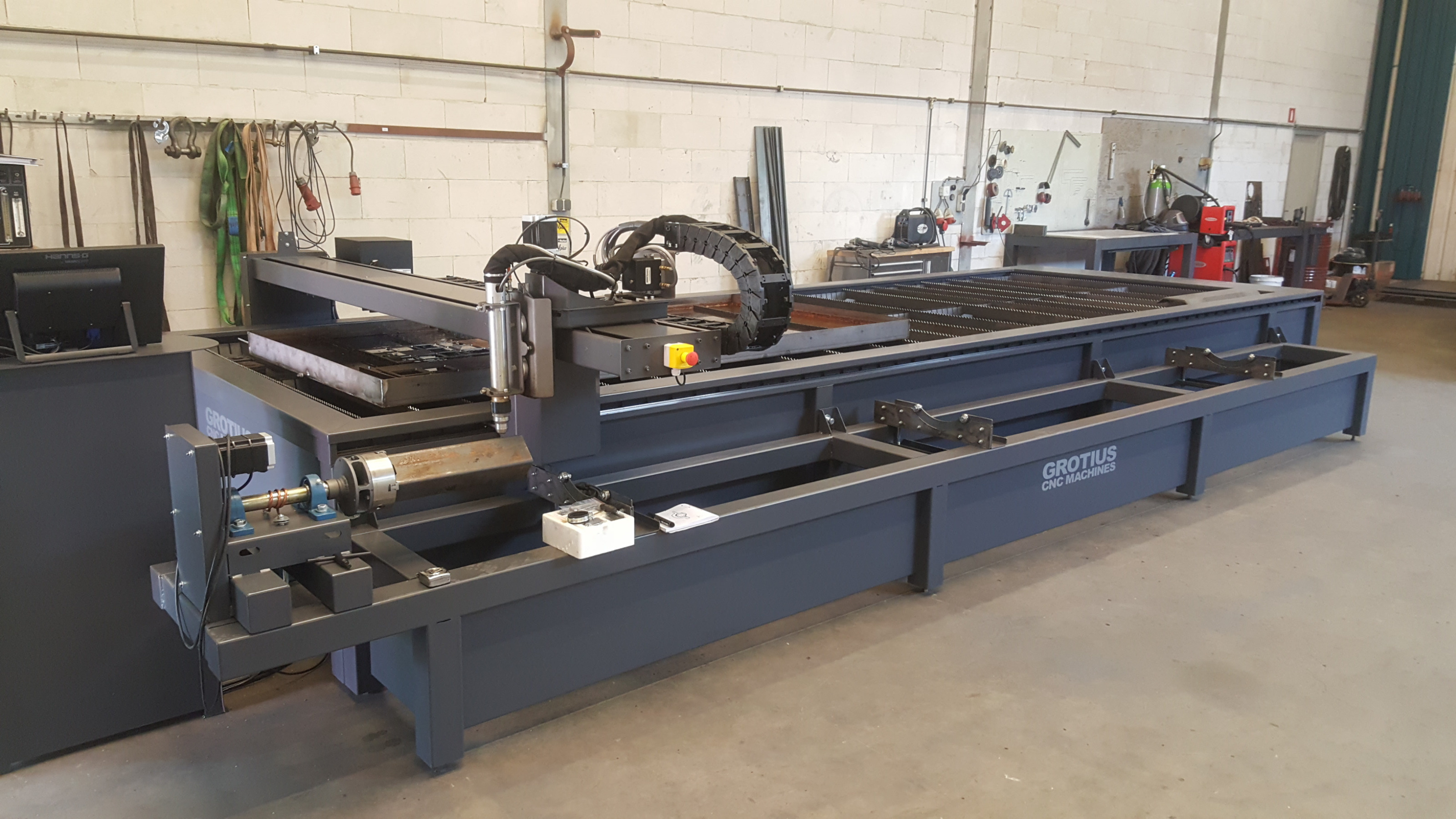
You do make a very nice machine
You do make a very nice machine
Please Log in or Create an account to join the conversation.
- Grotius
- Offline
- Platinum Member
-
Less
More
- Posts: 2419
- Thank you received: 2349
8 years 3 months ago - 8 years 3 months ago #114022
by Grotius
Replied by Grotius on topic FPGA (field programmable gate array) programmed for linuxcnc motion
Hi,
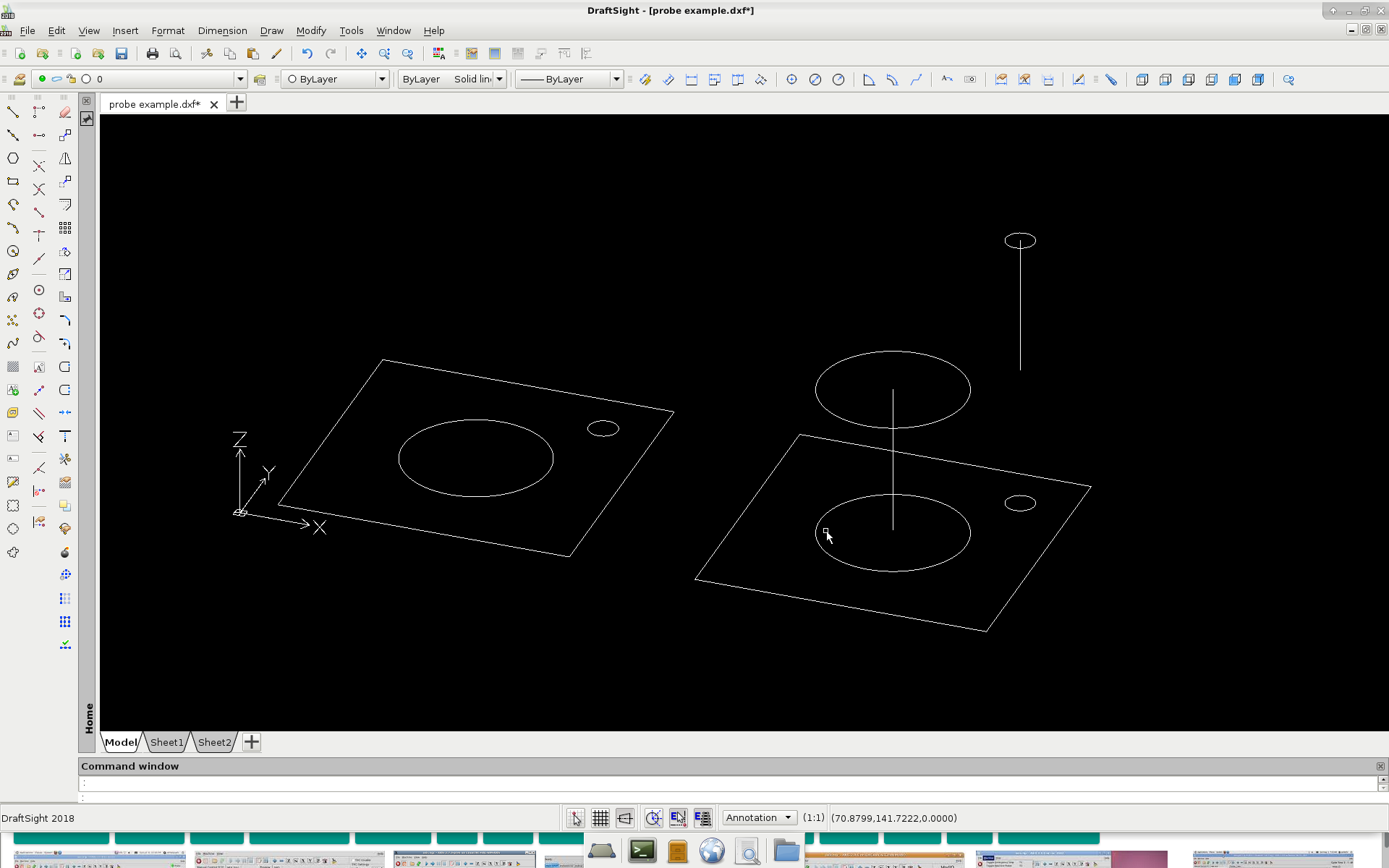
One of my problems with linuxcnc is the probe function, see picture.
Normally without probe, the gremlin screen looks like the left picture.
When i add a linuxcnc G-code based probe function in the post processor, i get a gremlin screen like the right picture.
Problem is : The probe measuring distance you see in the gremlin screen, this is not what i like. How to solve this?
The picture is an example of the problem. The height measuring distance for the probe function is for example 100mm in z axis.
So for a cutting a plate, your screen looks like...
The code looks like this, but i must check that : G91 G38.2 Z-100
Can i make a own gcode or macro in linuxcnc? Where can i find G38.2 in the linux source code?
That would make things easer for me.
Thanks, Rodw. The machine is also working very good with hd plasma. Microstep is far more expensiver. But i must make
a bevel head soon !! This is advice from Hypertherm. So then i must look for a linuxcnc type that can do this. It's a gantry profile + AB axis. I don't know if that exist's at the moment. But first solve a few tiny problem's.
Its a little bit offtopic now, but glad i am no moderator here to put it in the right section.
One of my problems with linuxcnc is the probe function, see picture.
Normally without probe, the gremlin screen looks like the left picture.
When i add a linuxcnc G-code based probe function in the post processor, i get a gremlin screen like the right picture.
Problem is : The probe measuring distance you see in the gremlin screen, this is not what i like. How to solve this?
The picture is an example of the problem. The height measuring distance for the probe function is for example 100mm in z axis.
So for a cutting a plate, your screen looks like...
The code looks like this, but i must check that : G91 G38.2 Z-100
Can i make a own gcode or macro in linuxcnc? Where can i find G38.2 in the linux source code?
That would make things easer for me.
Thanks, Rodw. The machine is also working very good with hd plasma. Microstep is far more expensiver. But i must make
a bevel head soon !! This is advice from Hypertherm. So then i must look for a linuxcnc type that can do this. It's a gantry profile + AB axis. I don't know if that exist's at the moment. But first solve a few tiny problem's.
Its a little bit offtopic now, but glad i am no moderator here to put it in the right section.
Last edit: 8 years 3 months ago by Grotius.
Please Log in or Create an account to join the conversation.
- rodw
- Offline
- Platinum Member
-
Less
More
- Posts: 12170
- Thank you received: 4153
8 years 3 months ago #114032
by rodw
Replied by rodw on topic FPGA (field programmable gate array) programmed for linuxcnc motion
Grotius, I have the same problem with the gremlin preview and mentioned it here
forum.linuxcnc.org/plasma-laser/34879-ex...erent-heights#114030
I'm sure there is a solution, I just can't remember it. I think its to use a different coordinate system (G10 L2).
As far as the additional axes go, with the development branch (v2. , All you need to do is add the extra joints, configure them in hal and change this ini section to something like
I think you also need to add them to the geometry statement so the DRO's display on screen
I hope I got that right. The bevel head would be pretty cool and they don't seem too hard to make.
I'm sure there is a solution, I just can't remember it. I think its to use a different coordinate system (G10 L2).
As far as the additional axes go, with the development branch (v2.
, All you need to do is add the extra joints, configure them in hal and change this ini section to something like
Code:
[KINS]
JOINTS = 6
KINEMATICS = trivkins coordinates=XYYZAB
I think you also need to add them to the geometry statement so the DRO's display on screen
Code:
[DISPLAY]
GEOMETRY = XYZAB
I hope I got that right. The bevel head would be pretty cool and they don't seem too hard to make.
Please Log in or Create an account to join the conversation.
- Grotius
- Offline
- Platinum Member
-
Less
More
- Posts: 2419
- Thank you received: 2349
8 years 3 months ago - 8 years 3 months ago #114081
by Grotius
Replied by Grotius on topic FPGA (field programmable gate array) programmed for linuxcnc motion
Hi Rodw,
Thanks for your excellent tip, this can save lot's of investegation time....
Tomorrow i try this code example on the system, i hope i can solve it soon :
G10 L2 P1 X0 Y0 Z0 (clear offsets for X,Y & Z axes in coordinate system 1)
G10 L2 Set Coordinate System
Program P0 to P9 to specify which coordinate system to change.
This problem i have never seen before, also not seen in any linux cnc online document's.
I wil try to make a test on wiki.linuxcnc.org
hmmm wiki.linuxcnc.org/cgi-bin/wiki.pl?action=editprefs
admin password should be pinguin or tux, but that is not working.
Thanks for your excellent tip, this can save lot's of investegation time....
Tomorrow i try this code example on the system, i hope i can solve it soon :
G10 L2 P1 X0 Y0 Z0 (clear offsets for X,Y & Z axes in coordinate system 1)
G10 L2 Set Coordinate System
Program P0 to P9 to specify which coordinate system to change.
This problem i have never seen before, also not seen in any linux cnc online document's.
I wil try to make a test on wiki.linuxcnc.org
hmmm wiki.linuxcnc.org/cgi-bin/wiki.pl?action=editprefs
admin password should be pinguin or tux, but that is not working.
Last edit: 8 years 3 months ago by Grotius.
Please Log in or Create an account to join the conversation.
Time to create page: 0.848 seconds