Manual tool change problem

More
8 years 2 months ago #116579 by MaHa
Replied by MaHa on topic Manual tool change problem
Do you have the ini file entry in the [EMCIO] section
eg.
TOOL_CHANGE_POSITION = 200 200 0 (x y z)
TOOL_CHANGE_QUILL_UP = 1
?

Talking about a milling machine or router
Years ago I was not really happy with M6 because of fixed toolchange position. I have collet manual toolchange, it could be done anywhere within working area. A touchplate or toolsensor is required for my solution, first setup reference tool, then setup z offset. Use g43 in gcode.
If you or someone is interrested, tell me. I need some time to modify the files for general use, need to remove some my_machine specific parts.

Please Log in or Create an account to join the conversation.

More
8 years 2 months ago #116598 by derekmac
Replied by derekmac on topic Manual tool change problem
No - neither are set. I can't imagine why anyone would try to change a tool with the tip at Z0. Even a collet needs a bit of wiggle room (at least mine do) and a drill chuck needs even more, particularly if the drill size is near the maximum for the chuck.

Please Log in or Create an account to join the conversation.
More
8 years 2 months ago - 8 years 2 months ago #116602 by MaHa
Replied by MaHa on topic Manual tool change problem
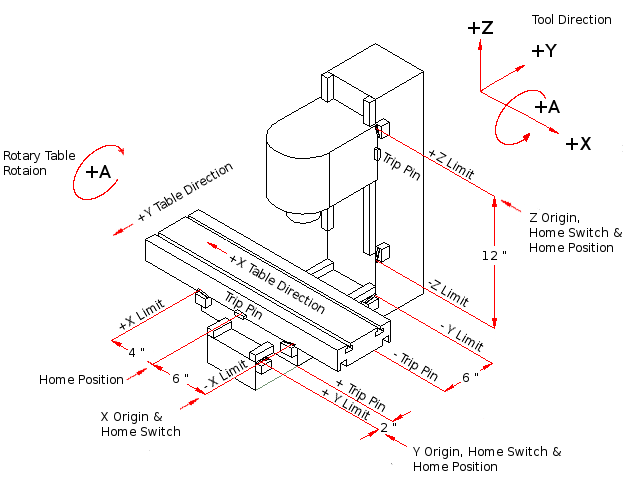
I think most Linuxcncmachines have G53/machine coordinate system Z0 at the most faraway position from the table,workpiece. Very good idea to avoid crashing the machine. If you are working with toollength compensation, G43, it needs to be activated with the first z-move after toolchange. After the last move in z, toollength compensation must be deactivated with G49, for toolchange. Most machines refuse toolchange, if you don`t. That time z retracted to G53 Z0 (z+ direction), has nothing to do with the tooltip at all, it is the position of the Z-slide. then there should be enough space for your tool.
The attched picture is from the manual, Important User Concepts, 6. Machine Configurations.
Last edit: 8 years 2 months ago by MaHa.

Please Log in or Create an account to join the conversation.

More
8 years 2 months ago #116607 by derekmac
Replied by derekmac on topic Manual tool change problem
My Taig mill is very small by most standards - very much Model Engineering rather than commercial
Max travel is X11, Y5, Z5 which immediately imposes contraints on what I can do
Add to that the fact that none of my tooling is fixed and can move up and down in the chucks
I have always used it with Z0 set to the top of the material, moving Z to 0.5 for tool change with a half inch block between tool tip and material
That way I adjust the tool within the chuck to suit. Changing the tool at higher altitude would be impractical as I would have no way of adjusting it relative to the material.

Please Log in or Create an account to join the conversation.

More
8 years 2 months ago - 8 years 2 months ago #116610 by JohnnyCNC
I have a Sieg X3 bigger but not a giant. This is what I do and it works quite well. Much of this is base on advise from this forum. Set home to be the front left corner of the table for the X & Y. Z home is with the spindle all the way up. Just a little below the upper Z limit. When I create the part in Fusion 360 I usually use the back left corner as the origin. That way I can touch off the X and Y on t he part or the fixed jaw of the vise depending on what I am making and how many I'm going to make. I put each operation in a separate file and name them PartnameSpot, PartnameDrill, PartnameMillSlot, and so on. Then I setup the material in the vised and touch off the back left corner using an edge finder. Load the file for the first operation. Put the bit in the collet/chuck. Touch off the tip of the tool to the top of the material using the touch plate I made. Then run the job. Then load the next file and tool and touch off the Z. Run the part. Just make sure there are no values other than zero in the tool table in LinuxCNC. That value would be added to the Z touch off value and for me usually resulted in cutting air.

Before I had the edge finder I would use a steel pin and eyeball when it touched the X & Y.. And before the touch plate I used the paper method on the Z Although loosening the bit and letting drop onto the part may have been more accurate.

John


When it comes time to cut the poart
Last edit: 8 years 2 months ago by JohnnyCNC.

Please Log in or Create an account to join the conversation.

More
8 years 2 months ago #116611 by MaHa
Replied by MaHa on topic Manual tool change problem
Now I understand. I think you can avoid M6. In MDI Just load the desired Toolnumber, maybe T1, with M61 Q1, and touch off to material.
M61 Q1 in your gcode or whatever tool used for touch off.

For toolchange:
retract z to 0.5
M5 ,stop spindle
If desired, do a debug message (debug, change tool...)
M0 ,pause a running program temporarily
Change tool
press s on the keyboard to resume
Program S,F for the new Tool and M3 to start spindle
Do the whole job with this T number.

Please Log in or Create an account to join the conversation.

Time to create page: 0.069 seconds
Powered by Kunena Forum
