Gscreen - a GTK / Glade / Python based screen

More
13 years 11 months ago #26397 by cmorley
Wow that looks really nice!
The following user(s) said Thank You: JaysonWallis

Please Log in or Create an account to join the conversation.

More
13 years 11 months ago #26398 by cmorley
Gscreen has now been merged to master!

still in development but testable.

Please Log in or Create an account to join the conversation.

More
13 years 11 months ago #26405 by BigJohnT
Yea!!!! I'll try and load it up on the BP Sunday...

John

Please Log in or Create an account to join the conversation.

More
13 years 11 months ago #26408 by LAIR82
Lookin pretty sweet, I might say.

We are definitely going to be trying this GUI on the retrofit I just started.


Rick

Please Log in or Create an account to join the conversation.

More
13 years 11 months ago #26452 by JaysonWallis
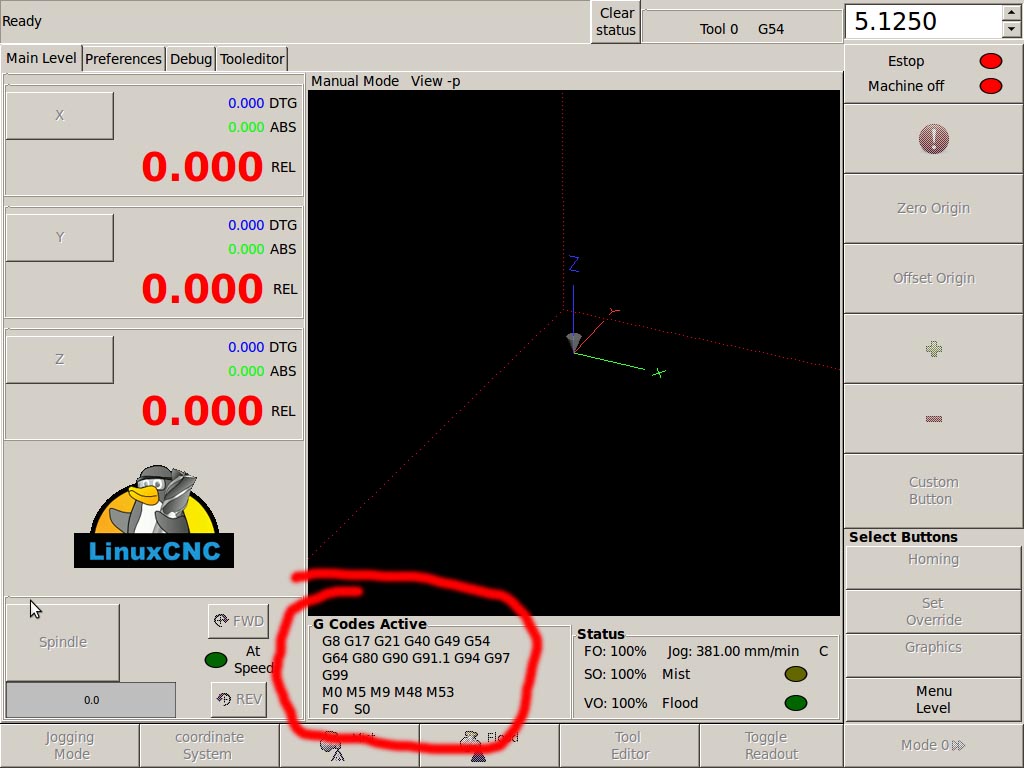
Well spent the day working on getting this working on the touchscreen.
I had the excessively large VO number which meant the interface did not fit on my touchscreen.
I remembered that Chris had stated early on in the piece that this may happen

cmorley wrote: It you get a weird number for VO percentage and the screen is too big for the display
add a DEFAULT_VELOCITY = something sane under the [TRAJ] heading

Chris M

Well I did that and it didn't work. After a few hours of messing about with it I decided that there must be something else wrong so I broke out the Integrators Manual and started putting in all the missing variables into my INI file. Well once I got to the entry "Default_Velocity = 10" I worked out what I had done wrong. For anyone else not familiar enough with Linux as a whole CAPITALIZATION matters. :blush:

Anyway after getting that working the screen still did not fit well enough. I had to edit the screen itself so it would fit onto my 1024 x 768 touchscreen


I just changed the settings of the G Codes Active box. Worked like a treat.

I have now hooked up rotary switches to the FO and VO parameters and just need to work out how to do something with the Jog speed.

First impressions are that this will work great.

Regards,

Jayson.

Please Log in or Create an account to join the conversation.

More
13 years 11 months ago - 13 years 11 months ago #26461 by BigJohnT
Chris,

I fired up gscreen for a bit today and a couple of things I noticed... not show stoppers but surprises.
No indication in the axis box if it is homed or not, I did see a homing icon show up after all axes were homed.
I can't read the tiny green numbers, I changed them to black and much better and now I see the * that must indicate the axis is homed.
The huge rel number draws my focus from the other numbers. I did find the toggle readout button :)
In jog mode I'd prefer a plus and minus button in the axis box.
When you press the spindle the fwd I don't see how to set the spindle speed and if you press the spindle button again the spindle keeps running but you can't turn it off.
So far I've not figured out how to open a file... but I've not read the manual yet just seeing how intuitive it is to me.

Quite an undertaking, my hat's off to you.

And take all this with a grain of salt as I've never used the "industry standard" fanuc... even though I don't think there is such a thing as "industry standard" when it comes to a CNC control.

Thanks
John
Last edit: 13 years 11 months ago by BigJohnT.

Please Log in or Create an account to join the conversation.

Time to create page: 0.752 seconds
Powered by Kunena Forum
