
- Posts: 39
- Thank you received: 0
Gscreen - a GTK / Glade / Python based screen
- karlkec
- Offline
- Junior Member
-

Less
More
13 years 10 months ago #28021
by karlkec
Replied by karlkec on topic Gscreen - a GTK / Glade / Python based screen
Gscreen is working quite well for me now. Great job, Chris.
I got the incremental jogwheel, MPG, and joysticks working. I should have tried a bit harder before asking the question above.
Thanks a lot Chris for all your hard work on this. This is looking good.
Karl
I got the incremental jogwheel, MPG, and joysticks working. I should have tried a bit harder before asking the question above.
Thanks a lot Chris for all your hard work on this. This is looking good.
Karl
Please Log in or Create an account to join the conversation.
- cmorley
- Offline
- Moderator
-

Less
More
- Posts: 7368
- Thank you received: 2181
13 years 10 months ago #28114
by cmorley
tjamscad that looks right. it is gray colored because of the theme style, is that what looks wrong?
I'm still in the UK so can answer more questions in a few days.
Chris M
Replied by cmorley on topic Gscreen - a GTK / Glade / Python based screen
tjamscad wrote: Chris,
I installed a fresh LinucCNC from source because the buildbot wasnt working correctly. I put the files you privided in the locations that you specfied but I still dont see what you have been posting.
tjamscad that looks right. it is gray colored because of the theme style, is that what looks wrong?
I'm still in the UK so can answer more questions in a few days.
Chris M
Please Log in or Create an account to join the conversation.
- tjamscad
- Offline
- Elite Member
-

Less
More
- Posts: 238
- Thank you received: 1
13 years 10 months ago #28127
by tjamscad
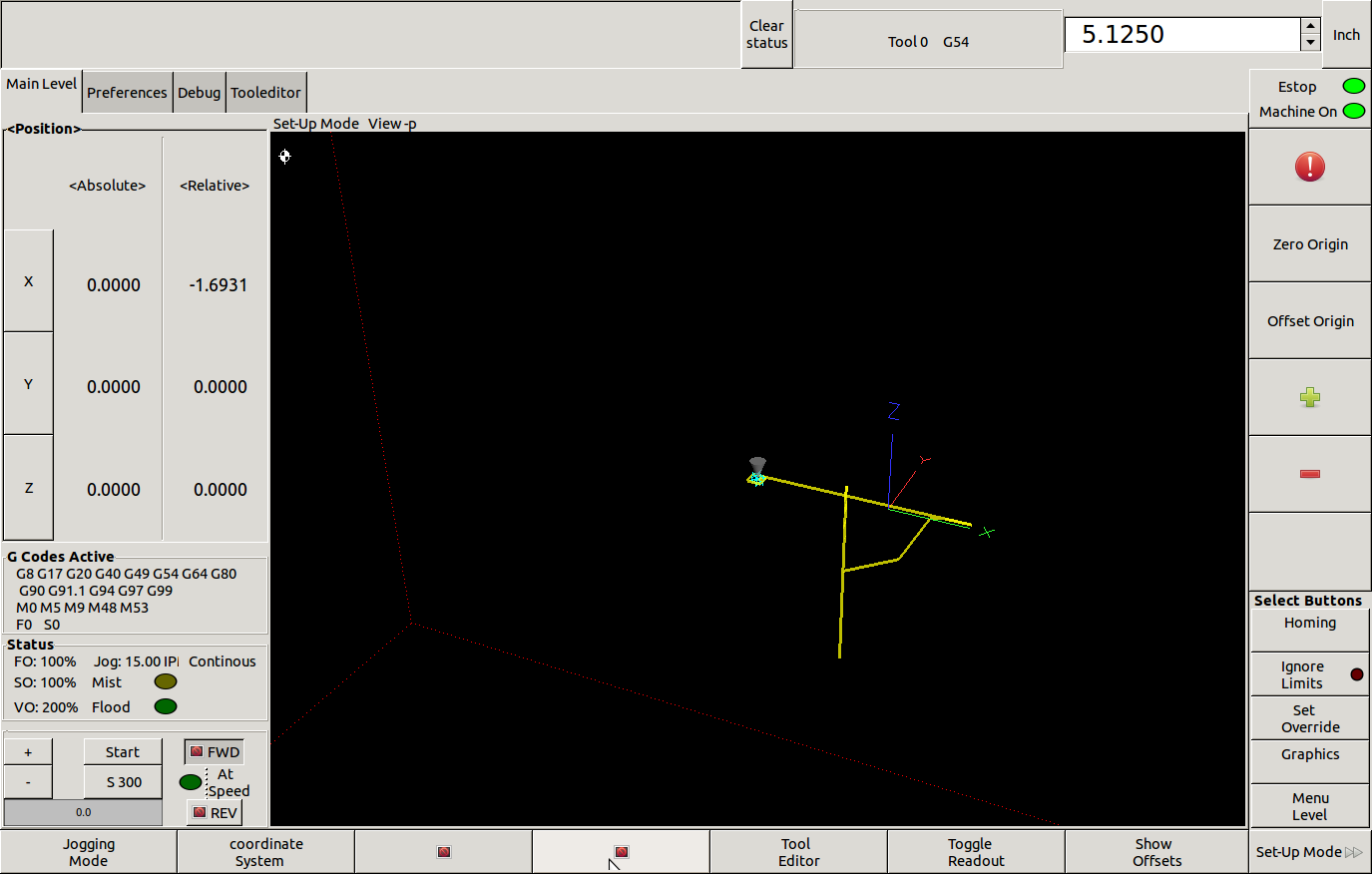
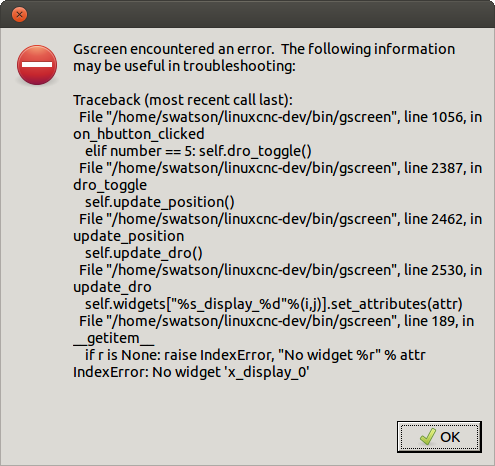
Yes that is it. What theme are you using with the screen shots? I have been using and playing with it quite a bit and have some sugestions and questions. I love this so far it is light years better to use than touchy and axis. Have a great time on the rest of your vacation Chris.
1. Preferences should be located under the debug tab.
2. Debug should be the last tab in the row.
3.Debug should have alarm history
4. MDI the text entry needs to be larger like in the program mode and should contain history of previous input commands.
5. Save and Save As need to be text in run mode.
6. Can you edit the program line before you get to it while the program is running? (program on line 20 edit line 100 with out stoping the program) Haas controls can do this.
7. What is page3 in run mode?
8. What is optional Pause in Run mode?
9. In setup mode I have a red dot with ! in it. What is that?
10. Feed, Spindle and Rapid feed rate overrides should go to 200%
11. The left side bar needs to me wider. In setup mode the status block you cant see the text for jog/
12. Jog Increments are confusing should start at .0001, .001, .010 .100, 1.000, Continus and only go up or down the wraping to the benging will mess with an operator.
13. Since the menu level button just toggles the tabs I recomend removing it for more space for new buttons.
14. I like the blinking ESTOP but sugest changeing color to red and black as well as slowing the blink rate down.
15. I would sugest seperating the Machine on/off and Estop to be 2 different buttons. Maybe even put Estop on the Left side of the screen.
16. I can't tell if Ignore limits is doing anything.
17. The clear status button and the that whole row at the top could be removed for more space.
Replied by tjamscad on topic Gscreen - a GTK / Glade / Python based screen
cmorley wrote:
tjamscad wrote: Chris,
I installed a fresh LinucCNC from source because the buildbot wasnt working correctly. I put the files you privided in the locations that you specfied but I still dont see what you have been posting.
tjamscad that looks right. it is gray colored because of the theme style, is that what looks wrong?
I'm still in the UK so can answer more questions in a few days.
Chris M
Yes that is it. What theme are you using with the screen shots? I have been using and playing with it quite a bit and have some sugestions and questions. I love this so far it is light years better to use than touchy and axis. Have a great time on the rest of your vacation Chris.
1. Preferences should be located under the debug tab.
2. Debug should be the last tab in the row.
3.Debug should have alarm history
4. MDI the text entry needs to be larger like in the program mode and should contain history of previous input commands.
5. Save and Save As need to be text in run mode.
6. Can you edit the program line before you get to it while the program is running? (program on line 20 edit line 100 with out stoping the program) Haas controls can do this.
7. What is page3 in run mode?
8. What is optional Pause in Run mode?
9. In setup mode I have a red dot with ! in it. What is that?
10. Feed, Spindle and Rapid feed rate overrides should go to 200%
11. The left side bar needs to me wider. In setup mode the status block you cant see the text for jog/
12. Jog Increments are confusing should start at .0001, .001, .010 .100, 1.000, Continus and only go up or down the wraping to the benging will mess with an operator.
13. Since the menu level button just toggles the tabs I recomend removing it for more space for new buttons.
14. I like the blinking ESTOP but sugest changeing color to red and black as well as slowing the blink rate down.
15. I would sugest seperating the Machine on/off and Estop to be 2 different buttons. Maybe even put Estop on the Left side of the screen.
16. I can't tell if Ignore limits is doing anything.
17. The clear status button and the that whole row at the top could be removed for more space.
Please Log in or Create an account to join the conversation.
- cncbasher
- Offline
- Moderator
-
Less
More
- Posts: 1021
- Thank you received: 202
13 years 10 months ago - 13 years 10 months ago #28128
by cncbasher
Replied by cncbasher on topic Gscreen - a GTK / Glade / Python based screen
the theme used is blue joy , at least thats the one i use
gnome-look.org/content/show.php/Blue-Joy?content=73387
Dave
gnome-look.org/content/show.php/Blue-Joy?content=73387
Dave
Last edit: 13 years 10 months ago by cncbasher.
Please Log in or Create an account to join the conversation.
- tjamscad
- Offline
- Elite Member
-
Less
More
- Posts: 238
- Thank you received: 1
13 years 10 months ago #28129
by tjamscad
Thanks, how do I install it?
Replied by tjamscad on topic Gscreen - a GTK / Glade / Python based screen
cncbasher wrote: the theme used is blue joy , at least thats the one i use
gnome-look.org/content/show.php/Blue-Joy?content=73387
Dave
Thanks, how do I install it?
Please Log in or Create an account to join the conversation.
- cncbasher
- Offline
- Moderator
-
Less
More
- Posts: 1021
- Thank you received: 202
13 years 10 months ago - 13 years 10 months ago #28130
by cncbasher
Replied by cncbasher on topic Gscreen - a GTK / Glade / Python based screen
see if you can follow this tutorial ,
www.liberiangeek.net/2010/07/manually-in...tu-10-04-lucid-lynx/
www.liberiangeek.net/2010/07/manually-in...tu-10-04-lucid-lynx/
Last edit: 13 years 10 months ago by cncbasher.
Please Log in or Create an account to join the conversation.
Time to create page: 0.905 seconds