
- Posts: 238
- Thank you received: 1
Gscreen - a GTK / Glade / Python based screen
- tjamscad
- Offline
- Elite Member
-

Less
More
13 years 10 months ago #28242
by tjamscad
1. I seconad the jogwheel override option Haas has this as an option by secleting hand control on the override section
2. I also like the tool editor but until I have this running some feedback from the machinest's I have no comments. Having it in the setup area would not hurt and might be better.
6. I agree to this too.
7. Agreed, I have never set or seen set a spindle speed with a deciminal.
Replied by tjamscad on topic Gscreen - a GTK / Glade / Python based screen
karlkec wrote: 1. Right now we use Touchy with a touchscreen. We have a jogwheel on the control panel which is used for jogging, but can also be used to set overrides in touchy. It would be nice to do that in Gscreen too. That way, after selecting which override I could adjust it while watching the cut, without looking at the screen. We have a signed 32bit value from the jogwheel that we can used for this. A 1 percent override per count of the wheel should be about right.
3. I really like the integrated tool table editor. Could it only show as many axes as are needed for the machine?
4. Maybe change the Tooleditor tab to a Setup tab? It could include the tool table editor as well as a tool touchoff button, the zero origin button, and offset origin button. We have a tool changer on the mill, so for us it would be nice if a Setup tab had the capability of changing tools too.
5. This is really minor -- it might be easier to have another tab to show offsets, rather than a button.
6. It would be nice for us to have jogging available without having to home the machine first. We don't have a way of moving the axes other than with the servos, and there are times when doing maintenance when I wouldn't want to go through the full travel to the home switch, but still want to jog it a bit this way or that.
7. Another minor point -- show the spindle speed with no decimals (or maybe one).
Gscreen is looking really great. Thanks a lot for all the hard work.
Karl
1. I seconad the jogwheel override option Haas has this as an option by secleting hand control on the override section
2. I also like the tool editor but until I have this running some feedback from the machinest's I have no comments. Having it in the setup area would not hurt and might be better.
6. I agree to this too.
7. Agreed, I have never set or seen set a spindle speed with a deciminal.
Please Log in or Create an account to join the conversation.
- cmorley
- Offline
- Moderator
-

Less
More
- Posts: 7368
- Thank you received: 2181
13 years 10 months ago #28243
by cmorley
I could create pins that are true only when one of the override buttons is selected and while not in jogging mode - is that sufficient?
2) it is possible to zoom in anyway you want with a little coding. Is the track ball used like a mouse? so track ball movement is the same as mouse movement?
3) Yes ideally the tool editor display will be more configurable. I hadn't decided how that should work at the time I built it.
4) tool changing requires the machine to be homed that is why I left it off the first screen. I know on my lathe we indexed tools manual fairly often.
I could add it, de-sensitized till homing is done. Could you llive with index next tool or would you need index to a particular tool?
As for tooleditor as a setup tab- I'm not sure what you mean exactly - are you saying you want to be able to set the origin while the tooleditor displays?
5) If tabs are easier to use yes an offset tab could be built.
6) Jogging is available without homing. Homing mode is set automatically when Gscreen is started as that is pretty standard. de-press the homing button on the right side and press the jogging button on the bottom left. If this is an option lots of people want I could add it as a preference.
7) I'll look into it.
Chris M
Replied by cmorley on topic Gscreen - a GTK / Glade / Python based screen
1) you can almost do this now by using halui override controls. The missing part is the on-screen enable controls.karlkec wrote: Hi Chris,
I hope your holiday was (is?) an enjoyable one.
I'm really glad to see Gscreen coming along. I'm sure it will be useful for a lot of people. On my simulator it's working great. I should have a chance to try it out on the mill later this week.
I've got some requests and questions. See what you and others think:
1. Right now we use Touchy with a touchscreen. We have a jogwheel on the control panel which is used for jogging, but can also be used to set overrides in touchy. It would be nice to do that in Gscreen too. That way, after selecting which override I could adjust it while watching the cut, without looking at the screen. We have a signed 32bit value from the jogwheel that we can used for this. A 1 percent override per count of the wheel should be about right.
2. I know the backplot can be zoomed from the graphics and zoom buttons, and from the scroll wheel on the mouse. On the mill we have a track ball, but no scroll wheel. Would it be possible to zoom the backplot by holding a key (ctrl?) and moving the track ball? I think Axis does this.
3. I really like the integrated tool table editor. Could it only show as many axes as are needed for the machine?
4. Maybe change the Tooleditor tab to a Setup tab? It could include the tool table editor as well as a tool touchoff button, the zero origin button, and offset origin button. We have a tool changer on the mill, so for us it would be nice if a Setup tab had the capability of changing tools too.
5. This is really minor -- it might be easier to have another tab to show offsets, rather than a button.
6. It would be nice for us to have jogging available without having to home the machine first. We don't have a way of moving the axes other than with the servos, and there are times when doing maintenance when I wouldn't want to go through the full travel to the home switch, but still want to jog it a bit this way or that.
7. Another minor point -- show the spindle speed with no decimals (or maybe one).
Gscreen is looking really great. Thanks a lot for all the hard work.
Karl
I could create pins that are true only when one of the override buttons is selected and while not in jogging mode - is that sufficient?
2) it is possible to zoom in anyway you want with a little coding. Is the track ball used like a mouse? so track ball movement is the same as mouse movement?
3) Yes ideally the tool editor display will be more configurable. I hadn't decided how that should work at the time I built it.
4) tool changing requires the machine to be homed that is why I left it off the first screen. I know on my lathe we indexed tools manual fairly often.
I could add it, de-sensitized till homing is done. Could you llive with index next tool or would you need index to a particular tool?
As for tooleditor as a setup tab- I'm not sure what you mean exactly - are you saying you want to be able to set the origin while the tooleditor displays?
5) If tabs are easier to use yes an offset tab could be built.
6) Jogging is available without homing. Homing mode is set automatically when Gscreen is started as that is pretty standard. de-press the homing button on the right side and press the jogging button on the bottom left. If this is an option lots of people want I could add it as a preference.
7) I'll look into it.
Chris M
Please Log in or Create an account to join the conversation.
- cmorley
- Offline
- Moderator
-
Less
More
- Posts: 7368
- Thank you received: 2181
13 years 10 months ago #28244
by cmorley
13) every time you add tabs it uses vertical space. They are great when there are lots of tab options. If I had the mode as tabs then that would have mode tabs inside of menu tabs which wastes a great deal of space. I would assume in general one would not change modes much after the machine was set up and running.
16) not practically - ignore-limits unsets it's self right after a jog command (linuxcnc does this) so it is much handier to have the button available while jogging off the limit switch.
Chris M
Replied by cmorley on topic Gscreen - a GTK / Glade / Python based screen
tjamscad wrote: 8. please rename to option stop or optional stop
9. Please use text
10. Thanks I can handle that
12. see #10
13. The tabs are very nice and very fast to change between screens. Tabs could better be used in the Modes were tabs also. The multiple toggle button works but I find myself passing the mode i want and having to go areound and back to it.
14. Yes, estop on = red, estop off = black
15. yes, the sample sim/gscreen_custom but with the color changes from point 14. Machine on = green machine off = black
16. Is that something that can be toggeld in debug of prefferences?
17. This can be adressed at a later date if nesseary I was just thinking that it could help with room for othere items.
On screen keyboard - is it possible for it to show the text that will be avaible when using the shift key?
13) every time you add tabs it uses vertical space. They are great when there are lots of tab options. If I had the mode as tabs then that would have mode tabs inside of menu tabs which wastes a great deal of space. I would assume in general one would not change modes much after the machine was set up and running.
16) not practically - ignore-limits unsets it's self right after a jog command (linuxcnc does this) so it is much handier to have the button available while jogging off the limit switch.
Chris M
Please Log in or Create an account to join the conversation.
- JaysonWallis
- Offline
- New Member
-

Less
More
- Posts: 10
- Thank you received: 0
13 years 10 months ago #28247
by JaysonWallis
Replied by JaysonWallis on topic Gscreen - a GTK / Glade / Python based screen
I have been using Gscreen all week and its working well.
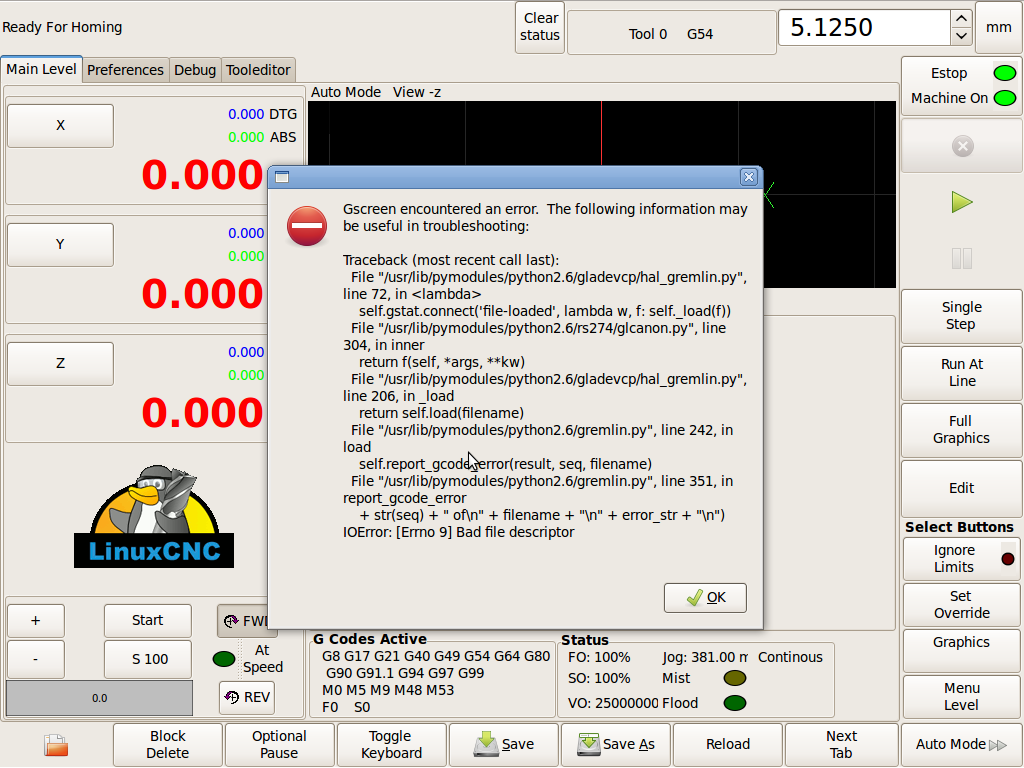
One small thing that I have noted is that if there is an error in the .nc file Gscreen throws up a bunch of python errors.
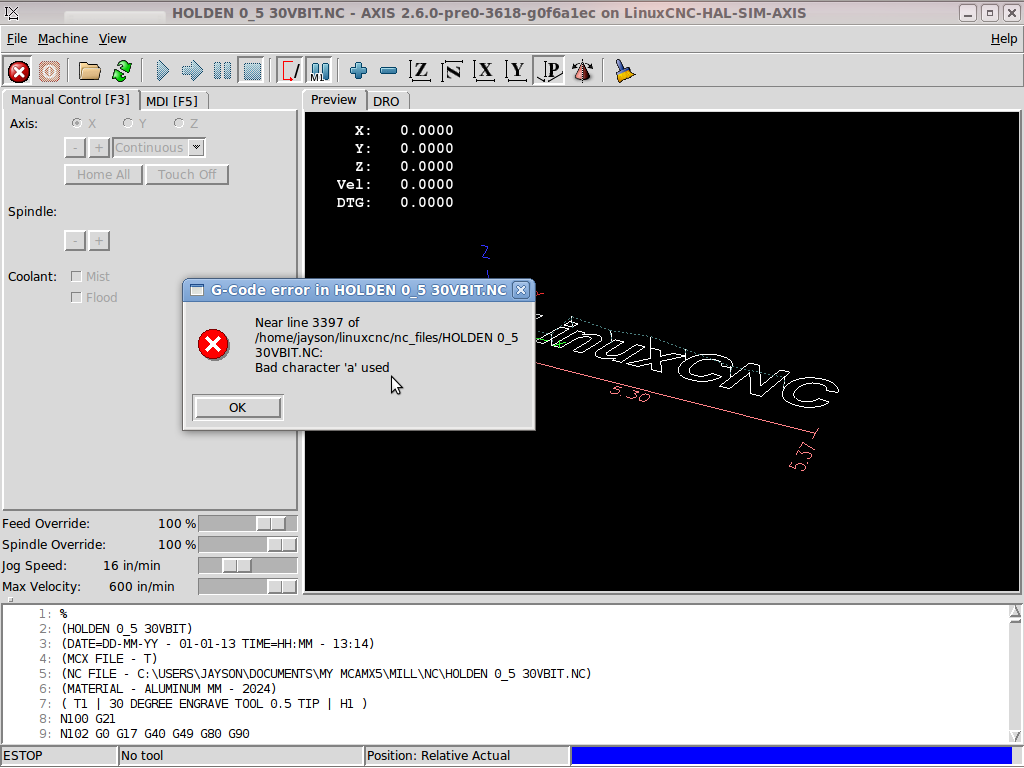
If I load the same file into axis it gives me the line number and points to what the error is.
Just makes it a little easier to find where I stuffed up
Thanks,
Jayson.
One small thing that I have noted is that if there is an error in the .nc file Gscreen throws up a bunch of python errors.
If I load the same file into axis it gives me the line number and points to what the error is.
Just makes it a little easier to find where I stuffed up
Thanks,
Jayson.
Please Log in or Create an account to join the conversation.
- cmorley
- Offline
- Moderator
-
Less
More
- Posts: 7368
- Thank you received: 2181
13 years 10 months ago - 13 years 10 months ago #28248
by cmorley
Replied by cmorley on topic Gscreen - a GTK / Glade / Python based screen
Ironically the error is from the code that is suppose to report the Gcode error.
This is a problem in the HAL_gremlin widget. Was hoping Pavel would fix it (he made HAL_gremlin)
I might look into it though...
Glad you find Gscreen useful!
Chris M
This is a problem in the HAL_gremlin widget. Was hoping Pavel would fix it (he made HAL_gremlin)
I might look into it though...
Glad you find Gscreen useful!
Chris M
Last edit: 13 years 10 months ago by cmorley.
Please Log in or Create an account to join the conversation.
- cmorley
- Offline
- Moderator
-
Less
More
- Posts: 7368
- Thank you received: 2181
13 years 10 months ago #28249
by cmorley
Replied by cmorley on topic Gscreen - a GTK / Glade / Python based screen
ok added override enable HAL pins.
also added 'industrial' as a sample config
it has most of the ideas you guts talked of besides the ones that take alot of work...
Chris M
also added 'industrial' as a sample config
it has most of the ideas you guts talked of besides the ones that take alot of work...
Chris M
Please Log in or Create an account to join the conversation.
Time to create page: 0.243 seconds