
- Posts: 7368
- Thank you received: 2181
Gscreen - a GTK / Glade / Python based screen
- cmorley
- Offline
- Moderator
-

Less
More
13 years 9 months ago #29348
by cmorley
1) You still need the patch - I have not heard anything about this patch for a while - there was a couple things that needed to be fixed.
and the limiting of the amount of tools possible was not liked much by the devs. personally I think we should live with the limit and fix it in master.
I think the patch is worthwhile - just a few things to fix on it IIRC.
2) You can look here: wiki.linuxcnc.org/cgi-bin/wiki.pl?Gscreen#Installation -It may be slightly out of date.
Also if you start a sample config of gscreen from the sim directory, then look on the debug page the terminal will display all the available gscreen pins
Chris M
Replied by cmorley on topic Gscreen - a GTK / Glade / Python based screen
LAIR82 wrote: Hello Chris,
We have been following this thread from inception and are very anxious to get our machine finished to get the gscreen interface operational. I probably have another week or two and we will be applying power to this one so I can start test and tune. Couple of questions for you,
1. We have applied the fanuc style tool patch on the machine we just finished, and now that we have some hours put on the new control, realized it is almost identical to the Fagor and Cincinnati controls in regards to the wear offset option that it incorporates. Does this have this available yet or do I still need to apply that patch while compiling?
2. For the hal file what is the best to find out the I/O pins related to gscreen so I can start writing my hal file?
1) You still need the patch - I have not heard anything about this patch for a while - there was a couple things that needed to be fixed.
and the limiting of the amount of tools possible was not liked much by the devs. personally I think we should live with the limit and fix it in master.
I think the patch is worthwhile - just a few things to fix on it IIRC.
2) You can look here: wiki.linuxcnc.org/cgi-bin/wiki.pl?Gscreen#Installation -It may be slightly out of date.
Also if you start a sample config of gscreen from the sim directory, then look on the debug page the terminal will display all the available gscreen pins
Chris M
Please Log in or Create an account to join the conversation.
- cmorley
- Offline
- Moderator
-
Less
More
- Posts: 7368
- Thank you received: 2181
13 years 9 months ago #29349
by cmorley
Yes good catch.
The real problem is the Calculator widget return zero on an error.
Now it returns None.
So now when Gscreen detects the None it doesn't accept it and leaves the dialog on screen with the Error message on it.
For the tool index it still accepts floats which is technically wrong but it converts them to integers.
I'm not sure I am perfectly happy with this way of tool indexing but for now it does work.
Thanks for the report Norbert !
Replied by cmorley on topic Gscreen - a GTK / Glade / Python based screen
newbynobi wrote: @Chris,
a bug or a feature?
Please push the INDEX TOOL Button and enter "(8x", not a value! and then OK from the manual tool index entry.
No error is lauched, but you should mount tool 0
I Think this should not hapen!
Norbert
This may be a solution:
Yes good catch.
The real problem is the Calculator widget return zero on an error.
Now it returns None.
So now when Gscreen detects the None it doesn't accept it and leaves the dialog on screen with the Error message on it.
For the tool index it still accepts floats which is technically wrong but it converts them to integers.
I'm not sure I am perfectly happy with this way of tool indexing but for now it does work.
Thanks for the report Norbert !
Please Log in or Create an account to join the conversation.
- emcPT
- Offline
- Platinum Member
-

Less
More
- Posts: 424
- Thank you received: 95
13 years 9 months ago #29352
by emcPT
Replied by emcPT on topic Gscreen - a GTK / Glade / Python based screen
Thank you for sharing this work (Gscreen).
This made my point of view of linuxcnc much more user oriented.
This made my point of view of linuxcnc much more user oriented.
Please Log in or Create an account to join the conversation.
- cmorley
- Offline
- Moderator
-
Less
More
- Posts: 7368
- Thank you received: 2181
13 years 9 months ago #29355
by cmorley
Replied by cmorley on topic Gscreen - a GTK / Glade / Python based screen
Your very welcome.
It was the point of Gscreen - to recognize that different people like different things and why make it hard to do that.
It just so happens that all the things fell into place to make it all work.
I would like linuxcnc to be more popular to attract more diversity to the development.
Welcome by the way.
not sure if your lathe has the tool on the back side but there is currently work on the graphics plot to show that properly (not by me).
Chris M
It was the point of Gscreen - to recognize that different people like different things and why make it hard to do that.
It just so happens that all the things fell into place to make it all work.
I would like linuxcnc to be more popular to attract more diversity to the development.
Welcome by the way.
not sure if your lathe has the tool on the back side but there is currently work on the graphics plot to show that properly (not by me).
Chris M
Please Log in or Create an account to join the conversation.
- emcPT
- Offline
- Platinum Member
-
Less
More
- Posts: 424
- Thank you received: 95
13 years 9 months ago #29359
by emcPT
Replied by emcPT on topic Gscreen - a GTK / Glade / Python based screen
Were is the toolholder. I suppose that it is more than 350Kg, but I am not sure.
The toolholder is after the center line (X0) in the operator point of view like most CNC lathes, so I am not sure if you were refering about this situation when you said "tools on the back"
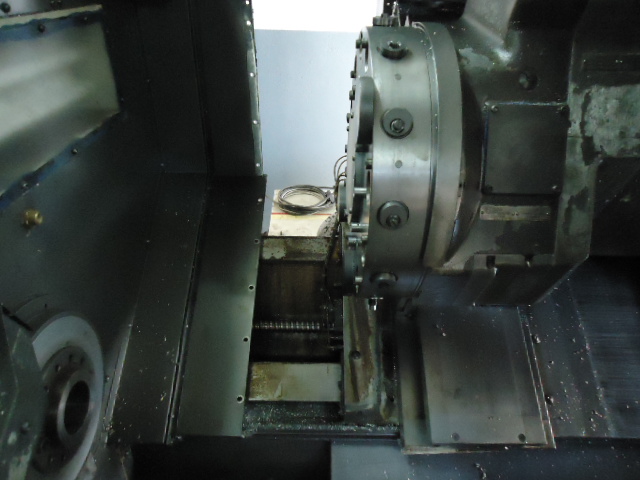
And this is showing the remaining body of the tool holder. The disk have about 550mm diameter (22")
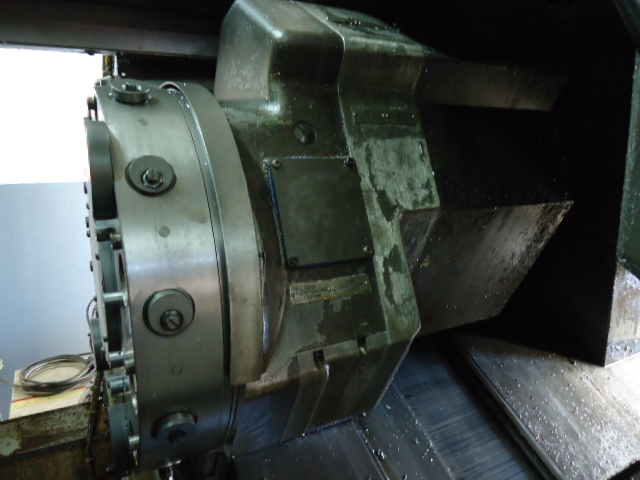
I would really like to make this good iron machine to work with linuxcnc. I am trying to convince the remaining people here to invest a bit in I&D and hire a worker just for this.
The toolholder is after the center line (X0) in the operator point of view like most CNC lathes, so I am not sure if you were refering about this situation when you said "tools on the back"
And this is showing the remaining body of the tool holder. The disk have about 550mm diameter (22")
I would really like to make this good iron machine to work with linuxcnc. I am trying to convince the remaining people here to invest a bit in I&D and hire a worker just for this.
Please Log in or Create an account to join the conversation.
- tjamscad
- Offline
- Elite Member
-

Less
More
- Posts: 238
- Thank you received: 1
13 years 9 months ago #29393
by tjamscad
Replied by tjamscad on topic Gscreen - a GTK / Glade / Python based screen
Chris,
The first comments I recived for gscreen-indrustrial.
1. Why are the buttons on the bottom row? Can the bottom row be moved to the top and shift everything down.
2. When opening a program it shows the Ubuntu bars on the top and bottom. Can you make something that will stay inside gscreen? I am running gscreen as full screen because I dont want machinest/operators doing anything outside that.
3. The demo programs dont run gives error about exceding limits. Can you make the needed changes so it will run? I have a pc hooked to a touch screen no keyboard, no ouse.
The first comments I recived for gscreen-indrustrial.
1. Why are the buttons on the bottom row? Can the bottom row be moved to the top and shift everything down.
2. When opening a program it shows the Ubuntu bars on the top and bottom. Can you make something that will stay inside gscreen? I am running gscreen as full screen because I dont want machinest/operators doing anything outside that.
3. The demo programs dont run gives error about exceding limits. Can you make the needed changes so it will run? I have a pc hooked to a touch screen no keyboard, no ouse.
Please Log in or Create an account to join the conversation.
Time to create page: 4.353 seconds