
- Posts: 238
- Thank you received: 1
Gscreen - a GTK / Glade / Python based screen
- tjamscad
- Offline
- Elite Member
-

Less
More
13 years 3 months ago #36578
by tjamscad
Replied by tjamscad on topic Gscreen - a GTK / Glade / Python based screen
Chris,
In what condition do the "cooridnate system" and "tool set" become active in the Indrustrial skin?
In what condition do the "cooridnate system" and "tool set" become active in the Indrustrial skin?
Please Log in or Create an account to join the conversation.
- cmorley
- Offline
- Moderator
-

Less
More
- Posts: 7368
- Thank you received: 2181
13 years 3 months ago #36583
by cmorley
Replied by cmorley on topic Gscreen - a GTK / Glade / Python based screen
you need to be homed for both buttons to work.
coordinate system is available in the setup page - Its really just a convenience button.
select it and press the up or down buttons to select one of the nine user systems. the current system is displayed in the upper right.
You must select an axis before the 'tool set' button.
coordinate system is available in the setup page - Its really just a convenience button.
select it and press the up or down buttons to select one of the nine user systems. the current system is displayed in the upper right.
You must select an axis before the 'tool set' button.
Please Log in or Create an account to join the conversation.
- tjamscad
- Offline
- Elite Member
-
Less
More
- Posts: 238
- Thank you received: 1
13 years 3 months ago #36594
by tjamscad
So then the "tool set" is a probe tool setter?
Replied by tjamscad on topic Gscreen - a GTK / Glade / Python based screen
cmorley wrote: you need to be homed for both buttons to work.
coordinate system is available in the setup page - Its really just a convenience button.
select it and press the up or down buttons to select one of the nine user systems. the current system is displayed in the upper right.
You must select an axis before the 'tool set' button.
So then the "tool set" is a probe tool setter?
Please Log in or Create an account to join the conversation.
- LAIR82
- Offline
- Elite Member
-
Less
More
- Posts: 197
- Thank you received: 3
13 years 3 months ago #36595
by LAIR82
Replied by LAIR82 on topic Gscreen - a GTK / Glade / Python based screen
Tool Set is used for touching tools off on your workpiece,
For instance when you touch off in the X and press Tool Set, a box pops up and you enter the appropriate value, then when you press enter, it applys that value to your tool table.
Rick
For instance when you touch off in the X and press Tool Set, a box pops up and you enter the appropriate value, then when you press enter, it applys that value to your tool table.
Rick
Please Log in or Create an account to join the conversation.
- tjamscad
- Offline
- Elite Member
-
Less
More
- Posts: 238
- Thank you received: 1
13 years 3 months ago #36596
by tjamscad
Ok, thanks Haas calls that tool offset measure.
Replied by tjamscad on topic Gscreen - a GTK / Glade / Python based screen
LAIR82 wrote: Tool Set is used for touching tools off on your workpiece,
For instance when you touch off in the X and press Tool Set, a box pops up and you enter the appropriate value, then when you press enter, it applys that value to your tool table.
Rick
Ok, thanks Haas calls that tool offset measure.
Please Log in or Create an account to join the conversation.
- tjamscad
- Offline
- Elite Member
-
Less
More
- Posts: 238
- Thank you received: 1
13 years 3 months ago - 13 years 3 months ago #36631
by tjamscad
Replied by tjamscad on topic Gscreen - a GTK / Glade / Python based screen
I have gscreen installed on one of our machines. It is not ready for production yet as there are several alarms and errors. It looks as though everything works except the hardbuttons on the control. I plan on building a standard control however this one is not it. The hard Estop button works though which I am happy about. The jog wheel is not functiong and I cant change the jog increments or jog with the incremental touch screen buttons. Postion goto works just fine. feel free to tell me what I dont know
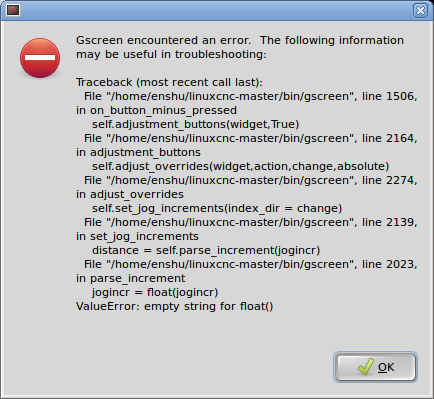

Last edit: 13 years 3 months ago by tjamscad. Reason: Added ini file
Please Log in or Create an account to join the conversation.
Time to create page: 0.167 seconds