
Gscreen - a GTK / Glade / Python based screen
- mariusl
- Offline
- Platinum Member
-

Less
More
13 years 3 months ago #36845
by mariusl
Regards
Marius
www.bluearccnc.com
Replied by mariusl on topic Gscreen - a GTK / Glade / Python based screen
I hope this is the right place for me to place this. This is very strange indeed I know but my debug terminal does not read the "r" key. I tested all the other keys but the "r' is not working. "R" works. Is this possible?
Regards
Marius
www.bluearccnc.com
Please Log in or Create an account to join the conversation.
- cmorley
- Offline
- Moderator
-

Less
More
- Posts: 7368
- Thank you received: 2181
13 years 3 months ago #36846
by cmorley
Replied by cmorley on topic Gscreen - a GTK / Glade / Python based screen
This is possible. One of my low power machines does this (and not all the time).
I have no idea why or a cure.
Chris M
I have no idea why or a cure.
Chris M
Please Log in or Create an account to join the conversation.
- cmorley
- Offline
- Moderator
-
Less
More
- Posts: 7368
- Thank you received: 2181
13 years 3 months ago #36852
by cmorley
Replied by cmorley on topic Gscreen - a GTK / Glade / Python based screen
pushed a new layout of industrial -now the onboard keyboard can be available anytime.
new calculator launch button.
Shannon: to answer your question about gremlin options. It requires a little python code to turn the options on and off.
I am a little bogged down right now to work on it.
On a simulator, try Gmoccapy. Norbert has exposed some of the options, and has buttons to click them on and off.
i just can't remember what options he has controls for....
Chris M
new calculator launch button.
Shannon: to answer your question about gremlin options. It requires a little python code to turn the options on and off.
I am a little bogged down right now to work on it.
On a simulator, try Gmoccapy. Norbert has exposed some of the options, and has buttons to click them on and off.
i just can't remember what options he has controls for....
Chris M
Please Log in or Create an account to join the conversation.
- newbynobi
- Offline
- Platinum Member
-
Less
More
- Posts: 1931
- Thank you received: 394
13 years 3 months ago #36856
by newbynobi
Replied by newbynobi on topic Gscreen - a GTK / Glade / Python based screen
gmoccapy offers the following gremlin function as buttons:
- Perspective view
- X View
- Y View
- Y2 View (Only in lathe mode)
- Z View
- Zoom in
- Zoom out
- dimensions on or off
- Tool Path on / off
- clear tool path
What is missing? I may be able to find space to add more button.
Norbert
- Perspective view
- X View
- Y View
- Y2 View (Only in lathe mode)
- Z View
- Zoom in
- Zoom out
- dimensions on or off
- Tool Path on / off
- clear tool path
What is missing? I may be able to find space to add more button.
Norbert
Please Log in or Create an account to join the conversation.
- tjamscad
- Offline
- Elite Member
-

Less
More
- Posts: 238
- Thank you received: 1
13 years 3 months ago #36883
by tjamscad
Replied by tjamscad on topic Gscreen - a GTK / Glade / Python based screen
Chris,
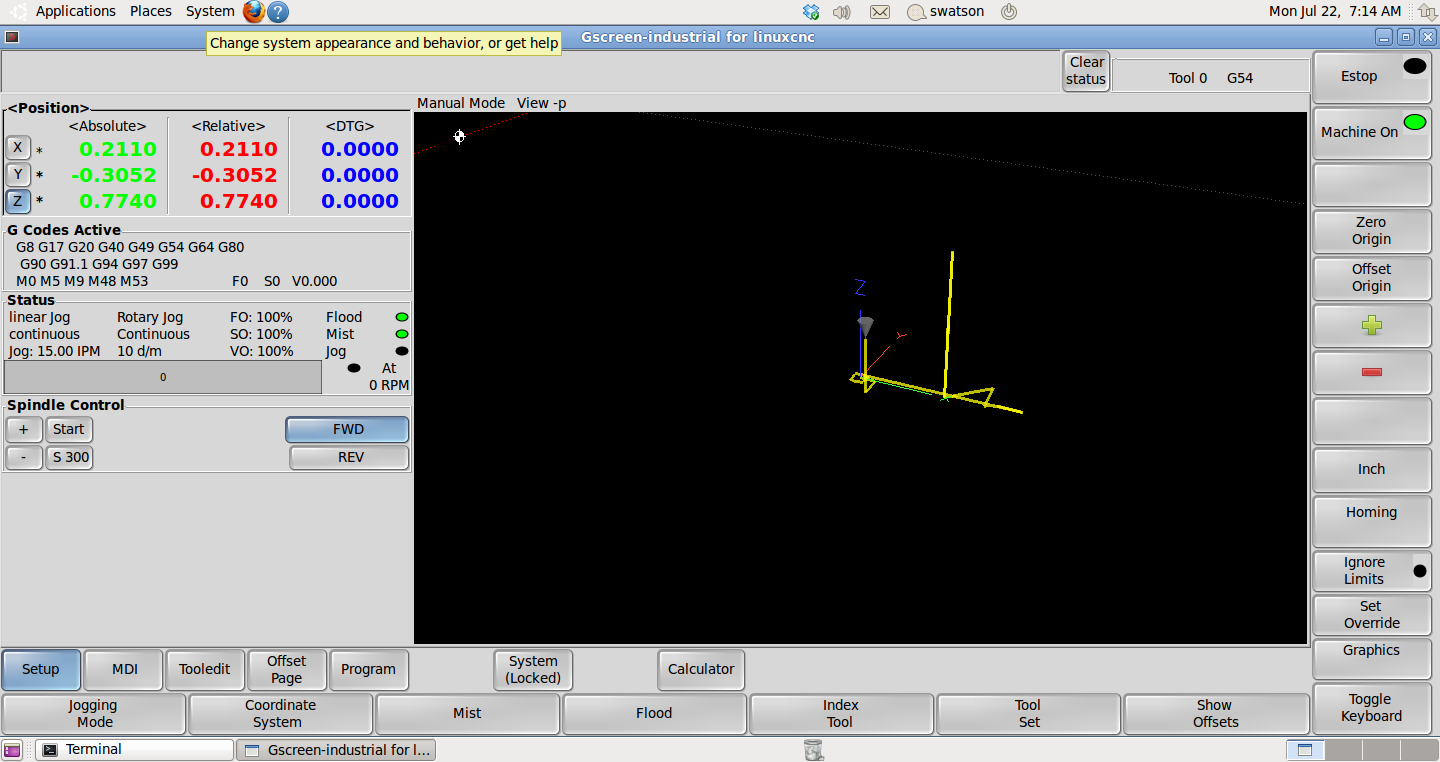
I like the keyboard on the bottom but it messed up your status panel. It will also be difficult to get more than 3 axes on there.
Can it be done so that on Setup, MDI and Program it only fills the space under the gremlin view area but still be at the bottom?
I like the keyboard on the bottom but it messed up your status panel. It will also be difficult to get more than 3 axes on there.
Can it be done so that on Setup, MDI and Program it only fills the space under the gremlin view area but still be at the bottom?
Please Log in or Create an account to join the conversation.
- cmorley
- Offline
- Moderator
-
Less
More
- Posts: 7368
- Thank you received: 2181
13 years 3 months ago #36913
by cmorley
Replied by cmorley on topic Gscreen - a GTK / Glade / Python based screen
It didn't - I changed it.
Since you don't want screen controls for the spindle, You could hide that little panel, giving you more room for axes.
You need to do that by editing the glade file.
look for frame5 look under properties/common/visible click no and save.
Now if you do want spindle screen controls....hmm
I'll have to look at the layering of the layout for your other suggestion.
Chris M
Since you don't want screen controls for the spindle, You could hide that little panel, giving you more room for axes.
You need to do that by editing the glade file.
look for frame5 look under properties/common/visible click no and save.
Now if you do want spindle screen controls....hmm
I'll have to look at the layering of the layout for your other suggestion.
Chris M
Please Log in or Create an account to join the conversation.
Time to create page: 3.294 seconds