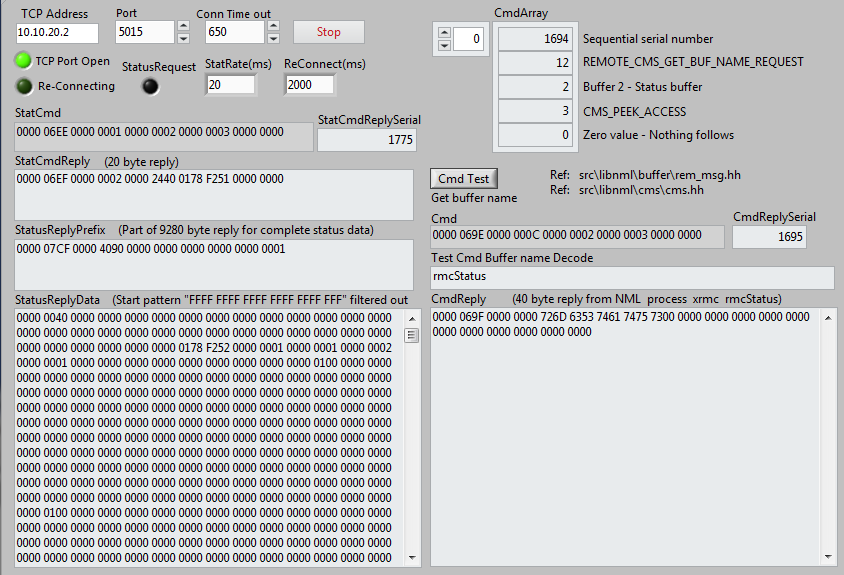
I'm looking for addition information on the below from old NIST information and the examples to see if this is suitable for use to help with mapping the obtained status data. Unfortunately most of the links contained in the document are no longer valid.
Obtaining the memory map.
The memory map file provides the information needed to determine the position of each variable in the file. The first character in the file is either 'L' (0x4c) to indicate the file is little-endian or 'B' (0x42) to indicate the file is big-endian. It can be read with a text-editor or opened with a spread sheet program. To generate the file write a program such as this "write_mem_map.cc"which really only needs to be run once.
#include "nml_ex1.hh" int main(int argc, const char **argv) { NML nml(ex_format, 0,0,0); EXAMPLE_MSG example_msg; nml.writeEncodedMessageMemoryMapToFile(&example_msg, CMS_PACKED_ENCODING, "EXAMPLE_MSG_TYPE_map.csv"); }
To compile and run:
## Set RCS lib install directory. ## likely needs to adjusted for your system. RCSLIB_DIR=~/rcslib/; ## Set the path for finding librcs.so LD_LIBRARY_PATH="${RCSLIB_DIR}/lib/:${LD_LIBRARY_PATH}"; export LD_LIBRARY_PATH; ## Create nml_ex1.cc from nml_ex1.hh java -jar "${RCSLIB_DIR}"/bin/CodeGenCmdLine.jar nml_ex1.hh -o nml_ex1.cc ## Compile examples: g++ write_mem_map.cc nml_ex1.cc -I"${RCSLIB_DIR}"/include -L "${RCSLIB_DIR}"/lib -lrcs -o write_mem_map ./write_mem_map
This is from the below link:
www.nist.gov/el/intelligent-systems-divi...up/nml-message-files
This makes it a bit easier to read:
The memory map file provides the information needed to determine the
position of each variable in the file. The first character in the
file is either 'L' (0x4c) to indicate the file is little-endian
or 'B' (0x42) to indicate the file is big-endian. It can be read
with a text-editor or opened with a spread sheet program.
To generate the file write a program such as this
"write_mem_map.cc" which really only needs to be run once.
#include "nml_ex1.hh" int main(int argc, const char **argv) {
NML nml(ex_format, 0,0,0); EXAMPLE_MSG example_msg;
nml.writeEncodedMessageMemoryMapToFile(&example_msg, CMS_PACKED_ENCODING, "EXAMPLE_MSG_TYPE_map.csv");
}
To compile and run:
## Set RCS lib install directory.
## likely needs to adjusted for your system.
RCSLIB_DIR=~/rcslib/;
## Set the path for finding librcs.so
LD_LIBRARY_PATH="${RCSLIB_DIR}/lib/:${LD_LIBRARY_PATH}";
export LD_LIBRARY_PATH;
## Create nml_ex1.cc from nml_ex1.hh java -jar "${RCSLIB_DIR}"/bin/CodeGenCmdLine.jar nml_ex1.hh -o nml_ex1.cc
## Compile examples:
g++ write_mem_map.cc nml_ex1.cc -I"${RCSLIB_DIR}"/include -L "${RCSLIB_DIR}"/lib -lrcs -o write_mem_map ./write_mem_map
This produces the file "EXAMPLE_MSG_TYPE_map.csv":