motor-0-position error beim Abbremsen aus 4-7,5 m/min

More
1 year 6 months ago #327189 by tommylight

Hi tommylight, i just followed the advice from PCW in an earlier posting: "...and change all joint PID "P" terms to 666"
That was correct back then when you had the servo period set at 1.5 million, it is not correct when you changed the period to 2 million.
1 million = P 1000
2 million = P 500
0.5 million = P 2000
etc.
And sorry, i missed the part with FF2.
The following user(s) said Thank You: Muftijaja

Please Log in or Create an account to join the conversation.

More
1 year 6 months ago #327190 by PCW
Also setting FF2 should be done with halscope.
The following user(s) said Thank You: Muftijaja

Please Log in or Create an account to join the conversation.

More
1 year 6 months ago #327193 by Muftijaja
Hi rodw,
thank you, I have the DKMS r8168 driver installed weeks ago. I try this tomorrow:
Optional kernel settings (install using grub-customizer as per
isolcpus setting)
r8168.aspm=0 r8168.eee_enable=0 pcie_aspm=off loglevel=3
I did not test them individually to see which helped but I suspect that disabling the "Energy Efficient Ethernet" mode might be a good culprit.
Ethernet efficiency mode has to be switched off in BIOS, right? OR is it in the network settings in Linux/Debian Network manager?

Please Log in or Create an account to join the conversation.

More
1 year 6 months ago - 1 year 6 months ago #327282 by Muftijaja
Hi, I tried a lot the last days.
I set the P to 500 as you said, I made the realtec optional kernel settings, i took a look for Energy efficiency and did not find anything of this, I set ff2 back to 0, and in the first try (an air run of my last part) it seemed to run - but 2 min after start the motor-0-position error came again, right in a direction change of the path. As before.

That was very disappointing, so I decided to get another PC from the shelf, a Lenovo m910q with 16GB, i7-6700T 4C/8T and put the SSD from the other in it.
The machine started at once, no problems to fix, I declined all BIOS settings that are described in the latency thread. This jounger PC has WLAN for the Internet and a I219-LM Intel network card, that should be better, somebody told me.

I did the coalescence workaround in etc/interfaces, I made the ethtool working (sudo ethtool -C enp0s31f6 rx-usecs 0), I made the kernel options:   quiet irqaffinity=0,1 isolcpus=3 intel_idle.max_cstate=1 i915.enable_rc6=0

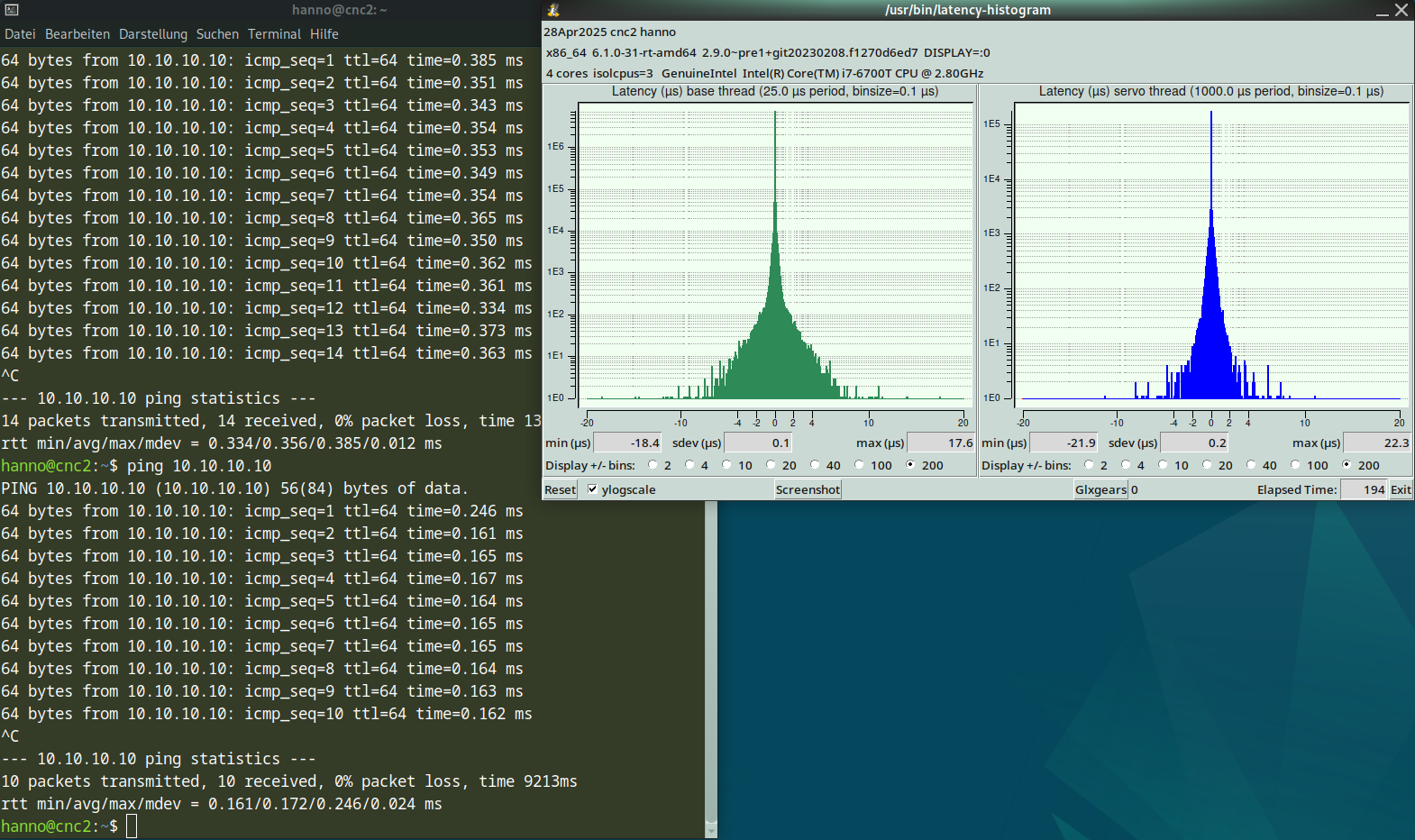
The outcome was not bad, but worse than before, regarding the ping times. The realtec gave me 0,056-0,070, the intel gives out:
rtt min/avg/max/mdev = 0.165/0.189/0.307/0.052 ms which is bad in my eyes.
Even if i kill the WLAN adapter, it does not much better:
111 packets transmitted, 111 received, 0% packet loss, time 112114ms
rtt min/avg/max/mdev = 0.108/0.164/0.199/0.011 ms

What do you think about it? should I go down to the machine and try it out or should I do sthing else?

Thanks for your advice, I appreciate that much!
Hanno

 
Last edit: 1 year 6 months ago by Muftijaja.

Please Log in or Create an account to join the conversation.

More
1 year 6 months ago - 1 year 6 months ago #327283 by Muftijaja
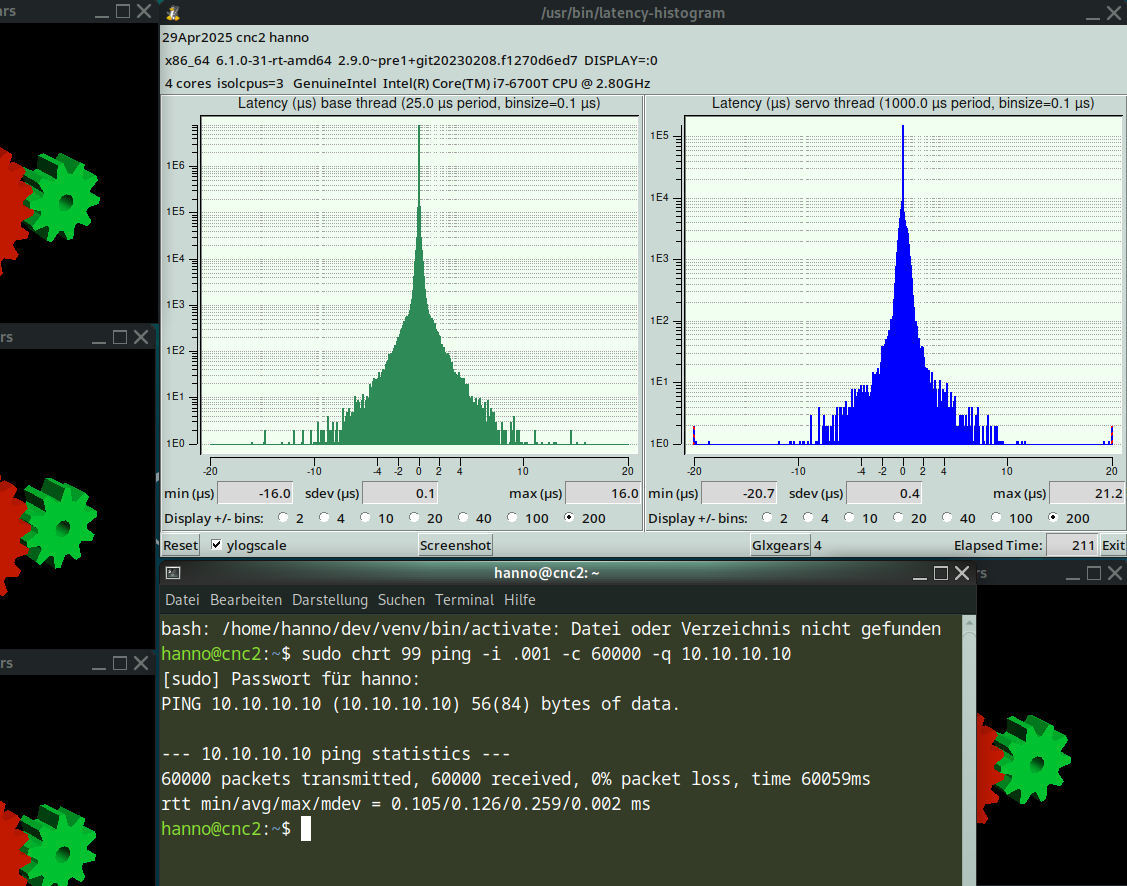
This is my last effort to get the ping down. I set the Cool Option to thermally optimized, a cool&quiet option in BIOS. Other settings would bee acoustic optimized or full throttle. I hope it does not affect anything of cpu clocks.
 

rtt min/avg/max/mdev = 0.105/0.126/0.259/0.002 ms  what do you think?

Greetings, Hanno

 
Last edit: 1 year 6 months ago by Muftijaja.

Please Log in or Create an account to join the conversation.

More
1 year 6 months ago #327297 by PCW
The ping times are not terribly important _unless_ packets are dropped due to timeouts.
Default timeout setting is 80% of the servo period so those times look fine for a 1 KHz
servo thread.
The following user(s) said Thank You: Muftijaja

Please Log in or Create an account to join the conversation.

Moderators: Muecke
Time to create page: 0.418 seconds
Powered by Kunena Forum