motor-0-position error beim Abbremsen aus 4-7,5 m/min

More
1 year 8 months ago #322101 by Muftijaja
Hello PCW,
I checked the hm2_7i76e.0.packet-error-total and got 57 errors about 45 minutes. Is this too much?

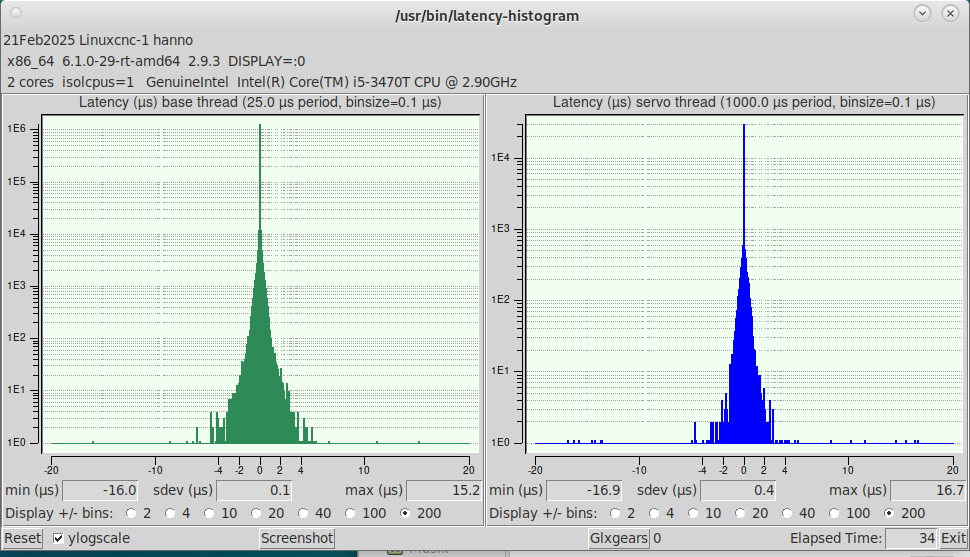
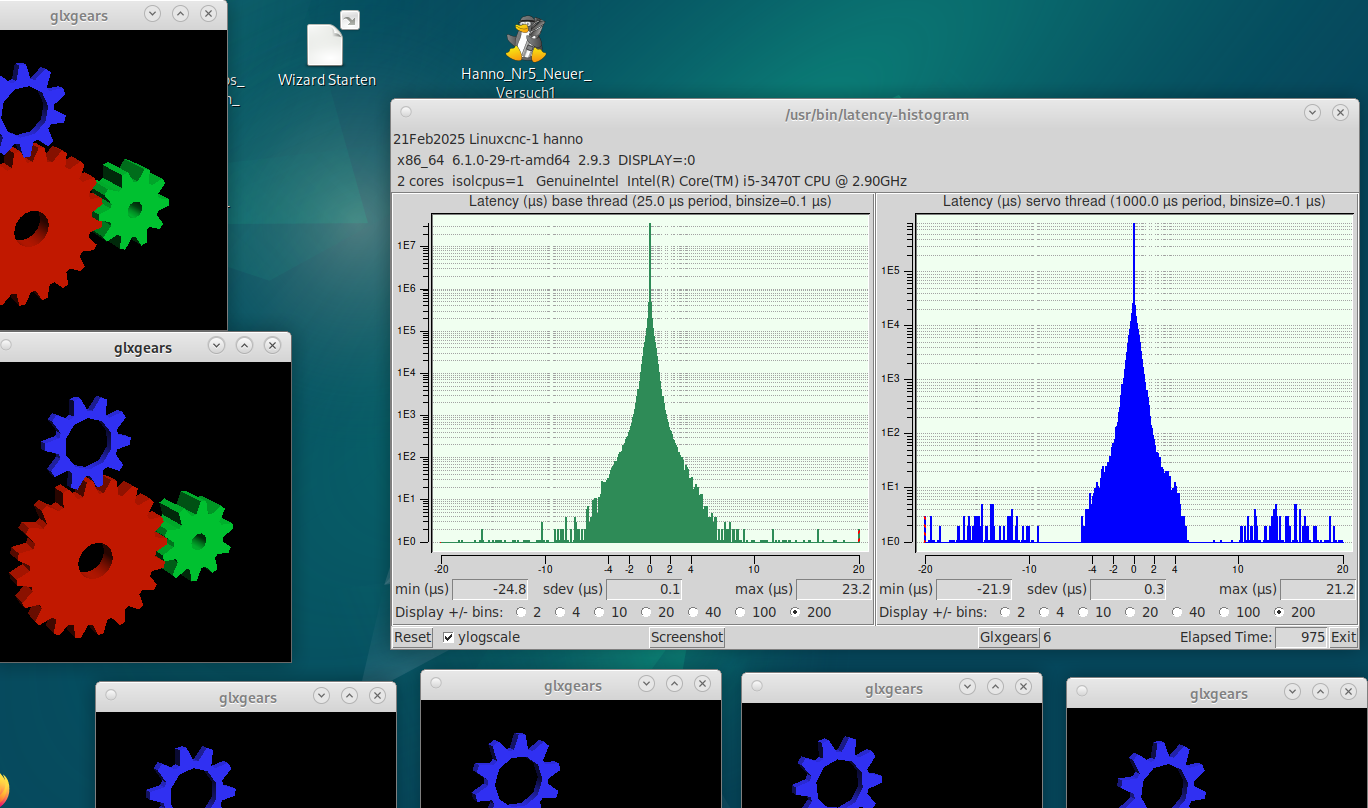
I don't understand these packet losses - (my PC is a lenovo ThinkCentre M92p Mini-PC, Intel Core i5-3470T 2.90 GHz 8GB Ram, in the latency Test I get readings as shown in the photos, first at start, Servo 4000, Base 5608, after 30 minutes surfing, coding in Vcode, doing sth else: servo 82040, Base 24542, I set servo thread in the INI file to 1.600.000.
Kernel release 6.1.0-29-rt-amd64, Kernel Version #1 SMP PREEMPT_RT Debian 6.1.123-1 (2025-01-02)
What do you think?

I did the most Latency tips in this thread: forum.linuxcnc.org/38-general-linuxcnc-q...ead-and-irq-affinity - I disabled hyperthreading, power saving, virtualisation, TPM, turbo mode, ACPI, APM, Audio,, kernel isolate core 0 for interrupts - quiet irqaffinity=0 isolcpus=0. I bought a new network controller with RTL_8125 chip,  optimize my network connection with sudo ethtool -C eno1 rx-usecs 0 at any system start. Kernel release 6.1.0-29-rt-amd64, Kernel Version #1 SMP PREEMPT_RT Debian 6.1.123-1 (2025-01-02)

Anyways, I dont have servo motors with encoders wired to the MEsa 7i76e, so I cannot calibrate in live mode. I just set the FF2 to 0.0003 as you said. Same results as yesterday, not often but sometimes i get that motor-0-position errors.
Maybe my PC is too slow for a Linux system? Any suggestions?
Thank you so much for your support!
Hanno
(For some reason, I cannot put photos <1MB in this thread...)


Please Log in or Create an account to join the conversation.

More
1 year 8 months ago #322112 by PCW
Ideally you should get no dropped packets at all.

I does sound like a network latency issue.

One thing to do to test is to run say:

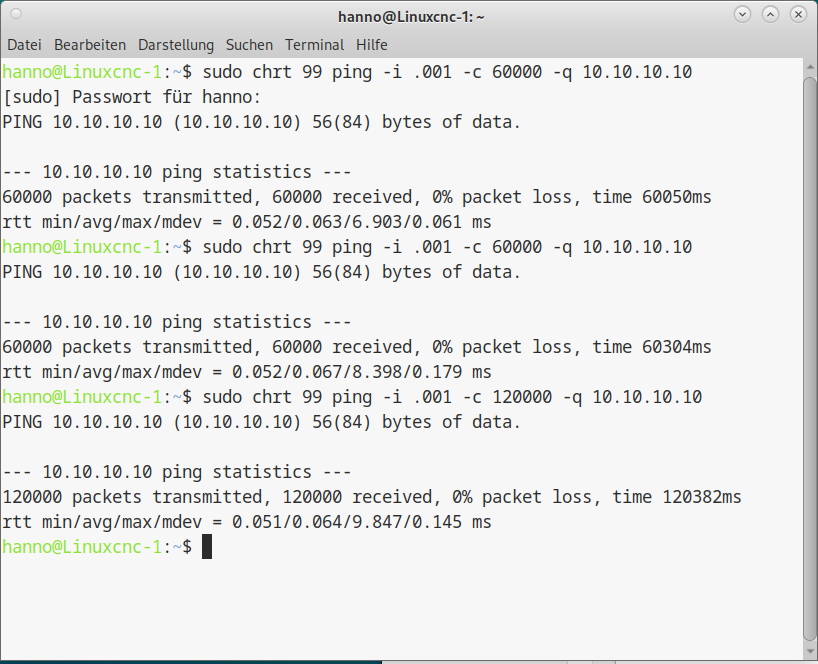
sudo chrt 99 ping -i .001 -c 60000 -q 10.10.10.10

(will run for ~1 minute)
and see what the stats are

If there are no more network latency optimizations to do

You can increase the servo thread period (say to 2 ms)

Its also possible to make dropped packets not trigger following errors
(or cause path deviations) by specific hal file modifications
 
The following user(s) said Thank You: Muftijaja

Please Log in or Create an account to join the conversation.

More
1 year 8 months ago #322200 by Muftijaja
Hello PCW! Thanks for your hints yesterday.

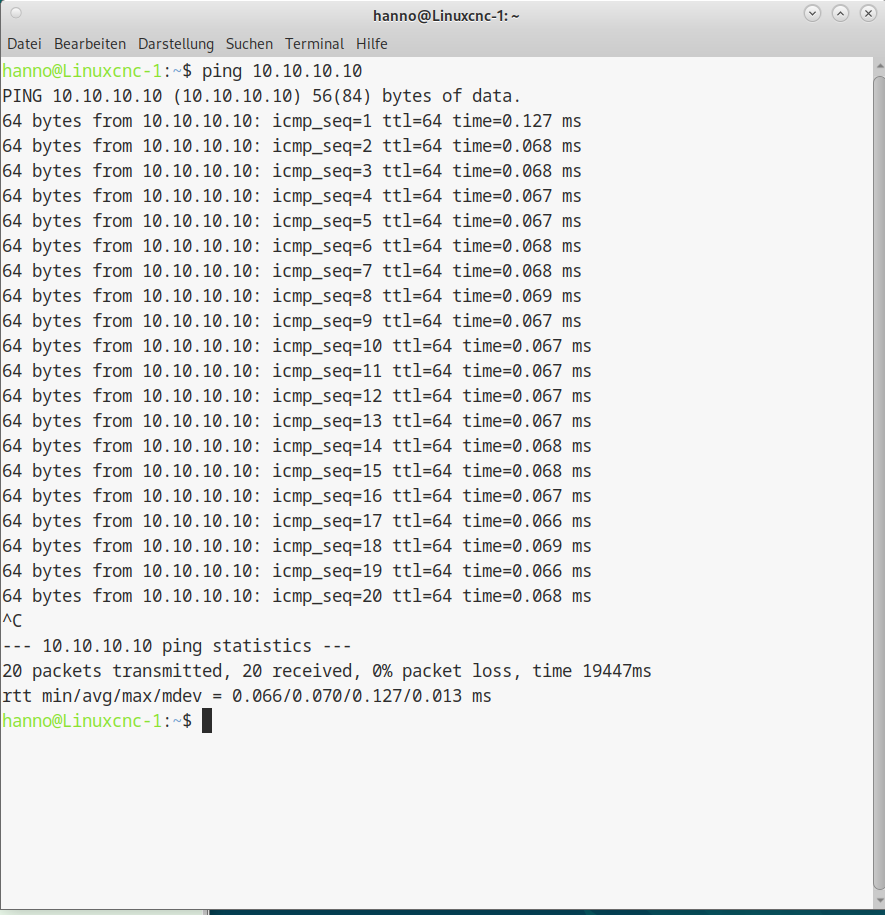
I did some pings and latency histograms, I hope I can put the photos in here. I thought both was allright, but this motor-0-position errors (and "error-finishing-read" at start) seems to be persistent.
BTW, I tried the most of this thread: forum.linuxcnc.org/38-general-linuxcnc-q...ead-and-irq-affinity and it was very successful in this regard, except these errors.
I think I try servo thread with 2 ms.


File Attachment:

File Name: Hanno_Nr5_...2-21.hal
File Size:12.06 KB
 

File Attachment:

File Name: Hanno_Nr5_...2-21.ini
File Size:6.01 KB


Thank you for your support!
Hanno

Please Log in or Create an account to join the conversation.

More
1 year 8 months ago #322205 by PCW
The ping test shows the issue with nearly 10 ms delays some times.

If you have a Realtek Ethernet interface it may require replacing
the stock driver with the DKMS one.

You can usually determine the Ethernet MAC on the PC with:

lspci  | grep -i ether

 
The following user(s) said Thank You: Muftijaja

Please Log in or Create an account to join the conversation.

More
1 year 8 months ago #322209 by tommylight
What does
ip a
in a terminal return?
The ping times look way to short (except the 10ms one) so you might be pinging your PC
Then again, i read above that it communicates with the Mesa board, so might be OK, just making sure.
The following user(s) said Thank You: Muftijaja

Please Log in or Create an account to join the conversation.

More
1 year 8 months ago - 1 year 8 months ago #322220 by Muftijaja
Hello PCW, tommylight,
Yes, I have switched to the optional Realtec Network Controller, because with the Intel i got triple as bad pings as with the Realtec when using it for the Mesa Card. (The Intel is very unstable indeed, Internet sometimes connects only with fixed IP, sometimes only with DHCP, that has cost me nerves the last weeks)

hanno@Linuxcnc-1:~$ lspci  | grep -i ether
00:19.0 Ethernet controller: Intel Corporation 82579LM Gigabit Network Connection (Lewisville) (rev 04)
02:00.0 Ethernet controller: Realtek Semiconductor Co., Ltd. RTL8111/8168/8411 PCI Express Gigabit Ethernet Controller (rev 15)
I try to find the DKMS driver, if you say this could help.
(oops, trying to load DKMS, I see "dkms ist schon die neueste Version (3.0.10-8+deb12u1)." But I can install/write the driver with r8168 new. I wait until I have done all the steps for that driver.

tommylight: ip a gives back:
hanno@Linuxcnc-1:~$ ip a
1: lo: <LOOPBACK,UP,LOWER_UP> mtu 65536 qdisc noqueue state UNKNOWN group default qlen 1000
    link/loopback 00:00:00:00:00:00 brd 00:00:00:00:00:00
    inet 127.0.0.1/8 scope host lo
       valid_lft forever preferred_lft forever
    inet6 ::1/128 scope host noprefixroute
       valid_lft forever preferred_lft forever
2: enp2s0: <BROADCAST,MULTICAST,UP,LOWER_UP> mtu 1500 qdisc fq_codel state UP group default qlen 1000
    link/ether 00:0a:cd:00:00:1b brd ff:ff:ff:ff:ff:ff
    inet 10.10.10.2/24 brd 10.10.10.255 scope global noprefixroute enp2s0
       valid_lft forever preferred_lft forever
3: eno1: <BROADCAST,MULTICAST,UP,LOWER_UP> mtu 1500 qdisc fq_codel state UP group default qlen 1000
    link/ether 00:23:24:55:94:28 brd ff:ff:ff:ff:ff:ff
    altname enp0s25
    inet 192.168.178.22/24 brd 192.168.178.255 scope global noprefixroute eno1
       valid_lft forever preferred_lft forever

What does that mean in relation to my pings?

Thanks for your support!
Hanno


Last edit: 1 year 8 months ago by Muftijaja.

Please Log in or Create an account to join the conversation.

Moderators: Muecke
Time to create page: 0.107 seconds
Powered by Kunena Forum