
- Posts: 55
- Thank you received: 4
Tandum Axis Shared Home/Limit Switches
- keyboard
- Offline
- Senior Member
-

Less
More
6 years 5 months ago #168340
by keyboard
Replied by keyboard on topic Tandum Axis Shared Home/Limit Switches
Ok, after setting my home switches to switch on at the same time as close as possible, can I use the HOME_OFFSET = with a different value to correct racking or squareness to the X axis. ? for both joints. ?
In other words for example:
Joint 1
HOME_OFFSET = 3.000
Joint 3
HOME_OFFSET = 3.054
In other words for example:
Joint 1
HOME_OFFSET = 3.000
Joint 3
HOME_OFFSET = 3.054
Please Log in or Create an account to join the conversation.
- cmorley
- Offline
- Moderator
-

Less
More
- Posts: 7368
- Thank you received: 2181
6 years 5 months ago #168341
by cmorley
Replied by cmorley on topic Tandum Axis Shared Home/Limit Switches
That seems reasonable - easy to test.
If that works that means the final home move is when the synchronizing is complete.
If that works that means the final home move is when the synchronizing is complete.
Please Log in or Create an account to join the conversation.
- rodw
- Offline
- Platinum Member
-

Less
More
- Posts: 12170
- Thank you received: 4153
6 years 5 months ago #168343
by rodw
Thats exactly what to do if your measurements are precise.
I did read a machine setup manual the other day that suggested you mark the corners of the largest square you can fit on your machine, measure the diagonals and do some maths to calculate the error. I was going to do it to mine one day..
Replied by rodw on topic Tandum Axis Shared Home/Limit Switches
keyboard wrote: Ok, after setting my home switches to switch on at the same time as close as possible, can I use the HOME_OFFSET = with a different value to correct racking or squareness to the X axis. ? for both joints. ?
In other words for example:
Joint 1
HOME_OFFSET = 3.000
Joint 3
HOME_OFFSET = 3.054
Thats exactly what to do if your measurements are precise.
I did read a machine setup manual the other day that suggested you mark the corners of the largest square you can fit on your machine, measure the diagonals and do some maths to calculate the error. I was going to do it to mine one day..
Please Log in or Create an account to join the conversation.
- cmorley
- Offline
- Moderator
-
Less
More
- Posts: 7368
- Thank you received: 2181
6 years 5 months ago #168460
by cmorley
Replied by cmorley on topic Tandum Axis Shared Home/Limit Switches
can you confirm the complete homing sequence including latching for tandem axes?
ie after initial tripping of the switch of both joints, does it search the final trip point of both joints together, does each joint stop when the trip point is found etc.
Thinking about docs
ie after initial tripping of the switch of both joints, does it search the final trip point of both joints together, does each joint stop when the trip point is found etc.
Thinking about docs
Please Log in or Create an account to join the conversation.
- keyboard
- Offline
- Senior Member
-
Less
More
- Posts: 55
- Thank you received: 4
6 years 5 months ago #168463
by keyboard
Replied by keyboard on topic Tandum Axis Shared Home/Limit Switches
Thanks rodw, thats exactly what one can do with values in the HOME_OFFSET line.
In my setup Joints 1 & 3 each has a proximity set as Shared Home/Limit switches. While jogging or homing the two joints, only always move in lockstep. The only time, they break step, is when the joint that hits the LS last only during homing . For this I set up both switches to come on as closely as possible. And whatever little racking/ correction for squareness adjust in HOME_OFFSET.
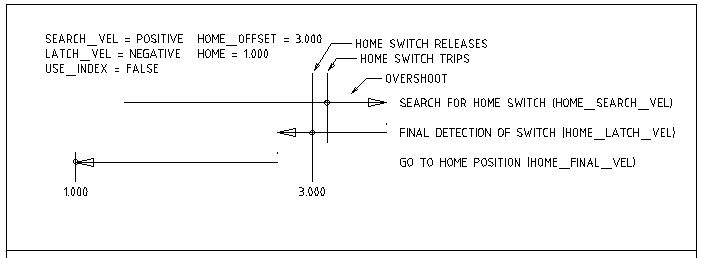
So to sum it up, when I hit the Y axis home button, both joints move at HOME_SEARCH velocity, the first joint to hit its switch stops, while the second keeps moving untill it hits its own switch , the moment the switch is hit, the joints Lockstep and move to HOME_POSITION off the limit switches ie, to a value set in HOME_OFFSET and stop.The switches now act as regular OT limit switches. I'm using the below first method as laid out in Docs/Homing configuration. The overshoot shown in the drawing is exaggerated, but does exist in the slightest way on smaller machines, maybe larger on heavier machines and can be minimized with a slower velocity.
In my setup Joints 1 & 3 each has a proximity set as Shared Home/Limit switches. While jogging or homing the two joints, only always move in lockstep. The only time, they break step, is when the joint that hits the LS last only during homing . For this I set up both switches to come on as closely as possible. And whatever little racking/ correction for squareness adjust in HOME_OFFSET.
So to sum it up, when I hit the Y axis home button, both joints move at HOME_SEARCH velocity, the first joint to hit its switch stops, while the second keeps moving untill it hits its own switch , the moment the switch is hit, the joints Lockstep and move to HOME_POSITION off the limit switches ie, to a value set in HOME_OFFSET and stop.The switches now act as regular OT limit switches. I'm using the below first method as laid out in Docs/Homing configuration. The overshoot shown in the drawing is exaggerated, but does exist in the slightest way on smaller machines, maybe larger on heavier machines and can be minimized with a slower velocity.
Please Log in or Create an account to join the conversation.
Time to create page: 2.933 seconds