Skew correction/perpendicularity correction (millkins or millkins_xyz)

More
3 years 1 month ago #280712 by Cant do this anymore bye all
The whole machine design is compromised to begin with.
To be fair it's not a milling machine, at best it's a table top router built to price. Suitable for working with soft materials and maybe thin brass sheet. Not the sort of thing that's suitable for cutting metal. Yeah I know there are plenty of YouTube videos people show doing those things, but I'd take it all with a pinch of salt.
They are probably ok for light duty tasks or having a feel for cnc'ing but other than that.......
And no I don't have access to machines worth 10 - 100 of thousands.
Having a trade background in carpentry does give some insight into what you expect from tools.
Now back to the issue, things maybe working as they should, but the amount being compensated for is too little to notice.
And that compensation will only be applied to the Y & Z axis, as the X is assumed to be straight.
Other things that will affect the outcome is the leadscrew type and backlash between the screw and nut. The coupler, if there isn't a belt and pulley between the motor and leadscrew will throw another variable into the mix. The cheaper helical type couplers are not very good, as they twist due to their construction.
Another thing to consider is racking on the gantry, this can be inconsistent. If things are twisted this is going to be an issue.
Cheap spindle and collets will have run out that will affect things.
There's so many mechanical issues that can add up that software compensation will only get you so far.
All in all getting down to .05 to .02 mm will be quite extraordinary with the way you described the machine's faults.
Yes I know full well shimming isn't easy, it's quite a fun job on my old ML7.
I wish you all the best.

Please Log in or Create an account to join the conversation.

More
3 years 1 month ago - 1 year 10 months ago #280714 by Aciera
[edit]
There actually already exists a more comprehensive kinematic for this:
www.linuxcnc.org/docs/devel/html/man/man9/matrixkins.9.html


[original post]

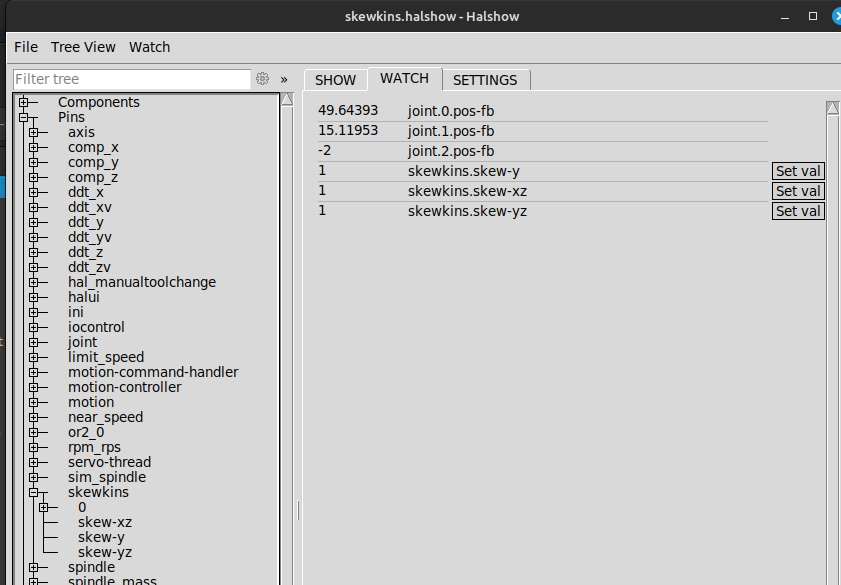
I adapted the linked 'millkins_xyz' using the userkins template and tested as an axis simulation config. Seems to work ok:


File Attachment:

File Name: skewkins.tar.gz
File Size:3.24 KB


use halcompile to install the enclosed skewkins.comp

see enclosed 'axis_mm_skewkins.ini' for setup of skew values


For simulation copy 'axis_mm_skewkins.ini' and 'skewkins.halshow' into 'configs/sim/axis' folder and start the ''axis_mm_skewkins" config. Joint position can be observed and skew values can be changed in the halshow window (which should open automatically at start up).
Last edit: 1 year 10 months ago by Aciera. Reason: Link to the more comprehensive built in solution.
The following user(s) said Thank You: tommylight, adouglas89, abdulasis12, Cant do this anymore bye all

Please Log in or Create an account to join the conversation.

More
3 years 1 month ago #280741 by adouglas89
Thanks Aciera! I will totally try this. I know nothing about software :(.

Cornholio, I set skew to 0.1 mm per mm to test. So that would be observable fairly easily.

I understand the machine is not suitable for more than 0.05 mm in it's current configuration, but if you line up error sources and knock them down it can be surprising how far you can get. I have it slated to get a better spindle, and I will get around to adjusting the mechanics to reduce the error from that source (will require totally dismantling it and drilling 6 holes out bigger), but as I mentioned that last bit is best addressed in software sometimes.

I have already used machines in this class to reliably make small posts and holes to within less than 10 microns, and larger dimensions to within 15 microns, actual accuracy measured with a micrometer. Again, it's about understanding the error sources and (mostly) dealing with them one by one, that requires significant labor but once things are adjusted and procedures established it's the way to go. There are some things you cannot compensate for like lack of perpendicularity of the z motion vs spindle axis (spindle tilt), backlash, and some other things. However if it's *just* the spindle I need to shim, that's manageable. I chose ballscrews because they have very little backlash, for instance, and I chose a machine which has a lot of material in it's structure, not extruded aluminum, and with a replaceable spindle (some are hardly replaceable). It doesn't actually cost that much in the end, in many ways to get into the 10 micron region, except labor, which it does take a lot. If the tools and subsystems are well made it takes a lot less. Although this particular issue has been a rough ride I am still a big fan of LinuxCNC and it is a good subsystem in general. I have also already machined free machining 1215 steel and some tool steel whose alloy designation I forget, with a nearly identical router no problem, there are ways forward. (mild steel was not viable, too gummy, aluminum was fine with adequate lubricant to prevent cold welding which reduces cutting forces by ~5x)

Please Log in or Create an account to join the conversation.

More
3 years 1 month ago #280752 by adouglas89
Aciera, it doesn't compile. How did you get it to go?
I go sudo halcompile --install skewkins.comp
and it goes:

Compiling realtime skewkins.c
skewkins.comp: In function ‘skewkins_setup’:
skewkins.comp:43:9: warning: implicit declaration of function ‘hal_set_unready’; did you mean ‘hal_stop_threads’? [-Wimplicit-function-declaration]
skewkins.comp: At top level:
skewkins.comp:63:1: warning: data definition has no type or storage class
skewkins.comp:63:1: warning: type defaults to ‘int’ in declaration of ‘KINS_NOT_SWITCHABLE’ [-Wimplicit-int]
In file included from skewkins.c:2:
/usr/include/linuxcnc/rtapi.h:734:5: error: expected ‘,’ or ‘;’ before ‘char’
char rtapi_exported_##x[] = #x;
^~~~
skewkins.comp:66:1: note: in expansion of macro ‘EXPORT_SYMBOL’
make: *** [/usr/share/linuxcnc/Makefile.modinc:115: skewkins.o] Error 1

Please Log in or Create an account to join the conversation.

More
3 years 1 month ago - 3 years 1 month ago #280757 by Aciera
What version of linuxcnc are you running?

My comp will need 2.9 so if you are running lower then I'm afraid it's not going to be as helpful as I thought.
Last edit: 3 years 1 month ago by Aciera.

Please Log in or Create an account to join the conversation.

More
3 years 1 month ago #281165 by adouglas89
it's 2.8.2, still good that things are compatible with the latest and greatest, I will try to upgrade. I have not put a lot of work into this configuration yet so I should upgrade before I do in case I loose stuff.

just gotta make note of my settings on paper first just in case.

Also I think I might roll with mechanical adjustment for the next short while, it is true as others have noted that is the best way, but it is also true that last bit is quite hard to mop up on cheap machines so I will still be wanting it for that last bit, but the current parts I require do not need that tight tolerance.

I will keep working on it. But thanks for the contribution, this is something important that others are bound to need indeed it surprises me that it had not been done along time ago, I guess it was but that stuff wasn't brought along for the ride as the system was improved/changed. Fortunately the fundamental system is well enough designed that this module can be prepared by someone relatively easily like this, so at least it's here now (apparently, still gotta test on a real machine of course)

Please Log in or Create an account to join the conversation.

Time to create page: 0.234 seconds
Powered by Kunena Forum