RPI4 Raspbian 64 bit & LinuxCNC

More
3 years 8 months ago #264683 by DrKnow65
I have burned the "linuxcnc_book" image to an SD, put it into my Rpi4x4gb and tried to open PNCconf. I get the same error as I attached to post #264248.

I appreciate the work you are putting in elovalvo, I would love the effect of a fully functional image when it comes together.

Please Log in or Create an account to join the conversation.

More
3 years 8 months ago - 3 years 8 months ago #264701 by elovalvo
I've never had a MESA card but I think you can try this:

From terminal run these commands:

Code:
sudo apt install mesaflash wget https://github.com/jethornton/mesact/releases/download/1.2.3/mesact_1.2.3_arm64.deb sudo gdebi mesact_1.2.3_arm64.deb

Once this is done run the Mesa Configuration Tool with the command
Code:
mesact  

Select the card and download the firmware. Then select the various options.

gnipsel.com/linuxcnc/mesact/index.html

Run pncconf without the "show advanced option pages" option

Maybe something settles down...
Last edit: 3 years 8 months ago by elovalvo.
The following user(s) said Thank You: DrKnow65

Please Log in or Create an account to join the conversation.

More
3 years 8 months ago #264707 by DrKnow65
Thank you for the reply, I did something similar but just started with a 32bit RaspiOS and compiled from there.

After some shut-eye today I will attempt a 64bit version.

I will re-build PNCconf on the LinuxCNC_book version too so I can give feedback if it fixes the issue.

Please Log in or Create an account to join the conversation.

More
3 years 8 months ago #264745 by elovalvo

Please Log in or Create an account to join the conversation.
More
3 years 6 months ago #268095 by Stef
Hi everyone,

I am a new LinuxCNC user. Over the past weeks/months I read a lot about LinuxCNC, and tried it out on my Windows PC via a virtual machine (with no hardware attached). I really like the software and decided that I am going to use it in my CNC machine. As I don’t have a Linux computer I bought a  Raspberry Pi 4 GB.

It took me a while to get LinuxCNC running on the RPi. The dedicated ISO from the LinuxCNC downloads section didn’t work, but after some frustrations I eventually got it solved by using linuxcnc_book.img. The explanation from Elovalvo was helpful for me. Thank you very much for that! 

Unfortunately I soon ran into the next issue, as I have difficulties installing QtPyVCP.
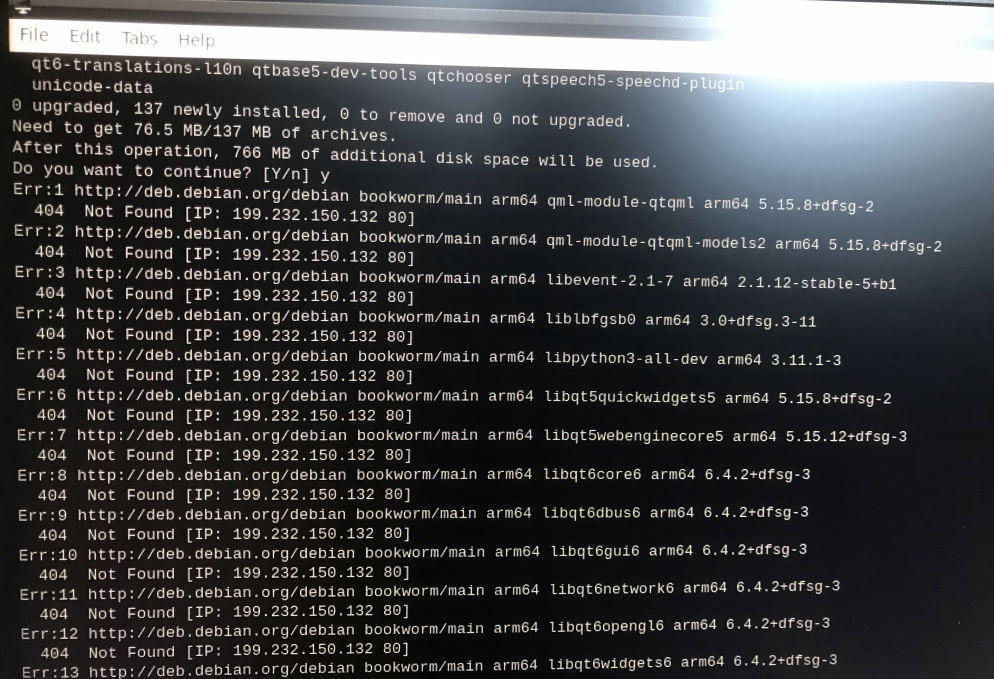
I tried to install the software dependencies with the command listed at the bottom of this page:
www.qtpyvcp.com/install/prerequisites.html

This gave me a list of error messages as attached on the screenshot.
However I continued with installing QtPyVCP, which did not generate any strange messages, but in the end it did not work so I guess it has something to do with the software dependencies.

My background is that I have quite a lot of experience in Python scripting (including graphical user interfaces) and a bit of Windows PowerShell, but apart from some very basic usage I am not at all familiar with Linux.

Actually it makes me doubt whether or not I should proceed with the Raspberry Pi approach, as I got the feeling that this is not the easiest or most robust way of using LinuxCNC… The software made me very enthusiastic when I used it on a virtual machine (without any hardware attached). But since I got the RPi things don’t go as smoothly as I hoped, maybe the learning curve is too steep for someone without Linux experience?
I was planning to order a Mesa 7C81, but as this card is dedicated for RPi I am still somewhat hesitant about that.

Does someone perhaps recognise the QtPyVCP issue and knows how to solve it?
Looking forward to your replies!

Please Log in or Create an account to join the conversation.

Time to create page: 0.088 seconds
Powered by Kunena Forum
