Installing LinuxCNC 2.9 or Master on Linux Mint 21

More
4 years 2 weeks ago #254078 by dberndt
Any thoughts on how to install linuxcnc-dev on mint 21?... Well I just grabbed the uspace-dev.deb off the repo in the same wget fashion as the linuxcnc-uspace was grabbed in the instructions. But I'm still curious as to why I can't install via apt when the repos are added. What's with the python version issues?
Code:
 sudo apt install linuxcnc-uspace-dev Reading package lists... Done Building dependency tree... Done Reading state information... Done Some packages could not be installed. This may mean that you have requested an impossible situation or if you are using the unstable distribution that some required packages have not yet been created or been moved out of Incoming. The following information may help to resolve the situation: The following packages have unmet dependencies:  linuxcnc-uspace : Depends: python3 (< 3.8) but 3.10.6-1~22.04 is to be installed                    Depends: libboost-python1.67.0 but it is not installable                    Depends: libpython3.7 (>= 3.7.0) but it is not installable                    Depends: libreadline5 (>= 5.2) but it is not installable ...


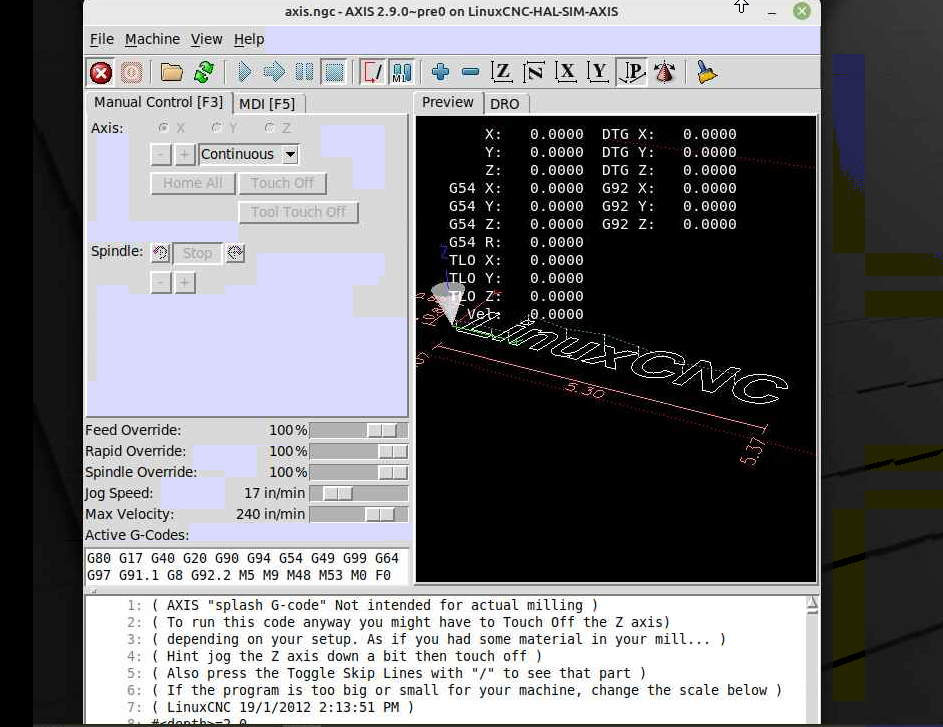
More importantly... Where has the maximize button gone to? Mint 21+cinnamon results in the maximize button disappearing. It's there in other apps... It is available if I switch to mate but it doesn't actually maximize the window. It squares out the corners of the window as though it was maximized, but the window dimensions do not actually change. Please Ignore the terrible screenshot quality, it was taken over a compressed VNC session and is not related to the issue.
 

Please Log in or Create an account to join the conversation.

More
4 years 2 weeks ago - 4 years 2 weeks ago #254079 by tommylight

But I'm still curious as to why I can't install via apt when the repos are added. What's with the python version issues?

What repos?
Nowhere in this tutorial is adding repos mentioned.
The package must be from the debian repo, again you or i did not add repos, here:
http.us.debian.org/debian/pool/main/l/li...744cdef6-1_amd64.deb
-

It is available if I switch to mate but it doesn't actually maximize the window. It squares out the corners of the window as though it was maximized, but the window dimensions do not actually change. 
Screen/resolution to small, there is no space where to maximize anything.
Last edit: 4 years 2 weeks ago by tommylight.

Please Log in or Create an account to join the conversation.

More
4 years 2 weeks ago #254080 by dberndt
I tried adding the buildbot repos. buildbot.linuxcnc.org/ to get the linuxcnc-dev package initially. Seemed like the thing to do to me.

Please Log in or Create an account to join the conversation.
More
4 years 2 weeks ago #254082 by tommylight

I tried adding the buildbot repos. buildbot.linuxcnc.org/ to get the linuxcnc-dev package initially. Seemed like the thing to do to me.
Nope! :)
At the very beginning it says:
-LinuxCNC Master is still in development, although it is reliable, something might now work
-LinuxCNC version is from the Debian repositories, dated 06 September of this year.

Please Log in or Create an account to join the conversation.

More
4 years 2 weeks ago #254198 by dberndt
Thanks for the help so far Tommy,

I'm a bit lost again. So we've decided the 5.19.0-2-rt-amd64 is the kernel for us and snagged it directly from the debian repo and installed it with gdebi. Wonderful.... But if I need to make/make install something like a wifi driver, I need the kernel source... or something? Which I would get where/how?

Example make error I'm experiencing:  make[1]: *** /lib/modules/5.19.0-2-rt-amd64/build: No such file or directory.  Stop.

Thanks,
Dave

Please Log in or Create an account to join the conversation.

More
4 years 2 weeks ago #254199 by tommylight
You need the linux header for the same version as linux kernel to be able to compile stuff for the kernel, something like
linux-headers-5.19.0-2-rt-amd64

Please Log in or Create an account to join the conversation.

Time to create page: 0.296 seconds
Powered by Kunena Forum
