
- Posts: 12170
- Thank you received: 4153
Ethercat installation from repositories - how to step by step
- rodw
- Offline
- Platinum Member
-

Less
More
3 years 2 months ago #277459
by rodw
Replied by rodw on topic Ethercat installation from repositories - how to step by step
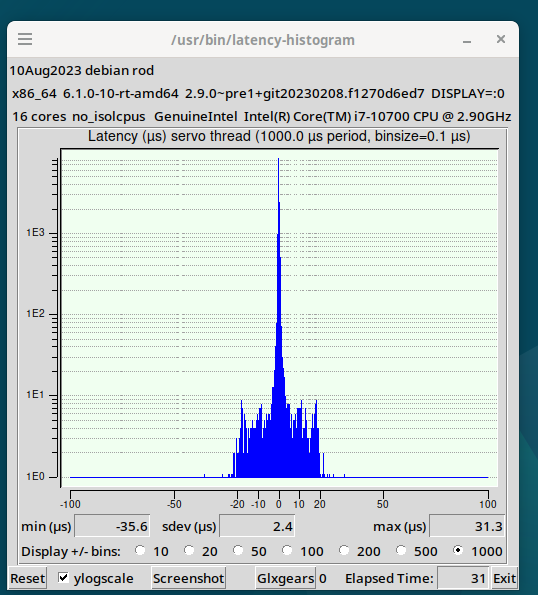
I would suggest a normal x86 PC with 4 cores, 4 GB RAM (eg Celeron J1900 or above). I3 and I5 seem OK too
My 16 core i7 on my desk is way over the top
My 16 core i7 on my desk is way over the top
Please Log in or Create an account to join the conversation.
- tommylight
- Offline
- Moderator
-

Less
More
- Posts: 22011
- Thank you received: 7491
3 years 2 months ago #277462
by tommylight
Replied by tommylight on topic Ethercat installation from repositories - how to step by step
16 core i7 ???
Please Log in or Create an account to join the conversation.
- Psylocke
- Offline
- New Member
-

Less
More
- Posts: 6
- Thank you received: 3
3 years 2 months ago #277464
by Psylocke
Replied by Psylocke on topic Ethercat installation from repositories - how to step by step
Thanks rodw,
I will proceed with my "old" laptop i7!!, 12 GB RAM. Its my old Autodesk Inventor laptop. It will do.

Thanks for your nice work on the forum.
I will proceed with my "old" laptop i7!!, 12 GB RAM. Its my old Autodesk Inventor laptop. It will do.
Thanks for your nice work on the forum.
The following user(s) said Thank You: rodw
Please Log in or Create an account to join the conversation.
- rodw
- Offline
- Platinum Member
-
Less
More
- Posts: 12170
- Thank you received: 4153
3 years 2 months ago #277486
by rodw
All I wanted to do was get rid of Windows!
Replied by rodw on topic Ethercat installation from repositories - how to step by step
I think technically its 8 core, 16 threads but it reports in with 16 on linux (including in htop). Frightened me!16 core i7 ???
All I wanted to do was get rid of Windows!
The following user(s) said Thank You: tommylight
Please Log in or Create an account to join the conversation.
- tommylight
- Offline
- Moderator
-
Less
More
- Posts: 22011
- Thank you received: 7491
3 years 2 months ago #277488
by tommylight
Replied by tommylight on topic Ethercat installation from repositories - how to step by step
Oh an 10700, that has 8 P cores and 8 E cores, meaning 8 performance and 8 efficient cores.
That was just another Intel f@k up as for a while those 8E cores could not be used under Windows and caused stability issues, lasted nearly a full year till they figured out how to use those.
Not that they do much anyway, but they do help a bit.
I have gone full AMD several years back, will not buy Intel ever again.
They (and AMD not being able to compete for quite a while) single handily retarded PC advancement for nearly 20 years.
For anyone wanting to rant about this, don't, just have a look how far have graphic chips gone in that time frame.
That was just another Intel f@k up as for a while those 8E cores could not be used under Windows and caused stability issues, lasted nearly a full year till they figured out how to use those.
Not that they do much anyway, but they do help a bit.
I have gone full AMD several years back, will not buy Intel ever again.
They (and AMD not being able to compete for quite a while) single handily retarded PC advancement for nearly 20 years.
For anyone wanting to rant about this, don't, just have a look how far have graphic chips gone in that time frame.
The following user(s) said Thank You: rodw
Please Log in or Create an account to join the conversation.
- buzzFab
- Offline
- Junior Member
-

Less
More
- Posts: 28
- Thank you received: 7
3 years 2 months ago - 3 years 2 months ago #277499
by buzzFab
Rod, Thanks for the update. I am trying again from the start on a i7 hp g2 mini. I have come across an error while compiling
I read the part you wrote "becasue you have not installed halcompile (in shipped in linuxcnc-uspace-dev)" but I for sure installed linuxcnc-uspace-dev. As you can see from the error, there is trouble finding ecrt.h even though the find command shows the file here /usr/src/ethercat-dkms-1.5.2/include/ecrt.h.
***EDIT... I forgot mention that i did try the spoiler and it didnt change anything also i tried adding a symbolic link with this line but the error is still the same
Do you know where i should go from here?
thanks
Replied by buzzFab on topic Ethercat installation from repositories - how to step by step
UPDATE: The first post has been updated following upstream changes. It also covers addidional steps required to build DKMS drivers if you have Secure boot (UEFI) enabled on your PC.
Rod, Thanks for the update. I am trying again from the start on a i7 hp g2 mini. I have come across an error while compiling
Code:
cnc@cnc:~/dev/linuxcnc-ethercat$ sudo make install
make[1]: Entering directory '/home/cnc/dev/linuxcnc-ethercat/src'
mkdir -p /usr/lib/linuxcnc/modules
make[2]: Entering directory '/home/cnc/dev/linuxcnc-ethercat/src'
gcc -o lcec_conf.o -Os -g -I. -I/build/linuxcnc-vf7ZID/linuxcnc-2.9.0~pre1+git20230208.f1270d6ed7/src/include -DUSPACE -fno-fast-math -mieee-fp -fno-unsafe-math-optimizations -DRTAPI -D_GNU_SOURCE -Drealtime -D__MODULE__ -I/usr/include/linuxcnc -DSIM -fPIC -URTAPI -U__MODULE__ -DULAPI -Os -c lcec_conf.c
In file included from lcec_conf.c:31:
lcec_conf.h:22:10: fatal error: ecrt.h: No such file or directory
22 | #include "ecrt.h"
| ^~~~~~~~
compilation terminated.
make[2]: *** [user.mk:22: lcec_conf.o] Error 1
make[2]: Leaving directory '/home/cnc/dev/linuxcnc-ethercat/src'
make[1]: *** [Makefile:11: install] Error 2
make[1]: Leaving directory '/home/cnc/dev/linuxcnc-ethercat/src'
make: *** [Makefile:11: install] Error 2
cnc@cnc:~/dev/linuxcnc-ethercat$ sudo find / -name "ecrt.h"
find: ‘/run/user/1000/doc’: Permission denied
/usr/src/ethercat-dkms-1.5.2/include/ecrt.h
cnc@cnc:~/dev/linuxcnc-ethercat$
I read the part you wrote "becasue you have not installed halcompile (in shipped in linuxcnc-uspace-dev)" but I for sure installed linuxcnc-uspace-dev. As you can see from the error, there is trouble finding ecrt.h even though the find command shows the file here /usr/src/ethercat-dkms-1.5.2/include/ecrt.h.
***EDIT... I forgot mention that i did try the spoiler and it didnt change anything also i tried adding a symbolic link with this line but the error is still the same
Code:
sudo ln -s /usr/src/ethercat-dkms-1.5.2/include/
Do you know where i should go from here?
thanks
Last edit: 3 years 2 months ago by buzzFab.
Please Log in or Create an account to join the conversation.
Time to create page: 2.373 seconds