
Search Results (Searched for: 7i76e)
- tcbmetalworks
- tcbmetalworks
18 Nov 2025 23:44
Replied by tcbmetalworks on topic Looking for a freelancer to assist in drawing schematics for cnc plasma table
I wrote this up in chat gpt pretty quickly I think it just about covers all of the bases here of the project.
CNC Plasma Table – Electrical & Wiring Requirements
Project: Remote design of electrical system + wiring documentation for LinuxCNC plasma table
Client: TCB Metal Works
1. Project Overview
You will remotely design the complete electrical and control system for a custom CNC plasma cutting table powered by LinuxCNC.
You will create:
Complete wiring diagram set (schematic + physical routing)
Full Bill of Materials (BOM) with real part numbers
Wire gauge, shielding, grounding, and EMI mitigation plan
Bulkhead connector list + panel layout
Mesa board selection + full LinuxCNC I/O map
Integration notes for all components
Testing & commissioning checklist
This is a 100% remote engineering job — no physical inspection of hardware is required.
2. Available Power Sources
Near the machine:
220 VAC available
460 VAC available
No dedicated 110/120 VAC, which must be generated using a control transformer if needed
Engineer must design the incoming power strategy and transformer selection.
3. Motion Hardware
3.1 X & Y Axis – AC Servos (Provided)
3× A6 Series 1000W RS485 AC Servo Motor Kits
3000 rpm
3.18 Nm
17-bit absolute encoder
IP67 motors
Axis layout:
Y axis: 2 servos (dual-drive gantry)
X axis: 1 servo
Notes:
Motor-to-drive cables are already supplied by the manufacturer.
You do not need to design or evaluate those cables.
Engineer must:
Design AC mains wiring to each servo drive
Design control, enable, alarm, and ESTOP signal wiring between drives and Mesa
Include needed fuses, breakers, filters, and terminals
Provide cabinet layout and routing plan
Include proper grounding and shielding recommendations
3.2 Z Axis – Stepper Motor (Needs Driver + Cable)
PV267-D2.8AA stepper motor — Oriental Motor
Stepper driver not provided
Stepper motor cable not provided
Engineer must:
Select a compatible stepper driver suitable for PV267-D2.8AA + LinuxCNC step/dir
Define driver voltage supply requirements
Design:
Step/Dir wiring from Mesa
Motor wiring from driver to Z motor
Required cable shielding, gauge, and insulation
Connector type and strain relief
4. Control Electronics (Mesa + Power)
Engineer must select Mesa hardware capable of supporting:
3× servo axes
1× stepper axis
THC-AD
Ohmic sensing
All limit/floating switches
Plasma start / Arc OK
E-stop & safety I/O
Deliverables:
Recommended Mesa board combination (e.g., 7i76E, 7i96S, 7i85, THCAD, etc.)
Justification for chosen hardware
Complete LinuxCNC I/O mapping
Required DC power supplies (24V / 5V / others)
Proper AC distribution, fuses, breakers, and protection devices
5. Torch Height & Ohmic Sensing
5.1 THC-AD Integration
Engineer must design:
Raw arc voltage wiring from Hypertherm HT2000 to THC-AD
THC-AD signal wiring to Mesa
Required shielding and filtering
Scaling notes for LinuxCNC
5.2 Ohmic Sensing (Planned)
Engineer must:
Recommend a compatible ohmic board
Provide wiring diagram for torch → ohmic board → Mesa
Specify cable type and shielding
Document signal polarity & behavior
6. Hypertherm HT2000 Integration
Engineer must design wiring for:
Required signals
Torch start / trigger
Arc OK
Raw arc voltage (+/–) into THC-AD
Required protection
Isolation (if needed)
Surge suppression
Filtering
EMI protection
Routing rules
Arc voltage wiring must be kept separate from low-voltage control wiring
7. Limit Switches & Floating Head
X Axis
2 limit switches:
X-min
X-max
Y Axis (Dual Gantry Drive)
2 limit switches:
Y-min
Y-max
Engineer must propose a reliable gantry squaring / homing method for the two Y motors.
Z Axis
2 end-of-travel limit switches:
Z-min
Z-max
1 floating-head switch (touch-off)
Engineer must:
Select appropriate switch type (mechanical or prox)
Provide wiring diagrams to Mesa
Specify wire gauge, shielding, and cable routing
Provide LinuxCNC input mapping
Include any debouncing/filtering requirements
8. Wiring, Shielding, & EMI
Engineer must specify:
Wire gauges for:
AC mains
Servo drive feeds
Stepper driver feeds
Stepper motor wiring
Limit/floating/ohmic wires
Plasma signals
DC supply lines
Shielding requirements for:
Step/dir
Limits/floating/ohmic
Arc voltage
THC-AD lines
EMI considerations
Cable separation
Ferrite locations
Filtering recommendations
9. Grounding & Bonding
The engineer must design the grounding/bonding approach.
Important physical detail:
The water table, gantry, and control cabinet are three separate physical assemblies.
The engineer must account for this when designing:
Grounding/bonding layout
EMC/EMI mitigation
Plasma return path considerations
Ohmic sensing grounding
No grounding method (star, bus, single-point, etc.) is mandated — the engineer chooses the correct approach.
10. Control Cabinet & Bulkheads
Engineer must design:
Cabinet Layout
AC distribution, transformers, PSUs
Mesa boards
Servo drives
Stepper driver
Fuses, breakers, contactors
DIN rail layout
Ventilation/fans
Bulkhead Connectors
Used wherever practical for:
Servo cables (using glands or pass-throughs)
Z stepper cable
Limit/floating switches
Ohmic sensing
Plasma start / Arc OK
E-stop / operator controls
Ethernet access
Engineer must specify:
Connector type
Pinout
Panel cutout style
Labeling
11. Documentation Package
Engineer must deliver:
11.1 Wiring Diagram Set
Full schematic
Cabinet wiring
Field wiring
Power distribution
Grounding/bonding
Bulkhead connector pinouts
11.2 BOM
Complete list of:
Mesa hardware
Stepper driver
Transformers / PSUs
Switches
Connectors
Wire/cable
Protection devices
Cabinet hardware
11.3 I/O Map
All LinuxCNC inputs/outputs
Axis definitions
THC/ohmic mappings
E-stop & safety signals
11.4 Commissioning Checklist
Power-up verification
Servo enable/jog
Stepper test
Homing / gantry squaring
Z floating-head test
Plasma start / Arc OK
THC test
Ohmic test
EMI/noise checks
CNC Plasma Table – Electrical & Wiring Requirements
Project: Remote design of electrical system + wiring documentation for LinuxCNC plasma table
Client: TCB Metal Works
1. Project Overview
You will remotely design the complete electrical and control system for a custom CNC plasma cutting table powered by LinuxCNC.
You will create:
Complete wiring diagram set (schematic + physical routing)
Full Bill of Materials (BOM) with real part numbers
Wire gauge, shielding, grounding, and EMI mitigation plan
Bulkhead connector list + panel layout
Mesa board selection + full LinuxCNC I/O map
Integration notes for all components
Testing & commissioning checklist
This is a 100% remote engineering job — no physical inspection of hardware is required.
2. Available Power Sources
Near the machine:
220 VAC available
460 VAC available
No dedicated 110/120 VAC, which must be generated using a control transformer if needed
Engineer must design the incoming power strategy and transformer selection.
3. Motion Hardware
3.1 X & Y Axis – AC Servos (Provided)
3× A6 Series 1000W RS485 AC Servo Motor Kits
3000 rpm
3.18 Nm
17-bit absolute encoder
IP67 motors
Axis layout:
Y axis: 2 servos (dual-drive gantry)
X axis: 1 servo
Notes:
Motor-to-drive cables are already supplied by the manufacturer.
You do not need to design or evaluate those cables.
Engineer must:
Design AC mains wiring to each servo drive
Design control, enable, alarm, and ESTOP signal wiring between drives and Mesa
Include needed fuses, breakers, filters, and terminals
Provide cabinet layout and routing plan
Include proper grounding and shielding recommendations
3.2 Z Axis – Stepper Motor (Needs Driver + Cable)
PV267-D2.8AA stepper motor — Oriental Motor
Stepper driver not provided
Stepper motor cable not provided
Engineer must:
Select a compatible stepper driver suitable for PV267-D2.8AA + LinuxCNC step/dir
Define driver voltage supply requirements
Design:
Step/Dir wiring from Mesa
Motor wiring from driver to Z motor
Required cable shielding, gauge, and insulation
Connector type and strain relief
4. Control Electronics (Mesa + Power)
Engineer must select Mesa hardware capable of supporting:
3× servo axes
1× stepper axis
THC-AD
Ohmic sensing
All limit/floating switches
Plasma start / Arc OK
E-stop & safety I/O
Deliverables:
Recommended Mesa board combination (e.g., 7i76E, 7i96S, 7i85, THCAD, etc.)
Justification for chosen hardware
Complete LinuxCNC I/O mapping
Required DC power supplies (24V / 5V / others)
Proper AC distribution, fuses, breakers, and protection devices
5. Torch Height & Ohmic Sensing
5.1 THC-AD Integration
Engineer must design:
Raw arc voltage wiring from Hypertherm HT2000 to THC-AD
THC-AD signal wiring to Mesa
Required shielding and filtering
Scaling notes for LinuxCNC
5.2 Ohmic Sensing (Planned)
Engineer must:
Recommend a compatible ohmic board
Provide wiring diagram for torch → ohmic board → Mesa
Specify cable type and shielding
Document signal polarity & behavior
6. Hypertherm HT2000 Integration
Engineer must design wiring for:
Required signals
Torch start / trigger
Arc OK
Raw arc voltage (+/–) into THC-AD
Required protection
Isolation (if needed)
Surge suppression
Filtering
EMI protection
Routing rules
Arc voltage wiring must be kept separate from low-voltage control wiring
7. Limit Switches & Floating Head
X Axis
2 limit switches:
X-min
X-max
Y Axis (Dual Gantry Drive)
2 limit switches:
Y-min
Y-max
Engineer must propose a reliable gantry squaring / homing method for the two Y motors.
Z Axis
2 end-of-travel limit switches:
Z-min
Z-max
1 floating-head switch (touch-off)
Engineer must:
Select appropriate switch type (mechanical or prox)
Provide wiring diagrams to Mesa
Specify wire gauge, shielding, and cable routing
Provide LinuxCNC input mapping
Include any debouncing/filtering requirements
8. Wiring, Shielding, & EMI
Engineer must specify:
Wire gauges for:
AC mains
Servo drive feeds
Stepper driver feeds
Stepper motor wiring
Limit/floating/ohmic wires
Plasma signals
DC supply lines
Shielding requirements for:
Step/dir
Limits/floating/ohmic
Arc voltage
THC-AD lines
EMI considerations
Cable separation
Ferrite locations
Filtering recommendations
9. Grounding & Bonding
The engineer must design the grounding/bonding approach.
Important physical detail:
The water table, gantry, and control cabinet are three separate physical assemblies.
The engineer must account for this when designing:
Grounding/bonding layout
EMC/EMI mitigation
Plasma return path considerations
Ohmic sensing grounding
No grounding method (star, bus, single-point, etc.) is mandated — the engineer chooses the correct approach.
10. Control Cabinet & Bulkheads
Engineer must design:
Cabinet Layout
AC distribution, transformers, PSUs
Mesa boards
Servo drives
Stepper driver
Fuses, breakers, contactors
DIN rail layout
Ventilation/fans
Bulkhead Connectors
Used wherever practical for:
Servo cables (using glands or pass-throughs)
Z stepper cable
Limit/floating switches
Ohmic sensing
Plasma start / Arc OK
E-stop / operator controls
Ethernet access
Engineer must specify:
Connector type
Pinout
Panel cutout style
Labeling
11. Documentation Package
Engineer must deliver:
11.1 Wiring Diagram Set
Full schematic
Cabinet wiring
Field wiring
Power distribution
Grounding/bonding
Bulkhead connector pinouts
11.2 BOM
Complete list of:
Mesa hardware
Stepper driver
Transformers / PSUs
Switches
Connectors
Wire/cable
Protection devices
Cabinet hardware
11.3 I/O Map
All LinuxCNC inputs/outputs
Axis definitions
THC/ohmic mappings
E-stop & safety signals
11.4 Commissioning Checklist
Power-up verification
Servo enable/jog
Stepper test
Homing / gantry squaring
Z floating-head test
Plasma start / Arc OK
THC test
Ohmic test
EMI/noise checks
- Muftijaja
- Muftijaja
18 Nov 2025 21:48
problems with Y-Axis, elliptic deviations after several changes -Probe Basic V.5 was created by Muftijaja
Hello community!
I have a Mesa 7i76e running, the wiring is correct except for the alarm loop. Using a Lenovo ThinkCentre M910q with i7 4-core, 256/GB NVMe SSD, i7 16GB RAM WLAN Intel Core i7-6700T 4x 2.80 - 3.60GHz with Linuxcnc 2.9.4, Probe Basic V.5 on Debian 12. No latency problems.
Once again, I'm here with a big problem. My DIY milling machine (1000x500x220 with aluminum profile frame, 20mm HGR, 1605 ball screws, 3 axes, 2x OMC Stpperonline 400W integrated servo, 1x JMC CL Stepper 3.5Nm, set 2000 steps/rev) is now mechanically finally assembled. I also got a lot of help from this forum in setting up LinuxCNC, eliminating latency problems and spindle control problems, but now I have a milling problem that I can't solve.
I have milled several test parts with drill holes, 2 circular pockets, and a rectangular outer contour, and have noticed that my circular pockets are becoming elliptical. The deviations in Y are approximately +0.35 mm at 45° and approximately -0.38 mm at 135°. The X values for the rectangular contour are perfect to within 0.01 mm in X and 0.09 mm in Y, X I consider to be acceptable, but Y is over tolerance. However, the circular movements contain deviations I cannot tolerate. I will show you a photo of the last test piece. After each individual test part, I made changes to rule out certain things.
The first change was to replace a simple Chinese C7 ball screw with a ground C5 spindle with double nuts. This reduced the originally even higher values by almost half. However, the deviations described above remained. After the next test part, I replaced the 400 W servo with a 3.5 Nm JMC CL stepper motor. The results remained almost the same. As a final attempt, a few days ago I replaced the spindle's fixed bearing with a new one, with 7002AC angular contact bearings in an O-arrangement with a 1 mm spacer ring between the outer rings. I inspected the previous fixed bearing and found no faults. There was a 1mm spacer also and the O arrangement was the same. I had also taken measurements at the spindle end earlier and actually and found no backlash.
Yesterday, moving away from mechanical faults, I noticed a difference in the motor definitions for the X and Y axes in the .ini file. The Ferror and min_Ferror points differed by one decimal place. X was set to 0.1 and 0.01, while the Y axis was set to 1.0 and 0.1. After I corrected this difference, the motor on the Y axis went into alarm mode after a few position changes.
What could be the reason for this? How can it be that one motor runs perfectly with much lower tolerance values, while the other quickly goes into alarm mode with less load? The motor in question has the same power supply and is certainly less demanding in terms of starting currents than the servo on the X-axis. With the higher tolerance values, the Y motor runs without alarm, but has these deviations. Are these tolerance values in the .ini file responsible for these deviations?
The mechanics of the Y and Z axes are flawless, as checked with a dial gauge, and the repeat accuracy is also very good, less than one hundredth.
Do you have any ideas about this? Where can I look further?
Thanks for your time and hints
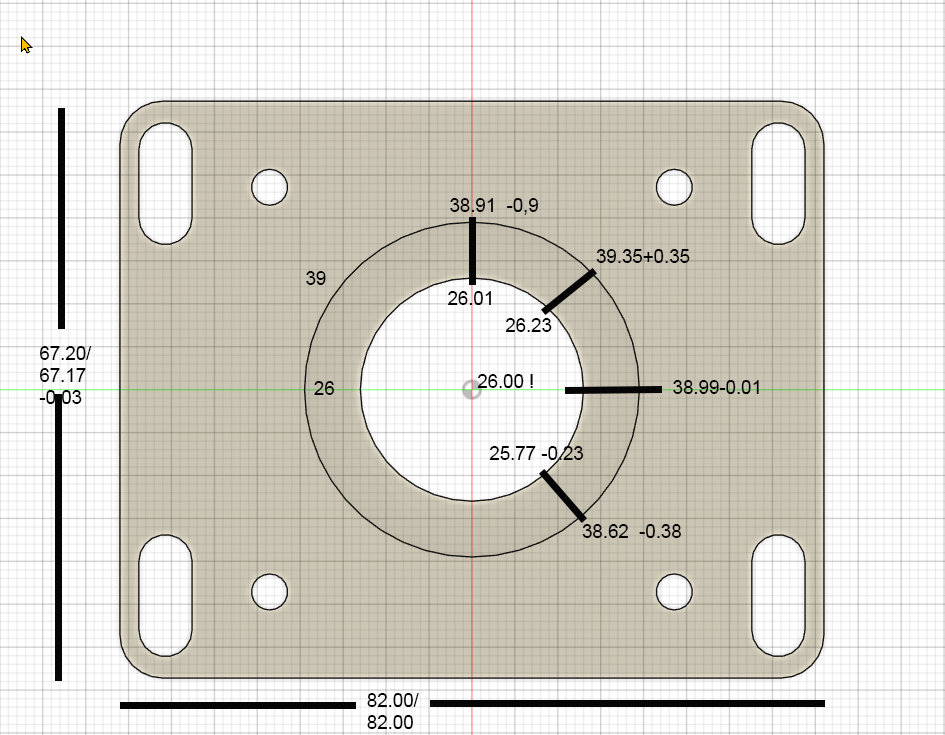
I have a Mesa 7i76e running, the wiring is correct except for the alarm loop. Using a Lenovo ThinkCentre M910q with i7 4-core, 256/GB NVMe SSD, i7 16GB RAM WLAN Intel Core i7-6700T 4x 2.80 - 3.60GHz with Linuxcnc 2.9.4, Probe Basic V.5 on Debian 12. No latency problems.
Once again, I'm here with a big problem. My DIY milling machine (1000x500x220 with aluminum profile frame, 20mm HGR, 1605 ball screws, 3 axes, 2x OMC Stpperonline 400W integrated servo, 1x JMC CL Stepper 3.5Nm, set 2000 steps/rev) is now mechanically finally assembled. I also got a lot of help from this forum in setting up LinuxCNC, eliminating latency problems and spindle control problems, but now I have a milling problem that I can't solve.
I have milled several test parts with drill holes, 2 circular pockets, and a rectangular outer contour, and have noticed that my circular pockets are becoming elliptical. The deviations in Y are approximately +0.35 mm at 45° and approximately -0.38 mm at 135°. The X values for the rectangular contour are perfect to within 0.01 mm in X and 0.09 mm in Y, X I consider to be acceptable, but Y is over tolerance. However, the circular movements contain deviations I cannot tolerate. I will show you a photo of the last test piece. After each individual test part, I made changes to rule out certain things.
The first change was to replace a simple Chinese C7 ball screw with a ground C5 spindle with double nuts. This reduced the originally even higher values by almost half. However, the deviations described above remained. After the next test part, I replaced the 400 W servo with a 3.5 Nm JMC CL stepper motor. The results remained almost the same. As a final attempt, a few days ago I replaced the spindle's fixed bearing with a new one, with 7002AC angular contact bearings in an O-arrangement with a 1 mm spacer ring between the outer rings. I inspected the previous fixed bearing and found no faults. There was a 1mm spacer also and the O arrangement was the same. I had also taken measurements at the spindle end earlier and actually and found no backlash.
Yesterday, moving away from mechanical faults, I noticed a difference in the motor definitions for the X and Y axes in the .ini file. The Ferror and min_Ferror points differed by one decimal place. X was set to 0.1 and 0.01, while the Y axis was set to 1.0 and 0.1. After I corrected this difference, the motor on the Y axis went into alarm mode after a few position changes.
What could be the reason for this? How can it be that one motor runs perfectly with much lower tolerance values, while the other quickly goes into alarm mode with less load? The motor in question has the same power supply and is certainly less demanding in terms of starting currents than the servo on the X-axis. With the higher tolerance values, the Y motor runs without alarm, but has these deviations. Are these tolerance values in the .ini file responsible for these deviations?
The mechanics of the Y and Z axes are flawless, as checked with a dial gauge, and the repeat accuracy is also very good, less than one hundredth.
Do you have any ideas about this? Where can I look further?
Thanks for your time and hints
- Ringardy
- Ringardy
18 Nov 2025 12:44
Setting up a Mesa 7i95T was created by Ringardy
Hi,
i am currently trying to setup my Mesa 7i95T but so far i hit a wall.
Problem is even after following a video to set it up via pncconf using the 7i76e, i get no working results.
The video i am reffering to :
Check the images to what im reffering to.
Perhaps there are files out for the 7i95T.
And yes i did check the forum and tried to update the pncconf but it wont let me.
Kind regrads
Ringardy
i am currently trying to setup my Mesa 7i95T but so far i hit a wall.
Problem is even after following a video to set it up via pncconf using the 7i76e, i get no working results.
The video i am reffering to :
Check the images to what im reffering to.
Perhaps there are files out for the 7i95T.
And yes i did check the forum and tried to update the pncconf but it wont let me.
Kind regrads
Ringardy
- kor
- kor
06 Nov 2025 10:26 - 06 Nov 2025 10:59
pc for linuxcnc using ethercat and Mesa was created by kor
I am looking to buy a "firewall" PC with 4 ethernet ports to have one ethernet port for my mesa 7i76e one for ethercat and one for LAN.
Do you have recommendations for that currently I am looking at this system on amazon: amzn.to/4nEujde it has 4 x i226-V 2.5Gigabit Ethernet ports and seems to be fine for a linuxcnc build what do you think.
Or do you think I should rather get a normal big pc and get pci-express lan cards?
Do you have recommendations for that currently I am looking at this system on amazon: amzn.to/4nEujde it has 4 x i226-V 2.5Gigabit Ethernet ports and seems to be fine for a linuxcnc build what do you think.
Or do you think I should rather get a normal big pc and get pci-express lan cards?
- 2tinker
- 2tinker
03 Nov 2025 16:04
Replied by 2tinker on topic MESA 7i76eu – I/O - Spannungsversorgung
So werde ich es machen.
Vielen lieben Dank!
Vielen lieben Dank!
- PCW
- PCW
03 Nov 2025 15:43
Replied by PCW on topic MESA 7i76eu – I/O - Spannungsversorgung
I would probably add a series resistor so so if you accidentally ground the ALM- output you do not damage the optocoupler
so:
+12V --> 1K resistor --> ALM+
ALM- --> 7I76EU input
so:
+12V --> 1K resistor --> ALM+
ALM- --> 7I76EU input
- MusicCityMfg
- MusicCityMfg
03 Nov 2025 13:06
Mesa 7i96S Daughter Card Question ... Can I use the 7i76U? was created by MusicCityMfg
I read the
Which Mesa Card Should I Buy?
post and it was super helpful.
I wanted to buy a Mesa 7i76EU card today but they are out of stock. They are also out of stock on the 7i77 daughter card.
So, I hope to buy a 7i96S today, but I need to know what daughter board I can use to increase the number of inputs an outputs?
Can I use the 7i76U ?
I am doing a manual lathe CNC conversion. I'm eventually going to be adding a 12 tool ATC turret.
I have not finalized all the required I/O yet, so I wanna make sure that I have enough I/O for future updates to the lathe.
If I can use the 7i76U , I think I will have plenty of I/O for future updates, that may include ...
Chris
I wanted to buy a Mesa 7i76EU card today but they are out of stock. They are also out of stock on the 7i77 daughter card.
So, I hope to buy a 7i96S today, but I need to know what daughter board I can use to increase the number of inputs an outputs?
Can I use the 7i76U ?
I am doing a manual lathe CNC conversion. I'm eventually going to be adding a 12 tool ATC turret.
I have not finalized all the required I/O yet, so I wanna make sure that I have enough I/O for future updates to the lathe.
If I can use the 7i76U , I think I will have plenty of I/O for future updates, that may include ...
- a third MPG
- an encoder on the ATC turret for tool location/identification,
- a "Y" axis, three motor, four gang live tool option with an MPG (this last addition is way in the future if at all).
Chris
- 2tinker
- 2tinker
03 Nov 2025 08:23
Replied by 2tinker on topic MESA 7i76eu – I/O - Spannungsversorgung
@PCW, @tommylight,
vielen Dank für die Tipps.
Wenn ich meine 12V direkt auf den Alarm des Motors geben kann, wäre das natürlich das einfachste.
@PCW
In der Beschreibung des Schrittmotores habe ich nun auch die richtige Stelle gefunden.

Was meinst du, ist der Vorwiederstand bereits im Motor verbaut, oder sollte ich da einen vorsetzen?
Danke und Grüße,
2tinker
vielen Dank für die Tipps.
Wenn ich meine 12V direkt auf den Alarm des Motors geben kann, wäre das natürlich das einfachste.
@PCW
In der Beschreibung des Schrittmotores habe ich nun auch die richtige Stelle gefunden.
Was meinst du, ist der Vorwiederstand bereits im Motor verbaut, oder sollte ich da einen vorsetzen?
Danke und Grüße,
2tinker
- PCW
- PCW
02 Nov 2025 13:40
Replied by PCW on topic MESA 7i76eu – I/O - Spannungsversorgung
The drive manual shows that the alarm output is an optocoupler
This can connect directly to the 7I76UE field inputs
+24V --> ALM+
ALM- --> 7I76EU field input
This can connect directly to the 7I76UE field inputs
+24V --> ALM+
ALM- --> 7I76EU field input
- tommylight
- tommylight
02 Nov 2025 13:32
Replied by tommylight on topic MESA 7i76eu – I/O - Spannungsversorgung
Mesa 7i76 should have 4 analog inputs (do check if EU has) that you can use for amplifier fault at 5V, but it will require some HAL editing.
Should be field inputs 0-3
Should be field inputs 0-3
- 2tinker
- 2tinker
02 Nov 2025 13:02
Replied by 2tinker on topic MESA 7i76eu – I/O - Spannungsversorgung
Meinst du ein mechanisches Relay?
- Plasmanfm
- Plasmanfm
02 Nov 2025 09:15 - 02 Nov 2025 09:24
Replied by Plasmanfm on topic MESA 7i76eu – I/O - Spannungsversorgung
Wenn das Alarmsignal des Steppmotors nur 5 V liefert dann schalte doch mit dieser ein Relais das die 12 V Ein und Ausschaltet
und lege die 12 V auf den PIN
Juergen
und lege die 12 V auf den PIN
Juergen
- 2tinker
- 2tinker
02 Nov 2025 07:29
Replied by 2tinker on topic MESA 7i76eu – I/O - Spannungsversorgung
Ich habe das Support Manual.
"The 7I76EU field inputs have a nominal input resistance of 10K Ohms to field power ground. 7I76EU inputs sense positive input voltages above a preset threshold. For best general purpose use, default input threshold is 50% of the field power supply voltage with 10% hysteresis. That is with a 24V field voltage an input must be brought to 60% of 24V= 14.4V to be sensed as high and then brought to 40% of 24V = 9.6V to be sensed as low.These accurate thresholds and hysteresis allow high speed field signal detection whilemaintaining excellent noise immunity."
So wie ich das verstehe müssten bei 12V mindestens 7,2V anliegen um ein "High"-Signal zu erhalten.
Damit komme ich ohne eine kleine Verstärkerschaltung nicht weiter.
Richtig?
Als Schrittmotor möchte ich gerne diese verwenden...
www.omc-stepperonline.com/ess-series-2-2...vdc-1000cpr-ess23-20
"The 7I76EU field inputs have a nominal input resistance of 10K Ohms to field power ground. 7I76EU inputs sense positive input voltages above a preset threshold. For best general purpose use, default input threshold is 50% of the field power supply voltage with 10% hysteresis. That is with a 24V field voltage an input must be brought to 60% of 24V= 14.4V to be sensed as high and then brought to 40% of 24V = 9.6V to be sensed as low.These accurate thresholds and hysteresis allow high speed field signal detection whilemaintaining excellent noise immunity."
So wie ich das verstehe müssten bei 12V mindestens 7,2V anliegen um ein "High"-Signal zu erhalten.
Damit komme ich ohne eine kleine Verstärkerschaltung nicht weiter.
Richtig?
Als Schrittmotor möchte ich gerne diese verwenden...
www.omc-stepperonline.com/ess-series-2-2...vdc-1000cpr-ess23-20
- PCW
- PCW
01 Nov 2025 17:40
Replied by PCW on topic MESA 7i76eu – I/O - Spannungsversorgung
Do you have the drive manual?
Is this a 5V push-pull output?
Is this a 5V push-pull output?
- 2tinker
- 2tinker
01 Nov 2025 16:53
MESA 7i76eu – I/O - Spannungsversorgung was created by 2tinker
Dank Hilfe aus diesem Forum bin ich jetzt ein Stückchen weiter.
Den I/O-Bereich meine 7i76eu (TB1) habe ich an einen 12V Ausgang meines ATX-Netzteiles angeschlossen. Ebenso den P4 (mit 5V).
Die Näherungssensoren für „Home“ liefern entsprechend ein verwertbares „True“ auf der Karte.
Ein SSR, dass das 48V-Netzteil für die Schrittmotoren einschaltet funktioniert auch.
(Netter Nebeneffekt ist, das ich mir das Enabled der Motoren sparen kann)
Jetzt stehe ich vor der Frage, wie ich das Alarmsignal der geplanten Closed-Loop-Schrittmotoren (die ja nur 5V liefern) in die Software bringe.
Die „Input’s“ der Karte scheinen nur auf die 12V zu reagieren.
=11.0ptMuss ich da einen Transistor zwischenschalten, der mir aus den 5V ein 12V Signal macht?
=11.0ptWenn ja, was sollte ich da am besten nehmen (Transistor/Schaltung)=11.0ptOder gibt es noch eine andere Möglichkeit?
Grüße, 2tinker
Den I/O-Bereich meine 7i76eu (TB1) habe ich an einen 12V Ausgang meines ATX-Netzteiles angeschlossen. Ebenso den P4 (mit 5V).
Die Näherungssensoren für „Home“ liefern entsprechend ein verwertbares „True“ auf der Karte.
Ein SSR, dass das 48V-Netzteil für die Schrittmotoren einschaltet funktioniert auch.
(Netter Nebeneffekt ist, das ich mir das Enabled der Motoren sparen kann)
Jetzt stehe ich vor der Frage, wie ich das Alarmsignal der geplanten Closed-Loop-Schrittmotoren (die ja nur 5V liefern) in die Software bringe.
Die „Input’s“ der Karte scheinen nur auf die 12V zu reagieren.
=11.0ptMuss ich da einen Transistor zwischenschalten, der mir aus den 5V ein 12V Signal macht?
=11.0ptWenn ja, was sollte ich da am besten nehmen (Transistor/Schaltung)=11.0ptOder gibt es noch eine andere Möglichkeit?
Grüße, 2tinker
Time to create page: 1.172 seconds