Advanced Search

Search Results (Searched for: )

  • Cant do this anymore bye all
  • Cant do this anymore bye all's Avatar
02 Jan 2025 03:33
Replied by Cant do this anymore bye all on topic Pi5 MESA 7c80: mesaflash can't see the card.

Pi5 MESA 7c80: mesaflash can't see the card.

Category: Driver Boards

With regards to the RPi5 images Rodw linked to a new one on his google drive that seems to fix the screen issues. This is the one I used recently with my RPi5.
  • Cant do this anymore bye all
  • Cant do this anymore bye all's Avatar
02 Jan 2025 03:31
Replied by Cant do this anymore bye all on topic Pi5 MESA 7c80: mesaflash can't see the card.

Pi5 MESA 7c80: mesaflash can't see the card.

Category: Driver Boards

If the SPI interface isn't enabled mesaflash will give
open: No such file or directory

So I would guess the SPI interface has been enabled and the nodes created under the /dev directory.
  • PCW
  • PCW's Avatar
02 Jan 2025 03:05

Pi5 MESA 7c80: mesaflash can't see the card.

Category: Driver Boards

The kernel is not going to work anyway since its not realtime

The way I built my RPI5 test system was that I downloaded the RPI5 image
from the LinuxCNC website:

www.linuxcnc.org/iso/rpi-5-debian-bookwo...23-11-17-1520.img.xz

Installed it and then built linuxCNC master from source.

I wonder if something in config.txt could be an issue also... (since the cable and 7C80 seem to work)
  • Jdolecki
  • Jdolecki
02 Jan 2025 02:53
Lathe sub spindle m codes was created by Jdolecki

Lathe sub spindle m codes

Category: Turning

On a lathe the m codes for a Main spindle are m3,m4 and m5. Fwd,rev,stop

if I had a second sub spindle what are the m codes for those?

thanks john
  • Cant do this anymore bye all
  • Cant do this anymore bye all's Avatar
02 Jan 2025 02:32 - 02 Jan 2025 02:39
Replied by Cant do this anymore bye all on topic Pi5 MESA 7c80: mesaflash can't see the card.

Pi5 MESA 7c80: mesaflash can't see the card.

Category: Driver Boards

Could be. Looks like it could be a self built kernel, there are a couple of options relating to the real time kernel built.

Be interesting to know the origin of the installation. To get the hm2_spix driver I think you still need to build from source as the Rpi packages seem to have a July changelog.
  • PCW
  • PCW's Avatar
02 Jan 2025 02:22

Pi5 MESA 7c80: mesaflash can't see the card.

Category: Driver Boards

Note: Using POSIX non-realtime

Is it possible that this is a kernel issue?
  • VRNF
  • VRNF
02 Jan 2025 02:08
Replied by VRNF on topic Maho mh800w retrofit

Maho mh800w retrofit

Category: Milling Machines

Hello Paul,

Also have a MH600W, although mine is a bit older with the 432/10.

Did you try manually updating your version of mesaflash by downloading and compiling directly from the github repository? Instructions are directly in the readme.MD

github.com/LinuxCNC/mesaflash
  • RNJFAB
  • RNJFAB
02 Jan 2025 02:02 - 02 Jan 2025 05:57

Homemade CNC Plasma - hypertherm, Mesa, gear drives, nema 34.

Category: Show Your Stuff
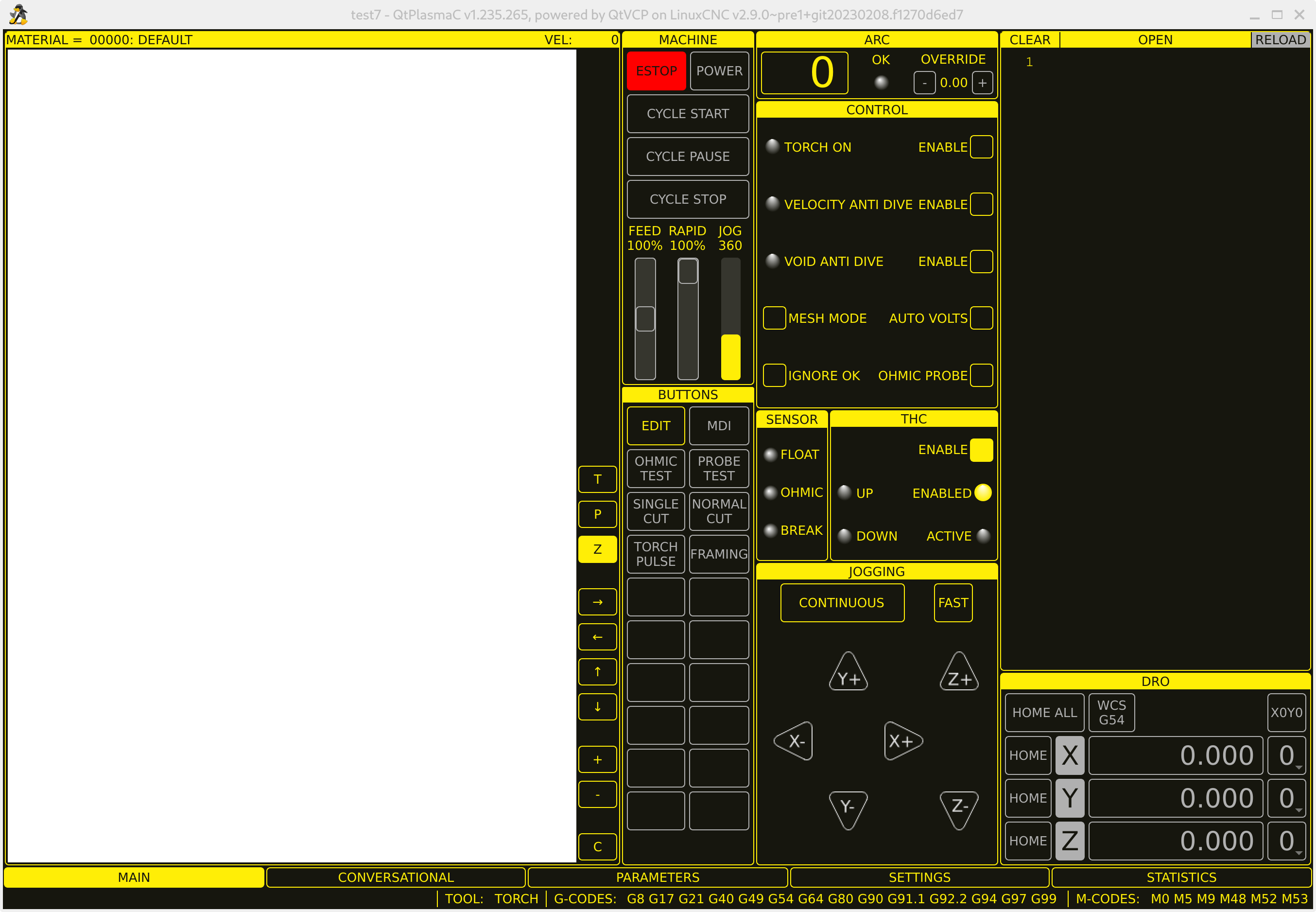
sorry guys,

I'm not sure what i'm doing at the moment. Feel like a lost sheep.

Anyway.


When i get in, this is what i see, note the plank page where there should be a drawing.

I can't get the estop to unload to engage power.

Where should I start from? wipe everything and try reloading it all again?

 
  • tommylight
  • tommylight's Avatar
02 Jan 2025 01:53
  • Cant do this anymore bye all
  • Cant do this anymore bye all's Avatar
02 Jan 2025 01:49
Replied by Cant do this anymore bye all on topic PnCConf vs. Raspberry Pi 5

PnCConf vs. Raspberry Pi 5

Category: PnCConf Wizard

run the menu-config (menu_config) and set the locale.

This page (read the whole thing) may help
forum.linuxcnc.org/forum/search?query=LC_ALL&childforums=1
  • Cant do this anymore bye all
  • Cant do this anymore bye all's Avatar
02 Jan 2025 01:43
Replied by Cant do this anymore bye all on topic Pi5 MESA 7c80: mesaflash can't see the card.

Pi5 MESA 7c80: mesaflash can't see the card.

Category: Driver Boards

I had issues with my RPi5 using SPI channel 0, dunno why, switching to SPI channel 1 resolved the issue. Not sure how you would resolve this without cobbling together a custom cable between the Pi and the 7c80.

you would have to use
loadrt hm2_spix spi_probe=2 config="insert your required config"

This is with my cobbled together 7c81 clone running hostmot2 firmware to suit the Spartan dev board.
  • ckuecker
  • ckuecker
02 Jan 2025 01:22
PnCConf vs. Raspberry Pi 5 was created by ckuecker

PnCConf vs. Raspberry Pi 5

Category: PnCConf Wizard

Hello,

I've got a home built router running a Raspberry Pi 4 with a Mesa 7196s via Ethernet. Running AXIS. Works fine.
Interested in trying the Rpi5 - loaded the image off the download page and the board can communicate with the Mesa board, but PnCConf keeps giving errors when I try to go past the first axis page - a long dump mentioning a problem with the locale.
Any suggestions? This is an 8GB RPi5 I just got from Digi-Key.
 
  • slowpoke
  • slowpoke
02 Jan 2025 01:18 - 02 Jan 2025 01:21
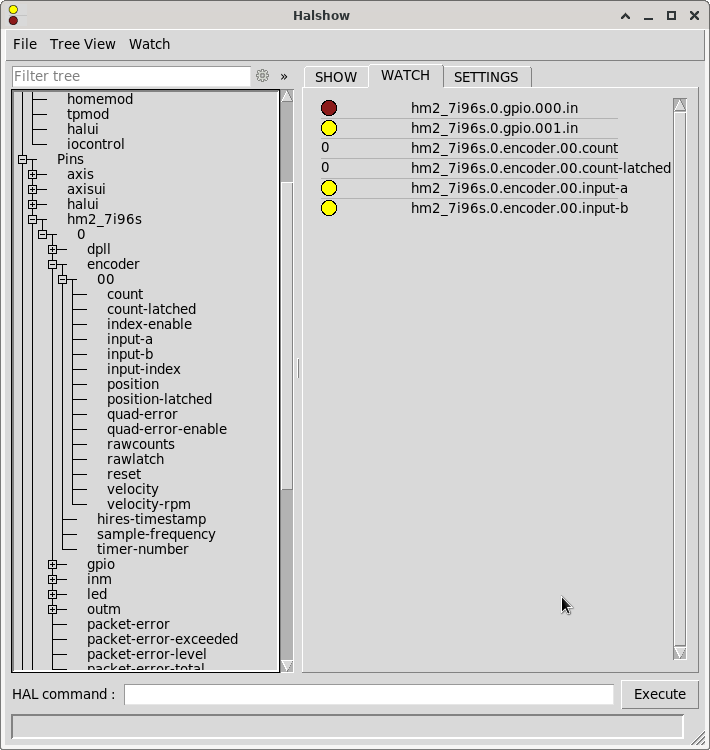
Replied by slowpoke on topic 7i96S MPG input

7i96S MPG input

Category: Basic Configuration

Standard 7I96S firmware has 4 built in MPG quadrature counters
overlaid on the first 8 isolated inputs. This means you do not need
to decode individual inputs (which is important since they are typically
only read at the 1 KHz servo thread rate)

The MPG counters have names like:

hm2_7i96s.0.inm.00.enc0-count
hm2_7i96s.0.inm.00.enc1-count
hm2_7i96s.0.inm.00.enc2-count
hm2_7i96s.0.inm.00.enc3-count


I'm trying to find these 4 overlaid quadrature encounters,
I have a glass scale connected up to inputs 0,1

I don't see them in HALshow. (I do see .encoder.00 however it does not seem to be linked to input 0,1), I think that's probably the spindle data.
How would I go about:
1) just viewing and scaling the quadrature data?
2) displaying the scaled value in axis?
 
  • RogEnk
  • RogEnk
02 Jan 2025 01:15 - 06 Jan 2025 14:55

[SOLVED] ProbeBasic NameError: name 'tool' is not defined

Category: QtPyVCP

Hi all.
Happy New Year!
Fresh install of LinuxCNC 2.9.3 (full image downloaded from wiki link) and freshly installed QtPyVCP and getting the NameError even after patching as per: github.com/LinuxCNC/linuxcnc/pull/3176/files
I have attached edited file and the qtypyvcp.log with .txt extensions.

System loads OK, homes and jogs, but as soon as I do a tool change for probing etc it throws that error.
I have also tried purge and reinstall of QtPyVCP, a reinstall of LinuxCNC as per kcjengr.github.io/probe_basic/index.html (that was a frustrating exercise, arrow keys in Putty were borked and weird permissions plus my user could not shutdown the system! So I opted for an official build).
EDIT: Should have mentioned this is the lathe config!
EDIT 2: Same behavior in the sim, log file for that now attached.
Any help much appreciated.
  • ccatlett1984
  • ccatlett1984
02 Jan 2025 00:59
Replied by ccatlett1984 on topic Pi5 MESA 7c80: mesaflash can't see the card.

Pi5 MESA 7c80: mesaflash can't see the card.

Category: Driver Boards

I have a pi4b with dead video out, connected and it's able to see the card. so we still have a config /driver issue with the pi5
halcmd: loadrt hm2_rpspi
hm2/hm2_7c80.0: Low Level init 0.15
hm2/hm2_7c80.0: Smart Serial Firmware Version 43
hm2/hm2_7c80.0: 54 I/O Pins used:
hm2/hm2_7c80.0:     IO Pin 000 (TB07-02/TB07-03): StepGen #0, pin Step (Output)
hm2/hm2_7c80.0:     IO Pin 001 (TB07-04/TB07-05): StepGen #0, pin Direction (Output)
hm2/hm2_7c80.0:     IO Pin 002 (TB08-02/TB08-03): StepGen #1, pin Step (Output)
hm2/hm2_7c80.0:     IO Pin 003 (TB08-04/TB08-05): StepGen #1, pin Direction (Output)
hm2/hm2_7c80.0:     IO Pin 004 (TB09-02/TB09-03): StepGen #2, pin Step (Output)
hm2/hm2_7c80.0:     IO Pin 005 (TB09-04/TB09-05): StepGen #2, pin Direction (Output)
hm2/hm2_7c80.0:     IO Pin 006 (TB10-02/TB10-03): StepGen #3, pin Step (Output)
hm2/hm2_7c80.0:     IO Pin 007 (TB10-04/TB10-05): StepGen #3, pin Direction (Output)
hm2/hm2_7c80.0:     IO Pin 008 (TB11-02/TB11-03): StepGen #4, pin Step (Output)
hm2/hm2_7c80.0:     IO Pin 009 (TB11-04/TB11-05): StepGen #4, pin Direction (Output)
hm2/hm2_7c80.0:     IO Pin 010 (TB12-02/TB12-03): StepGen #5, pin Step (Output)
hm2/hm2_7c80.0:     IO Pin 011 (TB12-04/TB12-05): StepGen #5, pin Direction (Output)
hm2/hm2_7c80.0:     IO Pin 012 (TB03-03/TB04-04): IOPort
hm2/hm2_7c80.0:     IO Pin 013 (TB03-05/TB04-06): IOPort
hm2/hm2_7c80.0:     IO Pin 014 (TB03-05/TB03-06): IOPort
hm2/hm2_7c80.0:     IO Pin 015 (TB04-01/TB04-02): Encoder #0, pin A (Input)
hm2/hm2_7c80.0:     IO Pin 016 (TB04-04/TB04-05): Encoder #0, pin B (Input)
hm2/hm2_7c80.0:     IO Pin 017 (TB04-07/TB04-08): Encoder #0, pin Index (Input)
hm2/hm2_7c80.0:     IO Pin 018 (TB05-02): PWMGen #0, pin Out0 (PWM or Up) (Output)
hm2/hm2_7c80.0:     IO Pin 019 (TB05-02): PWMGen #0, pin Not-Enable (Output)
hm2/hm2_7c80.0:     IO Pin 020 (TB05-05/TB05-06): IOPort
hm2/hm2_7c80.0:     IO Pin 021 (TB05-07/TB05-08): IOPort
hm2/hm2_7c80.0:     IO Pin 022 (Internal InMux0): InMux Input Mux #0, pin addr0 (Output)
hm2/hm2_7c80.0:     IO Pin 023 (Internal InMux1): InMux Input Mux #0, pin addr1 (Output)
hm2/hm2_7c80.0:     IO Pin 024 (Internal InMux2): InMux Input Mux #0, pin addr2 (Output)
hm2/hm2_7c80.0:     IO Pin 025 (Internal InMux3): InMux Input Mux #0, pin addr3 (Output)
hm2/hm2_7c80.0:     IO Pin 026 (Internal InMux4): InMux Input Mux #0, pin addr4 (Output)
hm2/hm2_7c80.0:     IO Pin 027 (Internal InMuxData): InMux Input Mux #0, pin muxdata (Input)
hm2/hm2_7c80.0:     IO Pin 028 (TB13-01/TB13-02): SSR #0, pin Out-00 (Output)
hm2/hm2_7c80.0:     IO Pin 029 (TB13-03/TB13-04): SSR #0, pin Out-01 (Output)
hm2/hm2_7c80.0:     IO Pin 030 (TB13-05/TB13-06): SSR #0, pin Out-02 (Output)
hm2/hm2_7c80.0:     IO Pin 031 (TB13-07/TB13-08): SSR #0, pin Out-03 (Output)
hm2/hm2_7c80.0:     IO Pin 032 (TB14-01/TB14-02): SSR #0, pin Out-04 (Output)
hm2/hm2_7c80.0:     IO Pin 033 (TB14-03/TB14-04): SSR #0, pin Out-05 (Output)
hm2/hm2_7c80.0:     IO Pin 034 (TB14-05/TB14-06): SSR #0, pin Out-06 (Output)
hm2/hm2_7c80.0:     IO Pin 035 (TB14-07/TB14-08): SSR #0, pin Out-07 (Output)
hm2/hm2_7c80.0:     IO Pin 036 (Internal SSR): SSR #0, pin AC Ref (internal) (Output)
hm2/hm2_7c80.0:     IO Pin 037 (P1-01/DB25-01): IOPort
hm2/hm2_7c80.0:     IO Pin 038 (P1-02/DB25-14): IOPort
hm2/hm2_7c80.0:     IO Pin 039 (P1-03/DB25-02): IOPort
hm2/hm2_7c80.0:     IO Pin 040 (P1-04/DB25-15): IOPort
hm2/hm2_7c80.0:     IO Pin 041 (P1-05/DB25-03): IOPort
hm2/hm2_7c80.0:     IO Pin 042 (P1-06/DB25-16): IOPort
hm2/hm2_7c80.0:     IO Pin 043 (P1-07/DB25-04): IOPort
hm2/hm2_7c80.0:     IO Pin 044 (P1-08/DB25-17): IOPort
hm2/hm2_7c80.0:     IO Pin 045 (P1-09/DB25-05): IOPort
hm2/hm2_7c80.0:     IO Pin 046 (P1-11/DB25-06): IOPort
hm2/hm2_7c80.0:     IO Pin 047 (P1-13/DB25-07): IOPort
hm2/hm2_7c80.0:     IO Pin 048 (P1-15/DB25-08): IOPort
hm2/hm2_7c80.0:     IO Pin 049 (P1-17/DB25-09): IOPort
hm2/hm2_7c80.0:     IO Pin 050 (P1-19/DB25-10): IOPort
hm2/hm2_7c80.0:     IO Pin 051 (P1-21/DB25-11): IOPort
hm2/hm2_7c80.0:     IO Pin 052 (P1-23/DB25-12): IOPort
hm2/hm2_7c80.0:     IO Pin 053 (P1-25/DB25-13): IOPort
hm2/hm2_7c80.0: registered
Displaying 20881 - 20895 out of 21770 results.
Time to create page: 0.443 seconds
Powered by Kunena Forum