Advanced Search

Search Results (Searched for: )

  • xunil
  • xunil
31 Aug 2025 00:15
Replied by xunil on topic halui.mdi-command-NN pins not showing up

halui.mdi-command-NN pins not showing up

Category: HAL

Thanks for the heads up! I don't think that would affect whether the mdi-command-NN pins would show up or not; even if don't load the PyVCP panel, I still don't see the pins exposed by halui.
  • vicstransam
  • vicstransam
30 Aug 2025 23:51

2.9.4 iso Bookworm RTAI AMD64 step config issue

Category: General LinuxCNC Questions

Fresh install and then run stepconfig and noticed that if I try to edit a loaded gcode file in Axis, it does nothing. So I take a look at my .ini file and it points to Gedit but that isn't in Debian 12. It uses Geany. I installed Gedit since it is what I'm used to. I could change it to Geany but I like Gedit better for gcode. 
 I just thought it strange that stepconfig would use a non-existent editor.
 Python 3 also makes the simple gcode generators not work anymore and I haven't figured out how to get Native Cam to install.
  • tommylight
  • tommylight's Avatar
30 Aug 2025 23:32
Replied by tommylight on topic Multi Axis Slow Feedrate

Multi Axis Slow Feedrate

Category: General LinuxCNC Questions

See if this helps, although pretty old.
  • tommylight
  • tommylight's Avatar
30 Aug 2025 23:30
Replied by tommylight on topic Simple G-Code Generator

Simple G-Code Generator

Category: CAD CAM

"No percent sign or M2"
Means there is no % at the start and end of the gcode file, or M2 at the end.
See if those can be added as a header and/Or footer, or maybe as post processor?
All this is a stab in the dark from what i know using Inkscape where both above options work fine for LinuxCNC.
  • vicstransam
  • vicstransam
30 Aug 2025 23:26
Replied by vicstransam on topic Simple G-Code Generator

Simple G-Code Generator

Category: CAD CAM

I had to use "2to3" to try and convert them to Python3 and was able to get the GUI's to work on Bezel and a few others and then I filled out the the dimensions and hit "Write to Axis" but it always errored with "No percent sign or M2" and discarded the gcode file. I couldn't get them to write to the clipboard either. I couldn't get "Engrave" or "Bolt pattern" to run without "indentions or tab" errors.
  • scotta
  • scotta's Avatar
30 Aug 2025 23:13

Remora - Rpi Software Stepping Using External Microcontroller via SPI

Category: Computers and Hardware

Sorry, forgot to mention updated hal line as well to set the SPI speed to 2Mhz, the default 20Mhz is probably the issue.

loadrt remora-spi SPI_num=0 CS_num=0 SPI_freq=2000000
  • scotta
  • scotta's Avatar
30 Aug 2025 23:04

Remora - Rpi Software Stepping Using External Microcontroller via SPI

Category: Computers and Hardware

Hi again and thanks for all the help up until now!

I wan't to give more context and explain myself better, we have been using this cnc router since 2023, originally setup with a raspberry pi 3b and octopus pro combo, it has worked wonders and is amazing the only real issue is that the raspberry pi 3b was slow. Recently we made the change to a raspberry pi 5, we took the original .ini and .hal files which we then update to be compatible with the new remora version, we kept the same config.txt file. We installed the linuxcnc-raspberrypi5 image and installed the remora components as instructed in the documentation.

The issues we've seen: when we first loaded linuxcnc and ran the .ini file by double clicking on it and choosing linuxcnc as the app to run the ini file we then saw the raspberry pi 5 using rp1 driver alert, we initially thought this was error but figured this was just an alert and so continued. We then started testing leaving e stop we could but just for a moment, no more than 3s, we could even get to enable but non of the drivers actually enable. We then tested if this was the E-stop's fault but we assumed it wasn't since if we disconnected the estop we could exit estop at all, wehn it was properly setup we could but can't enable the steppers fisically. This isn't a stepper issue or driver issue since they get enabled with the raspberry pi 3.

Thanks in advance and thank you for all of the help until now! Oh and sorry for any grammar or spelling mistakes, english isn't our first tounge.

Ok, so I pulled out my octopus board and RPi5 to see what could be the issue. I found my working config and noted:

#SERVO_PERIOD = 1000000
SERVO_PERIOD = 5000000

Making this change to your config, I got it up and running. With the faster servo period the board was throwing so many communication errors.
  • MaHa
  • MaHa
30 Aug 2025 21:49
Replied by MaHa on topic halui.mdi-command-NN pins not showing up

halui.mdi-command-NN pins not showing up

Category: HAL

There is  </vbox> missing at the end of of the .xml file
  • ziggi
  • ziggi's Avatar
30 Aug 2025 21:28 - 31 Aug 2025 08:56

Troubles to get started with SD240 Retrofit

Category: Turning

Sorry to bother you again guys. With the help of some people I have the axes and the spindle going now.
My current issue is the homing of the axes. They do not move to search for the home- switches, but just home "in place" so just where they stand. Obviously the axes pretend to "be homed" then, because softlimits are active. Signal joint.1.homed swaps immediately to yellow
If I unhome all axes I can move them where I want by jogging them- otherwise the + way is limited as it should be to 5/10mm +.
The hm2_7i80.0.gpio.026.in reacts in HAL-show on pushing the home switch manually and also the signal  "z-home-sw" swaps from red to yellow together with hm2_7i80.0.gpio.026.in.
The signal "z-is-homed" stays red .... if this is of any importance.

It is just that the search for the HOME signal does not take place. When trying to home an axis the axis motor is activated, stops immediately (does not move the axis) and sets the DRO value to 0.0
Any help appreciated
Thank you
Sigi
  • xunil
  • xunil
30 Aug 2025 19:30 - 30 Aug 2025 19:37
Replied by xunil on topic halui.mdi-command-NN pins not showing up

halui.mdi-command-NN pins not showing up

Category: HAL

Yeah, I commented those out to get LinuxCNC to start so I could look at the halui component in halshow, to see if maybe the pins were numbered differently than I expected or something. With those lines uncommented LinuxCNC won't start, since the mdi-command-NN pins don't exist.

Thanks for mentioning it though, I've certainly had forest-for-trees errors like that before where another pair of eyes spotted the problem immediately.  :)
  • MaHa
  • MaHa
30 Aug 2025 19:20
Replied by MaHa on topic halui.mdi-command-NN pins not showing up

halui.mdi-command-NN pins not showing up

Category: HAL

Just in case you are not aware that in the # Syringe section in your postgui.hal everything regarding mdi-command is commented out.
  • xunil
  • xunil
30 Aug 2025 18:34
Replied by xunil on topic halui.mdi-command-NN pins not showing up

halui.mdi-command-NN pins not showing up

Category: HAL

I’m aware of how it’s _supposed_ to work, my question is what I’m doing wrong in my configs that make halui not expose mdi-command-00 etc pins despite the presence of MDI_COMMAND entries in the [HALUI] INI section, and HALUI=halui in the [HAL] section?
  • Waldemar
  • Waldemar's Avatar
30 Aug 2025 18:12 - 31 Aug 2025 11:48
Simple/Manual Centre Finder was created by Waldemar

Simple/Manual Centre Finder

Category: AXIS

Hello all,

I'm a basic user of LCNC - I know it reasonably well, but don't use a tool changer, only have a basic through tool Z probe which gets occasional use - you get the idea: my set-up is pretty rudimentary but I get good results and productive use out of the software.

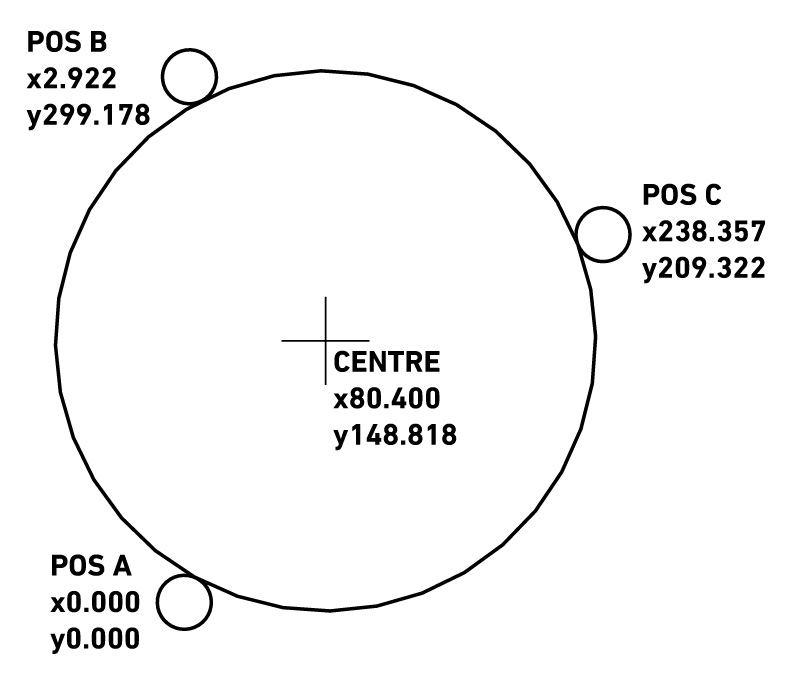
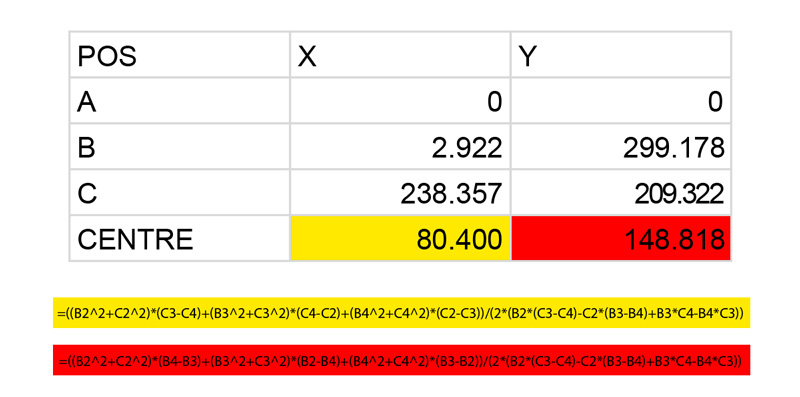
When I need to find the centre of a circular feature I've been touching a dowel off at three points around a circumference (fag paper or multimeter method) and feeding three sets of X,Y coordinates into a spreadsheet which then works out the centre for me, like so:


Here's the sheet in OpenOffice format.

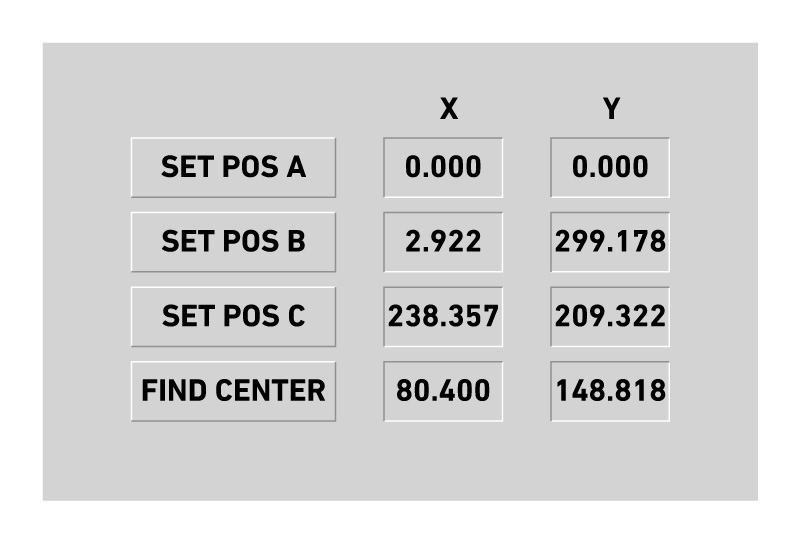
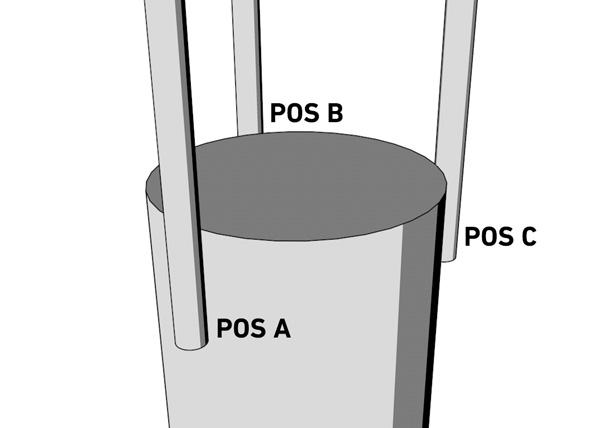
It works, but I was wondering if there was a way to incorporate a simple centre finder tab into the interface, something that would look a little like this:


The first three buttons to touch off the three positions on the circumference and the 'FIND CENTRE' button to perform four ops:

Calculate the X,Y centre coordinates
Lift the Z axis to its G53 0
Move to the calculated X,Y centre
Set G54 (or current WCS) X,Y to 0,0

So I guess there would need to be six variables that get written using date from 'current position' numbered parameters #5420 & #5421

POSA_X
POSA_Y
POSB_X
POSB_Y
POSC_X
POSC_Y

And then the two calculated variables that are used in a subroutine to lift and move the spindle to the centre and zero out X,Y at the new position

CNTR_X
CNTR_Y

I get that this is still clunkier than using a probe, but I honestly have little need for one!  If I have to keep punching the numbers into the spreadsheet then that's fine, but to have this in a tab would be cool.  Am I thinking about this in the right way?

How would you tackle it?

Many thanks.

Wal.
  • jschulze
  • jschulze
30 Aug 2025 18:05
Replied by jschulze on topic Unwinding Rotary Axis for Homing

Unwinding Rotary Axis for Homing

Category: Advanced Configuration

If anyone stumbles on this looking for a solution I was able to work it out in hal using wcomp and some and, or, not components. Basically I used the wcomp to check the startup position from the last_position.txt file, then using a bit of funny logic I made it so after the joints hits the home switch in the positive direction, the wcomp keeps the home switch closed for the remainder of the positive direction travel, then in the negative direction I used the min wcomp output to disable the home switch input for the remainder of the negative travel. So the home switch only properly works in a narrow joint position range. With this setup the normal homing routine does exactly what I need. When the joint is in the positive direction it backs off until it's in the proper range and in the negative direction it ignores the physical switch until it's in the proper range. There's some silly logic with some and/or/not comps which I'm sure could be made more elegant, but it does work.
  • Benb
  • Benb's Avatar
30 Aug 2025 17:32
Replied by Benb on topic halui.mdi-command-NN pins not showing up

halui.mdi-command-NN pins not showing up

Category: HAL

An MDI command can be executed by using halui.mdi-command-00
Here is an example showing how it 's done:

linuxcnc.org/docs/html/gui/halui.html
 
Displaying 10516 - 10530 out of 17074 results.
Time to create page: 2.069 seconds
Powered by Kunena Forum