Advanced Search

Search Results (Searched for: )

  • Shaypo
  • Shaypo
01 May 2025 11:24
Segmentation fault was created by Shaypo

Segmentation fault

Category: General LinuxCNC Questions

Hi folks,
I'm a hobby CNC enthusiast, working for a couple of years now with a self built CNC machine. My setup includes an old pc using a PCI card to connect via a parallel port to a 3axis tb6560 controller. my spindle is the 2.2KW with the HY VFD.
This setup worked perfectly until it didn't. For some reason every time I tried to open gmail the computer crashed completely (lost power all together). I decided to replace the USB stick holding the Linux installation with a new (and bigger) one.
I have successfully (I think) installed the rtai kernel and linuxcnc, the old issue was resolved, my latency test looks great and I can control the motors while in the Stepconf Wizard.
The Problem is after I finish setting the configuration and trying to open the launch icon, first I get a message that it is not .exe. when I hit launch anyway is shows the linuxcnc logo as aspects and then crashes with the attached report.

I would appreciate any help on the subject, I already wasted crazy amouny of time trying to get my setup running.
Thanks.
 
  • Adam Maszynotwór
  • Adam Maszynotwór's Avatar
01 May 2025 11:11 - 01 May 2025 11:13

Is there a bug in the carousel component or am I doing it wrong ATC Denford

Category: Advanced Configuration

Below is the translated and polished version of your analysis, ready to be posted on the LinuxCNC forum. It retains all the technical details, observations, and context while being concise and clear for the community. I've formatted it to fit a typical forum post structure, focusing on your issue with the carousel component and the lack of reverse motion in REV_TIME.Forum Post: Lack of Reverse Motion in carousel Component (counts Mode, rev-pulse)Title: No Reverse Motion in carousel Component with counts Mode and rev-pulseBody:Hello everyone,Thank you for the help so far. I'm working on a toolchanger carousel with 8 pockets, driven by a stepper motor (1600 steps/rev, scale=200) in LinuxCNC (version [insert your version, e.g., 2.9.2]). I'm using the carousel component in counts mode (encoding=counts, dir=1) with a physical homing sensor on parport.0.pin-10-in. Homing works correctly, but subsequent M6 tool changes fail to perform the reverse motion (rev-pulse=2.0), even though carousel.0.motor-rev changes state. Below, I've analyzed the carousel component's source code to understand how the reverse motion (for locking) should work and why it’s not generating pulses on parport.0.pin-08-out in REV_TIME with stepgen in position mode (step_type=0).Analysis of Reverse Motion Mechanism1. Documentation on rev-pulseFrom the carousel component documentation:text
Copy
pin in float rev-pulse """The duration in seconds for which a ratchet changer (Boxford, Emco) should pulse the reverse pin to lock the holder""";
text
Copy
For tool changers which lock the carousel against a stop the \fBrev-pulse\fR pin can be set to a non-zero value. The motor-rev pin will then be set for this many seconds at the completion of the tool search and at the same time the reverse duty/cycle velocity value will be sent to the motor-vel pin.
Interpretation:
  • rev-pulse defines the duration (in seconds) that the motor-rev pin is active (TRUE) to perform a reverse motion to lock the carousel (e.g., for ratchet-type changers like Boxford or Emco).
  • During this time, motor-vel is set to rev-dc (reverse velocity), suggesting the reverse motion is intended for velocity control (e.g., DC motors or stepgen in velocity mode).
  • The documentation does not mention updating counts-target in REV_TIME, which is critical for counts mode with stepgen in position mode.
My Configuration:
  • carousel.0.rev-pulse=2.0 (2 seconds of reverse motion).
  • carousel.0.rev-dc=-0.5 (reverse velocity, 50% of max velocity).
  • stepgen.2.maxvel=80 (80 pulses/second).
  • encoding=counts, dir=1 (unidirectional carousel).
  • stepgen.2 in position mode (step_type=0), driven by carousel.0.counts-target.
Expectation:
  • After reaching the target pocket (e.g., T1 M6), the carousel should perform a reverse motion for 2 seconds, generating pulses on parport.0.pin-08-out (e.g., 80 pulses, calculated as 2.0 * 80 * 0.5).
2. Source Code Analysis – How Reverse Motion is ImplementedI analyzed the carousel.comp source code to understand how reverse motion is handled, focusing on the REV_TIME state.Transition to REV_TIMEReverse motion is initiated in the MOVE state (state 2) when the carousel reaches the target pocket (current_position == mod_pocket):c
Copy
case 2: // moving if ((current_position != mod_pocket) && enable){ deb = debounce; return; } else if (deb-- > 0) { return; } if (rev_pulse > 0){ motor_fwd = 0; motor_rev = 1; motor_vel = rev_dc; timer = rev_pulse; state = 3; } else if (decel_time > 0) { // stop and prepare for alignment motor_vel = 0; timer = decel_time; state = 5; } else { motor_fwd = 0; motor_rev = 0; motor_vel = hold_dc; active = 0; if (enable && current_position == mod_pocket) ready = 1; state = 9; } break;
What happens:
  • If rev_pulse > 0 (in my case, 2.0), the component:
    • Sets motor-fwd=0, motor-rev=1 (activates reverse direction, seen on parport.0.pin-09-out).
    • Sets motor-vel=rev-dc (in my case, -0.5 for reverse velocity).
    • Initializes the timer to rev-pulse (2.0 seconds).
    • Transitions to REV_TIME (state 3).
  • Key Issue: It does not update counts-target, which drives stepgen.2.position-cmd in position mode.
REV_TIME StateThe REV_TIME state (state 3) handles the reverse motion:c
Copy
case 3: // timed reverse pulse timer -= fperiod; if (timer > 0) return; state = 9; motor_fwd = 0; motor_rev = 0; motor_vel = hold_dc; active = 0; if (enable) ready = 1; break;
What happens:
  • The timer counts down rev-pulse (2.0 seconds) in thread cycles (fperiod, typically 1 ms in the servo thread).
  • During this time, motor-rev=1 and motor-vel=rev-dc (set in the MOVE state) remain active.
  • When the timer expires (timer <= 0):
    • Motion stops: motor-fwd=0, motor-rev=0, motor-vel=hold-dc (likely 0 in my case).
    • Sets active=0 and ready=1 (signals tool change completion).
    • Transitions to WAIT_ENABLE_FALSE (state 9).
  • Key Issue: There is no update to counts-target in REV_TIME, so stepgen.2 in position mode does not receive a new target position, resulting in no pulses on parport.0.pin-08-out.
counts Mode and Position HandlingIn counts mode (inst_code='C'), the position is calculated based on counts from stepgen.2.counts:c
Copy
case 'C': // encoder or stepgen counts. new_pos = current_position; if (homed){ int c; int t; int w = width / 2; c = (counts - base_counts); t = floor(((float)c + w) / scale); if (c >= (t * scale - w) && c <= (t * scale + w)) { new_pos = 1 + (t % inst_pockets); if (new_pos < 1) new_pos += inst_pockets; } align_pin = (c % scale <= 2 && c % scale >= -2); }
  • counts-target is updated in the DIR_CHOOSE state (state 1) for forward motion:
    c
    Copy
    counts_target += (mod_pocket - current_position) * scale;
  • In REV_TIME, counts-target remains unchanged, so stepgen.2.position-cmd equals stepgen.2.position-fb, resulting in no pulses.
Velocity vs. Position Mode
  • The documentation suggests motor-vel and motor-rev are primarily for velocity control (e.g., DC motors or stepgen in velocity mode, step_type=1).
  • In my setup, stepgen.2 is in position mode (step_type=0), where motion depends on the difference between position-cmd and position-fb, and motor-vel is ignored.
  • This explains why motor-rev=1 and motor-vel=-0.5 do not generate pulses – stepgen.2 waits for a change in position-cmd (i.e., carousel.0.counts-target).
3. Expected Behavior of Reverse MotionBased on the code and documentation, the reverse motion (rev-pulse) is designed as:
  • A timed reverse pulse: After reaching the pocket, the component sets motor-rev=1 and motor-vel=rev-dc for rev-pulse seconds (2.0 seconds).
  • Intended for ratchet-type changers where reverse motion locks the carousel against a mechanical stop (e.g., a pawl).
  • Assumes motion control via motor-vel and motor-rev, suitable for:
    • DC motors (with PWM).
    • stepgen in velocity mode (velocity-cmd).
    • Carousels with position sensors where the exact number of pulses is not critical.
  • In counts mode with stepgen in position mode, reverse motion does not occur because counts-target is not updated in REV_TIME.
4. Why It Fails in My SetupMy observations confirm the issue:
  • carousel.0.motor-rev changes to TRUE, and carousel.0.motor-vel to -0.5 in REV_TIME.
  • However, stepgen.2.position-cmd, stepgen.2.position-fb, and carousel.0.counts remain unchanged.
  • No pulses are generated on parport.0.pin-08-out because stepgen.2 in position mode does not receive a new position-cmd value.
Questions for the Community
  1. Is the carousel component in counts mode supposed to update counts-target in REV_TIME to enable reverse motion in position mode? If not, how should reverse motion be configured?
  2. Has anyone used the carousel component in counts mode with rev-pulse for a stepper-driven carousel? If so, could you share your configuration?
  3. Would modifying the carousel component to update counts-target in REV_TIME (e.g., based on rev-pulse, rev-dc, and maxvel) be a reasonable solution, or is there a better approach?
  • Adam Maszynotwór
  • Adam Maszynotwór's Avatar
01 May 2025 11:05

Is there a bug in the carousel component or am I doing it wrong ATC Denford

Category: Advanced Configuration

dir=2 is for a revolver of this type
i.e. working in two directions and blocked mechanically or in a way other than changing the direction of rotation. generally dir=2 works. if I set it, the magazine rotates in two directions and looks for the shortest path to the tool.

by the way, I will add a fragment of the analysis that GROK did based on github.com/LinuxCNC/linuxcnc/blob/v2.9.2...onents/carousel.comp
  • timo
  • timo
01 May 2025 10:40
Replied by timo on topic comparing to Grbl, or FluidNC

comparing to Grbl, or FluidNC

Category: Milling Machines

One aspect that I did not see mentioned is the time delay between inputs and action on some of the systems.
My Marlin based 3d printer takes ages to accept a feed override or pause instruction. (seems to finish the complete "look ahead", before it stops?)
Something that I would not be happy with. For a milling machine things quickly become expensive and messy when the machine is able to destroy itself.
  • Thayloreing
  • Thayloreing
01 May 2025 10:31
  • pippin88
  • pippin88
01 May 2025 08:23
  • Attis92
  • Attis92
01 May 2025 06:30

Remora - ethernet NVEM / EC300 / EC500 cnc board

Category: Computers and Hardware

Hi Spyderbreath,I'll write down the steps I followed to create the DAPLink. I worked on Linux, so some parts may differ on Windows.1. I bought ST-Link devices.
2. I prepared the hardware based on the first part of Scott3D’s YouTube video :
It clearly shows the soldering process.
He uses the ST-Link Utility, but since it's not available on Linux, I used STM32CubeProgrammer, which works on both Linux and Windows:
I connected the four soldered wires to the ST-Link as follows:
3V3 → 3V3
GND → GND
SWCLK → CLK
SWDIO → DO
(The rest of the video is not relevant for this process.)

3. I downloaded (or cloned) the Remora-RT1052 repository.
It contains a CMSIS-DAP folder, and inside it, the CMSIS-DAP-STLINK21.hex file.

4. I opened STM32CubeProgrammer, plugged in the ST-Link device,
clicked “Connect” (top right corner), and once connected, the left-side menu became available.
Then:
Clicked the “OB” (Option Bytes) button
Under Read Out Protection, I unchecked the “RDP” flag.

5. I went back to the main menu (Memory & File Editing):
Clicked “Open File” → selected CMSIS-DAP-STLINK21.hex
Clicked “Download” to flash the firmware.
Now the DAPLink is ready to use. (Note: This version of DAPLink doesn't support drag-and-drop (MSC), so we’ll flash the RT1052 using pyOCD instead.)

6. I created a temporary folder (e.g., remora_flash) and set up a Python virtual environment inside it:
python3 -m venv .venv
source .venv/bin/activate
pip install pyocd

Plug in the DAPLink via USB and check if it's detected:
sudo pyocd list

Example output:
  #   Probe/Board          Unique ID      Target  
--------------------------------------------------
  0   X893 ARM CMSIS-DAP   0001A0000000   n/a  
  

7. Finally, I flashed the firmware to the RT1052.
Clone or download the Remora-RT1052-cpp repository.
In the Firmware folder, you’ll find the binary image: remora-rt1052-3.1.3.bin.

Connect the board via DAPLink and flash it using:
pyocd flash remora-rt1052-3.1.3.bin --target mimxrt1050_quadspi

8. Configuration upload is described in Daz’s post.

Hope this helps!
  • Hakan
  • Hakan
01 May 2025 05:46
Replied by Hakan on topic AX58100

AX58100

Category: EtherCAT

I think there is something not quite right in the eeprom_generator with bits, so I use uint8 instead.
And then create a bit pin in linuxcnc with
<pdoEntry idx="600x" subIdx="01" bitLen="8" halPin="enable1" halType="bit"/>

Those DI pins are the input pins, for switches etc. I think the halType should be "bit" for them.

What do you do in the code with the enable information?
  • Aciera
  • Aciera's Avatar
01 May 2025 05:35
Replied by Aciera on topic Plasma center punching operation

Plasma center punching operation

Category: General LinuxCNC Questions

Thanks for sharing!
  • Aciera
  • Aciera's Avatar
01 May 2025 05:32

GSK 980 MDI milling machine, I want to make my first program

Category: Milling Machines

Maybe you could post your gcode so we have something to go on.
  • ffffrf
  • ffffrf
01 May 2025 04:08

Can someone explain how squaring is handled on dual motor linear axis?

Category: CNC Machines

I currently am building out my machine and have somewhat of a stupid question that is racking my brain. I have a tiny homebuilt lathe that has XZC kinematics plus a stepgen servo spindle.

My plan is to add a dual motor Y axis (in my case it is a vertical axis) onto the lathe cross slide to give Y axis capabilities. Now my actual question is much more simple but I am struggling how to think it through and want to make sure I am capable of taking on this extra axis project.

Here is my issue:

In my case, i will have a rigid steel coupler between both sides of the Y axis to attach a spindle and gang tooling / etc. How can I ensure that the position of the coupler on each side ALWAYS stays at the exact same height, as there is no room for misalignment. My thoughts are:

1. Ensure the home switches are EXACTLY at the same height, but i cant imagine i could do it perfectly
2. Add some sort of adjustment mechanism to the coupler such as oversized bolt holes, allow it to home on both of the home switches, and then tap the coupler level and bolt it down which would account for any home switch misalignment
3. perhaps linuxcnc has some sort of axis offset you can add to account for something like home switch height difference? I.e you calculate the axis offset by jogging it until the coupler is perfectly parallel to the cross slide and then set a difference in height between the two axis?


Its clearly an easily solved issue given how common things like dual Y axis routers are - but I am a bit confused this and was hoping someone could chime in who has already done a dual motor axis?
  • MagMag5
  • MagMag5
01 May 2025 03:09

GSK 980 MDI milling machine, I want to make my first program

Category: Milling Machines

I want to run my first drilling, countersinking, and threading program on my GSK 980 mdi milling machine. Upon starting it, tool 1 crashed 3 times.

The job I want to do is a steel bar measuring 1 inch wide (y-axis), 0.5 inches high (z-axis), and 90 cm long (x-axis). It has drilled holes, followed by countersinking, and ends with a thread for an M10 x 1.5 screw.

If anyone has an example that could help me correct what I've done, that would be a great help.
  • PCW
  • PCW's Avatar
01 May 2025 00:49

[SOLVED]linuxcnc Latency test ambiguous results

Category: General LinuxCNC Questions

Another optimization is to pin the Ethernet IRQ to the last processor
(the one LinuxCNC uses for real time)

Here is a test script to run to temporarily set this:


File Attachment:

File Name: pinirq_2025-04-30.txt
File Size:1 KB


Download the script

chmod +x pinirq.txt

then

sudo ./pinirq.txt  ethernet_device_name

where ethernet device name is something like eth0 or eno1
( ip a to find the device name )


  • PCW
  • PCW's Avatar
01 May 2025 00:38

Absolute easiest way to add a 6th stepgen to my mesa 7i96s setup?

Category: Driver Boards
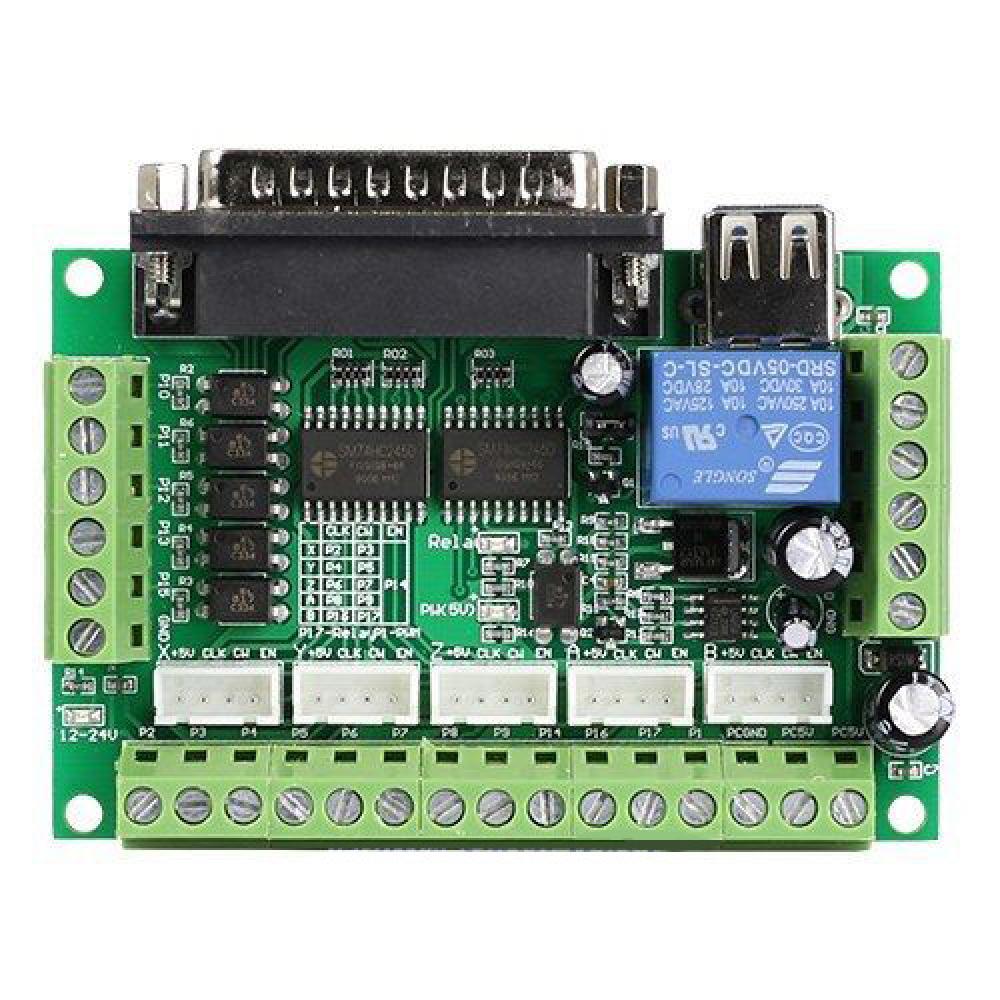
You can use say 7i96s_5abobd.bin. 

This gives you 10 stepgens total and expects a common "Mach 5Axis BOB"
(shown below) parallel port breakout connected to P1.

You can run step drives directly from the P1 outputs (step drive STEP+,DIR+ to +5V
STEP-,DIR- to P1 outputs) BUT a wiring mistake will be costly...
Displaying 15901 - 15915 out of 17460 results.
Time to create page: 0.398 seconds
Powered by Kunena Forum