Advanced Search

Search Results (Searched for: )

  • Corne
  • Corne's Avatar
15 Feb 2025 07:04

Error: undefined symbol: hm2_pktuart_setup_rx - while lading custom modbus.so

Category: Driver Boards

Copied the mb25ioc32.so to the modules directory > same result as mentioned in my initial post.
A search to *pktuart* doesn't give any hit. So I don't know where to place these.

A compile of mb25ioc32.so delivers a mesa_modbus.o (and .c) in a tmp directory. I can find the source of this file at /usr/share/linuxcnc/ as mesa_modbus.o.tmpl.
  • newbynobi
  • newbynobi's Avatar
15 Feb 2025 06:42
Replied by newbynobi on topic Lathe axis display

Lathe axis display

Category: Gmoccapy

Depending of the mode: Radius Mode or Diamiter Mode one off the DRO (R or D) is grey, meaning not active.
That way you see very quick with mode you did activate with your gcode.

Norbert
  • gabriel176
  • gabriel176
15 Feb 2025 06:25 - 15 Feb 2025 06:31

Fix for "Go Home" button qtdragon_hd (make it go to the Z value you need)

Category: Qtvcp

the fix for the GO HOME button in the qtdragon_hd Offsets frame

the setting is in the following file:

/usr/share/qtvcp/screens/qtdragon_hd/qtdragon_hd_handler.py

(you need to edit it with sudo nano on a terminal)

on the line 821 (in my case)
there is a section called

"# offsets frame"

and about 17 lines below there is a setting that you have to change to get the button to go where you want, it's the following:

"ACTION.CALL_MDI_WAIT("G53 G0 Z0") " <--- there it is! that Z0 you have to change to the Z value you want.

after that, save the file, restart your linuxcnc and the button will go to that position.

i hope it helps someone
cheers have a nice day!
  • gabriel176
  • gabriel176
15 Feb 2025 06:19

QtDragon HD with Z-Comp: Tool Sensor and Touch Plate Function

Category: Qtvcp

the fix for the GO HOME button
i found it! (it took me days to do it but i'm so proud of myself for finding it)
the setting is in the following file:
/usr/share/qtvcp/screens/qtdragon_hd/qtdragon_hd_handler.py

(you need to edit it with sudo nano on a terminal)

on the line 821 (in my case)
there is a section called

"# offsets frame"

and about 17 lines below there is a setting that you have to change to ge the button to go where you want, it's the following:

"ACTION.CALL_MDI_WAIT("G53 G0 Z0") " <--- there it is! that Z0 you have to change to the Z value you want.

after that, save the file, restart your linuxcnc and the button will go to that position.

i hope it helps you.
have a nice day
  • webbyguy
  • webbyguy
15 Feb 2025 04:22
Replied by webbyguy on topic Can't eek out that last bit of jitter

Can't eek out that last bit of jitter

Category: General LinuxCNC Questions

Yes. I'm using the parallel port to drive my milling machine.
  • spicer
  • spicer's Avatar
15 Feb 2025 03:52 - 15 Feb 2025 04:00
Replied by spicer on topic Referenzschalter Genauigkeit

Referenzschalter Genauigkeit

Category: Deutsch

Nachtrag:
Mein Link sieht aus, als hätte der vernünftige Befestigungspunkte. Ansonsten reicht eine nackte ITR9606.
Eine Lichtschranke hat niemals mechanische Streuung (sogar weniger als induktive Schalter).
Natürlich ist der Ref-Zyklus absolut wichtig (zurück und langsames Anfahren und zurück bis zur Öffnung des Kontakts).
Wichtig ist, dass die Lichtschranke NIEMALS direkte Sonneneinstrahlung bekommt und auch gegen Staub und Flüssigkeiten geschützt ist (meistens kein Problem, da unter dem Tisch).
Vorallem ist dieser Lösungsweg eine präzise und bezahlbare Lösung ;)
  • tommylight
  • tommylight's Avatar
15 Feb 2025 03:15
Replied by tommylight on topic Lathe axis display

Lathe axis display

Category: Gmoccapy

Nothing to fix there, that is all correct for a lathe, you have the X R-adius and X D-iameter, where radius is what you are taking off and diameter is the total size of the part.
  • tommylight
  • tommylight's Avatar
15 Feb 2025 03:12
Replied by tommylight on topic Can't eek out that last bit of jitter

Can't eek out that last bit of jitter

Category: General LinuxCNC Questions

Do you need a parallel port?
If not:
latency-histogram --nobase --sbinsize 1000 --show
  • unknown
  • unknown
15 Feb 2025 02:29
Replied by unknown on topic Potential All-in-One Single Board Computers

Potential All-in-One Single Board Computers

Category: Computers and Hardware

Ethercat appears to install ok, some modules are built for the current kernel, some are built for 6.1.0-31-arm64.

With no Ethercat devices connected I get this, would this indicate a good install ?
cnc@raspberrypi:~$ ethercat master
Master0
  Phase: Idle
  Active: no
  Slaves: 0
  Ethernet devices:
    Main: d8:3a:dd:ac:2e:74 (attached)
      Link: UP
      Tx frames:   28884
      Tx bytes:    1733040
      Rx frames:   0
      Rx bytes:    0
      Tx errors:   0
      Tx frame rate [1/s]:    124    124    122
      Tx rate [KByte/s]:      7.3    7.3    7.1
      Rx frame rate [1/s]:      0      0      0
      Rx rate [KByte/s]:      0.0    0.0    0.0
    Common:
      Tx frames:   28884
      Tx bytes:    1733040
      Rx frames:   0
      Rx bytes:    0
      Lost frames: 28884
      Tx frame rate [1/s]:    124    124    122
      Tx rate [KByte/s]:      7.3    7.3    7.1
      Rx frame rate [1/s]:      0      0      0
      Rx rate [KByte/s]:      0.0    0.0    0.0
      Loss rate [1/s]:        124    124    122
      Frame loss [%]:       100.0  100.0  100.0
  Distributed clocks:
    Reference clock:   None
    DC reference time: 0
    Application time:  0
                       2000-01-01 00:00:00.000000000
  • Jdolecki
  • Jdolecki
15 Feb 2025 01:53 - 15 Feb 2025 02:15
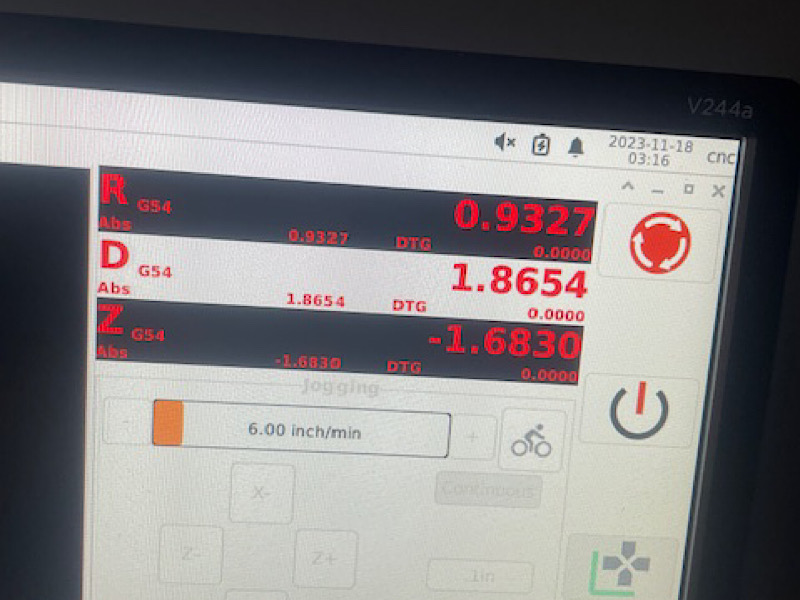
Lathe axis display was created by Jdolecki

Lathe axis display

Category: Gmoccapy

I set up my PcConfig for lathe x and z.

but this is what my screen displays how do I fix this?

 
  • unknown
  • unknown
15 Feb 2025 01:25
Replied by unknown on topic ssh connection instead of telnet

ssh connection instead of telnet

Category: General LinuxCNC Questions

That will not connect to the Linuxcncrsh server, the docs clearly state telnet or nc.

All changing the sshd port to 5007 will do is have sshd using port 5007 instead of 22, it will not connect to the linuxcncrsh server. Telnet & ssh (secure shell) are different protocols.

If you don't understand this I suggest get a proper network security advisor.
  • gmouer
  • gmouer
15 Feb 2025 01:01 - 15 Feb 2025 01:17

Need basic ini/hal/pathpilot.json files for new versions 2.10/2.12

Category: PathPilot

Been trying to get PP 2.12 to boot in a bare bones configuration to get me started on a non-tormach retrofit.    All the instructions and sample files here on the forum will not work with the latest versions, I tried them all.

What I am looking for is hal/ini and pathpilot files (bare bones) just to get me booted and started.    Eventually I will be using a 5i25/7i77 mesa but do not want to take them from a working machine until I get much closer to a working pathpilot configuration.

Can anyone help me out with some sample files, something similar to the ones in the tutors here but more current that will work with 2.12 pathpilot.     (2.10 would be ok too to get me started)

Thanks !
  • webbyguy
  • webbyguy
15 Feb 2025 00:54
Can't eek out that last bit of jitter was created by webbyguy

Can't eek out that last bit of jitter

Category: General LinuxCNC Questions
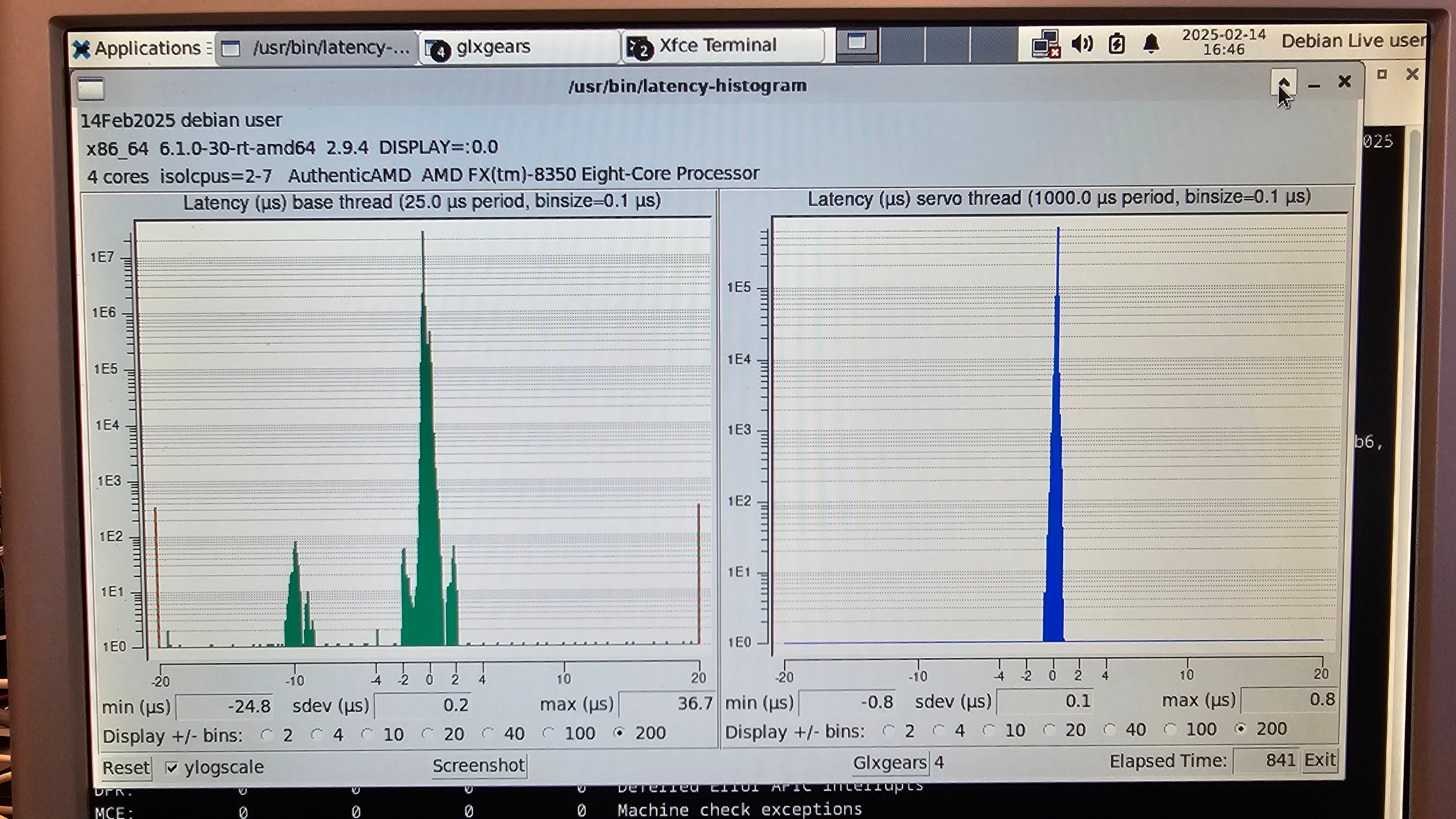
How can I track down the remaining sources of jitter? 

I have reduced the jitter a lot, but there are still some odd areas of jitter in my base histogram that I can't track down.  On my base thread, you can see a few spikes out at -20us and 20us and also some spikes around -10us.  (I'm going to use the parallel port for driving my milling machine.)
 
I'm using an AMD FX-8350 cpus on a biostar A880GZ motherboard.  The AMD FX-8350 has 4 cores each with 2 threads, but I set nosmt, so linuxcnc is only using 2 cores.  I'm using the integrated graphics card.  It is ATI Radeon HD4250 Graphics .

I am running from a live usb drive with the following boot command.

    linux    /live/vmlinuz-6.1.0-30-rt-amd64 boot=live components quiet splash findiso=${iso_path} skew_tick=1 nosmt=force kthread_cpus=0-1 irqaffinity=0-1 rcu_nocb_poll rcu_nocbs=2-7 nohz=on nohz_full=2-7 isolcpus=2-7 intel_pstate=disable amd_pstate=disable idle=poll cpufreq.off=1 cpuidle.off=1 intel_idle.max_cstate=1 amd_idle.max_cstate=1 nowatchdog nosoftlockup
    initrd    /live/initrd.img-6.1.0-30-rt-amd64

When booted I also set
  1. sudo sysctl kernel.timer_migration=0
  2. sudo sysctl kernel.sched_rt_runtime_us=-1
(All these setings based on:  dantalion.nl/2024/09/29/linuxcnc-latency...arameter-tuning.html )

When I run 

watch -n 1 -d cat /proc/interrupts

I only see LOC (Local timer interrupts) on CPU2, CPU4, and CPU6, until I start the latency-histogram.  All other interrupts are on CPU0.  After starting the latency histogram I also see IWI (IRQ work interrupts) on CPU6.  (Note: I tried not isolating CPU6. Then the IWI interrupts stayed on CPU6, but the histogram looked worse.

I think I've disabled everything I can in the bios, but maybe I misunderstood some bios setting, and mistakenly turned something on.  Here's all my settings I think apply:
Advanced>PCI Subsystem Settings>
  PCI ROM Priority = Legacy ROM
  PCI Latency Timer = 32 PCI Bus Clocks
  VGA Palette Snoop = Disabled
  PERR# Generation = Disabled
  SERR# Generation = Disabled
Advanced>PCI Subsystem Settings>PCI Express Settings>
  Relaxed Ordering = Disabled
  Extended Tag = Disabled
  No Snoop = Enabled
  Maximum Payload = Auto
  Maximum Read Request = Auto
  ASPM Support = Disabled
  Extended Synch = Disabled
  Link Training Retry = 5
  Link Traing Timeout (uS) = 100
  Unpopulated Links = Keep Link ON
Advanced>ACPI Settings
  Enable Hibernation = Disabled
  ACPI Sleep State = Suspend Disabled
  Lock Legacy Resources = Disabled
  Wake System With Fixed Time = Disabled
  USB Device Wake Up From S3/S4 = Enabled
  PME Wake Up From S5 = Enabled
  PS2 Keyboard PowerOn = Any Key
  Stroke Key = Wake Key
  PS2 Mouse PowerOn = Enabled
Advanced>CPU Configuration
  Limit CPUID Maximum = Disabled
  PowerNow = Disabled
  C1E = Disabled
  SVM = Disabled
  Core C6 State = Disabled
  HPC Mode = Disabled
  core performance boost = Disabled
  HTC temperature limit = 70
  Core Leveling = Auto
       (I tried disabling, but it just reduces the amount of cores that I can use.)
Advanced>SATA Configuration
  All ports = Not Present
Advanced>USB Configuration
  USB Devices: = 1 Drive, 1 Mouse
  Legacy USB Support = Auto  (I tried Disabled, but then I can't boot from USB at all)
  EHCI Hand-off = Disabled
  USB transfer time-out = 20 sec
  Device reset time-out = 20 sec
  Device power-up delay = Auto
  Mass Storage Devices: Samsung Flash Drive FIT 1100 = Auto
Advanced>SMART FAN Control
  CPU Smart FAN = Disabled
Advanced>Super IO Configuration
  Super IO Chip = IT8728
  Restore AC Power Loss = Power Off
Advanced>Super IO Configuration> Serial Port 0 Configuration
  Serial Port = Disabled
Advanced>Super IO Configuration>Parallel Port Configuration
  Parallel Port = Enabled
  Device Settings =  I0=378h; IRQ=5;
  Change Settings = Auto
  Device Mode = Standard Parallel ...
Advanced>Super IO Configuration>CIR Controller Configuration
  CIR Controller = Disabled
Advanced>Chipset
  NB Power Management Features = Disabled
Advanced>Chipset>Internal Graphics Configuration
  Internal Graphics Mode = UMA
    UMA Frame Buffer Size = 1024MB
  GFX Engine Clock Override = Disabled
  Surround View = Auto
  FB Location = Above 4G
  AMD 880 HD Audo = Enabled
  Vbios Type = HDMI
Advanced>Chipset>PCI Express Configuration
  GPP Slots Power Limit, W = 25
Advanced>Chipset>PCI Express Configuration>Port #02 Features
  Gen2 High Speed Mode = Auto
  Link ASPM = Disabled
  Link Width = Auto
  Slot Power Limit, W = 75
Advanced>Chipset>PCI Express Configuration>Port #06 Features
  Gen2 High Speed Mode = Auto
  Link ASPM = Disabled
Advanced>Chipset>PCI Express Configuration>NB-SB Port Features
  NB-SB Link ASPM = L1
  NP NB-SB VC1 Traffic Support = Disabled
  Link Width = Auto
Advanced>Chipset>South Bridge Configuration
  SB CIM Version:  1.1.0.9
  SB Clock Spread Spectrum = Disabled
Advanced>Chipset>South Bridge Configuration>SB SATA Configuration
  OnChip SATA Channel = Disabled
  OnChip IDE mode = Legacy mode
  SATA-III Mode = Auto
Advanced>Chipset>South Bridge Configuration>SB USB Configuration
  (All enabled)
Advanced>Chipset>South Bridge Configuration>SB HD Azalia Configuration
  HD Audio Azalia Device = Disabled
  Azalia Snoop = Disabled
Advanced>Chipset>OnBoard Peripherals Configuration
  Realtek PCIE NIC = Disabled
  MAC ID not find

Under the Performance section I left everything default.

Any ideas where I can further reduce jitter?
  • cakeslob
  • cakeslob
15 Feb 2025 00:18

Remora - ethernet NVEM / EC300 / EC500 cnc board

Category: Computers and Hardware

lol its fine, but its going to take a while to get it working 1 error at a time.
  • Jens23
  • Jens23
14 Feb 2025 23:20

3D plot: Cannot probe with zero feedrate

Category: General LinuxCNC Questions

Hello,
I am a fairly new LinuxCNC User. I am using a Mesa 7i76e with the probe basic UI.

So far everything works fine but I am having one "issue" or inconvenience.
Whenever I load a gcode, I get the following message: (Header) 3d plot (message) Error in ...ngc line -1 Cannot Probe with zero feedrate.

It still works, I can start the gcode and it runs without any issues but I would like to know why this message comes up.

I will attach my config files and a pic of the error as well as the gcode that was loaded when I took that picture.

If someone knows where this is coming from, please share your wisdom! :)

Thanks in advance!
Displaying 18856 - 18870 out of 19423 results.
Time to create page: 4.779 seconds
Powered by Kunena Forum