
- Posts: 297
- Thank you received: 56
Gmoccapy - A new screen for linuxcnc
- tuxcnc
- Offline
- Elite Member
-

Less
More
11 years 11 months ago #53535
by tuxcnc
Replied by tuxcnc on topic Gmoccapy - A new screen for linuxcnc
ESTOP is only to immediately stop moving mechanisms in an emergency.
Do not use it for anything else, and after use it, the machine is only suitable for re-homing.
In this situation, the discussion of how the state should have a signal after the withdrawal ESTOP makes no sense.
Do not use it for anything else, and after use it, the machine is only suitable for re-homing.
In this situation, the discussion of how the state should have a signal after the withdrawal ESTOP makes no sense.
Please Log in or Create an account to join the conversation.
- verser
- Offline
- Senior Member
-

Less
More
- Posts: 78
- Thank you received: 69
11 years 11 months ago #53540
by verser
Replied by verser on topic Gmoccapy - A new screen for linuxcnc
thanks for the reply,
I found error in its own configuration .hal file,
there found the right way to connect an external ESTOP.
I apologize for the false alarm.
I found error in its own configuration .hal file,
there found the right way to connect an external ESTOP.
I apologize for the false alarm.
Please Log in or Create an account to join the conversation.
- todmorg
- Offline
- New Member
-

Less
More
- Posts: 16
- Thank you received: 0
11 years 10 months ago #54100
by todmorg
Replied by todmorg on topic Gmoccapy - A new screen for linuxcnc
Hi,
I am wondering if the Gmoccapy plasma screen is set up to work with a Mesa Thcad.
I am setting up a Mesa 5i25 and 7i77 with a thcad on Axis, and have it close to correct, but I would prefer to use Gmoccapy.
I have looked at the wiki, but am still unsure what needs to be done use Gmoccapy plasma.
Where is the file that takes all the settings from the main screen and calculates them into the the proper Z axis settings? Also, what type of a file is it?
Thanks,
Todd
I am wondering if the Gmoccapy plasma screen is set up to work with a Mesa Thcad.
I am setting up a Mesa 5i25 and 7i77 with a thcad on Axis, and have it close to correct, but I would prefer to use Gmoccapy.
I have looked at the wiki, but am still unsure what needs to be done use Gmoccapy plasma.
Where is the file that takes all the settings from the main screen and calculates them into the the proper Z axis settings? Also, what type of a file is it?
Thanks,
Todd
Please Log in or Create an account to join the conversation.
- newbynobi
- Offline
- Moderator
-

Less
More
- Posts: 1931
- Thank you received: 394
11 years 10 months ago #54101
by newbynobi
Replied by newbynobi on topic Gmoccapy - A new screen for linuxcnc
Hallo Todd,
gmoccapy_plasma is mostly a normal gmoccapy screen with some special embedded tabs, so some controls like spindle and coolant are covered by the new panel for the torch control.
The additional panels do have there own hal pin, so they can be connected to every existing hal pin, so MESA should not be a problem.
The expert for plasma is indeed Marius, he did also make a comp for THC, sure he will read this and give also his comment.
You can find all relevant files in
/configs/sim/gmoccapy/gmoccapy_plasma/
Regards Norbert
gmoccapy_plasma is mostly a normal gmoccapy screen with some special embedded tabs, so some controls like spindle and coolant are covered by the new panel for the torch control.
The additional panels do have there own hal pin, so they can be connected to every existing hal pin, so MESA should not be a problem.
The expert for plasma is indeed Marius, he did also make a comp for THC, sure he will read this and give also his comment.
You can find all relevant files in
/configs/sim/gmoccapy/gmoccapy_plasma/
Regards Norbert
Please Log in or Create an account to join the conversation.
- mariusl
- Offline
- Platinum Member
-

11 years 10 months ago #54103
by mariusl
Regards
Marius
www.bluearccnc.com
Replied by mariusl on topic Gmoccapy - A new screen for linuxcnc
Hi Todd
Norbert is correct about the Mesa card. You can use many variations of THC control.
With the Mesa THCAD I use two components. The first one look at the voltage that comes from the THCAD and compares it to the THC Voltage setting on the screen. It will output a UP/DOWN signal that is coupled to the THCUD component ( already in the distro's). This component will control the Z axis to follow the material at the correct height. This method requires you to make use of Gcode to control the torch actions.
There are many settings on the Plasma screen but not all are needed for every system. We have included many parameters in order to allow users to create a very comprehensive control system. Many systems use a hardware THC and then it only makes use of Gcode and a simple up/down signal setup. You could also do the whole THC control in a component if you use just the THCAD. It al depends on how much effort you want to put in.
I have been busy with a very comprehensive THC controller in software for some time (to many concurrent projects ) and I hope to finish it soon in the new year as my own plasma machine will be done by then. I will make use of all the settings on the plasma screen as I am only using a voltage input similar to the THCAD. The rest is done in the component without using Gcode. The M3 is remapped in order to allow me to control the sequence of events of the plasma.
Let me know if you need help on setting up the system. I suggest that you read up on the wiki about plasma procedures. I have put a lot of information on there that could be useful in understanding the process.
Plasma wiki
Norbert is correct about the Mesa card. You can use many variations of THC control.
With the Mesa THCAD I use two components. The first one look at the voltage that comes from the THCAD and compares it to the THC Voltage setting on the screen. It will output a UP/DOWN signal that is coupled to the THCUD component ( already in the distro's). This component will control the Z axis to follow the material at the correct height. This method requires you to make use of Gcode to control the torch actions.
There are many settings on the Plasma screen but not all are needed for every system. We have included many parameters in order to allow users to create a very comprehensive control system. Many systems use a hardware THC and then it only makes use of Gcode and a simple up/down signal setup. You could also do the whole THC control in a component if you use just the THCAD. It al depends on how much effort you want to put in.
I have been busy with a very comprehensive THC controller in software for some time (to many concurrent projects
) and I hope to finish it soon in the new year as my own plasma machine will be done by then. I will make use of all the settings on the plasma screen as I am only using a voltage input similar to the THCAD. The rest is done in the component without using Gcode. The M3 is remapped in order to allow me to control the sequence of events of the plasma.Let me know if you need help on setting up the system. I suggest that you read up on the wiki about plasma procedures. I have put a lot of information on there that could be useful in understanding the process.
Plasma wiki
Regards
Marius
www.bluearccnc.com
Please Log in or Create an account to join the conversation.
- Johnny-Don
- Offline
- New Member
-
Less
More
- Posts: 7
- Thank you received: 0
11 years 10 months ago #54104
by Johnny-Don
Replied by Johnny-Don on topic Gmoccapy - A new screen for linuxcnc
Hello all. I seem to have gotten an error after some updates that I can't track down, here are the 2 error sceens I get when trying to open. I have made no changes to the python file in these areas.
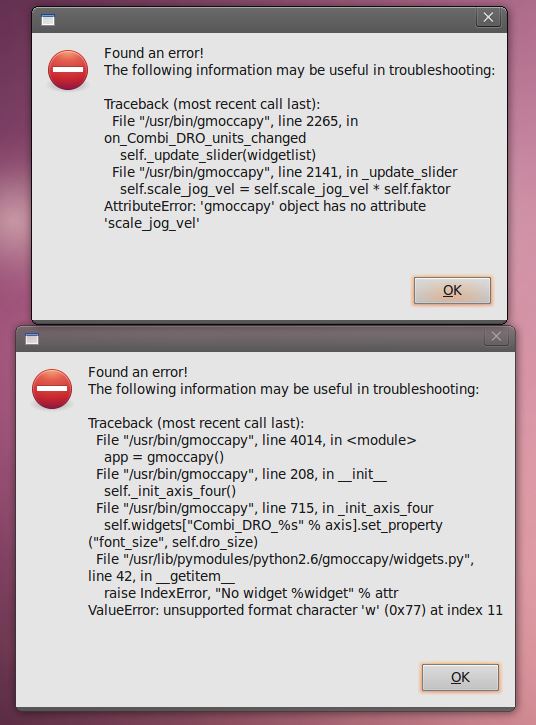
Please Log in or Create an account to join the conversation.
Moderators: newbynobi, HansU
Time to create page: 0.717 seconds