
- Posts: 42
- Thank you received: 49
Trajectory Planner using Ruckig Lib
- hmnijp
- Offline
- Senior Member
-

Less
More
2 years 4 months ago - 2 years 4 months ago #303243
by hmnijp
Replied by hmnijp on topic Trajectory Planner using Ruckig Lib
yes, it is a spiral in the corresponding plane (g17 for Z)
Linuxcnc is also able to draw multiturn spirals
G2 or G3 <X- Y- Z- I- J- P-> where P is the number of turns
Full circle or spiral programming is possible without axis words
G2 Z- I- J- P-
Linuxcnc is also able to draw multiturn spirals
G2 or G3 <X- Y- Z- I- J- P-> where P is the number of turns
Full circle or spiral programming is possible without axis words
G2 Z- I- J- P-
Last edit: 2 years 4 months ago by hmnijp.
The following user(s) said Thank You: Lcvette, Grotius
Please Log in or Create an account to join the conversation.
- Grotius
- Offline
- Platinum Member
-

Less
More
- Posts: 2419
- Thank you received: 2349
2 years 4 months ago #303266
by Grotius
Replied by Grotius on topic Trajectory Planner using Ruckig Lib
@Hmnijp,
Thanks for confirming.
Thanks for confirming.
The following user(s) said Thank You: Lcvette
Please Log in or Create an account to join the conversation.
- Grotius
- Offline
- Platinum Member
-
Less
More
- Posts: 2419
- Thank you received: 2349
2 years 4 months ago #303353
by Grotius
Replied by Grotius on topic Trajectory Planner using Ruckig Lib
Hi,
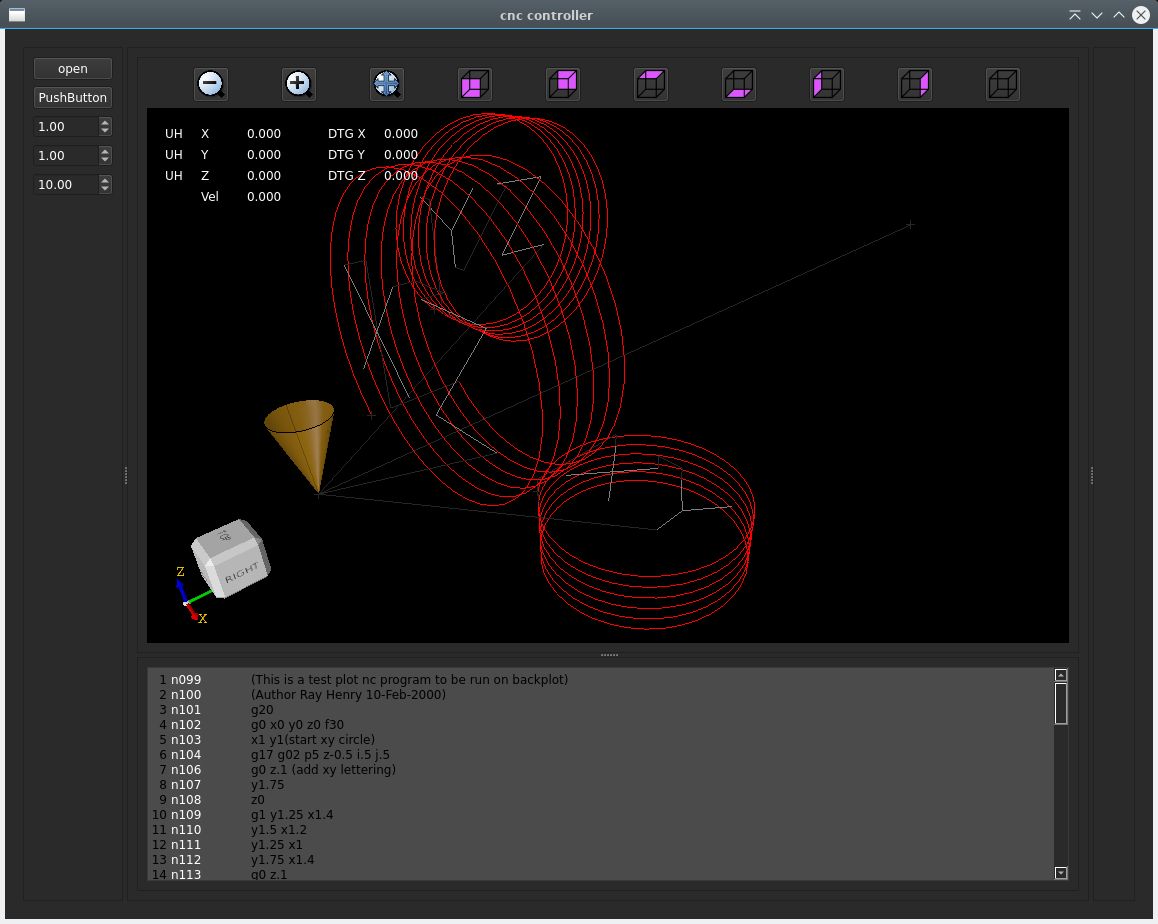
The helix, or spirals are working now for 3 planes. G17 xy-plane, G18 xz-plane, G19 yz-plane.
They use G2 or G3 for helix direction.
I started using opencascade to create a cilinder surface, and then combine it with a line on that surface,
there was a example, it all turned out to nothing as i need to start at a given point, need to end at a given point,
add extra turns if requested etc.
So ended up starting to write functions plane by plane, as i find the yz-plane the most difficult to code.
And i also seperated G2 and G3 functions to keep it simple.
And as Hmnijp mentioned in his post, it can use the P word for nr of turns.
This nr of turns is tested in the lcnc 3d example ngc file:
And then the gcode file of robh, the helix is also color red:
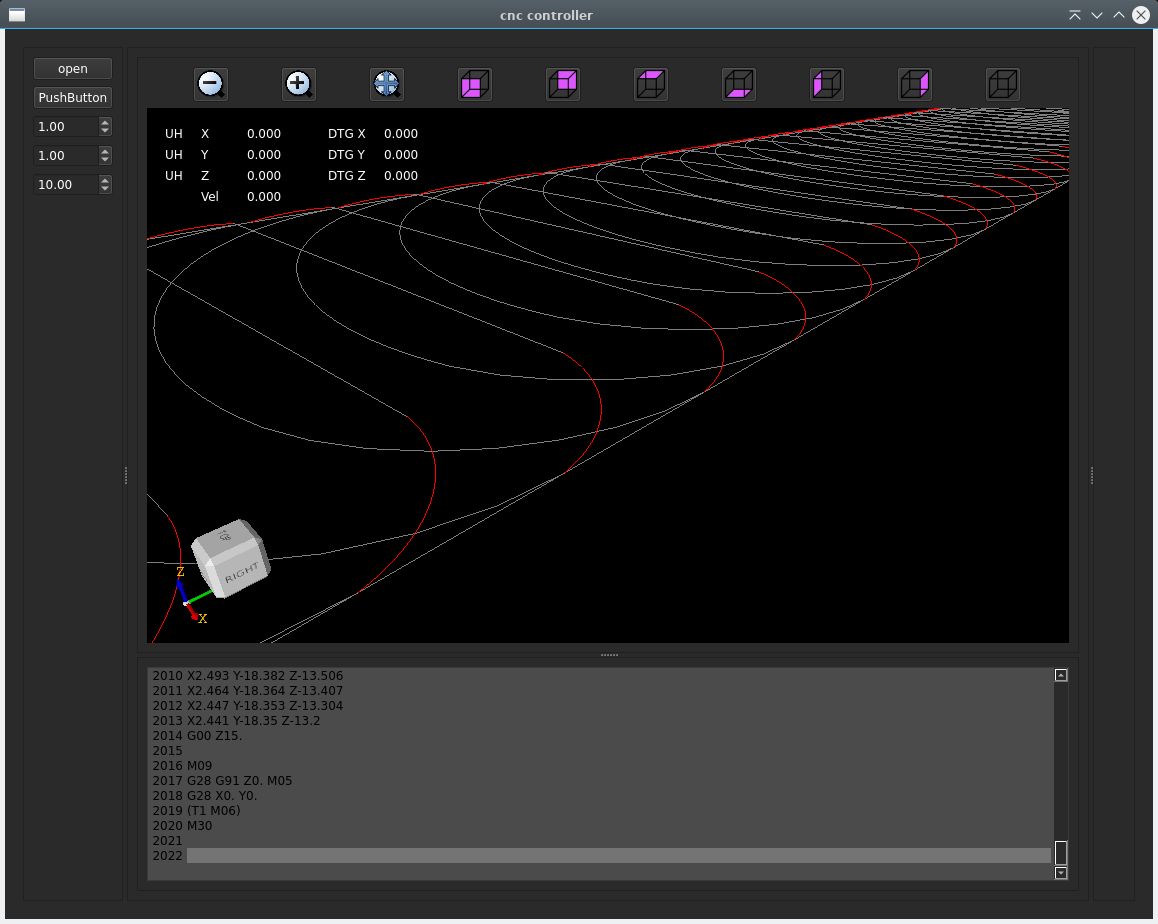
Ok, this looks ok for now.
Helix source file creating a spiral, helix : creating a G2 helix
My conclusion is : Helix start, endpoints are impossible to use for a 2d tri-clothoid fillet to get G2 continuity.
The only way to get the G2 continuity fillet for a helix is to modify the helix spring curvature into a tri-clothoid curvature.
So the spring of the helix will have the model of a tri-clothoid. Is this usefull?
The helix, or spirals are working now for 3 planes. G17 xy-plane, G18 xz-plane, G19 yz-plane.
They use G2 or G3 for helix direction.
I started using opencascade to create a cilinder surface, and then combine it with a line on that surface,
there was a example, it all turned out to nothing as i need to start at a given point, need to end at a given point,
add extra turns if requested etc.
So ended up starting to write functions plane by plane, as i find the yz-plane the most difficult to code.
And i also seperated G2 and G3 functions to keep it simple.
And as Hmnijp mentioned in his post, it can use the P word for nr of turns.
This nr of turns is tested in the lcnc 3d example ngc file:
And then the gcode file of robh, the helix is also color red:
Ok, this looks ok for now.
Helix source file creating a spiral, helix : creating a G2 helix
My conclusion is : Helix start, endpoints are impossible to use for a 2d tri-clothoid fillet to get G2 continuity.
The only way to get the G2 continuity fillet for a helix is to modify the helix spring curvature into a tri-clothoid curvature.
So the spring of the helix will have the model of a tri-clothoid. Is this usefull?
The following user(s) said Thank You: tommylight, Lcvette
Please Log in or Create an account to join the conversation.
- Grotius
- Offline
- Platinum Member
-
Less
More
- Posts: 2419
- Thank you received: 2349
2 years 4 months ago #303355
by Grotius
Replied by Grotius on topic Trajectory Planner using Ruckig Lib
Hi,
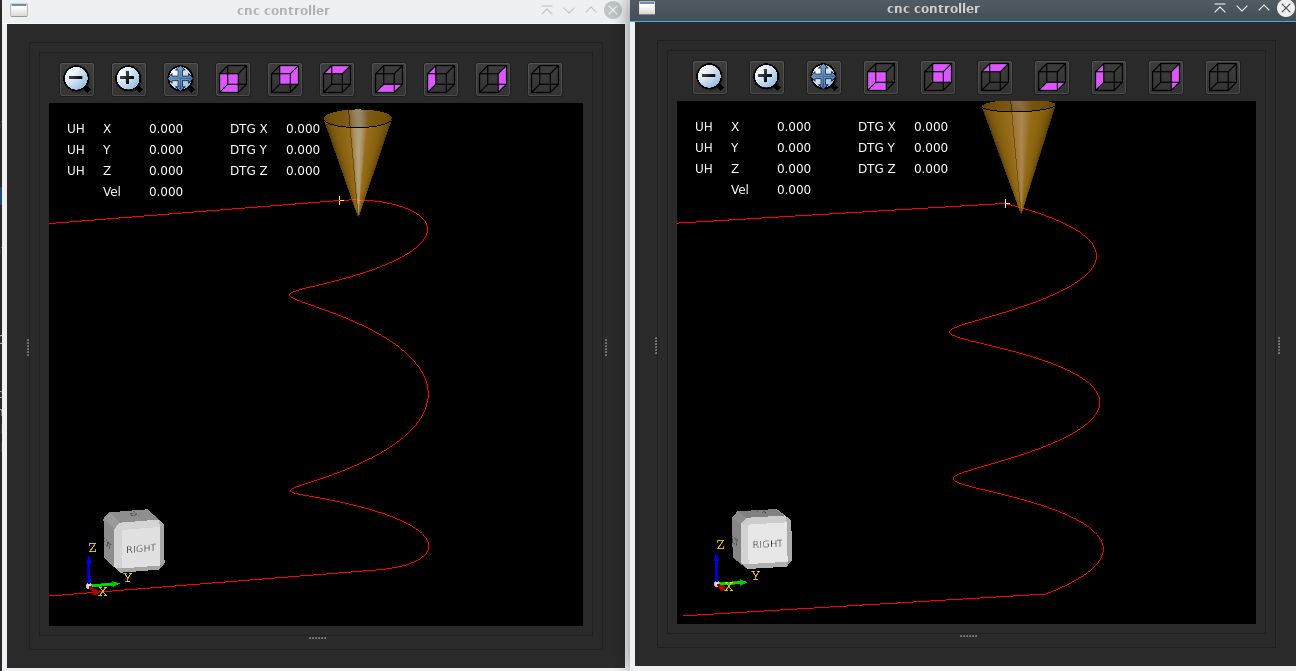
Now i added a helix G2 continuity test function.
Instead of drawing a helix in a plane, we add something special.
It's a G2 helix (clockwise arc), 2 gcode lines are attached. You can see what happens in both situations.
So it starts the helix with zero curvature (k value) in the spring axis, in this case top view xy plane G17.
Then along the path it uses a cos function to increase the curvature along the path.
Then at the end it comes down to zero curvature.
So now this spiral, or helix has G2 continuity and can be used to create fillets with a tri-clothoid.

I think for spiral we can use the gcode L word to enable G2 continuity mode like :
G2 P2 I0.5 J0.5 Z1 L1
P= turns
L= enable G2 continuity for spirals
Now i added a helix G2 continuity test function.
Instead of drawing a helix in a plane, we add something special.
It's a G2 helix (clockwise arc), 2 gcode lines are attached. You can see what happens in both situations.
So it starts the helix with zero curvature (k value) in the spring axis, in this case top view xy plane G17.
Then along the path it uses a cos function to increase the curvature along the path.
Then at the end it comes down to zero curvature.
So now this spiral, or helix has G2 continuity and can be used to create fillets with a tri-clothoid.
I think for spiral we can use the gcode L word to enable G2 continuity mode like :
G2 P2 I0.5 J0.5 Z1 L1
P= turns
L= enable G2 continuity for spirals
The following user(s) said Thank You: Lcvette, Aciera
Please Log in or Create an account to join the conversation.
- automata
- Offline
- Premium Member
-

Less
More
- Posts: 105
- Thank you received: 93
2 years 4 months ago #303367
by automata
Replied by automata on topic Trajectory Planner using Ruckig Lib
Kudos Grotius!
Maybe the L1 can be made as a G64 parameter and the default value set at startup like the G64 P and Q parameters.
Another option would be to set it up as an ini parameter.
Will the clothoid interpolation work for 9 axis G1 moves?
Regards
automata
Maybe the L1 can be made as a G64 parameter and the default value set at startup like the G64 P and Q parameters.
Another option would be to set it up as an ini parameter.
Will the clothoid interpolation work for 9 axis G1 moves?
Regards
automata
The following user(s) said Thank You: Lcvette, Grotius
Please Log in or Create an account to join the conversation.
- Grotius
- Offline
- Platinum Member
-
Less
More
- Posts: 2419
- Thank you received: 2349
2 years 4 months ago #303373
by Grotius
Replied by Grotius on topic Trajectory Planner using Ruckig Lib
@Automata,
Yes, G64 P.. Q.. L..
Will the clothoid interpolation work for 9 axis G1 moves?
It is going to work, but we need someone who makes a tiny document how the rules are to achieve this.
I mean, i will code it following the document guide lines, coding steps.
So the document needs a few steps, what are the rules for interpolation on 9 axis. Wich axis first, when what
to do and so on.
Maybe you can make the document and think about it extensively.
Here are the results of a helix not doing a G2 continuity, G2 ... L0
Clearly you see sharp transition corner in yellow, this is bad for machine :
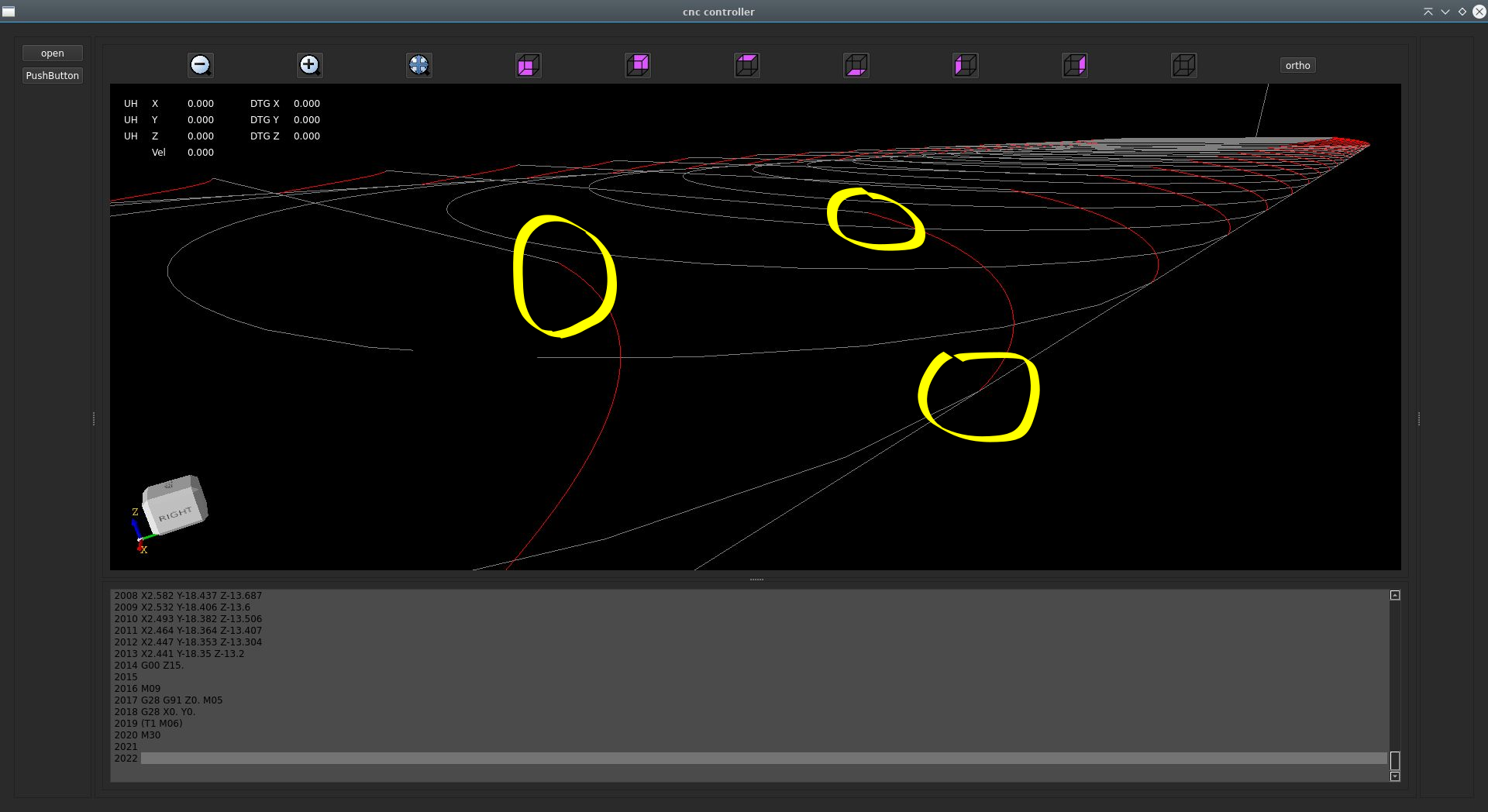
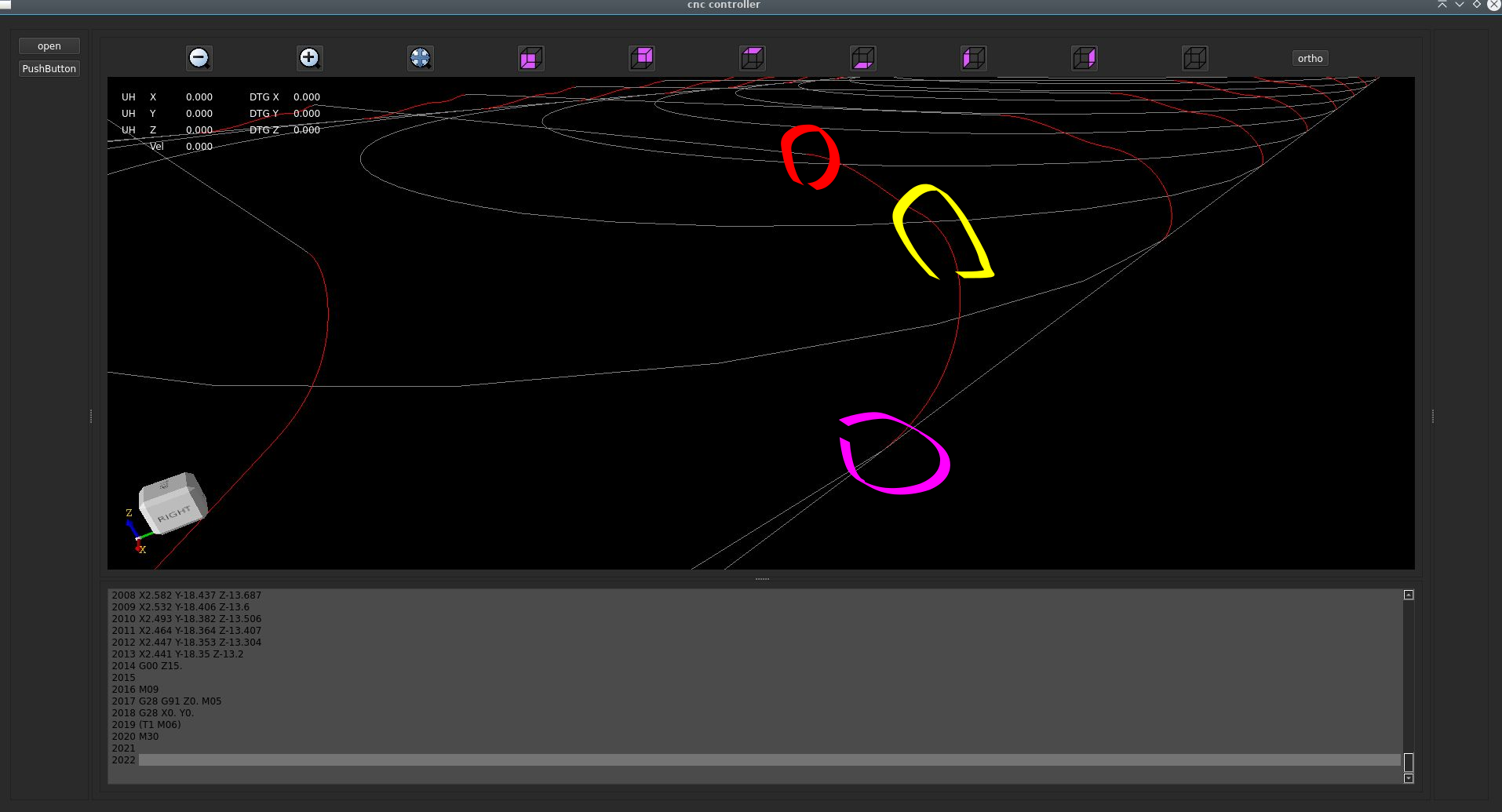
And a helix doing G2 continuity in the testfile of Robh, G2 ... L1:
Yellow is transition from helix to helix. Red and purple, no transition corners visible.
Path is better for machine.
Yes, G64 P.. Q.. L..
Will the clothoid interpolation work for 9 axis G1 moves?
It is going to work, but we need someone who makes a tiny document how the rules are to achieve this.
I mean, i will code it following the document guide lines, coding steps.
So the document needs a few steps, what are the rules for interpolation on 9 axis. Wich axis first, when what
to do and so on.
Maybe you can make the document and think about it extensively.
Here are the results of a helix not doing a G2 continuity, G2 ... L0
Clearly you see sharp transition corner in yellow, this is bad for machine :
And a helix doing G2 continuity in the testfile of Robh, G2 ... L1:
Yellow is transition from helix to helix. Red and purple, no transition corners visible.
Path is better for machine.
The following user(s) said Thank You: pommen, Lcvette
Please Log in or Create an account to join the conversation.
Time to create page: 1.221 seconds