
- Posts: 4819
- Thank you received: 2177
Trajectory Planner using Ruckig Lib
- Aciera
- Offline
- Administrator
-

Less
More
2 years 3 months ago #304260
by Aciera
Replied by Aciera on topic Trajectory Planner using Ruckig Lib
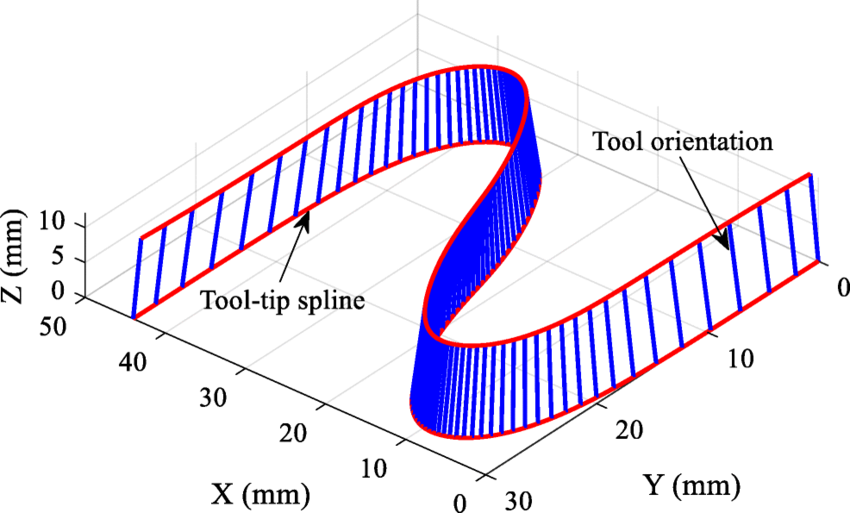
Here is another image that shows the tool-tip spline (ie TCP/ tool position) the tool orientation in blue and the resulting tool-orientation spline:
The following user(s) said Thank You: tivoi, Grotius
Please Log in or Create an account to join the conversation.
- Aciera
- Offline
- Administrator
-
Less
More
- Posts: 4819
- Thank you received: 2177
2 years 3 months ago - 2 years 3 months ago #304261
by Aciera
Replied by Aciera on topic Trajectory Planner using Ruckig Lib
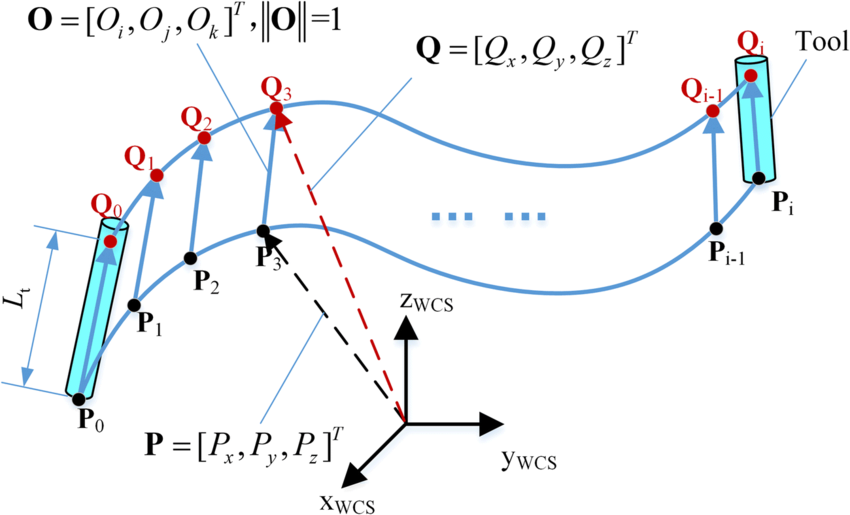
This might be the best one ('Lt' would be the fixed distance), Points 'Pn' would be the tool positions (XYZ) and Points 'Qn' the 'TA knots/ TC knots':
Last edit: 2 years 3 months ago by Aciera.
The following user(s) said Thank You: tommylight, Grotius
Please Log in or Create an account to join the conversation.
- Grotius
- Offline
- Platinum Member
-

Less
More
- Posts: 2419
- Thank you received: 2349
2 years 3 months ago #304272
by Grotius
Replied by Grotius on topic Trajectory Planner using Ruckig Lib
Hi Arciera,
I understand now.
Then my interpolation proposal seems correct :
G1 X1 Y2 Z3 A10 C20
G1 X11 Y2 Z3 A20 C40
Here the xyz moves 10 mm = Line lenght xyz.
Lets assume the spline or fillet lenght from "Q0 to Q1" -> "A10 C20 to A20 C40" = 40mm
Then the interpolation for xyz at 5mm = t0.5 (for interpolation i use time 0 to 1 for a segment)
For Q0 to Q1 is t0.5*40mm = 20mm on the spline or fillet path.
Then we can calculate new vector for A & C. This vector then has a A and a C value for radians.
This whole circus can be done offline in opencascade cad.
So just like you proposed, we do the
1. Run the clothoid fillets algo based on G64 P & Q input values. In one gcode file different fillet sizes can be given.
2. Run a tool orientation algo for a & b axis. I think using A & B is simplest. This then solves smoothing for A & B axis toolpath.
3. Run a check if A & C orientation's can be made in the xyz move time, otherwise xyz velocity must be lowered down.
Did we miss something? Or is it ready to be coded?
I understand now.
Then my interpolation proposal seems correct :
G1 X1 Y2 Z3 A10 C20
G1 X11 Y2 Z3 A20 C40
Here the xyz moves 10 mm = Line lenght xyz.
Lets assume the spline or fillet lenght from "Q0 to Q1" -> "A10 C20 to A20 C40" = 40mm
Then the interpolation for xyz at 5mm = t0.5 (for interpolation i use time 0 to 1 for a segment)
For Q0 to Q1 is t0.5*40mm = 20mm on the spline or fillet path.
Then we can calculate new vector for A & C. This vector then has a A and a C value for radians.
This whole circus can be done offline in opencascade cad.
So just like you proposed, we do the
1. Run the clothoid fillets algo based on G64 P & Q input values. In one gcode file different fillet sizes can be given.
2. Run a tool orientation algo for a & b axis. I think using A & B is simplest. This then solves smoothing for A & B axis toolpath.
3. Run a check if A & C orientation's can be made in the xyz move time, otherwise xyz velocity must be lowered down.
Did we miss something? Or is it ready to be coded?
Please Log in or Create an account to join the conversation.
- Grotius
- Offline
- Platinum Member
-
Less
More
- Posts: 2419
- Thank you received: 2349
2 years 3 months ago #304275
by Grotius
Replied by Grotius on topic Trajectory Planner using Ruckig Lib
@Hi,
Tonight i went to the production machine with a hard-drive for testing hal-core.
After figuring out how to setup hal parport and run posix realtime etc for a few hours,
i managed to run the machine on hal-core.
Most of you know halcore uses no python and is very compact coded.
It run's posix realtime, so i am happy for today.
github up to date
Tonight i went to the production machine with a hard-drive for testing hal-core.
After figuring out how to setup hal parport and run posix realtime etc for a few hours,
i managed to run the machine on hal-core.
Most of you know halcore uses no python and is very compact coded.
It run's posix realtime, so i am happy for today.
github up to date
The following user(s) said Thank You: tommylight, Clive S, tiagounderground, zmrdko, Unlogic
Please Log in or Create an account to join the conversation.
- Aciera
- Offline
- Administrator
-
Less
More
- Posts: 4819
- Thank you received: 2177
2 years 3 months ago #304302
by Aciera
Replied by Aciera on topic Trajectory Planner using Ruckig Lib
This would only work for a machine with XYZAB kinematics so the algorithm needs to be adjusted depending on the type of machine kinematics used in the particular config as solving for AB angles will not work for XYZAC (C axis instead of a B axis) or XYZBC (C axis instead of a A axis) machines.2. Run a tool orientation algo for a & b axis. I think using A & B is simplest. This then solves smoothing for A & B axis toolpath.
I'm still a bit confused seeing that tool motion still decelerates to a full stop after each segment. I guess feed rate blending over consecutive feed moves is a separate problem to solve but given the importance of constant tool velocity in CNC trajectory planning I'm wondering if you have a solution in mind for this yet.Tonight i went to the production machine with a hard-drive for testing hal-core.
After figuring out how to setup hal parport and run posix realtime etc for a few hours,
i managed to run the machine on hal-core.
The following user(s) said Thank You: Grotius
Please Log in or Create an account to join the conversation.
- Grotius
- Offline
- Platinum Member
-
Less
More
- Posts: 2419
- Thank you received: 2349
2 years 3 months ago #304318
by Grotius
Replied by Grotius on topic Trajectory Planner using Ruckig Lib
Hi Arciera,
Yes XYZAC, XYZBC need different kinematics. For the math and calculating the tool direction in opencascade i just
thought use the letters A & B. At this stage the kinematics are not solved. Only the tool tcp & tool direction is then solved.
Do you think this is ok?
I'm still a bit confused seeing that tool motion still decelerates to a full stop after each segment.
In the video i speak about a first test without any motion logic for hal-core. Stopping motion at each gcode line.
Next step now is to add g64 fillets to the gcode. Then eventually the look ahead add's end velocity where it can.
Yes XYZAC, XYZBC need different kinematics. For the math and calculating the tool direction in opencascade i just
thought use the letters A & B. At this stage the kinematics are not solved. Only the tool tcp & tool direction is then solved.
Do you think this is ok?
I'm still a bit confused seeing that tool motion still decelerates to a full stop after each segment.
In the video i speak about a first test without any motion logic for hal-core. Stopping motion at each gcode line.
Next step now is to add g64 fillets to the gcode. Then eventually the look ahead add's end velocity where it can.
The following user(s) said Thank You: Aciera
Please Log in or Create an account to join the conversation.
Time to create page: 1.626 seconds