
- Posts: 4819
- Thank you received: 2177
Trajectory Planner using Ruckig Lib
- Aciera
- Offline
- Administrator
-

Less
More
2 years 3 months ago #304516
by Aciera
I'm not suggesting to limit the interpreter to this format but it would make a lot of sense to allow vector format as an option since it makes the calculation of the tool vector unnecessary. It seems kind of silly to have the CAM calculate the tool vector and then to invest in a postprocessor to calculate the rotary angles from the tool vector just to have your algorithm reconstruct the tool vector that we already had in the CAM output.
So basically:
1. Check if the first G01 command has I,J,K words
2a. if no then read the machine kinematics from the ini file and recalculate the tool vector from the ABC values
2b. if yes, use the IJK values to create the tool vector directly.
I have created kinematic models with mixed work side and tool side rotations but my 'tilted work plane work' only dealt with machines with tool side rotation (primary C, secondary B or A). Maybe I'll find some time to expand on that.
For Gcode that was postprocessed to fit a specific kinematic you need to account for the kinematic settings in the postprocessor (PP) to basically undo what the PP did AND you need to know the machine kinematics for the calculation of the rotary axis position to achieve the requested tool orientation.
If you decide to allow vector format Gcode then you only need to worry about kinematics for the calculation of the rotary axis position to achieve the requested tool orientation. This is why I suggested looking at vector (ie IJK) format as it's really the easier task.
However, the usual 4axis case will still likely still involve XYZA gcode. I think this would still work with the orientation path smoothing as it still creates a valid 3d curve that can be smoothed out to a G2 continuous path. What happens if you feed your 5axis test a XYZA gcode (ie B and C angle values all zero)?
Note: I would interpret XYZA as a machine with linear cartesian XYZ axes and a rotary A (ie rotates the tool around the X axis). And again I _think_ that it is irrelevant whether A rotates the work or the tool.
Replied by Aciera on topic Trajectory Planner using Ruckig Lib
Yes, that is because the 5axis CAM output only consists of straight line segments (ie no G02 or G03 commands) the CAM user defines the length of the line segments.They use I,J,K for vector. But for G2, G3 that is not a valid gcode input.
I'm not suggesting to limit the interpreter to this format but it would make a lot of sense to allow vector format as an option since it makes the calculation of the tool vector unnecessary. It seems kind of silly to have the CAM calculate the tool vector and then to invest in a postprocessor to calculate the rotary angles from the tool vector just to have your algorithm reconstruct the tool vector that we already had in the CAM output.
So basically:
1. Check if the first G01 command has I,J,K words
2a. if no then read the machine kinematics from the ini file and recalculate the tool vector from the ABC values
2b. if yes, use the IJK values to create the tool vector directly.
Not sure I can follow you there. I don't see the need for U,V,W for work side rotations. Come to think of it I may have been confused myself by thinking we need to handle work side rotation differently from tool side rotation as I thought we would need to reverse the rotation direction. However the positive rotation is defined in respect to the tool rotation around the machine XYZ in either case.Basicly when using external rotary table, we could use this as axis u,v,w.
Where u=rotation around x, v=rotation around y, and w=rotary table clamp symetric axis.
Then we have a xyz, abc, uvw machine, 6 axis for tool, 3 axis for extern rotary table.
I have created kinematic models with mixed work side and tool side rotations but my 'tilted work plane work' only dealt with machines with tool side rotation (primary C, secondary B or A). Maybe I'll find some time to expand on that.
So all other configurations, like xyzab, xyzac, xyza, etc need a different software approach.
And i think not all of these variants can use tooldirection optimalisation. Like xyza, where a is secondaire z axis.
For Gcode that was postprocessed to fit a specific kinematic you need to account for the kinematic settings in the postprocessor (PP) to basically undo what the PP did AND you need to know the machine kinematics for the calculation of the rotary axis position to achieve the requested tool orientation.
If you decide to allow vector format Gcode then you only need to worry about kinematics for the calculation of the rotary axis position to achieve the requested tool orientation. This is why I suggested looking at vector (ie IJK) format as it's really the easier task.
However, the usual 4axis case will still likely still involve XYZA gcode. I think this would still work with the orientation path smoothing as it still creates a valid 3d curve that can be smoothed out to a G2 continuous path. What happens if you feed your 5axis test a XYZA gcode (ie B and C angle values all zero)?
Note: I would interpret XYZA as a machine with linear cartesian XYZ axes and a rotary A (ie rotates the tool around the X axis). And again I _think_ that it is irrelevant whether A rotates the work or the tool.
Overall the current use of kinematic modules works quite well, except for the inability of the trajectory planner to catch axis limit violations in the look ahead and decelerate in a controlled manner before raising a sudden joint limit abort. This would be nice to have but would mean that the planner passes every motion segment through the custom kinematic module to check for limit violations before actually adding it to the queue.Then it should use correspondenting c++ function to translate gcode into the proper tcp, and other axis.
Like choosing kinematics.
The following user(s) said Thank You: Grotius
Please Log in or Create an account to join the conversation.
- Aciera
- Offline
- Administrator
-
Less
More
- Posts: 4819
- Thank you received: 2177
2 years 3 months ago #304517
by Aciera
Replied by Aciera on topic Trajectory Planner using Ruckig Lib
Here is a post regarding vector format that actually seems to be familiar with it.
forum.linuxcnc.org/10-advanced-configura...gcode?start=0#143455
As for the absence of arc moves in vector format code see this post in the same thread:
forum.linuxcnc.org/10-advanced-configura...gcode?start=0#143507
forum.linuxcnc.org/10-advanced-configura...gcode?start=0#143455
As for the absence of arc moves in vector format code see this post in the same thread:
forum.linuxcnc.org/10-advanced-configura...gcode?start=0#143507
The following user(s) said Thank You: Grotius
Please Log in or Create an account to join the conversation.
- Grotius
- Offline
- Platinum Member
-

Less
More
- Posts: 2419
- Thank you received: 2349
2 years 3 months ago #304531
by Grotius
Replied by Grotius on topic Trajectory Planner using Ruckig Lib
@Arciera,
Yes, that is because the 5axis CAM output only consists of straight line segments (ie no G02 or G03 commands) the CAM user defines the length of the line segments.
I wasn't aware off this. This makes things easyer.
But i think it's stupid to use no G2, G3 in 5 axis machine code.
--
We where wrong about connecting the ta knots with lines.
Proposing connect ta (tool dir points) knots with lines. :
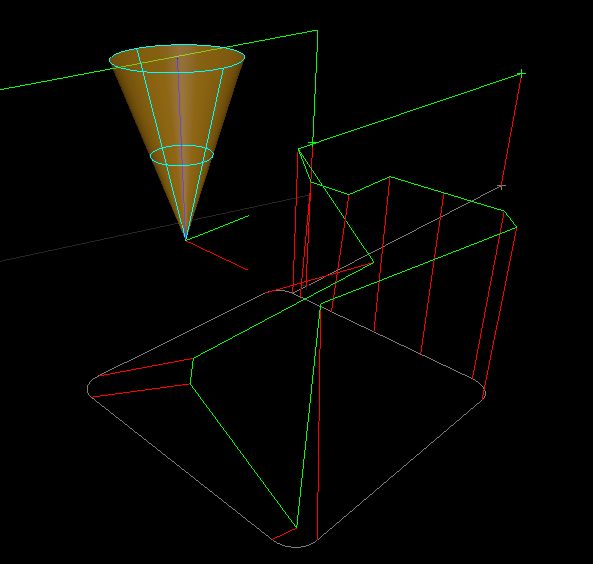
The thin blue line is the recorded tooldir path:
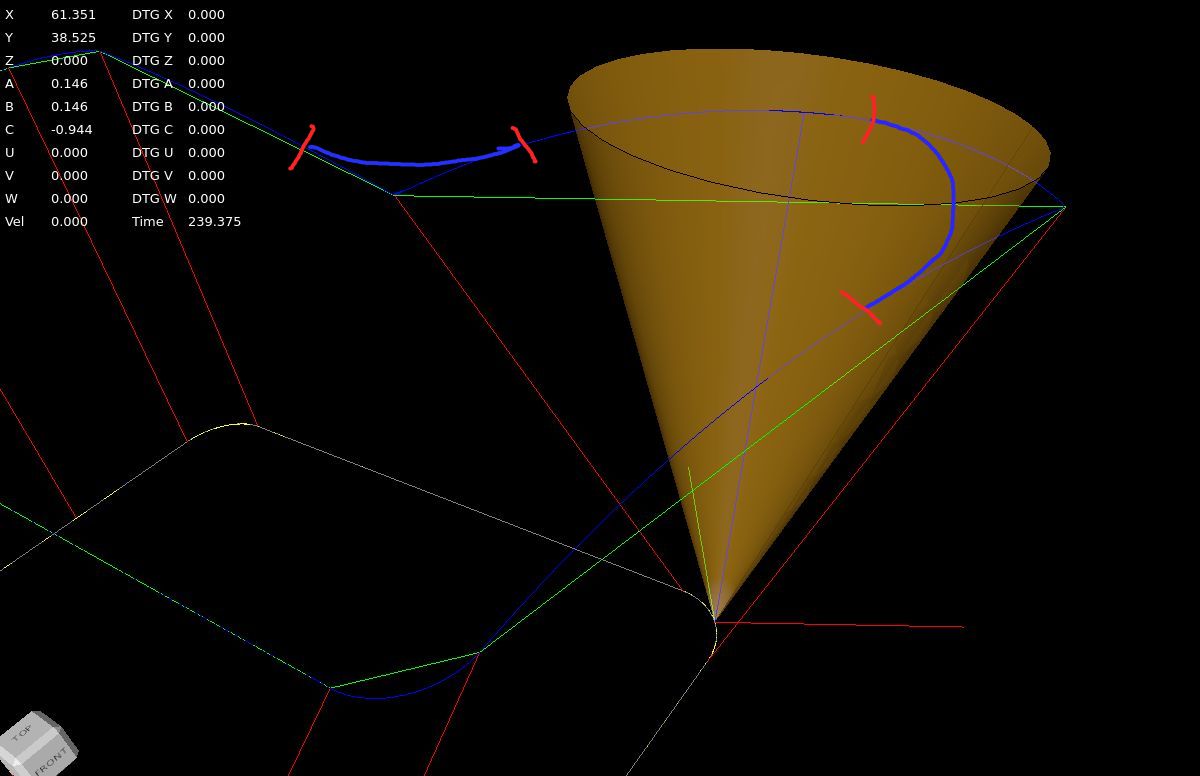
I think we need to create the recordedb blue toolpath before program starts. Then create the fillets, like
sketched in the image.
This example uses gcode with no G64 fillets so far. This is just a example howto get where we want to.
Short movie how to tool tp and tool dir are recorded.
I will now try to create an idea to add clothoid fillets to the tool tp path and tool dir path.
Yes, that is because the 5axis CAM output only consists of straight line segments (ie no G02 or G03 commands) the CAM user defines the length of the line segments.
I wasn't aware off this. This makes things easyer.
But i think it's stupid to use no G2, G3 in 5 axis machine code.
--
We where wrong about connecting the ta knots with lines.
Proposing connect ta (tool dir points) knots with lines. :
The thin blue line is the recorded tooldir path:
I think we need to create the recordedb blue toolpath before program starts. Then create the fillets, like
sketched in the image.
This example uses gcode with no G64 fillets so far. This is just a example howto get where we want to.
Short movie how to tool tp and tool dir are recorded.
I will now try to create an idea to add clothoid fillets to the tool tp path and tool dir path.
The following user(s) said Thank You: Aciera
Please Log in or Create an account to join the conversation.
- Grotius
- Offline
- Platinum Member
-
Less
More
- Posts: 2419
- Thank you received: 2349
2 years 3 months ago #304533
by Grotius
Replied by Grotius on topic Trajectory Planner using Ruckig Lib
1. Check if the first G01 command has I,J,K words
2a. if no then read the machine kinematics from the ini file and recalculate the tool vector from the ABC values
2b. if yes, use the IJK values to create the tool vector directly.
I think in my program if u have 5 axis gcode as you say that are only G0 or G1 segments.
Then parse I,J,K to letters A,B,C if a line has a G0 or G1. This could be done also by the 5 axis post processor.
The A,B,C are the tool vector. It doen's have to be a normalized vector.
Inside the program A, B, C has a transformation matrix, they are multiplied in order. Then multiplied by a tcp offset matrix.
For now to keep it simple..
Let's say we stick to the 6 axis machine configuration for now to solve the toolpath & tooldir optimalisation.
Then if this works, we can expand the code with different kinematic models.
2a. if no then read the machine kinematics from the ini file and recalculate the tool vector from the ABC values
2b. if yes, use the IJK values to create the tool vector directly.
I think in my program if u have 5 axis gcode as you say that are only G0 or G1 segments.
Then parse I,J,K to letters A,B,C if a line has a G0 or G1. This could be done also by the 5 axis post processor.
The A,B,C are the tool vector. It doen's have to be a normalized vector.
Inside the program A, B, C has a transformation matrix, they are multiplied in order. Then multiplied by a tcp offset matrix.
For now to keep it simple..
Let's say we stick to the 6 axis machine configuration for now to solve the toolpath & tooldir optimalisation.
Then if this works, we can expand the code with different kinematic models.
Please Log in or Create an account to join the conversation.
- Aciera
- Offline
- Administrator
-
Less
More
- Posts: 4819
- Thank you received: 2177
2 years 3 months ago - 2 years 3 months ago #304540
by Aciera
Yes, it's kind of obvious now that I see it:
If we are at X0 A0 and we have a move G1 X10 A180 then the connecting orientation line will actually intersect the toolpath. l didn't think of that.
I agree.
Well, it can't be that stupid if the big players do it that way.
[edit]
BTW, also see the gcode posted in here (not a single arc move):
forum.linuxcnc.org/38-general-linuxcnc-q...lib?start=430#303983
[/edit]
But in any case, ABC path smoothing is not limited to 5axis machining. Which is why I'm not suggesting to tailor this to vector format gcode exclusively. It just seems to be something that could be an option because it's actually the easier case.
Absolutely, pick a kinematic and test it. No point in getting spread out too much.
Replied by Aciera on topic Trajectory Planner using Ruckig Lib
We where wrong about connecting the ta knots with lines.
Yes, it's kind of obvious now that I see it:
If we are at X0 A0 and we have a move G1 X10 A180 then the connecting orientation line will actually intersect the toolpath. l didn't think of that.
I think we need to create the recordedb blue toolpath before program starts. Then create the fillets, like
sketched in the image.
I agree.
But i think it's stupid to use no G2, G3 in 5 axis machine code.
Well, it can't be that stupid if the big players do it that way.
[edit]
BTW, also see the gcode posted in here (not a single arc move):
forum.linuxcnc.org/38-general-linuxcnc-q...lib?start=430#303983
[/edit]
But in any case, ABC path smoothing is not limited to 5axis machining. Which is why I'm not suggesting to tailor this to vector format gcode exclusively. It just seems to be something that could be an option because it's actually the easier case.
For now to keep it simple..
Let's say we stick to the 6 axis machine configuration for now to solve the toolpath & tooldir optimalisation.
Then if this works, we can expand the code with different kinematic models.
Absolutely, pick a kinematic and test it. No point in getting spread out too much.
Last edit: 2 years 3 months ago by Aciera.
The following user(s) said Thank You: tommylight, Lcvette, Grotius
Please Log in or Create an account to join the conversation.
- Grotius
- Offline
- Platinum Member
-
Less
More
- Posts: 2419
- Thank you received: 2349
2 years 3 months ago - 2 years 3 months ago #304544
by Grotius
Replied by Grotius on topic Trajectory Planner using Ruckig Lib
If i add your move to the gcode.
Then we turn 180 radians.
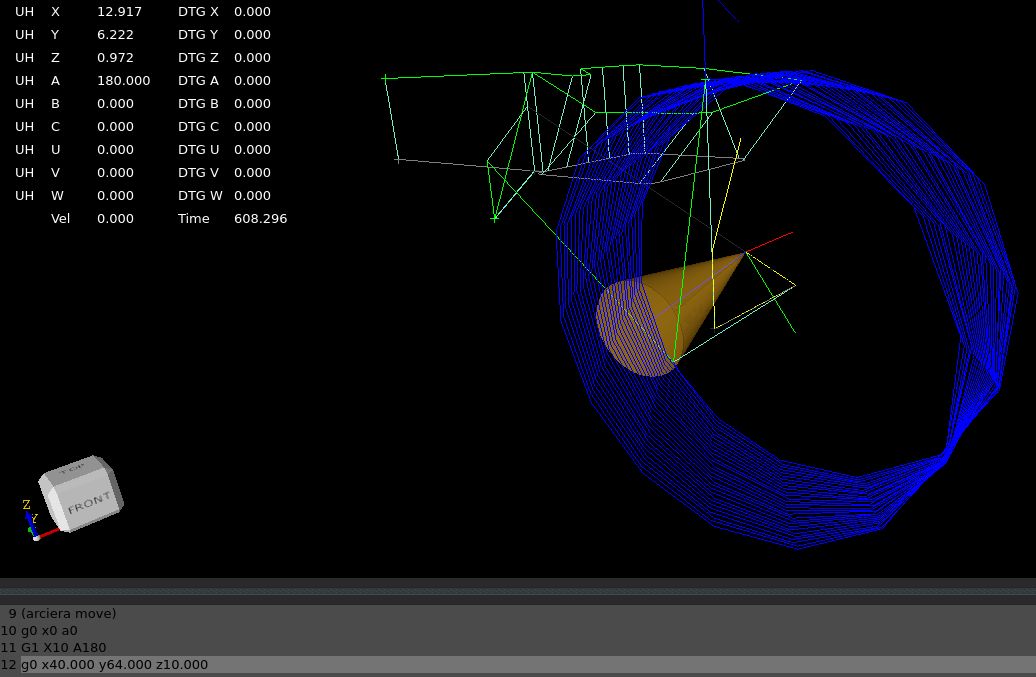
When we turn pi radians, 180 degrees this happens :
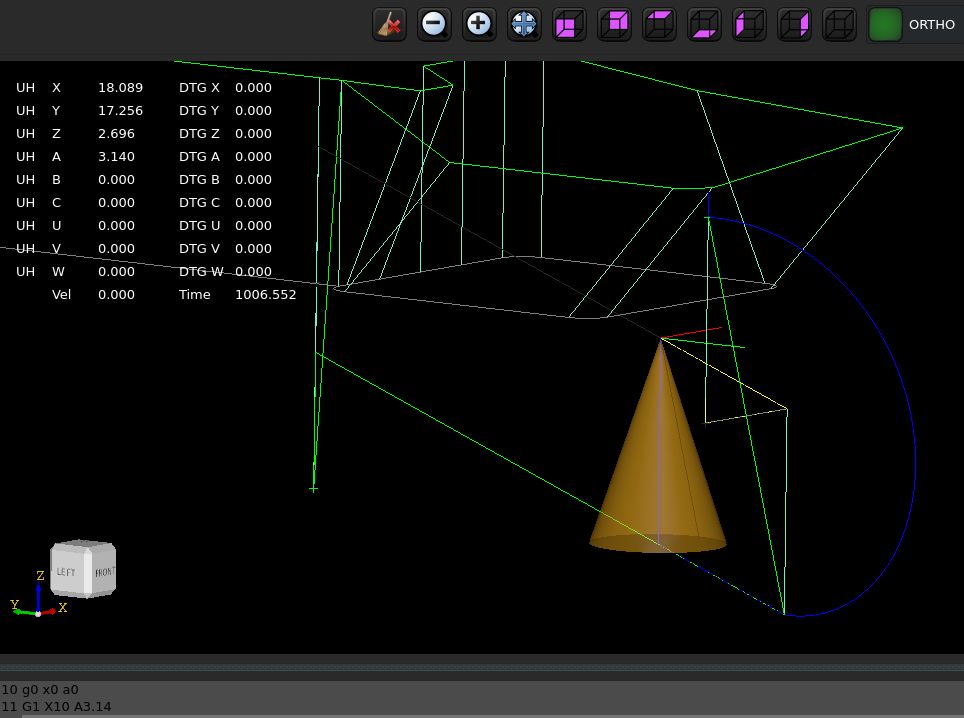
Now the program loads showing the actual tool dir path.
This tool dir path is calculated at program load at the user side. Kernel isn't aware of this.
The toolpath segments are off type 3d_polyline. This is like a linestrip.
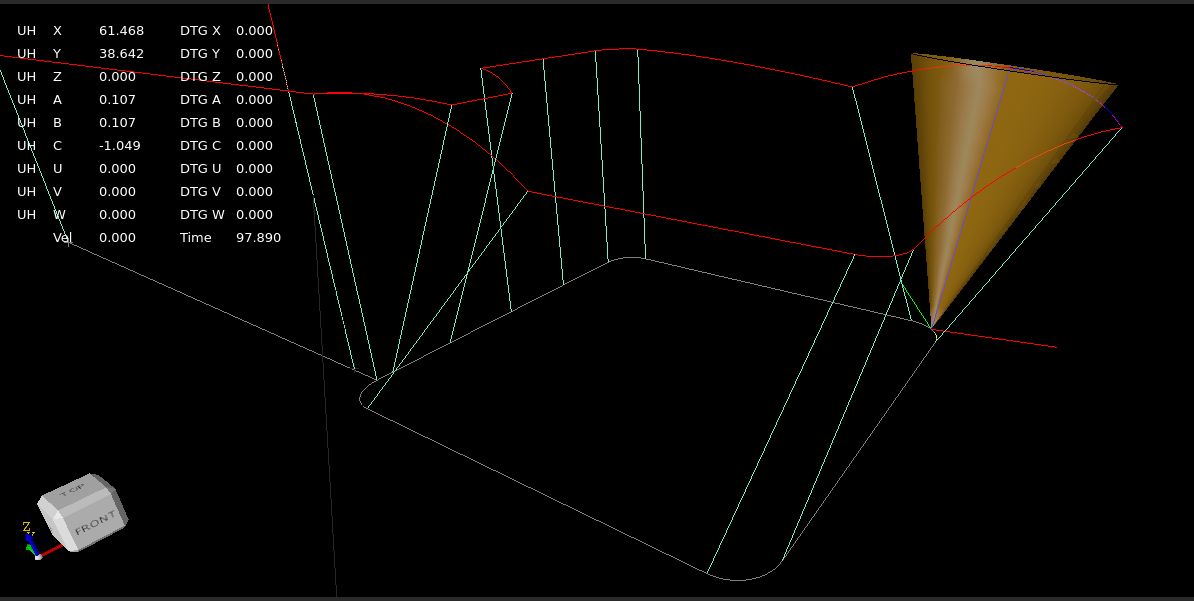
This looks like a nice basis to create fillets for both the tcp path & tooldir path.
Then we turn 180 radians.
When we turn pi radians, 180 degrees this happens :
Now the program loads showing the actual tool dir path.
This tool dir path is calculated at program load at the user side. Kernel isn't aware of this.
The toolpath segments are off type 3d_polyline. This is like a linestrip.
This looks like a nice basis to create fillets for both the tcp path & tooldir path.
Last edit: 2 years 3 months ago by Grotius.
The following user(s) said Thank You: tommylight, Lcvette, Aciera, Darium
Please Log in or Create an account to join the conversation.
Time to create page: 0.894 seconds