
- Posts: 205
- Thank you received: 127
LinuxCNC on Raspberry Pi 4
- elovalvo
- Offline
- Elite Member
-

Less
More
3 years 11 months ago - 3 years 11 months ago #256269
by elovalvo
The problem is more complicated than I thought and it's not just about cpuinfo.c and I think it's due to the new kernel you use:
kernel-vers -v: # 1 SMP PREEMPT_RT Debian 6.0.5-1 (2022-10-28)
In fact, to temporarily overcome the problem I copied the file / proc / cpuinfo in / tmp with the following command
cp /proc/cpuinfo /tmp/cpuinfo.txt
I added the following string at the end of the file
Revision: c03112
and then I used the following command
mount --bind /tmp/cpuinfo.txt /proc/cpuinfo
At this point, however, the error has changed and is related to the hal_pi_gpio.c module
pi@raspberrypi:~ $ halrun -I
halcmd: loadrt hal_pi_gpio
Note: Using POSIX realtime
HAL_PI_GPIO: can't open /dev/gpiomem: 2 - No such file or directory
If the error is 'permission denied' then try adding the user who runs
LinuxCNC to the gpio group: sudo gpasswd -a username gpio
HAL_PI_GPIO: can't open /dev/mem: 13 - Permission denied
hal_pi_gpio: rtapi_app_main: Operation not permitted (-1)
<stdin>:1: waitpid failed /usr/bin/rtapi_app hal_pi_gpio
<stdin>:1: /usr/bin/rtapi_app exited without becoming ready
<stdin>:1: insmod for hal_pi_gpio failed, returned -1
halcmd: exit
Note: Using POSIX realtime
I tried as superuser but again a new error occurred
pi@raspberrypi:~ $ sudo halrun -I
halcmd: loadrt hal_pi_pio
Refusing to run as root without fallback UID specified
To run under a debugger with I/O, use e.g.,
sudo env RTAPI_UID=`id -u` RTAPI_FIFO_PATH=$HOME/.rtapi_fifo gdb /usr/bin/rtapi_app
<stdin>:1: waitpid failed /usr/bin/rtapi_app hal_pi_pio
<stdin>:1: /usr/bin/rtapi_app exited without becoming ready
<stdin>:1: insmod for hal_pi_pio failed, returned -1
halcmd: exit
Refusing to run as root without fallback UID specified
To run under a debugger with I/O, use e.g.,
sudo env RTAPI_UID=`id -u` RTAPI_FIFO_PATH=$HOME/.rtapi_fifo gdb /usr/bin/rtapi_app
pi@raspberrypi:~ $
I am therefore trying to figure out how to deal with the problem which I hope will be solved by a kernel update
Replied by elovalvo on topic LinuxCNC on Raspberry Pi 4
Was just wondering if you were able to update cpuinfo.c
The problem is more complicated than I thought and it's not just about cpuinfo.c and I think it's due to the new kernel you use:
kernel-vers -v: # 1 SMP PREEMPT_RT Debian 6.0.5-1 (2022-10-28)
In fact, to temporarily overcome the problem I copied the file / proc / cpuinfo in / tmp with the following command
cp /proc/cpuinfo /tmp/cpuinfo.txt
I added the following string at the end of the file
Revision: c03112
and then I used the following command
mount --bind /tmp/cpuinfo.txt /proc/cpuinfo
At this point, however, the error has changed and is related to the hal_pi_gpio.c module
pi@raspberrypi:~ $ halrun -I
halcmd: loadrt hal_pi_gpio
Note: Using POSIX realtime
HAL_PI_GPIO: can't open /dev/gpiomem: 2 - No such file or directory
If the error is 'permission denied' then try adding the user who runs
LinuxCNC to the gpio group: sudo gpasswd -a username gpio
HAL_PI_GPIO: can't open /dev/mem: 13 - Permission denied
hal_pi_gpio: rtapi_app_main: Operation not permitted (-1)
<stdin>:1: waitpid failed /usr/bin/rtapi_app hal_pi_gpio
<stdin>:1: /usr/bin/rtapi_app exited without becoming ready
<stdin>:1: insmod for hal_pi_gpio failed, returned -1
halcmd: exit
Note: Using POSIX realtime
I tried as superuser but again a new error occurred
pi@raspberrypi:~ $ sudo halrun -I
halcmd: loadrt hal_pi_pio
Refusing to run as root without fallback UID specified
To run under a debugger with I/O, use e.g.,
sudo env RTAPI_UID=`id -u` RTAPI_FIFO_PATH=$HOME/.rtapi_fifo gdb /usr/bin/rtapi_app
<stdin>:1: waitpid failed /usr/bin/rtapi_app hal_pi_pio
<stdin>:1: /usr/bin/rtapi_app exited without becoming ready
<stdin>:1: insmod for hal_pi_pio failed, returned -1
halcmd: exit
Refusing to run as root without fallback UID specified
To run under a debugger with I/O, use e.g.,
sudo env RTAPI_UID=`id -u` RTAPI_FIFO_PATH=$HOME/.rtapi_fifo gdb /usr/bin/rtapi_app
pi@raspberrypi:~ $
I am therefore trying to figure out how to deal with the problem which I hope will be solved by a kernel update
Last edit: 3 years 11 months ago by elovalvo.
Please Log in or Create an account to join the conversation.
- tjmarch
- Offline
- Premium Member
-

Less
More
- Posts: 152
- Thank you received: 22
3 years 11 months ago - 3 years 11 months ago #256604
by tjmarch
Replied by tjmarch on topic LinuxCNC on Raspberry Pi 4
To elovalvo,
Made a little progress was able to downgrade kernel to 5.15.65-rt49-v8+
from github.com/kdoren/linux/releases .
To do this I installed deb files then I copied initrd.img-5.15.65-rt49-v8+ and vmlinuz-5.15.65-rt49-v8+ from /boot to /boot/firmware.
Then made appropriate changes to /boot/firmware/config.txt
This eliminated original problem of not recognizing rpi board.
After reading this at roboticsbackend.com/raspberry-pi-hardware-permissions/
Then I added file /etc/udev/rules.d/local.rules with the following;
ACTION=="add", KERNEL=="mem", MODE="0666"
This got ride of permission problem for memory.
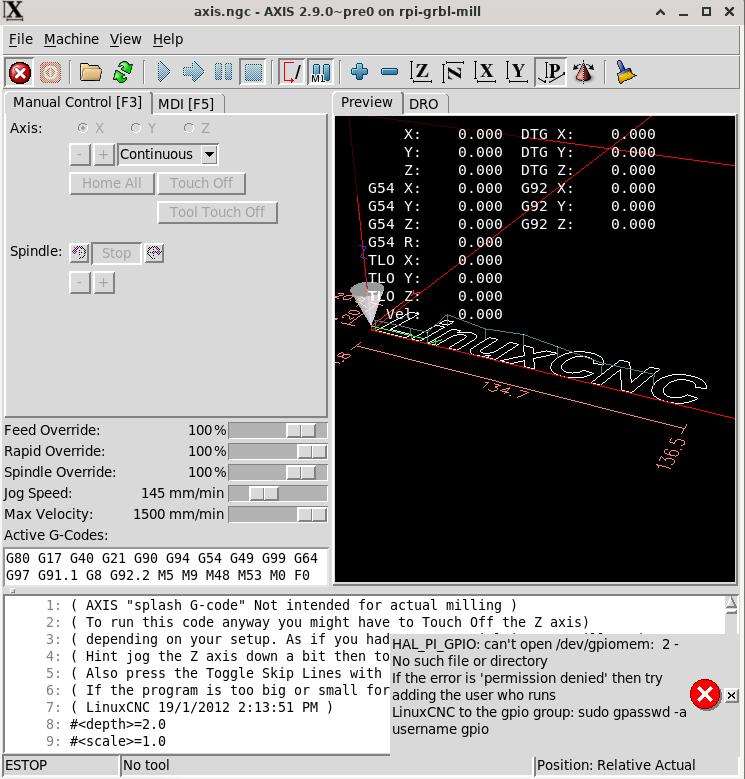
Now linuxcnc will start but still with error which I think goose back to
HAL_PI_GPIO: can't open /dev/gpiomem: 2 - No such file or directory
If you open terminal then
cd /dev
ls -l | more
you will see that there is no /dev/gpiomem
just gpiochip0 and gpiochip1
Made a little progress was able to downgrade kernel to 5.15.65-rt49-v8+
from github.com/kdoren/linux/releases .
To do this I installed deb files then I copied initrd.img-5.15.65-rt49-v8+ and vmlinuz-5.15.65-rt49-v8+ from /boot to /boot/firmware.
Then made appropriate changes to /boot/firmware/config.txt
This eliminated original problem of not recognizing rpi board.
After reading this at roboticsbackend.com/raspberry-pi-hardware-permissions/
Then I added file /etc/udev/rules.d/local.rules with the following;
ACTION=="add", KERNEL=="mem", MODE="0666"
This got ride of permission problem for memory.
Now linuxcnc will start but still with error which I think goose back to
HAL_PI_GPIO: can't open /dev/gpiomem: 2 - No such file or directory
If you open terminal then
cd /dev
ls -l | more
you will see that there is no /dev/gpiomem
just gpiochip0 and gpiochip1
Last edit: 3 years 11 months ago by tjmarch.
Please Log in or Create an account to join the conversation.
- tjmarch
- Offline
- Premium Member
-
Less
More
- Posts: 152
- Thank you received: 22
3 years 11 months ago #256705
by tjmarch
Replied by tjmarch on topic LinuxCNC on Raspberry Pi 4
To elovalvo,
After closer inspection of HAL pins that were created gpio pins were created correctly
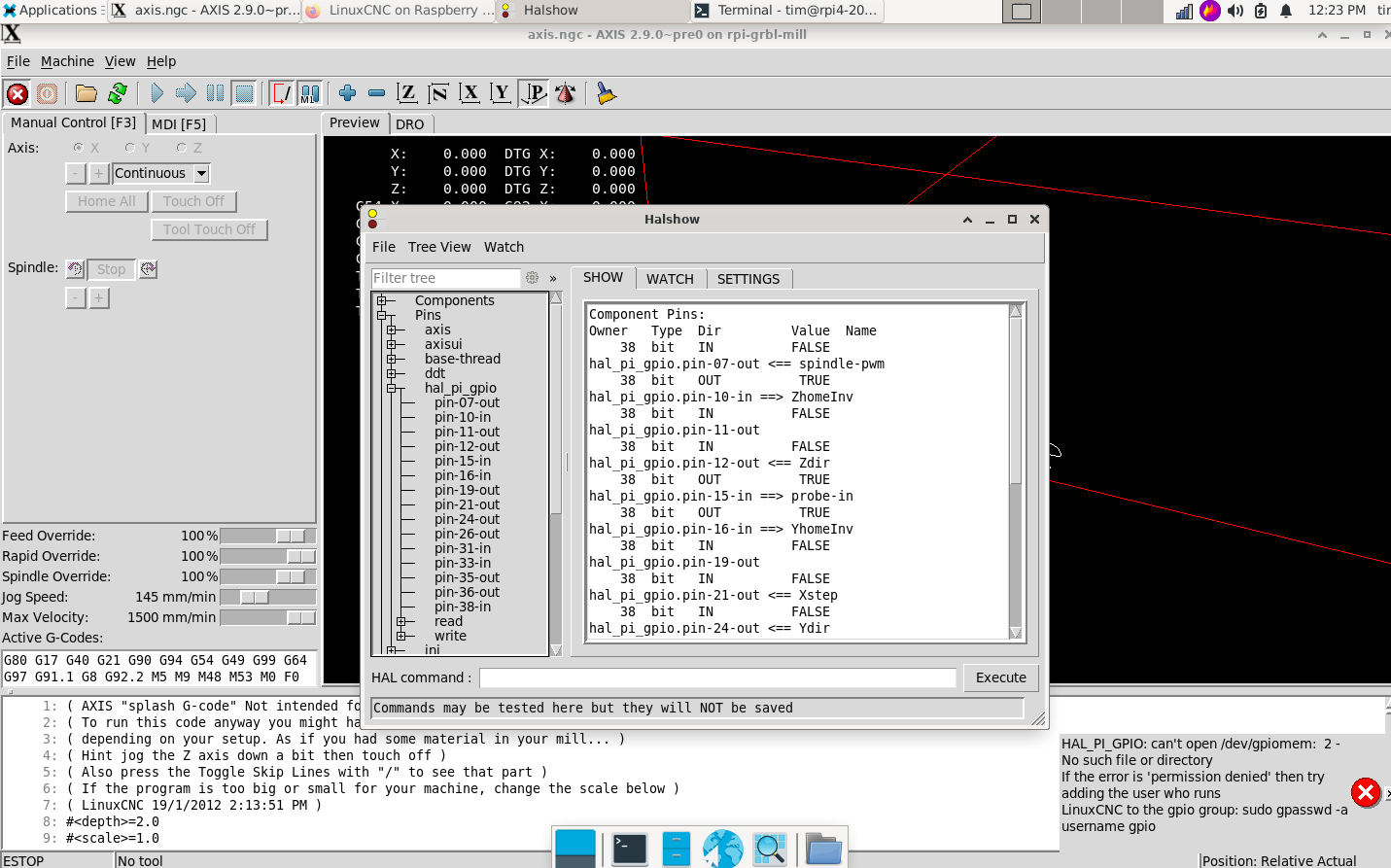
After closer inspection of HAL pins that were created gpio pins were created correctly
Please Log in or Create an account to join the conversation.
- elovalvo
- Offline
- Elite Member
-
Less
More
- Posts: 205
- Thank you received: 127
3 years 11 months ago #256942
by elovalvo
Unfortunately, despite many attempts, I have not been able to solve the problem.
I believe this is due to the new kernel version 6.0.5-1 (2022-10-28) that you are using.
As the full working version (5.15.65-rt49-v8+), based on Raspbian rather than Debian, is available here
forum.linuxcnc.org/9-installing-linuxcnc...cnc?start=150#253623
why do you want to use Debian? To switch to Bookworm?
Replied by elovalvo on topic LinuxCNC on Raspberry Pi 4
To elovalvo,
Made a little progress was able to downgrade kernel to 5.15.65-rt49-v8+
from github.com/kdoren/linux/releases .
To do this I installed deb files then I copied initrd.img-5.15.65-rt49-v8+ and vmlinuz-5.15.65-rt49-v8+ from /boot to /boot/firmware.
Then made appropriate changes to /boot/firmware/config.txt
This eliminated original problem of not recognizing rpi board.
After reading this at roboticsbackend.com/raspberry-pi-hardware-permissions/
Then I added file /etc/udev/rules.d/local.rules with the following;
ACTION=="add", KERNEL=="mem", MODE="0666"
This got ride of permission problem for memory.
Now linuxcnc will start but still with error which I think goose back to
HAL_PI_GPIO: can't open /dev/gpiomem: 2 - No such file or directory
If you open terminal then
cd /dev
ls -l | more
you will see that there is no /dev/gpiomem
just gpiochip0 and gpiochip1
Unfortunately, despite many attempts, I have not been able to solve the problem.
I believe this is due to the new kernel version 6.0.5-1 (2022-10-28) that you are using.
As the full working version (5.15.65-rt49-v8+), based on Raspbian rather than Debian, is available here
forum.linuxcnc.org/9-installing-linuxcnc...cnc?start=150#253623
why do you want to use Debian? To switch to Bookworm?
Please Log in or Create an account to join the conversation.
- elovalvo
- Offline
- Elite Member
-
Less
More
- Posts: 205
- Thank you received: 127
3 years 11 months ago - 3 years 11 months ago #257156
by elovalvo
Going to sift through my notes, I found that, as reported in this link ( forum.linuxcnc.org/9-installing-linuxcnc...-debian-64bit#178472 ), in this link ( forum.linuxcnc.org/9-installing-linuxcnc...-debian-64bit#158905 that you modified on 17/4/2021) there was a file (services or linuxcnc-mem-services.zip) that would solve the problem you indicated
In particular, I found these instructions
Do you have a chance to recover this file?
Replied by elovalvo on topic LinuxCNC on Raspberry Pi 4
To elovalvo,
...........
This got ride of permission problem for memory.
Now linuxcnc will start but still with error which I think goose back to
HAL_PI_GPIO: can't open /dev/gpiomem: 2 - No such file or directory
If you open terminal then
cd /dev
ls -l | more
you will see that there is no /dev/gpiomem
just gpiochip0 and gpiochip1
Going to sift through my notes, I found that, as reported in this link ( forum.linuxcnc.org/9-installing-linuxcnc...-debian-64bit#178472 ), in this link ( forum.linuxcnc.org/9-installing-linuxcnc...-debian-64bit#158905 that you modified on 17/4/2021) there was a file (services or linuxcnc-mem-services.zip) that would solve the problem you indicated
In particular, I found these instructions
Code:
# To overcome permissions for memory usage for gpio driver download the following archive
linuxcnc-mem-services.zip
There two files in archive extract them
setmempermissions.service
setgpiomempermissions.service
Place files in /etc/systemd/system/
Do in Terminal
sudo systemctl enable setmempermissions.service
sudo systemctl start setmempermissions.servicesudo
sudo systemctl enable setgpiomempermissions.service
sudo systemctl start setgpiomempermissions.service
sudo reboot -n
After reboot check /dev/mem and /dev/gpiomem permissions
In terminal
cd /dev
ls -l | more
press ENTER key to scroll through
Should be
crwxrwxrwx 1 root root 246, 0 Mar 1 09:50 gpiomem <---date and time will be different
crwxrwxrwx 1 root kmem 1, 1 Mar 1 09:50 mem
Do you have a chance to recover this file?
Last edit: 3 years 11 months ago by elovalvo.
Please Log in or Create an account to join the conversation.
- tjmarch
- Offline
- Premium Member
-
Less
More
- Posts: 152
- Thank you received: 22
3 years 11 months ago #257192
by tjmarch
Replied by tjmarch on topic LinuxCNC on Raspberry Pi 4
To elovalvo,
I deleted that post along with the files I had a long time ago, sorry. But those file would not have gotten rid of the problem of /dev/gpiomem because /dev/gpiomem dose not exsist on the version of debian that is in development for raspberry pi now. But Rasbian still uses /dev/gpiomem. The probem with reconizing the board can be overcome with using the kernel from github.com/kdoren/linux/releases . I also came up with a fix for /dev/mem useage from this artical roboticsbackend.com/raspberry-pi-hardware-permissions/
Then I added file /etc/udev/rules.d/local.rules with the following;
ACTION=="add", KERNEL=="mem", MODE="0666"
This got ride of permission problem for /dev/mem. What I think needs to happen is the Hal_pi_gpio driver needs to be updated to not use /dev/gpiomem when used with pure Debian OS.
Regards
Tim
I deleted that post along with the files I had a long time ago, sorry. But those file would not have gotten rid of the problem of /dev/gpiomem because /dev/gpiomem dose not exsist on the version of debian that is in development for raspberry pi now. But Rasbian still uses /dev/gpiomem. The probem with reconizing the board can be overcome with using the kernel from github.com/kdoren/linux/releases . I also came up with a fix for /dev/mem useage from this artical roboticsbackend.com/raspberry-pi-hardware-permissions/
Then I added file /etc/udev/rules.d/local.rules with the following;
ACTION=="add", KERNEL=="mem", MODE="0666"
This got ride of permission problem for /dev/mem. What I think needs to happen is the Hal_pi_gpio driver needs to be updated to not use /dev/gpiomem when used with pure Debian OS.
Regards
Tim
The following user(s) said Thank You: tommylight
Please Log in or Create an account to join the conversation.
Time to create page: 0.686 seconds