
- Posts: 403
- Thank you received: 75
Gmoccapy - A new screen for linuxcnc
- cncnoob1979
- Offline
- Platinum Member
-

Less
More
10 years 7 months ago #72062
by cncnoob1979
Replied by cncnoob1979 on topic Gmoccapy - A new screen for linuxcnc
Hey Norbert!
Thanks for the reply, Sorry I haven't responded as of yet. I will try to switch to a button to see if I get the same behavior. Where is the logic performed for Gmoccapy in reference to the E-Stop. I really like the design and will almost certainly be using this for my frontend.
I am replacing the computer I use to control the mill. I had a few complete freezes this past weekend. However I don't believe that this will be the culprit.
Did I mention I really like Gmoccapy? Also do you believe it will be possible to embed Linuxcnc-Features into a user tab? I have tried but failed at the attempt so far.
Thanks!
Thanks for the reply, Sorry I haven't responded as of yet. I will try to switch to a button to see if I get the same behavior. Where is the logic performed for Gmoccapy in reference to the E-Stop. I really like the design and will almost certainly be using this for my frontend.
I am replacing the computer I use to control the mill. I had a few complete freezes this past weekend. However I don't believe that this will be the culprit.
Did I mention I really like Gmoccapy? Also do you believe it will be possible to embed Linuxcnc-Features into a user tab? I have tried but failed at the attempt so far.
Thanks!
Please Log in or Create an account to join the conversation.
- newbynobi
- Offline
- Moderator
-

Less
More
- Posts: 1931
- Thank you received: 394
10 years 7 months ago #72070
by newbynobi
Replied by newbynobi on topic Gmoccapy - A new screen for linuxcnc
It is done in a combination of gladevcp, pytho status and gmoccapy.py.
Look in the gmoccapy.py file for on_hal_status as entry point.
Norbert
Look in the gmoccapy.py file for on_hal_status as entry point.
Norbert
Please Log in or Create an account to join the conversation.
- Robban
- Offline
- Junior Member
-

Less
More
- Posts: 30
- Thank you received: 2
10 years 6 months ago #73881
by Robban
Replied by Robban on topic Gmoccapy - A new screen for linuxcnc
Is it possible to get rid of the error i get when i embed the gearchange tab in gmoccapy, see the two images!
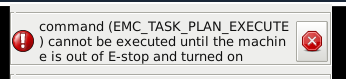
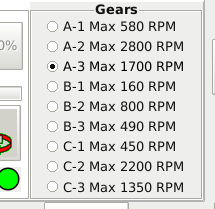
The gearchange tab is connected to the postgui hal with this code that runs an "M" file that changes the scale and offset in for the pwm gen.
The gearchange tab is connected to the postgui hal with this code that runs an "M" file that changes the scale and offset in for the pwm gen.
Code:
postgui hal
net vaxel-580 halui.mdi-command-16 <= vaxlar.hal_radiobutton1
net vaxel-2800 halui.mdi-command-17 <= vaxlar.hal_radiobutton2
net vaxel-1700 halui.mdi-command-18 <= vaxlar.hal_radiobutton3
net vaxel-160 halui.mdi-command-19 <= vaxlar.hal_radiobutton4
net vaxel-800 halui.mdi-command-20 <= vaxlar.hal_radiobutton5
net vaxel-490 halui.mdi-command-21 <= vaxlar.hal_radiobutton6
net vaxel-450 halui.mdi-command-22 <= vaxlar.hal_radiobutton7
net vaxel-2200 halui.mdi-command-23 <= vaxlar.hal_radiobutton8
net vaxel-1350 halui.mdi-command-24 <= vaxlar.hal_radiobutton9
gmoccapy.ini
#16
MDI_COMMAND=M100 P580 Q-0.005
#17
MDI_COMMAND=M100 P2800 Q-0.002
#18
MDI_COMMAND=M100 P1700 Q-0.005
#19
MDI_COMMAND=M100 P160 Q-0.005
#20
MDI_COMMAND=M100 P800 Q-0.005
#21
MDI_COMMAND=M100 P490 Q-0.005
#22
MDI_COMMAND=M100 P450 Q-0.005
#23
MDI_COMMAND=M100 P2200 Q-0.005
#24
MDI_COMMAND=M100 P1350 Q-0.005
M100 file
#!/bin/bash
scale=$1
offset=$2
halcmd setp pwmgen.0.scale $scale #Scale
halcmd setp pwmgen.0.offset $offset #Offset
exit 0
Please Log in or Create an account to join the conversation.
- newbynobi
- Offline
- Moderator
-
Less
More
- Posts: 1931
- Thank you received: 394
10 years 6 months ago #73932
by newbynobi
Replied by newbynobi on topic Gmoccapy - A new screen for linuxcnc
Please try to connect the signals with a own hal file, called together with the gladevcp embedding function in the ini file.
-c = the name of the component
-u = a python handler
-H a user hal file, please connect here
Norbert
Code:
gladevcp -c gladevcp -u hitcounter.py -H manual-example.hal manual-example.ui
-c = the name of the component
-u = a python handler
-H a user hal file, please connect here
Norbert
Please Log in or Create an account to join the conversation.
- lexxa
- Offline
- New Member
-

Less
More
- Posts: 3
- Thank you received: 0
10 years 5 months ago #74144
by lexxa
Replied by lexxa on topic Gmoccapy - A new screen for linuxcnc
Hello!
1) I have a problem with halui.spindle.forward/reverse/stop and gmoccapy.
in mu postgui_halfile.hal
When spindle is stopped and I press "hw_sp_fwd", spindle starts to cw. When spindle is running and I pressing "hw_sp_rev", spindle stops, but software button spindle CCW is active and target speed of spindle equal of zero.
When spindle is running and I pressing "hw_sp_stop" spindle stops through time
After some cycle pressing of hw button stop-rev spindle starts with reverse direction yet.
When I run the spindle from gmoccapy sowtware button everything works as it should.
When changing direction, the output voltage change the sign to target voltage for a short time and then output voltage is set to zero.
2) When in list of G code is G95 and F0.1. The seted value of feed is zero. When F1.2 setted value of feed is 1.
I corrected it:
i.e
and
How add hal pins to correct control the spindle (and coolant, mist)?
1) I have a problem with halui.spindle.forward/reverse/stop and gmoccapy.
in mu postgui_halfile.hal
Code:
net hw_sp_fwd halui.spindle.forward hm2_5i25.0.7i70.0.2.input-16
net hw_sp_stop halui.spindle.stop hm2_5i25.0.7i70.0.2.input-15
net hw_sp_rev halui.spindle.reverse hm2_5i25.0.7i70.0.2.input-14
When spindle is stopped and I press "hw_sp_fwd", spindle starts to cw. When spindle is running and I pressing "hw_sp_rev", spindle stops, but software button spindle CCW is active and target speed of spindle equal of zero.
When spindle is running and I pressing "hw_sp_stop" spindle stops through time
After some cycle pressing of hw button stop-rev spindle starts with reverse direction yet.
When I run the spindle from gmoccapy sowtware button everything works as it should.
When changing direction, the output voltage change the sign to target voltage for a short time and then output voltage is set to zero.
2) When in list of G code is G95 and F0.1. The seted value of feed is zero. When F1.2 setted value of feed is 1.
I corrected it:
Code:
def _update_vel( self ):
# self.stat.program_units will return 1 for inch, 2 for mm and 3 for cm
real_feed = float( self.stat.settings[1] * self.stat.feedrate )
if self.stat.program_units != 1:
self.widgets.lbl_current_vel.set_text( "%d" % ( self.stat.current_vel * 60.0 * self.faktor ) )
if "G95" in self.active_gcodes:
feed_str = "%s" % self.stat.settings[1]
real_feed_str = "F %s" % real_feed
else:
feed_str = "%d" % self.stat.settings[1]
real_feed_str = "F %.d" % real_feed
else:
self.widgets.lbl_current_vel.set_text( "%.3f" % ( self.stat.current_vel * 60.0 * self.faktor ) )
if "G95" in self.active_gcodes:
feed_str = "%s" % self.stat.settings[1]
real_feed_str = "F %s" % real_feed
else:
feed_str = "%.3f" % self.stat.settings[1]
real_feed_str = "F %.3f" % real_feed
# converting 0.0 to string brings nothing, so the string is empty
# happens only on start up
if not real_feed:
feed_str = "0"
real_feed_str = "F 0"
self.widgets.lbl_active_feed.set_label( feed_str )
self.widgets.lbl_feed_act.set_text( real_feed_str )
Code:
feed_str = "%d" % self.stat.settings[1] change to feed_str = "%s" % self.stat.settings[1]
real_feed_str = "F %.2f" % real_feed change to real_feed_str = "F %s" % real_feed
real_feed_str = "F %.4f" % real_feed change to real_feed_str = "F %s" % real_feed
Code:
if not real_feed:
feed_str = "0"
real_feed_str = "F 0"
How add hal pins to correct control the spindle (and coolant, mist)?
Please Log in or Create an account to join the conversation.
- newbynobi
- Offline
- Moderator
-
Less
More
- Posts: 1931
- Thank you received: 394
10 years 5 months ago - 10 years 5 months ago #74188
by newbynobi
I am pretty sure, that that is caused due to non perfect Hal connections.
if you do:
setp halui.spindle.forward 1
setp haluie.spindle.stop 1
setp halui.spindle.reverse 1
you will get problems, because the halui pin do only react on getting high.
setp halui.spindle.forward 1
setp halui.spindle.forward 0
setp haluie.spindle.stop 1
setp halui.spindle.forward 0
setp halui.spindle.reverse 1
setp halui.spindle.reverse 0
will work. Do you use momentary switches?
I tested in metric and imperial units.
Or do you refer to the F value in active gcode?
Please check from MDI and tell me if that does work.
What version of gmoccapy do you use?
Norbert
Replied by newbynobi on topic Gmoccapy - A new screen for linuxcnc
) I have a problem with halui.spindle.forward/reverse/stop and gmoccapy.
in mu postgui_halfile.hal
net hw_sp_fwd halui.spindle.forward hm2_5i25.0.7i70.0.2.input-16
net hw_sp_stop halui.spindle.stop hm2_5i25.0.7i70.0.2.input-15
net hw_sp_rev halui.spindle.reverse hm2_5i25.0.7i70.0.2.input-14
When spindle is stopped and I press "hw_sp_fwd", spindle starts to cw. When spindle is running and I pressing "hw_sp_rev", spindle stops, but software button spindle CCW is active and target speed of spindle equal of zero.
When spindle is running and I pressing "hw_sp_stop" spindle stops through time
After some cycle pressing of hw button stop-rev spindle starts with reverse direction yet.
When I run the spindle from gmoccapy sowtware button everything works as it should.
When changing direction, the output voltage change the sign to target voltage for a short time and then output voltage is set to zero.
I am pretty sure, that that is caused due to non perfect Hal connections.
if you do:
setp halui.spindle.forward 1
setp haluie.spindle.stop 1
setp halui.spindle.reverse 1
you will get problems, because the halui pin do only react on getting high.
setp halui.spindle.forward 1
setp halui.spindle.forward 0
setp haluie.spindle.stop 1
setp halui.spindle.forward 0
setp halui.spindle.reverse 1
setp halui.spindle.reverse 0
will work. Do you use momentary switches?
I just tested on gmoccapy 1.6.0 and if I enter in MDI G95 F0.1 I do get F0.1 and if I enter G95 F1.2 I get F1.22) When in list of G code is G95 and F0.1. The seted value of feed is zero. When F1.2 setted value of feed is 1.
I tested in metric and imperial units.
Or do you refer to the F value in active gcode?
Please check from MDI and tell me if that does work.
What version of gmoccapy do you use?
Norbert
Last edit: 10 years 5 months ago by newbynobi.
Please Log in or Create an account to join the conversation.
Moderators: newbynobi, HansU
Time to create page: 0.238 seconds