
- Posts: 78
- Thank you received: 69
Gmoccapy - A new screen for linuxcnc
- verser
- Offline
- Senior Member
-

Less
More
11 years 5 months ago #58649
by verser
Replied by verser on topic Gmoccapy - A new screen for linuxcnc
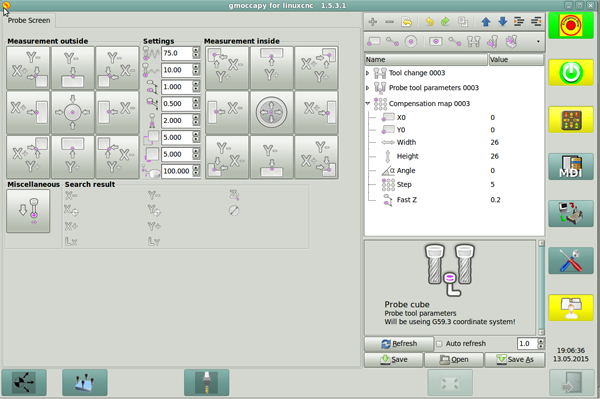
This
application can be easily connected to Gmoccapy
Code:
EMBED_TAB_NAME=Probe Screen
EMBED_TAB_LOCATION = ntb_user_tabs
EMBED_TAB_COMMAND = gladevcp -x {XID} -u python/probe_screen.py probe_icons/probe_screen.glade
The following user(s) said Thank You: balestrino, nilsht
Please Log in or Create an account to join the conversation.
- FernV
- Offline
- Platinum Member
-

Less
More
- Posts: 457
- Thank you received: 124
11 years 1 month ago #62827
by FernV
Replied by FernV on topic Gmoccapy - A new screen for linuxcnc
Hi Verser,
I see you have been using LinuxCNC-Features for some time with an old release by Nick. I am about to release a new update with a virtual keypad, better grouping and more.
About the last issue I have is with reloading the file in gmoccapy after some changes. It will reload automatically some times but not always and I have to press the Refresh button many times and sometimes I can only reload with the File button in gmoccapy.
How is your experience with it ? Could something not be configured right on my computer or do you experience the same as I ?
Regards
Fern
I see you have been using LinuxCNC-Features for some time with an old release by Nick. I am about to release a new update with a virtual keypad, better grouping and more.
About the last issue I have is with reloading the file in gmoccapy after some changes. It will reload automatically some times but not always and I have to press the Refresh button many times and sometimes I can only reload with the File button in gmoccapy.
How is your experience with it ? Could something not be configured right on my computer or do you experience the same as I ?
Regards
Fern
Please Log in or Create an account to join the conversation.
- probamo
- Offline
- Premium Member
-

Less
More
- Posts: 139
- Thank you received: 9
10 years 11 months ago #65251
by probamo
Replied by probamo on topic Gmoccapy - A new screen for linuxcnc
@Norbert
recently I bought a second hand touch screen for piece of money :laugh: and tried gmoccapy. Everything was brilliant. Touch here, touch there, perfect. However, I noticed one thing that could be improved.
I am cutting MDF very offten, though I get very good dedusting system, small particles still flies in the room. Sometimes, my fingers are coated with fine duct as well. This does not allow me to slide feedrate, jog and spindle speed slide bars. Is it possible, instead of having slidebars, to have "-" & "+" buttons, to decrease/increase parameters, but 100% to remain as such.
Thank you!
recently I bought a second hand touch screen for piece of money :laugh: and tried gmoccapy. Everything was brilliant. Touch here, touch there, perfect. However, I noticed one thing that could be improved.
I am cutting MDF very offten, though I get very good dedusting system, small particles still flies in the room. Sometimes, my fingers are coated with fine duct as well. This does not allow me to slide feedrate, jog and spindle speed slide bars. Is it possible, instead of having slidebars, to have "-" & "+" buttons, to decrease/increase parameters, but 100% to remain as such.
Thank you!
Please Log in or Create an account to join the conversation.
- DaBit
- Offline
- Elite Member
-

Less
More
- Posts: 203
- Thank you received: 19
10 years 11 months ago #65258
by DaBit
Replied by DaBit on topic Gmoccapy - A new screen for linuxcnc
In that case I would seriously consider using external controls for that. Up/down buttons are slow, rotary encoders (the 'volume up/down' variant and not the '2500 line servo type') are cheap, and so is an extra parallel port card if you do not use Mesa hardware. A single LPT-card can interface 5 encoders or so.
Adding a small box with rapid/feed/spindle override potmeters at a handy spot on the machine is still on my todo-list.. It is a highly endmill-and-stock saving practice to start a program with rapid speeds reduced.
Adding a small box with rapid/feed/spindle override potmeters at a handy spot on the machine is still on my todo-list.. It is a highly endmill-and-stock saving practice to start a program with rapid speeds reduced.
Please Log in or Create an account to join the conversation.
- newbynobi
- Offline
- Moderator
-

Less
More
- Posts: 1931
- Thank you received: 394
10 years 11 months ago - 10 years 11 months ago #65277
by newbynobi
Replied by newbynobi on topic Gmoccapy - A new screen for linuxcnc
@probamo,
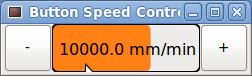
something like the attached one?
I have thought about that too, but I asked here and in the German forum and didn't get positive feedback., you can modify also your desktop theme to get them a little bit bigger.
@DaBit
you are absolutly right! Best is to use hardware to control the slider.
Norbert
something like the attached one?
I have thought about that too, but I asked here and in the German forum and didn't get positive feedback., you can modify also your desktop theme to get them a little bit bigger.
@DaBit
you are absolutly right! Best is to use hardware to control the slider.
Norbert
Last edit: 10 years 11 months ago by newbynobi.
Please Log in or Create an account to join the conversation.
- probamo
- Offline
- Premium Member
-
Less
More
- Posts: 139
- Thank you received: 9
10 years 11 months ago #65281
by probamo
Replied by probamo on topic Gmoccapy - A new screen for linuxcnc
Exactly like this one!!!
Sorry not being commented at the time, I did not get touch screen.
Would it be an update of the gmoccapy in this regards, or, since I am under 2.6.11 any guidelines how to incorporate your file in my local folders.
Cheers,
Sorry not being commented at the time, I did not get touch screen.
Would it be an update of the gmoccapy in this regards, or, since I am under 2.6.11 any guidelines how to incorporate your file in my local folders.
Cheers,
Please Log in or Create an account to join the conversation.
Moderators: newbynobi, HansU
Time to create page: 1.346 seconds