
- Posts: 203
- Thank you received: 19
Gmoccapy - A new screen for linuxcnc
- DaBit
- Offline
- Elite Member
-

Less
More
11 years 6 months ago #58289
by DaBit
That is the advantage of the entire LinuxCNC :laugh:
If you have a convenient method to measure that height and if it is indeed a block you are right. But I also often have existing parts that need modification or situations like this:
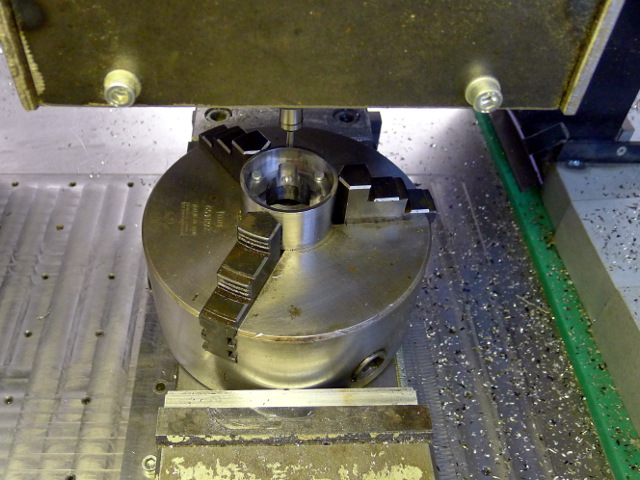
Hard to fit a caliper anyway, and the Z reference surface I needed to touchoff to is inside the workpiece.
Using a touchprobe is much more versatile. In fact it is the same as 'measuring the block height' since when I know the trigger point in machine-Z I also know the 'block height'. Too bad my current one is not accurate and not reliable. Luckily I got it for about the money I would need to pay for the stylus only so that's not a big issue.
But by not forcing to have a known 'block height' I am flexible in determining how I want to set the Z reference. Touchprobe, manual, helper tool, calipers, etc. If Z is correct with any random tool in the spindle it will be correct with any other tool too.
Anyway, different people, different opinions. The beauty of LinuxCNC is that I can make things work the way I want them to be.
It is just a couple of buttons that call O-word subroutines. It is a little inconvenient that gmoccapy stays in MDI mode after the GladeVCP panel called an o-word subroutine BTW.
Maybe that wiki-thing is best. After all it is not gmoccapy specific; it could be embedded into axis just as easily. The only 'problem' is maybe that I stole the icons from that Mach3 touchoff page screenshot shown a few pages back.
Replied by DaBit on topic Gmoccapy - A new screen for linuxcnc
newbynobi wrote: That is one of the very big advantages of remap, everybody can modify the code to fit best his needs!
That is the advantage of the entire LinuxCNC :laugh:
About the accuracy I do not agree at all, that your way is more accurate. The digital caliper I do use has an accuracy of 0.03 mm and one time "calibrated the touch probe height" the accuracy is not worse as the way you do the measurement.
If you have a convenient method to measure that height and if it is indeed a block you are right. But I also often have existing parts that need modification or situations like this:
Hard to fit a caliper anyway, and the Z reference surface I needed to touchoff to is inside the workpiece.
Using a touchprobe is much more versatile. In fact it is the same as 'measuring the block height' since when I know the trigger point in machine-Z I also know the 'block height'. Too bad my current one is not accurate and not reliable. Luckily I got it for about the money I would need to pay for the stylus only so that's not a big issue.
But by not forcing to have a known 'block height' I am flexible in determining how I want to set the Z reference. Touchprobe, manual, helper tool, calipers, etc. If Z is correct with any random tool in the spindle it will be correct with any other tool too.
Anyway, different people, different opinions. The beauty of LinuxCNC is that I can make things work the way I want them to be.
Would you please send me the code of your touch off macro page? I thing that would be a good beginning to introduce some stuff to standard. Or better, just write a WIKI page about how you did it.
It is just a couple of buttons that call O-word subroutines. It is a little inconvenient that gmoccapy stays in MDI mode after the GladeVCP panel called an o-word subroutine BTW.
Maybe that wiki-thing is best. After all it is not gmoccapy specific; it could be embedded into axis just as easily. The only 'problem' is maybe that I stole the icons from that Mach3 touchoff page screenshot shown a few pages back.
Please Log in or Create an account to join the conversation.
- MrFluffy
- Offline
- New Member
-

Less
More
- Posts: 7
- Thank you received: 0
11 years 6 months ago #58290
by MrFluffy
Replied by MrFluffy on topic Gmoccapy - A new screen for linuxcnc
Hi Norbert, not to distract from the touchprobe stuff as thats of great interest and benefit to all, but I started using gmoccapy on my bridgeport with touchscreen running the wheezy linuxcnc install.
I noticed the resolution minimum is 976, my monitor is only capable of 800x600 so I have dropped the limits a little in the glade files and its working for me fine but I wont mention any dimensional problems if they occur as they are of my own making but for me its happy at 800x600 even if its not the optimal experience. I will look at tweaking it for myself by removal of a few bits I dont need as per usual.
When I started trying gmoccapy I tried to install onscreen, adding lots of the dependancies and building some components from source, but I got stuck at a late stage when I had a onscreen binary but it had dbus and other errors on startup but I noticed earlier in this thread matchbox-keyboard was supported now (thanks) so took the path of least resistance. Gnoccapy wasnt working at all with this, but I found if I removed onscreen completely, matchbox-keyboard started to work, so if someone else is having problems like this, make sure onscreen is removed as the code will fire up the broken one instead.
Second one, the sound files are hard linked to the ubuntu location, "/usr/share/sounds/ubuntu/stereo/dialog-question.ogg" etc, if sound is wanted the path can be changed in the /usr/bin/gmoccapy file eg. I dont think theres a gui way to do this, but I could have missed it.
self.alert_sound = "/usr/share/sounds/ubuntu/stereo/bell.ogg"
self.error_sound = "/usr/share/sounds/ubuntu/stereo/dialog-question.ogg"
Now i just have to find the sounds somewhere (raid my wifes ubuntu laptop perhaps), and fit a speaker to my machine in the display cabinet
Just tiny comments. Thanks for your work.
I noticed the resolution minimum is 976, my monitor is only capable of 800x600 so I have dropped the limits a little in the glade files and its working for me fine but I wont mention any dimensional problems if they occur as they are of my own making but for me its happy at 800x600 even if its not the optimal experience. I will look at tweaking it for myself by removal of a few bits I dont need as per usual.
When I started trying gmoccapy I tried to install onscreen, adding lots of the dependancies and building some components from source, but I got stuck at a late stage when I had a onscreen binary but it had dbus and other errors on startup but I noticed earlier in this thread matchbox-keyboard was supported now (thanks) so took the path of least resistance. Gnoccapy wasnt working at all with this, but I found if I removed onscreen completely, matchbox-keyboard started to work, so if someone else is having problems like this, make sure onscreen is removed as the code will fire up the broken one instead.
Second one, the sound files are hard linked to the ubuntu location, "/usr/share/sounds/ubuntu/stereo/dialog-question.ogg" etc, if sound is wanted the path can be changed in the /usr/bin/gmoccapy file eg. I dont think theres a gui way to do this, but I could have missed it.
self.alert_sound = "/usr/share/sounds/ubuntu/stereo/bell.ogg"
self.error_sound = "/usr/share/sounds/ubuntu/stereo/dialog-question.ogg"
Now i just have to find the sounds somewhere (raid my wifes ubuntu laptop perhaps), and fit a speaker to my machine in the display cabinet
Just tiny comments. Thanks for your work.
Please Log in or Create an account to join the conversation.
- newbynobi
- Offline
- Moderator
-

Less
More
- Posts: 1931
- Thank you received: 394
11 years 5 months ago #58293
by newbynobi
Replied by newbynobi on topic Gmoccapy - A new screen for linuxcnc
You can set the sounds on the settings page.

Norbert
Norbert
The following user(s) said Thank You: MrFluffy
Please Log in or Create an account to join the conversation.
- LAIR82
- Offline
- Elite Member
-
Less
More
- Posts: 197
- Thank you received: 3
11 years 5 months ago #58294
by LAIR82
Replied by LAIR82 on topic Gmoccapy - A new screen for linuxcnc
Probably a little late to the ballgame, but we use all touch screens, with external rubber keyboards, so we all ways have the cursor turned off, and we noticed the fact that the buttons would not change color sometimes when the given item was selected.
Rick
Rick
Please Log in or Create an account to join the conversation.
- MrFluffy
- Offline
- New Member
-
Less
More
- Posts: 7
- Thank you received: 0
11 years 5 months ago - 11 years 5 months ago #58358
by MrFluffy
Replied by MrFluffy on topic Gmoccapy - A new screen for linuxcnc
Hi Norbert,
I had lost the file chooser editing buttons altering the layout for my small screen, and I see them well documented in the gmoccapy wiki page too.
I know the frustration of writing good documentation then having users not read it fully, so my apologies for being one of those annoying users!
I had lost the file chooser editing buttons altering the layout for my small screen, and I see them well documented in the gmoccapy wiki page too.
I know the frustration of writing good documentation then having users not read it fully, so my apologies for being one of those annoying users!
Last edit: 11 years 5 months ago by MrFluffy.
Please Log in or Create an account to join the conversation.
- newbynobi
- Offline
- Moderator
-
Less
More
- Posts: 1931
- Thank you received: 394
11 years 5 months ago #58361
by newbynobi
Replied by newbynobi on topic Gmoccapy - A new screen for linuxcnc
You are wellcome:-)
Please Log in or Create an account to join the conversation.
Moderators: newbynobi, HansU
Time to create page: 0.211 seconds