
- Posts: 78
- Thank you received: 69
Gmoccapy - A new screen for linuxcnc
- verser
- Offline
- Senior Member
-

Less
More
11 years 6 months ago #58257
by verser
Replied by verser on topic Gmoccapy - A new screen for linuxcnc
I decided to connect at the Auto Tool Measurement. Now I regret not having done it before.
Norbert, thank you so much for the Auto Tool Measurement system! This is a very convenient way of manual tool change!
Norbert, thank you so much for the Auto Tool Measurement system! This is a very convenient way of manual tool change!
Please Log in or Create an account to join the conversation.
- Tom_R2E3
- Offline
- Junior Member
-

Less
More
- Posts: 33
- Thank you received: 1
11 years 6 months ago #58258
by Tom_R2E3
Replied by Tom_R2E3 on topic Gmoccapy - A new screen for linuxcnc
Couldn't agree with this more, I have pathetic Z travel on my machine and this makes it so much more useable.
Think I mentioned it before but it would be useful to see what the "block height" is set to. Sometimes I cant remember if I've set it or not, and Gmoccapy lets you run a program without setting a block height at all. Maybe it could be displayed in the "tool information" box, along side the tool Z offset?
Think I mentioned it before but it would be useful to see what the "block height" is set to. Sometimes I cant remember if I've set it or not, and Gmoccapy lets you run a program without setting a block height at all. Maybe it could be displayed in the "tool information" box, along side the tool Z offset?
Please Log in or Create an account to join the conversation.
- newbynobi
- Offline
- Moderator
-

Less
More
- Posts: 1931
- Thank you received: 394
11 years 6 months ago - 11 years 6 months ago #58260
by newbynobi
Replied by newbynobi on topic Gmoccapy - A new screen for linuxcnc
Thanks for the compliment!
What about a hal pin, if TRUE, gmoccapy will force you to enter the block hight on program start?
Default of that Pin would be FALSE. So you may change the behavior using a custom M100 command in your gcode, or do you prefer if I add a check button on the settings page?
I am planing to connect a digital caliper to the PC and just measure the hight Push the send button on the caliper and set this way the block hight. I just have to find out how to get the value through the USB / RS232 connection. Unfortunately I have to many projects at once at the moment, as my wife forced me to build a pool and I liked the idea :laugh:
Norbert
Good suggestion, I could hide the label, if no tool measurement is set in the INI.Think I mentioned it before but it would be useful to see what the "block height" is set to. Sometimes I cant remember if I've set it or not, and Gmoccapy lets you run a program without setting a block height at all. Maybe it could be displayed in the "tool information" box, along side the tool Z offset?
What about a hal pin, if TRUE, gmoccapy will force you to enter the block hight on program start?
Default of that Pin would be FALSE. So you may change the behavior using a custom M100 command in your gcode, or do you prefer if I add a check button on the settings page?
I am planing to connect a digital caliper to the PC and just measure the hight Push the send button on the caliper and set this way the block hight. I just have to find out how to get the value through the USB / RS232 connection. Unfortunately I have to many projects at once at the moment, as my wife forced me to build a pool
and I liked the idea :laugh:Norbert
Last edit: 11 years 6 months ago by newbynobi.
Please Log in or Create an account to join the conversation.
- pippin88
- Offline
- Elite Member
-

Less
More
- Posts: 263
- Thank you received: 51
11 years 6 months ago #58263
by pippin88
Replied by pippin88 on topic Gmoccapy - A new screen for linuxcnc
Norbert:
I suggest an option in the settings page for Touch screen vs mouse and keyboard.
Touch screen benefits from buttons rather than sliders etc, and needs the different focus behaviour.
I like sliders because I use mouse and keyboard.
I suggest an option in the settings page for Touch screen vs mouse and keyboard.
Touch screen benefits from buttons rather than sliders etc, and needs the different focus behaviour.
I like sliders because I use mouse and keyboard.
Please Log in or Create an account to join the conversation.
- DaBit
- Offline
- Elite Member
-
Less
More
- Posts: 203
- Thank you received: 19
11 years 6 months ago #58266
by DaBit
Replied by DaBit on topic Gmoccapy - A new screen for linuxcnc
I am using the tool height measurement too, but I decided to modify the code quite a bit. I never got that 'block height' idea.
Tool length is currently measured relative from the spindle nose and stored in the tooltable. The M6 remap also uses that information to initially rapid towards the switch; a length variation of more than 30mm is unlikely for the same tool and if that happens it is a high diameter indexed endmill that will survive hitting the tool probe switch at rapid speed. Probing motion is therefore; rapid down to 30mm above switch, 'high' speed (600mm/min or so) downwards until probe triggers, slow up to latch the position, rapid up to most positive Z. One fluent down-up movement.
When I start milling I either first load a tool (either using the gmoccapy interface of by simply entering e.g. T36M6, G43 in MDI) and do a manual touchoff in Z using the 'piece of paper' or 'roll a cylinder between work and mill' method, or I use a touchprobe that also uses the spindle nose as reference to determine workpiece zero. Having to measure and enter a 'block height' sounds like a pain in the ass to me, and inaccurate too.


Old pictures:
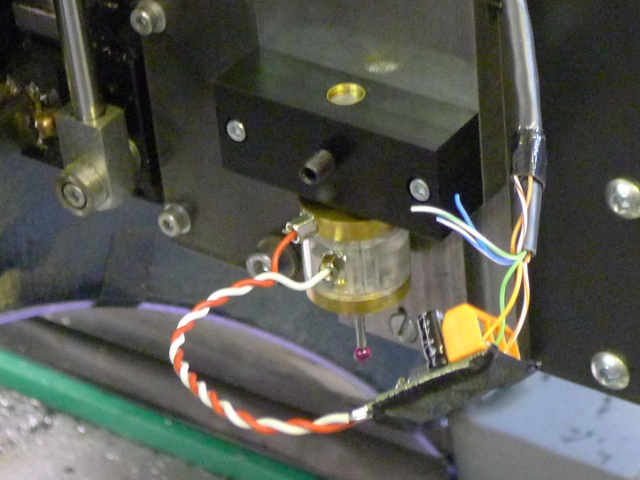
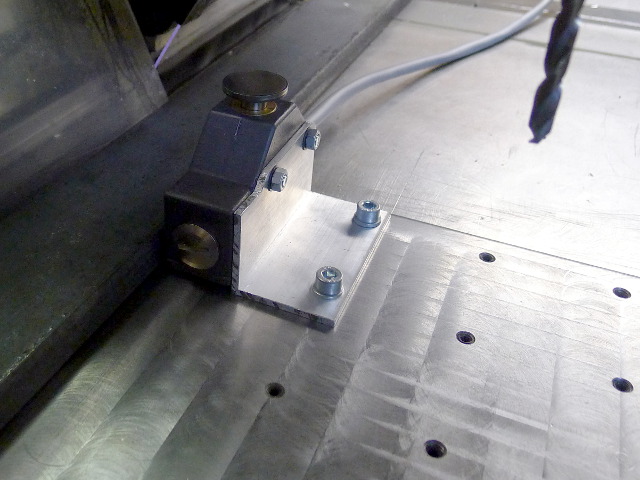
Currently working on an all-steel wireless touchprobe that should be much more accurate. Plastic is not stable and stiff enough to be used in a touchprobe imho.
There is one thing that I want to change though: use a reference that results in negative tool lengths. G43 is cancelled at M2/M30/a lot of other reasons and then a rapid to Z=15 crashes the mill into the workpiece with positive compensation lengths. Simply picking the reference to be '100,00mm under the spindle nose' is probably sufficient.
Tool length is currently measured relative from the spindle nose and stored in the tooltable. The M6 remap also uses that information to initially rapid towards the switch; a length variation of more than 30mm is unlikely for the same tool and if that happens it is a high diameter indexed endmill that will survive hitting the tool probe switch at rapid speed. Probing motion is therefore; rapid down to 30mm above switch, 'high' speed (600mm/min or so) downwards until probe triggers, slow up to latch the position, rapid up to most positive Z. One fluent down-up movement.
When I start milling I either first load a tool (either using the gmoccapy interface of by simply entering e.g. T36M6, G43 in MDI) and do a manual touchoff in Z using the 'piece of paper' or 'roll a cylinder between work and mill' method, or I use a touchprobe that also uses the spindle nose as reference to determine workpiece zero. Having to measure and enter a 'block height' sounds like a pain in the ass to me, and inaccurate too.
Old pictures:
Currently working on an all-steel wireless touchprobe that should be much more accurate. Plastic is not stable and stiff enough to be used in a touchprobe imho.
There is one thing that I want to change though: use a reference that results in negative tool lengths. G43 is cancelled at M2/M30/a lot of other reasons and then a rapid to Z=15 crashes the mill into the workpiece with positive compensation lengths. Simply picking the reference to be '100,00mm under the spindle nose' is probably sufficient.
Please Log in or Create an account to join the conversation.
- newbynobi
- Offline
- Moderator
-
Less
More
- Posts: 1931
- Thank you received: 394
11 years 6 months ago #58276
by newbynobi
About the accuracy I do not agree at all, that your way is more accurate. The digital caliper I do use has an accuracy of 0.03 mm and one time "calibrated the touch probe height" the accuracy is not worse as the way you do the measurement. The block height solution has the benefit, that you do not need a reference tool. And you zero will change according to the fixture you use. One time in a chuck and next part on the table, is just one block height measurement. That is much faster than doing a touch of with paper.
Would you please send me the code of your touch off macro page? I thing that would be a good beginning to introduce some stuff to standard. Or better, just write a WIKI page about how you did it.
Norbert
Replied by newbynobi on topic Gmoccapy - A new screen for linuxcnc
That is one of the very big advantages of remap, everybody can modify the code to fit best his needs!I am using the tool height measurement too, but I decided to modify the code quite a bit. I never got that 'block height' idea.
About the accuracy I do not agree at all, that your way is more accurate. The digital caliper I do use has an accuracy of 0.03 mm and one time "calibrated the touch probe height" the accuracy is not worse as the way you do the measurement. The block height solution has the benefit, that you do not need a reference tool. And you zero will change according to the fixture you use. One time in a chuck and next part on the table, is just one block height measurement. That is much faster than doing a touch of with paper.
Would you please send me the code of your touch off macro page? I thing that would be a good beginning to introduce some stuff to standard. Or better, just write a WIKI page about how you did it.
Norbert
Please Log in or Create an account to join the conversation.
Moderators: newbynobi, HansU
Time to create page: 1.785 seconds