
- Posts: 5711
- Thank you received: 2100
Post Processor for LinuxCNC and PlasmaC
- phillc54
- Offline
- Platinum Member
-

Less
More
7 years 4 months ago - 7 years 4 months ago #137250
by phillc54
Replied by phillc54 on topic Post Processor for LinuxCNC and PlasmaC
Sorry Guys,
I took some time off to do a bit of work on my table. I have finished the control panel and have all the axis moving. I just need to tune the velocity and acceleration then make sure the X and Y axes are perpendicular then I can begin hacking the plasma power supply.
Back on topic, Rod is correct, I have set it so you call out the actual percentage of velocity you require, so Q70 = 70%.
Anything above 100 is limited to 100% and below 10 is set to 100% as well to account for folk not using this feature and leaving the default at 0.
I hope that makes sense.
Cheers, Phill.
I took some time off to do a bit of work on my table. I have finished the control panel and have all the axis moving. I just need to tune the velocity and acceleration then make sure the X and Y axes are perpendicular then I can begin hacking the plasma power supply.
Back on topic, Rod is correct, I have set it so you call out the actual percentage of velocity you require, so Q70 = 70%.
Anything above 100 is limited to 100% and below 10 is set to 100% as well to account for folk not using this feature and leaving the default at 0.
I hope that makes sense.
Cheers, Phill.
Last edit: 7 years 4 months ago by phillc54.
The following user(s) said Thank You: rodw
Please Log in or Create an account to join the conversation.
- islander261
- Offline
- Platinum Member
-
Less
More
- Posts: 757
- Thank you received: 216
7 years 4 months ago #137291
by islander261
Replied by islander261 on topic Post Processor for LinuxCNC and PlasmaC
Guys
Sorry, my bad. I am a couple of updates behind the current Plasmac release and didn't know Phill was error checking and scaling in the code.
John
Sorry, my bad. I am a couple of updates behind the current Plasmac release and didn't know Phill was error checking and scaling in the code.
John
Please Log in or Create an account to join the conversation.
- phillc54
- Offline
- Platinum Member
-
Less
More
- Posts: 5711
- Thank you received: 2100
7 years 4 months ago #137314
by phillc54
Replied by phillc54 on topic Post Processor for LinuxCNC and PlasmaC
Something else to consider...
Another way of achieving the end result would be instead of:
you could do:
Cheers, Phill
Another way of achieving the end result would be instead of:
Code:
M67 E3 Q60
Code:
F[#<_hal[plasmac.cut-feed-rate]> * 0.6]
Cheers, Phill
The following user(s) said Thank You: rodw
Please Log in or Create an account to join the conversation.
- fupeama
- Offline
- Senior Member
-

Less
More
- Posts: 66
- Thank you received: 14
7 years 3 months ago #139098
by fupeama
Hi Rod,
what does it mean mark hole in this case?
Hole through all material or only mark on surface?
I need only little mark on surface for next drill operation.
In description on linuxcnc/docs is
A spindle on signal (connected to the plasmac.spindle-on input pin) begins the sequence of:
- set feedhold.
- find top of stock.
- move up to pierce height.
- start torch, retry if unsuccessful until too many attempts.
- wait for pierce delay.
- move to puddle jump height (if enabled).
- release feedhold, X/Y motion begins.
- wait for puddle jump delay (if enabled).
- move down to cutting height.
...
...
in your plasmac-sheetcam.ngc is
(Drill Process)
X50.000 Y17.500
F#<_hal[plasmac.cut-feed-rate]>
M3 S1
G1 X50.025 Y17.525 (Add tiny extension)
M5
G0 X50.000 Y17.500
if I understand it well, then I cant make mark on the surface. Is it true?
Thank Martin
Replied by fupeama on topic Post Processor for LinuxCNC and PlasmaC
rodw wrote: ....................
Also, create a tool called "CENTERPUNCH". Then if you have holes you just want to mark hole centres for subsequent drilling, you can create a new layer in sheetcam and move your holes to that layer. Then do a drill operation with the centerpunch tool on that layer and it will spot them for you. It is pretty cool watching plasmac swap the tools and updating the GUI on auto pilot!
Hi Rod,
what does it mean mark hole in this case?
Hole through all material or only mark on surface?
I need only little mark on surface for next drill operation.
In description on linuxcnc/docs is
A spindle on signal (connected to the plasmac.spindle-on input pin) begins the sequence of:
- set feedhold.
- find top of stock.
- move up to pierce height.
- start torch, retry if unsuccessful until too many attempts.
- wait for pierce delay.
- move to puddle jump height (if enabled).
- release feedhold, X/Y motion begins.
- wait for puddle jump delay (if enabled).
- move down to cutting height.
...
...
in your plasmac-sheetcam.ngc is
(Drill Process)
X50.000 Y17.500
F#<_hal[plasmac.cut-feed-rate]>
M3 S1
G1 X50.025 Y17.525 (Add tiny extension)
M5
G0 X50.000 Y17.500
if I understand it well, then I cant make mark on the surface. Is it true?
Thank Martin
Please Log in or Create an account to join the conversation.
- rodw
- Offline
- Platinum Member
-
Less
More
- Posts: 12170
- Thank you received: 4153
7 years 3 months ago #139099
by rodw
Replied by rodw on topic Post Processor for LinuxCNC and PlasmaC
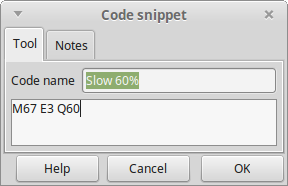
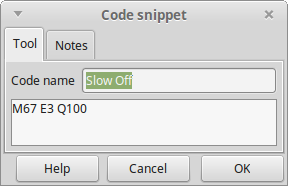
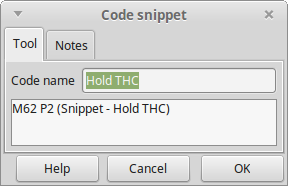
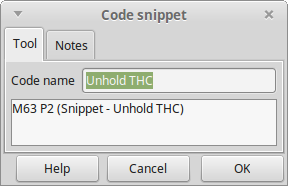
This is where my current post processor is. I've included screen dumps of all of my main Sheetcam code Snippets and my setup for the centrepunch. Keep the name exactly as shown. To tell you the truth, I can't quite remember how the centerpunch works. I think becasue I have a pierce delay of 0.0 seconds, it will stop as soon as it sees an ArcOK. (That assumes you import the sheetcam tools to plasmac)

The following user(s) said Thank You: bevins, tommylight, crowloy
Please Log in or Create an account to join the conversation.
- docwelch
- Offline
- Senior Member
-
Less
More
- Posts: 58
- Thank you received: 25
7 years 3 months ago #139919
by docwelch
Replied by docwelch on topic Post Processor for LinuxCNC and PlasmaC
Guys,
I've been working on a post processor for Fusion 360 to use with plasmac. I've had a couple of thoughts I'd like to throw out for others to give me some feedback. I suspect the following could be implemented on other post processors as well without too much effort.
With respect to slowing down for small holes, what I am doing is having the post processor look to see if the arc being cut is a full circle and if that circle's diameter is <37 mm. If it meets those criteria, it will insert code to slow down the cut rate to 60%. I chose to use
instead of the the M67 E3 Q60 simply because the feed rate will be reset "automatically" at the next move (another F#<_hal[plasmac.cut-feed-rate]> is sent with the next move which will get you back to the baseline).
Along those same lines, I'm sure the kerf width will change when the speed is slowed but I don't know how much (still building my machine). If it is enough to be significant, I have a potential solution for that as well. If you are using offsets (G41.1 or G42.1), you should be able to adjust the offset when you adjust the speed for the smaller circle - something like
would add 0.25 to the kerf width. Obviously, you would need to reset the kerf width before moving to the next cut.
I'd appreciate any thoughts - maybe you guys are already doing this but I have not seen it in any of the post processors.
Thanks,
Steven
I've been working on a post processor for Fusion 360 to use with plasmac. I've had a couple of thoughts I'd like to throw out for others to give me some feedback. I suspect the following could be implemented on other post processors as well without too much effort.
With respect to slowing down for small holes, what I am doing is having the post processor look to see if the arc being cut is a full circle and if that circle's diameter is <37 mm. If it meets those criteria, it will insert code to slow down the cut rate to 60%. I chose to use
Code:
F[#<_hal[plasmac.cut-feed-rate]> * 0.6]
Along those same lines, I'm sure the kerf width will change when the speed is slowed but I don't know how much (still building my machine). If it is enough to be significant, I have a potential solution for that as well. If you are using offsets (G41.1 or G42.1), you should be able to adjust the offset when you adjust the speed for the smaller circle - something like
Code:
G42.1 D[#<_hal[plasmac_run.kerf-width-f]> + 0.25]
I'd appreciate any thoughts - maybe you guys are already doing this but I have not seen it in any of the post processors.
Thanks,
Steven
Please Log in or Create an account to join the conversation.
Moderators: snowgoer540
Time to create page: 0.153 seconds