
- Posts: 132
- Thank you received: 27
LinuxCNC Features - a kind of NGCGUI
- fixer
- Offline
- Premium Member
-

Less
More
11 years 3 weeks ago #63422
by fixer
Replied by fixer on topic LinuxCNC Features - a kind of NGCGUI
Hallo Norbert,
Using aux screen is the same as using features in standalone mode. Just a window on top of gmoccapy. Not what I meant. I belive that it would be the best to get myself a larger widescreen touch monitor and use it embedded in right panel.
One thing you mabye could easily do is to prevent graphic preview to always jump to default preview when Features refresh. Sometimes I have some detail zoomed and doing some optimization with parameters there and I have to constantly re-zoom after refresh...
Und wie is es mit deine Luminos?
Using aux screen is the same as using features in standalone mode. Just a window on top of gmoccapy. Not what I meant. I belive that it would be the best to get myself a larger widescreen touch monitor and use it embedded in right panel.
One thing you mabye could easily do is to prevent graphic preview to always jump to default preview when Features refresh. Sometimes I have some detail zoomed and doing some optimization with parameters there and I have to constantly re-zoom after refresh...
Und wie is es mit deine Luminos?
Please Log in or Create an account to join the conversation.
- FernV
- Offline
- Platinum Member
-

Less
More
- Posts: 457
- Thank you received: 124
11 years 3 weeks ago - 11 years 3 weeks ago #63434
by FernV
Replied by FernV on topic LinuxCNC Features - a kind of NGCGUI
Hi Mit
Right, I forgot
Tell me if you like it better this way ;
Uncomment lines 2455 and 2532
Replace lines 2557 and 2558 with
Fern
fixer wrote: I commented out treeview.expand_all() in line 2558. I dont know what you mean with it, but it works better without it IMHO - it shouldn't expand everything in main tree after adding feature.
Right, I forgot
Tell me if you like it better this way ;
Uncomment lines 2455 and 2532
Replace lines 2557 and 2558 with
Code:
if tree_path is not None and not self.sub_hdrs_in_tv1 :
self.treeview.expand_row(tree_path, False)
Fern
Last edit: 11 years 3 weeks ago by FernV.
The following user(s) said Thank You: Nick
Please Log in or Create an account to join the conversation.
- fixer
- Offline
- Premium Member
-
Less
More
- Posts: 132
- Thank you received: 27
11 years 3 weeks ago - 11 years 3 weeks ago #63451
by fixer
Yep, better.
I did my homework too - attached new engrave feature, support for unicode strings and fixed exceptions in main().
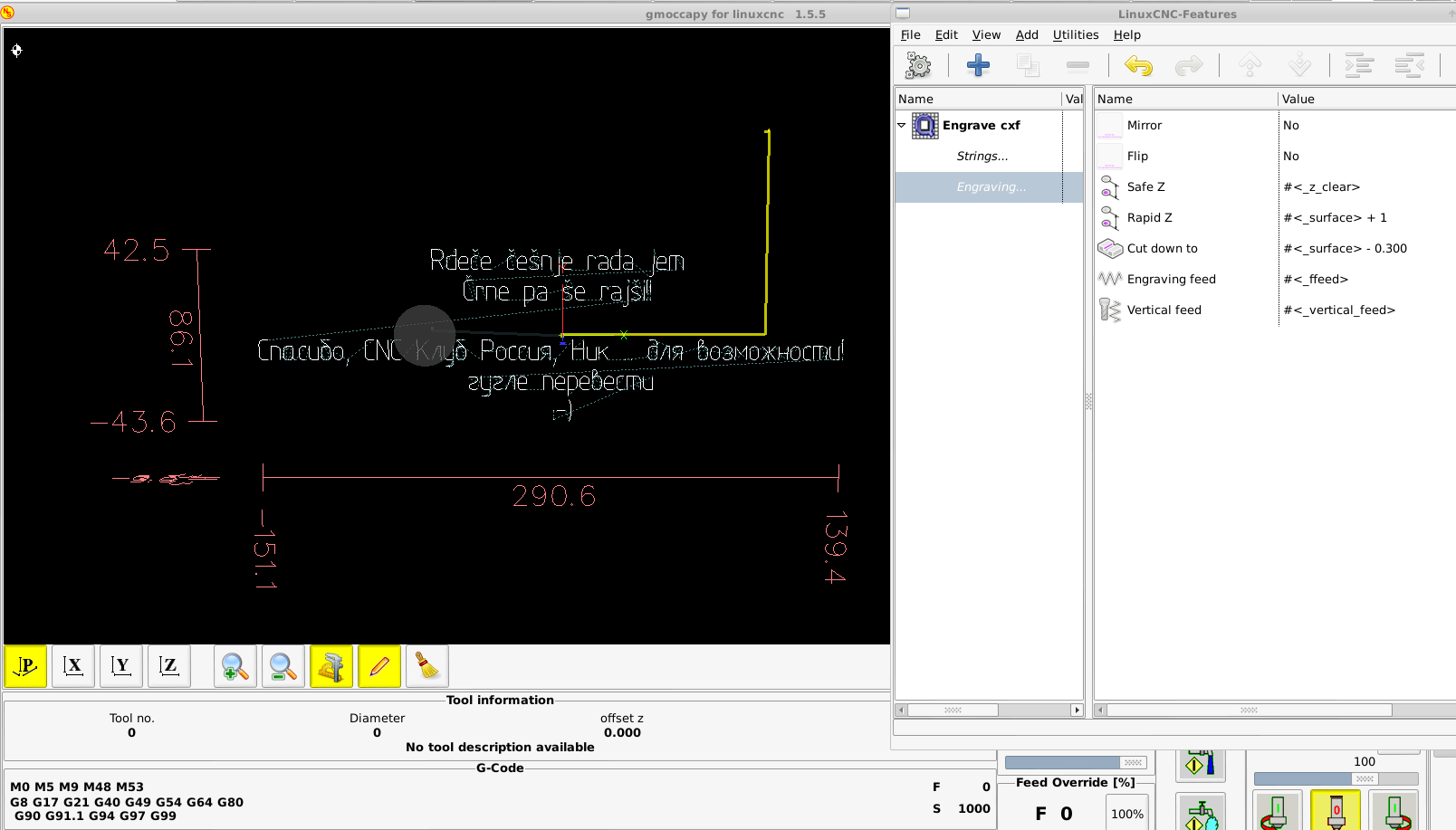
It's your call, but i think it is better to have default values to be like that^^ , imperial would be
and
And remove that G0 moves loop in defaults, leave only debug message, M0 and loop.
EDIT: Replaced attachment, major bug removed.
Replied by fixer on topic LinuxCNC Features - a kind of NGCGUI
Tell me if you like it better this way ;
Yep, better.
I did my homework too - attached new engrave feature, support for unicode strings and fixed exceptions in main().
It's your call, but i think it is better to have default values to be like that^^ , imperial would be
Code:
#<_surface> + 0.1
Code:
#<_surface> - 0.01
And remove that G0 moves loop in defaults, leave only debug message, M0 and loop.
EDIT: Replaced attachment, major bug removed.
Last edit: 11 years 3 weeks ago by fixer.
The following user(s) said Thank You: Nick
Please Log in or Create an account to join the conversation.
- FernV
- Offline
- Platinum Member
-
Less
More
- Posts: 457
- Thank you received: 124
11 years 3 weeks ago #63476
by FernV
Replied by FernV on topic LinuxCNC Features - a kind of NGCGUI
Hi Mit
I will make it an option in the Preferences dialog, and others also like the use of Top Features toolbar so you do not have to reconfigure after updating.
Real nice now. Flip issue can be solved simply by changing sign of line spacing and limiting input to a minimum of 0.0, what do you think about it ?
Thanks, this is much smarter. I will change it so inputing Safe Z will only need be 0.1 and Cut down to only -0.01. Underneath it will calc #<_surface> + #<_safe_z> and #<_surface> + #<_cut_depth>. I also changed the safety loop.
I will make a quick release this week when done. I also noticed that some TrueType would display but not mill, are bugs in ttt.c or FT library ? I will look at it too.
Regards
Fern
fixer wrote:
Yep, better.Tell me if you like it better this way ;
I will make it an option in the Preferences dialog, and others also like the use of Top Features toolbar so you do not have to reconfigure after updating.
fixer wrote: I did my homework too - attached new engrave feature, support for unicode strings and fixed exceptions in main().
Real nice now. Flip issue can be solved simply by changing sign of line spacing and limiting input to a minimum of 0.0, what do you think about it ?
fixer wrote: It's your call, but i think it is better to have default values to be like that^^ , imperial would be
andCode:#<_surface> + 0.1Code:#<_surface> - 0.01
And remove that G0 moves loop in defaults, leave only debug message, M0 and loop.
Thanks, this is much smarter. I will change it so inputing Safe Z will only need be 0.1 and Cut down to only -0.01. Underneath it will calc #<_surface> + #<_safe_z> and #<_surface> + #<_cut_depth>. I also changed the safety loop.
I will make a quick release this week when done. I also noticed that some TrueType would display but not mill, are bugs in ttt.c or FT library ? I will look at it too.
Regards
Fern
Please Log in or Create an account to join the conversation.
- fixer
- Offline
- Premium Member
-
Less
More
- Posts: 132
- Thank you received: 27
11 years 3 weeks ago - 11 years 3 weeks ago #63512
by fixer
Replied by fixer on topic LinuxCNC Features - a kind of NGCGUI
- above I have replaced engrave-feature, use that one now.
-I would replace top features with features history.
-SafeZ and surface are set with task. this should do the same move in all subroutines. SafeZ is set above all fixtures, so you cannot hit anything no matter how you arrange your subprograms, surface is where the material starts (cut start). Safe Z is only used in first tmove from previous operation to start of engraving, Rapid Z is where G0 moves between characters are made. First vertical move is from safeZ to rapidZ, from rapidZ to depth is G1 with #_vertical_feed
Make it so that the users will clearly know what are you doing underneath.
And there is a missing underscore _ in mz_engrave.ini at font combo at file Cyrillic_II. And font Sans NS doesnt work, best to delete it from features.
-about ttf it looks there is some kind of problem with trajecotry planner there. With default values, when it comes to engraving of letter "u", the machine starts to move somewhere far away on Y axis - move is not shown in simulation, only when you start the machining... Set your soft limits in simulation linuxcnc ini file to +99999999999 and -99999999999 so it doesn't warn and you will see. I never used G5 moves and I dont know nothing about how is the preview drawn differently to real machining, so i cant really help...
-I would replace top features with features history.
-SafeZ and surface are set with task. this should do the same move in all subroutines. SafeZ is set above all fixtures, so you cannot hit anything no matter how you arrange your subprograms, surface is where the material starts (cut start). Safe Z is only used in first tmove from previous operation to start of engraving, Rapid Z is where G0 moves between characters are made. First vertical move is from safeZ to rapidZ, from rapidZ to depth is G1 with #_vertical_feed
Make it so that the users will clearly know what are you doing underneath.
And there is a missing underscore _ in mz_engrave.ini at font combo at file Cyrillic_II. And font Sans NS doesnt work, best to delete it from features.
-about ttf it looks there is some kind of problem with trajecotry planner there. With default values, when it comes to engraving of letter "u", the machine starts to move somewhere far away on Y axis - move is not shown in simulation, only when you start the machining... Set your soft limits in simulation linuxcnc ini file to +99999999999 and -99999999999 so it doesn't warn and you will see. I never used G5 moves and I dont know nothing about how is the preview drawn differently to real machining, so i cant really help...
Last edit: 11 years 3 weeks ago by fixer.
Please Log in or Create an account to join the conversation.
- fixer
- Offline
- Premium Member
-
Less
More
- Posts: 132
- Thank you received: 27
11 years 6 days ago #64258
by fixer
Replied by fixer on topic LinuxCNC Features - a kind of NGCGUI
Something strange I noticed and I am not sure where the problem is. Can you please try to duplicate this:
Using metric units, make a tool with a diameter of 40mm
do a T0M6 in MDI
in features, put only tool change to that tool above
and a circle, dont change any parameter, only tool number
watch LinuxCNC status, variables dtg and distance_to_go while lead-in move and compare to DRO (type linuxcnctop in terminal)
Change tool diameter to 10mm, do a T0M6 in MDI and only repeat start of previous program.
The problem is, that the lead-in move doesn't get executed with big tool, distance_to_go in linuxcnctop is decrementing, but the axes don't move. After the lead in move is finished, it continues to cut a circle on the wrong position. It costed me an expensive tool, destroyed workpiece and a whole afternoon figuring out what actually went wrong.
The following screenshot shows path moves by the same program with only tool diameter changed.
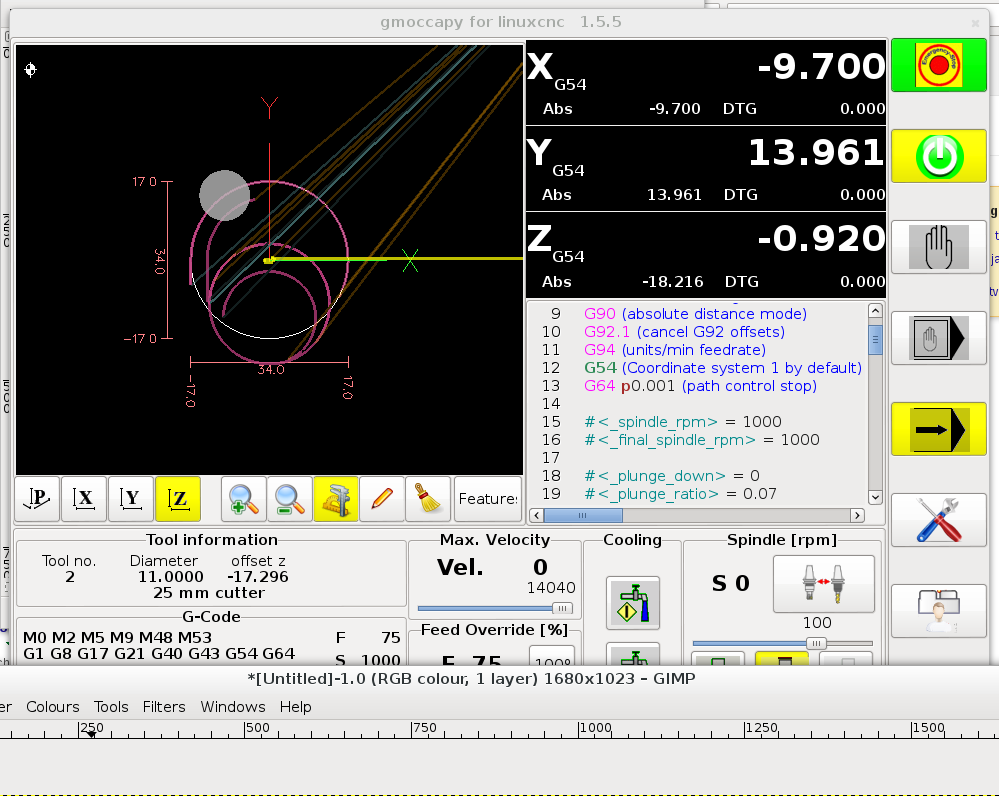
I use lcnc 2.7, features 2.01, with some GUI changes in gmoccapy.py and features.py. Changes should not affect machine moves.
Using metric units, make a tool with a diameter of 40mm
do a T0M6 in MDI
in features, put only tool change to that tool above
and a circle, dont change any parameter, only tool number
watch LinuxCNC status, variables dtg and distance_to_go while lead-in move and compare to DRO (type linuxcnctop in terminal)
Change tool diameter to 10mm, do a T0M6 in MDI and only repeat start of previous program.
The problem is, that the lead-in move doesn't get executed with big tool, distance_to_go in linuxcnctop is decrementing, but the axes don't move. After the lead in move is finished, it continues to cut a circle on the wrong position. It costed me an expensive tool, destroyed workpiece and a whole afternoon figuring out what actually went wrong.
The following screenshot shows path moves by the same program with only tool diameter changed.
I use lcnc 2.7, features 2.01, with some GUI changes in gmoccapy.py and features.py. Changes should not affect machine moves.
Please Log in or Create an account to join the conversation.
Time to create page: 0.311 seconds