Another GUI project underway

More
7 years 10 months ago #122832 by workaholic
Hello, this GUI is really nice looking!
I'm curious how this preview works?
How can be zoomed, moved and changed X Y Z? There are no buttons.:dry:

I'm searching for more than 2 weeks now how could I do some changes on preview but no success.
If you could help me with any informations I would be more than happy. (Already opened topic in forum with my issue)
The following user(s) said Thank You: Lcvette, KCJ

Please Log in or Create an account to join the conversation.
More
7 years 10 months ago #122836 by KCJ
Replied by KCJ on topic Another GUI project underway
Lcvette has not added any view control buttons, but the backplot has Slots for setting the view and clearing the live plot so they would be very easy to add.

With a mouse and keyboard you have good control over the backplot, but it's a little harder on a touchscreen, because you have no way to right click to get a menu. I would like to try using gestures, pinch to zoom etc.

With QtPyVCP you can change backplot colors from within QtDesigner. Eventually I plan to expose a lot more settings there, as well as make them settable from QSS stylesheets and from the .yaml config files.

Looking at the other topic you started it sounds like you are using QtVCP, this UI is made using QtPyVCP which was originally a branch of QtVCP, but at this point shares very little code.

You can find out more about QtPyVCP here: qtpyvcp.kcjengr.com/

Cheers,
Kurt
The following user(s) said Thank You: tommylight, Lcvette, workaholic

Please Log in or Create an account to join the conversation.

More
7 years 10 months ago #122848 by workaholic
Thank you for fast answer!

To be honest I'm new in this world of Linux CNC and I have started exploring it.
The concept which I'm working on and showing in my topic it's very friendly to users which are using touchscreens.

Link to my topic so you can see example image and description of my idea.
Preview plot - zoom to fit

I'm sorry for this reply being little off topic.
But maybe it would be nice to see that function in here if I or any other one will successfully made it.
The following user(s) said Thank You: KCJ

Please Log in or Create an account to join the conversation.

More
7 years 10 months ago #122854 by Lcvette
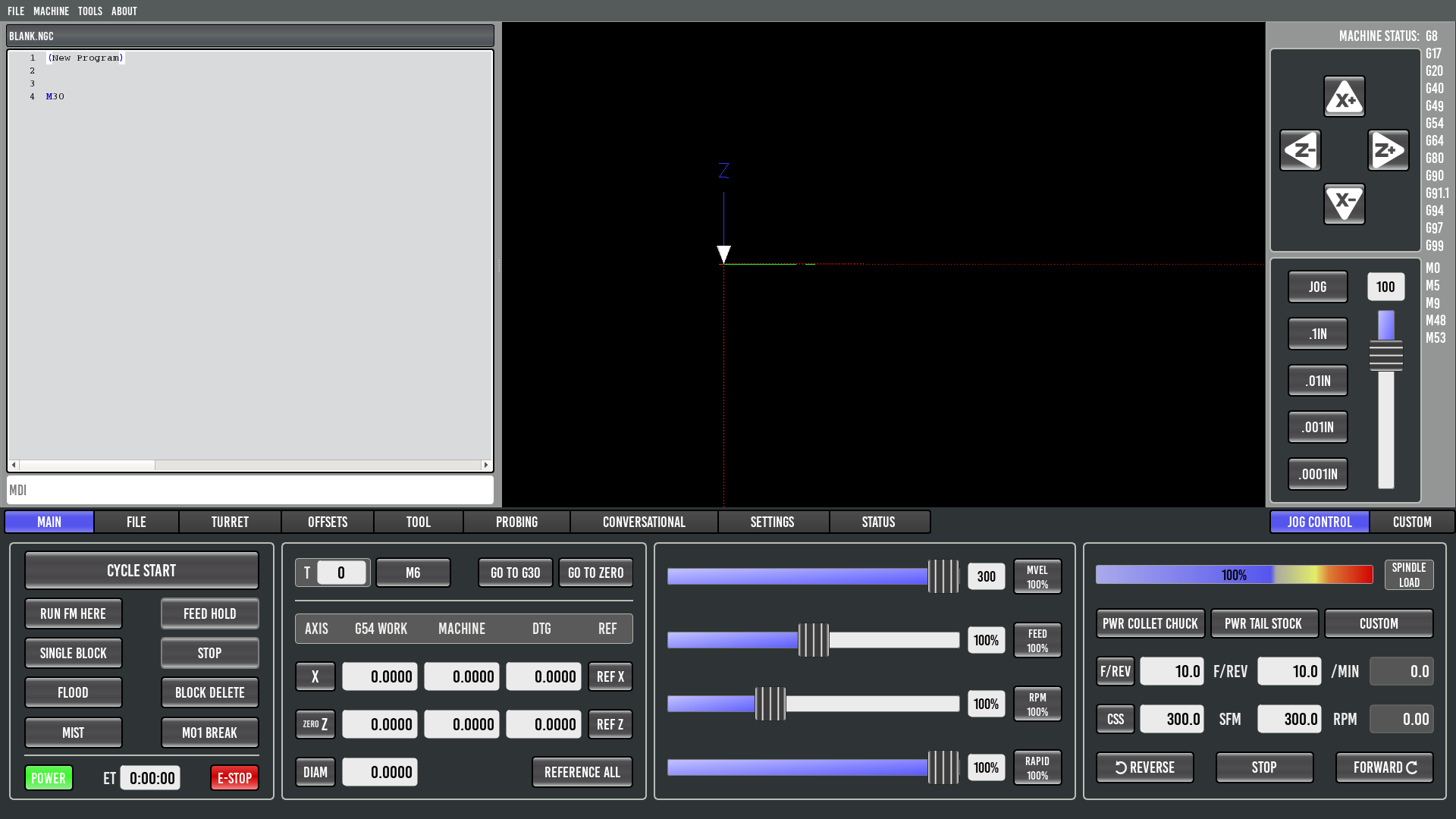
ok Lathe users, I have a pretty decent start I think but wanted to toss this out into the world for input from those who use true cnc lathes/Turning center machines who might be able to help me complete the main control panel interface layout. so please have a look and supply your feedback!
Thanks!

The following user(s) said Thank You: tommylight, KCJ, mclausen, COFHAL

Please Log in or Create an account to join the conversation.

More
7 years 10 months ago - 7 years 10 months ago #122860 by Chich2
Replied by Chich2 on topic Another GUI project underway
First of all thank you all for this fantastic work. Im sure it what the future of linuxcnc will look like.
Your cnc lathe screen is a fantastic start. Some things to consider for the main screen that my lathe has:
My lathe has seperate buttons for tailstock quill in and out. A single button for the tool setter probe. Chip conveyor forwards and reverse buttons. I also have a 2 speed gear box driving my spindle that has a high and low speed buttons which are also selectable via M-codes during a program. A parts catcher button would be great also.

A little off topic issue i have is I would like to explain something about true cnc lathes and mills. When something goes wrong like a tool change doesn't mechanically complete correctly e.g. the tool change routine stalls half way through the routine for many reasons, there has to be a way to recover from the uncontrolled stop. Is there consideration in the GUI for a screen to manually force i/o?

Also I have personally seen a touchscreen become triggered by a fly running into it (Yes an insect hitting the screen) I would dread the thought of me being in my lathe or mill and a fly hitting cycle start or zero home all axis. You may laugh but Ive seen it happen on touch screens and you dont get a second chance with machinery.

I cant wait to see the final release of your awesome GUI. I hope my rambling is interpreted as only positive remarks and dont come across as negative. Please keep up the momentum and excellent regular updates.

Im sure we all appreciate your efforts,
Chich.
Last edit: 7 years 10 months ago by Chich2. Reason: Spelling mistake.
The following user(s) said Thank You: Lcvette, KCJ

Please Log in or Create an account to join the conversation.

More
7 years 10 months ago #122861 by KCJ
Replied by KCJ on topic Another GUI project underway

I have personally seen a touchscreen become triggered by a fly running into it


Inadvertent triggering of a touchscreen is a very valid concern. I was using compressed air to clear chips when a droplet of coolant hit my touchscreen and aborted the program. It was a pain, but the best possible thing that could have happened.

Proper touchscreen selection should go a long way to preventing such mishaps. The resistive wire type screens require force to trigger, so won't be erroneously triggered by water droplets and the like. The capacitive (like on a phone) and SAW (ELO Intelitouch, what I have) are nicer to use but I've learned are not good for any critical applications!

I also don't use or recommend any sort of on-screen (or even keyboard) jogging - I had key stick and it was a bit panicky for a few seconds. Now I only use an MPG wired directly into the mesa card.

But there are also a lot of people here running routers and other light machines, where the consequences are small don't have the luxury of physical knobs and switches (Aaron Tippin voice :)). Probably the best solution is have multiple VCP layouts for different classes of machines ...

Cheers,
Kurt
The following user(s) said Thank You: Lcvette

Please Log in or Create an account to join the conversation.

Moderators: KCJ, Lcvette
Time to create page: 0.147 seconds
Powered by Kunena Forum
