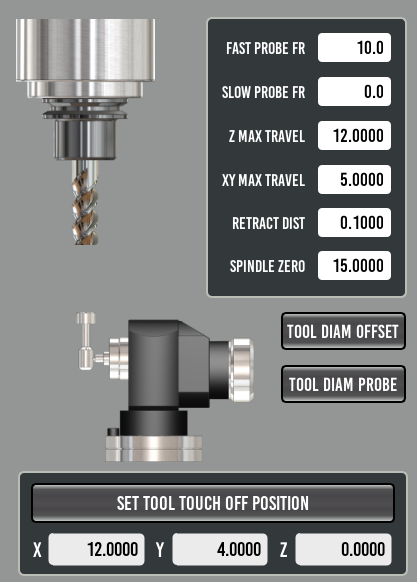
electronic tool setter, tool touch off process

More
5 years 9 months ago #195806 by Lcvette
i'm headed out the door and won't be back on dev until later tonight, but a short and dirty version is that you don't use the z probe for tool touch off, only for the initial spindle height setup, and you need to define the tool touch off location on the offsets page, when doing this be sure that you are at G53 Z0.000 as this is the point at which downward probing will begin, this is a very safe height to start with. for measuring the actual tool lengths you use the "Touch off current tool" button on the tooling page which is what calls for the tool touch off routine. also be sure all of your touch of subroutine settings , they will be personalized to your probing preferences, also setting the slow probe to zero eliminates a second probe and setting a probe speed in "slow probe FR" will initiate the secondary slower probe. that should be enough to get you started!

Please Log in or Create an account to join the conversation.

More
5 years 9 months ago #195830 by swalts
ok This is what seems to have worked so far.

from startup:
0. home machine
1. unload spindle... Tool zero
2. touch off tool
3. input the value into spindle zero length box (red circle from your previous post).
4. load tool 99 (drewtronics probe for me)
5. touch off tool 99
6. load test file
7. run probe routine
8. load tool (it was tool 6 for me)
9. touch off tool 6
10. cycle start

for restarting the file after exit
use 6-10 steps, 4-10 if probe is not repeatable.

i will be taking some test cuts this week to prove this out fully.

Will follow up.

Please Log in or Create an account to join the conversation.

More
5 years 9 months ago #195994 by Lcvette

swalts wrote: ok This is what seems to have worked so far.

from startup:
0. home machine
1. unload spindle... Tool zero
2. touch off tool
3. input the value into spindle zero length box (red circle from your previous post).
4. load tool 99 (drewtronics probe for me)
5. touch off tool 99
6. load test file
7. run probe routine
8. load tool (it was tool 6 for me)
9. touch off tool 6
10. cycle start

for restarting the file after exit
use 6-10 steps, 4-10 if probe is not repeatable.

i will be taking some test cuts this week to prove this out fully.

Will follow up.


Did it work out correctly in testing?

Please Log in or Create an account to join the conversation.

More
5 years 9 months ago #196472 by swalts
Lcvette:

Yes!!!! This is a successful process. I ran a test part today with very good results.

One thing I did notice though.
I flipped my part over to deck it. For this operation I was going to use the facing operation from the GUI.

During that process I switched to incremental feed and moved to my start point of the part.
the trouble came when I noticed there is no button to return to continuous feed. The AXIS GUI command is "C" for this effort. I tried hitting C and I am still in incremental feed.

Any ideas on the cause or is there a way to switch back to continuous. So far i think my option is to load AXIS gui and press C. Then close and go back to Probe Basic GUI.

Other than that, every so often I will have to switch from MAN to AUTO to regain control over my axis' movement.

As I mentioned before though. The process worked well. The part came out with beautiful results, except the decking part. I made a mess there.
The following user(s) said Thank You: Lcvette

Please Log in or Create an account to join the conversation.

More
5 years 9 months ago #196599 by JohnnyCNC
This thread has been a great read and will help with with my setup. I'm working on a M6 remap in QTDragon with the goal of measuring variable length tools and using the offsets in the tool table for my repeatable length tools. I use a 3D probe for work touch-offs and a fixed position tool setter for measuring the tools. I have TTS holders for all of my commonly used tools except drill bits and taps. I have the process basically working and I am just going through testing now.

Thank you both.
John
The following user(s) said Thank You: Lcvette

Please Log in or Create an account to join the conversation.

More
5 years 9 months ago #196601 by Lcvette

swalts wrote: Lcvette:

One thing I did notice though.
I flipped my part over to deck it. For this operation I was going to use the facing operation from the GUI.

During that process I switched to incremental feed and moved to my start point of the part.
the trouble came when I noticed there is no button to return to continuous feed. The AXIS GUI command is "C" for this effort. I tried hitting C and I am still in incremental feed.

Any ideas on the cause or is there a way to switch back to continuous. So far i think my option is to load AXIS gui and press C. Then close and go back to Probe Basic GUI.


swalts,

you mean the jog button is not working? hitting jog should go back to continuous movement and clicking the incremental changes over to the incremental amount.. wondering if you did not add a JOG entry in your ini file maybe? if not just add it in front of the incremental settings you have.. ie:

INCREMENTS = JOG .1in .01in .001in .0001in

this should populate a jog button next to the incremental selections! hope that helps!

Chris

Please Log in or Create an account to join the conversation.

Moderators: KCJ, Lcvette
Time to create page: 0.362 seconds
Powered by Kunena Forum