
- Posts: 1931
- Thank you received: 394
qtvcp issues
- newbynobi
- Offline
- Platinum Member
-

Less
More
7 years 9 months ago #123697
by newbynobi
Replied by newbynobi on topic qtvcp issues
If you like, just take a look at my gmoccapy_3_0 branch
gmoccapy_3_0
It is a working version with the possibility up to 9 axis and for trivial and non trivial kinematics.
So also a lathe with C and W axis is possible, all changeable widgets are created dynamically.
It just miss the possibility of a non trivial kinematics with more than 7 joints, but that will be done in short time.
I will publisch this very soon, so I can get than to the new GUI based on pyQT
Norbert
gmoccapy_3_0
It is a working version with the possibility up to 9 axis and for trivial and non trivial kinematics.
So also a lathe with C and W axis is possible, all changeable widgets are created dynamically.
It just miss the possibility of a non trivial kinematics with more than 7 joints, but that will be done in short time.
I will publisch this very soon, so I can get than to the new GUI based on pyQT
Norbert
Please Log in or Create an account to join the conversation.
- cmorley
- Offline
- Moderator
-

Less
More
- Posts: 7368
- Thank you received: 2181
7 years 9 months ago #123721
by cmorley
In your function get_info(), you duplicate functions already available in qtvcp (in the Istat library)
While I see you check for machine unit base, i don;t see where you check for machine unit mode (G21/20).
Nor do I see any conversions. Do you do all that when actually jogging?
It seems to me you are creating your own way of jogging, without using any of Qtvcp's idioms.
This creates some issues.
anyone who decides to modify your screen with builtin widgets, say a status label for jog increment, will fail.
the amount of people who can debug and fix problems become less and less.
any changes to linuxcnc down the line that creates problems must be fixed in many places, rather then just the base library.
These are problems that I hope we can work together to minimize.
This is not to say that I think people shouldn't do things differently then standard widgets allow, it means we should work hard to incorporate relevant idioms into new widgets/concepts.
Eg use action button, but use code to reassign the increments from an INI file. As far as I can tell this changes nothing function wise in the screen but allows normal widgets to work properly plus the actual jogging code is common.
The same for Norberts suggestion of building wIdgets on the fly - build them with action widgets on the fly.
If one builds completely new widgets then it makes sense (though is a little more work) to use the available libraries/code examples to support the rest of the widget system, so things like jogging with widgets is consistent and error free. Noone wants to crash a machine because two buttons jog differently.
For my part I try to comment the code reasonably and I have added 5 subjects of documentation.
If anyone lets me know of specific questions i will try to answer and document them.
As you can tell i am passionate about making easy to maintain screens/code - ask me why
Chris M
Replied by cmorley on topic qtvcp issues
auto-mation-assist wrote: Norbert,
Thank you for your comments. I'm somewhat familiar with your code and refer to it on a regular basis when thinking about potential methods to solve an issue. For now I will stick with the way I have it since it is working very well and has proven to be very reliable. The lists, which are really arrays provide a good way to share control information between various functions and are items which I have used for many years including control systems for government use.
The use of separate list for inch and mm has also proved to be very beneficial and is something that can easily be implemented especially in new construction.
In your function get_info(), you duplicate functions already available in qtvcp (in the Istat library)
While I see you check for machine unit base, i don;t see where you check for machine unit mode (G21/20).
Nor do I see any conversions. Do you do all that when actually jogging?
It seems to me you are creating your own way of jogging, without using any of Qtvcp's idioms.
This creates some issues.
anyone who decides to modify your screen with builtin widgets, say a status label for jog increment, will fail.
the amount of people who can debug and fix problems become less and less.
any changes to linuxcnc down the line that creates problems must be fixed in many places, rather then just the base library.
These are problems that I hope we can work together to minimize.
This is not to say that I think people shouldn't do things differently then standard widgets allow, it means we should work hard to incorporate relevant idioms into new widgets/concepts.
Eg use action button, but use code to reassign the increments from an INI file. As far as I can tell this changes nothing function wise in the screen but allows normal widgets to work properly plus the actual jogging code is common.
The same for Norberts suggestion of building wIdgets on the fly - build them with action widgets on the fly.
If one builds completely new widgets then it makes sense (though is a little more work) to use the available libraries/code examples to support the rest of the widget system, so things like jogging with widgets is consistent and error free. Noone wants to crash a machine because two buttons jog differently.
For my part I try to comment the code reasonably and I have added 5 subjects of documentation.
If anyone lets me know of specific questions i will try to answer and document them.
As you can tell i am passionate about making easy to maintain screens/code - ask me why
Chris M
Please Log in or Create an account to join the conversation.
- newbynobi
- Offline
- Platinum Member
-
Less
More
- Posts: 1931
- Thank you received: 394
7 years 9 months ago #123726
by newbynobi
Replied by newbynobi on topic qtvcp issues
Attantion!
My code example as well as gmoccapy 3.0 is gtk based!
So that is not the qtvcp way!
I do convert all metric imperial stuff on the fly as i do listen to hal status metric or prior to the combi_dro signals!
I create the widgets on the fly, as that way only the needed widgets need to be loaded and that lead to performance increase.
As what widgets to use, is up to the command, bin glade theire are no special jog button.
Wait a few weeks and i start "MINOS" a new qt based GUI with at least the features of gmoccapy. I just need to finish gmoccapy 3.0 and i am on the last steps!
Norbert
My code example as well as gmoccapy 3.0 is gtk based!
So that is not the qtvcp way!
I do convert all metric imperial stuff on the fly as i do listen to hal status metric or prior to the combi_dro signals!
I create the widgets on the fly, as that way only the needed widgets need to be loaded and that lead to performance increase.
As what widgets to use, is up to the command, bin glade theire are no special jog button.
Wait a few weeks and i start "MINOS" a new qt based GUI with at least the features of gmoccapy. I just need to finish gmoccapy 3.0 and i am on the last steps!
Norbert
Please Log in or Create an account to join the conversation.
- cmorley
- Offline
- Moderator
-
Less
More
- Posts: 7368
- Thank you received: 2181
7 years 9 months ago #123729
by cmorley
Replied by cmorley on topic qtvcp issues
I have a big update to hal_glib that i want to put in master but have been holding off. but maybe i should add it so you can possibly use some of the code.
anyways that should be in a separate post - i'lll try to keep it to X1mill related stuff here
Chris M
anyways that should be in a separate post - i'lll try to keep it to X1mill related stuff here
Chris M
Please Log in or Create an account to join the conversation.
- auto-mation-assist
- Offline
- Platinum Member
-
Less
More
- Posts: 425
- Thank you received: 81
7 years 9 months ago #123821
by auto-mation-assist
Replied by auto-mation-assist on topic qtvcp issues
Very nice Norbert. I will be real interested to see your qt version. Your gmoccapy is well developed and I have used it for years.
In regards to inches and mm. In linear jog mode I have 20 buttons for increments that are normally labelled in fractions of a inch. When switching from inch to mm iwith the dro button these labels would make the values displayed confusing for many mm values. For that reason a separate mm table is used that supplies users desired mm values with conversion to fractions of a inch being done internally.
It also works the other ways around, mm to inches. Thus there are two tables one used for inch and the other for mm. The correct table is automatically selected based on ini file machine units at start up and switching tables between mm and inch dro display modes is also automatic for the linear jogging button values and labels. This allows me or a potential user to set mm and inch increments independently
I think that switching from mm to inches is not as bad as from inches to mm for displayed values on the jogging buttons. And I grew up with mm in Holland.
In regards to inches and mm. In linear jog mode I have 20 buttons for increments that are normally labelled in fractions of a inch. When switching from inch to mm iwith the dro button these labels would make the values displayed confusing for many mm values. For that reason a separate mm table is used that supplies users desired mm values with conversion to fractions of a inch being done internally.
It also works the other ways around, mm to inches. Thus there are two tables one used for inch and the other for mm. The correct table is automatically selected based on ini file machine units at start up and switching tables between mm and inch dro display modes is also automatic for the linear jogging button values and labels. This allows me or a potential user to set mm and inch increments independently
I think that switching from mm to inches is not as bad as from inches to mm for displayed values on the jogging buttons. And I grew up with mm in Holland.
Please Log in or Create an account to join the conversation.
- auto-mation-assist
- Offline
- Platinum Member
-
Less
More
- Posts: 425
- Thank you received: 81
7 years 9 months ago - 7 years 9 months ago #123822
by auto-mation-assist
Replied by auto-mation-assist on topic qtvcp issues
Chris,
I have been working on some updates to my code, which seems like a never ending thing, While looking at the keyboard it bothers me that it hides my DRO displays. So I would like to see the dro data automatically displayed in graphics display when the keyboard is active.
I need a bit of help with the keyboard since it does not enter any information in the mdi line. The onboard is in the gui and I have just let this problem go by because of the low priority.
Gremlin zoom in and out features. Is there coding in qtvcp that allow access to those features.
If you are able to put the updated hal_glib I can grab it. You can use my email address if you need to.
I have updated my coding for generating my increment tables and lost my automatic labelling change on top of the picture below, its supposed to say MM LINEAR JOG MODE. Any way the picture show the area for the status LED's. I will need to filter out the -1 values that where not entered in the INI file.
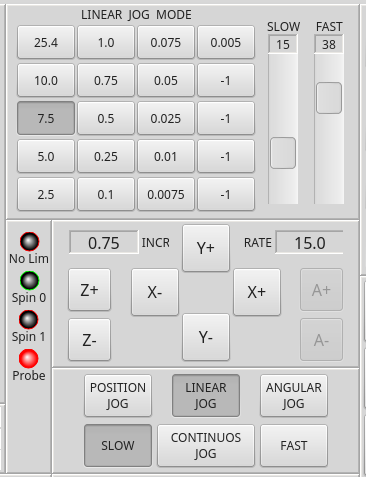
I have been working on some updates to my code, which seems like a never ending thing, While looking at the keyboard it bothers me that it hides my DRO displays. So I would like to see the dro data automatically displayed in graphics display when the keyboard is active.
I need a bit of help with the keyboard since it does not enter any information in the mdi line. The onboard is in the gui and I have just let this problem go by because of the low priority.
Gremlin zoom in and out features. Is there coding in qtvcp that allow access to those features.
If you are able to put the updated hal_glib I can grab it. You can use my email address if you need to.
I have updated my coding for generating my increment tables and lost my automatic labelling change on top of the picture below, its supposed to say MM LINEAR JOG MODE. Any way the picture show the area for the status LED's. I will need to filter out the -1 values that where not entered in the INI file.
Last edit: 7 years 9 months ago by auto-mation-assist.
Please Log in or Create an account to join the conversation.
Moderators: cmorley
Time to create page: 6.241 seconds