
- Posts: 7368
- Thank you received: 2181
qtvcp issues
- cmorley
- Offline
- Moderator
-

Less
More
7 years 9 months ago #123866
by cmorley
Replied by cmorley on topic qtvcp issues
DRO in the graphics was disabled in qtvcp - there was a technical reason and I wasn't interested in it at the time...I will revisit it.
graphics can be zoomed with (in handler) :
self.w.GRAPHICS_NAME.zoom_in()
self.w.GRAPHICS_NAME.zoom_out()
Did you try matchbox keyboard. IIRC it worked better.
Qtvcp has the most developed hal_glib - no need to update it if your are up to date with qtvcp.
Chris M
graphics can be zoomed with (in handler) :
self.w.GRAPHICS_NAME.zoom_in()
self.w.GRAPHICS_NAME.zoom_out()
Did you try matchbox keyboard. IIRC it worked better.
Qtvcp has the most developed hal_glib - no need to update it if your are up to date with qtvcp.
Chris M
The following user(s) said Thank You: auto-mation-assist
Please Log in or Create an account to join the conversation.
- auto-mation-assist
- Offline
- Platinum Member
-

Less
More
- Posts: 425
- Thank you received: 81
7 years 9 months ago - 7 years 9 months ago #123870
by auto-mation-assist
Replied by auto-mation-assist on topic qtvcp issues
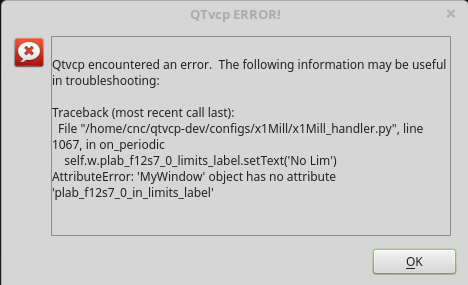
When you get a warning message like the one below it repeats over and over and over. The only way to get out of it is with a cntrl/c from terminal window I started it in. Likely due its placement in periodic but should it not know that the message was sent already?
Last edit: 7 years 9 months ago by auto-mation-assist.
Please Log in or Create an account to join the conversation.
- cmorley
- Offline
- Moderator
-
Less
More
- Posts: 7368
- Thank you received: 2181
7 years 9 months ago #123872
by cmorley
Replied by cmorley on topic qtvcp issues
Since the function is called continuously, each message really is for a new error.
The only other practical response would be to stop the screen and shutdown.
But sometimes the error is not fatal, so you would not want to shutdown.
On an operating machine you don't want to crash the screen if you can help it.
I think this is just an annoyance of development, that goes away after you are finished.
You can also trap the error yourself in the periodic function with try/except -
but that usually just hides the error so it take longer to find it.
Chris M
The only other practical response would be to stop the screen and shutdown.
But sometimes the error is not fatal, so you would not want to shutdown.
On an operating machine you don't want to crash the screen if you can help it.
I think this is just an annoyance of development, that goes away after you are finished.
You can also trap the error yourself in the periodic function with try/except -
but that usually just hides the error so it take longer to find it.
Chris M
The following user(s) said Thank You: auto-mation-assist
Please Log in or Create an account to join the conversation.
- auto-mation-assist
- Offline
- Platinum Member
-
Less
More
- Posts: 425
- Thank you received: 81
7 years 9 months ago #123880
by auto-mation-assist
Replied by auto-mation-assist on topic qtvcp issues
I was looking in the debug list while making some changes to my initialize sequence and noticed this for the onboard keyboard.
(onboard:14832): Gdk-CRITICAL **: gdk_window_thaw_toplevel_updates: assertion 'window->update_and_descendants_freeze_count > 0' failed
(onboard:14832): Gdk-CRITICAL **: gdk_window_thaw_toplevel_updates: assertion 'window->update_and_descendants_freeze_count > 0' failed
Please Log in or Create an account to join the conversation.
- cmorley
- Offline
- Moderator
-
Less
More
- Posts: 7368
- Thank you received: 2181
7 years 9 months ago #123886
by cmorley
Replied by cmorley on topic qtvcp issues
GDK is the low level library for GTK which onboard uses.
Fixing embedded program problems is deep black magic on at least three large libraries.
It's too bad QT didn't port over their x11 embedded libary from qt4 to qt5. It seemed to work well enough.
Unless I stumble on a fix - i won't get to this for some time (really hoping someone else might look at it )
It might be easier to build a pyqt based keyboard instead.
Chris M
Fixing embedded program problems is deep black magic on at least three large libraries.
It's too bad QT didn't port over their x11 embedded libary from qt4 to qt5. It seemed to work well enough.
Unless I stumble on a fix - i won't get to this for some time (really hoping someone else might look at it )
It might be easier to build a pyqt based keyboard instead.
Chris M
Please Log in or Create an account to join the conversation.
- auto-mation-assist
- Offline
- Platinum Member
-
Less
More
- Posts: 425
- Thank you received: 81
7 years 9 months ago #123943
by auto-mation-assist
Replied by auto-mation-assist on topic qtvcp issues
I have been working on my onboard virtual keyboard issue and decided to remove it, updated dependencies and reinstalled it. I kept on working on trying to write some code for it and decided to reboot to clean things up. Now when I try to run the designer from every one of me development folders and backups I get the below message.
cnc@cnc-OptiPlex-9020 ~/qtvcp-dev $ designer -qt=5
Traceback (most recent call last):
File "/usr/lib/x86_64-linux-gnu/qt5/plugins/designer/python/qtvcp_plugin.py", line 22, in <module>
from qtvcp.plugins.simplewidgets_plugin import *
File "/home/cnc/qtvcp-dev/lib/python/qtvcp/plugins/simplewidgets_plugin.py", line 5, in <module>
from qtvcp.widgets.simple_widgets import PushButton
File "/home/cnc/qtvcp-dev/lib/python/qtvcp/widgets/simple_widgets.py", line 17, in <module>
from qtvcp.widgets.widget_baseclass import _HalWidgetBase, _HalToggleBase, _HalSensitiveBase
File "/home/cnc/qtvcp-dev/lib/python/qtvcp/widgets/widget_baseclass.py", line 19, in <module>
import hal
File "/home/cnc/qtvcp-dev/lib/python/hal.py", line 30, in <module>
import _hal
ImportError: /home/cnc/qtvcp-dev/lib/python/_hal.so: undefined symbol: _Py_ZeroStruct
Segmentation fault (core dumped)
cnc@cnc-OptiPlex-9020 ~/qtvcp-dev $ designer -qt=5
Traceback (most recent call last):
File "/usr/lib/x86_64-linux-gnu/qt5/plugins/designer/python/qtvcp_plugin.py", line 22, in <module>
from qtvcp.plugins.simplewidgets_plugin import *
File "/home/cnc/qtvcp-dev/lib/python/qtvcp/plugins/simplewidgets_plugin.py", line 5, in <module>
from qtvcp.widgets.simple_widgets import PushButton
File "/home/cnc/qtvcp-dev/lib/python/qtvcp/widgets/simple_widgets.py", line 17, in <module>
from qtvcp.widgets.widget_baseclass import _HalWidgetBase, _HalToggleBase, _HalSensitiveBase
File "/home/cnc/qtvcp-dev/lib/python/qtvcp/widgets/widget_baseclass.py", line 19, in <module>
import hal
File "/home/cnc/qtvcp-dev/lib/python/hal.py", line 30, in <module>
import _hal
ImportError: /home/cnc/qtvcp-dev/lib/python/_hal.so: undefined symbol: _Py_ZeroStruct
Segmentation fault (core dumped)
Please Log in or Create an account to join the conversation.
Moderators: cmorley
Time to create page: 0.879 seconds