
- Posts: 425
- Thank you received: 81
qtvcp issues
- auto-mation-assist
- Offline
- Platinum Member
-

Less
More
7 years 9 months ago - 7 years 9 months ago #123987
by auto-mation-assist
Replied by auto-mation-assist on topic qtvcp issues
I fixed my problem by doing this:
sourceforge.net/projects/pyqt/files/PyQt...-5.5.tar.gz/download
Extracted the files
Opened a terminal in the extracted folder
Using cmd python , not python3
Entered the below in the terminal to configure qmake:
python configure.py --qmake=/usr/lib/x86_64-linux-gnu/qt5/bin/qmake
Excepted the license by entering yes when asked
Response was:
Querying qmake about your Qt installation...
Determining the details of your Qt installation...
This is the GPL version of PyQt 5.5 (licensed under the GNU General Public
License) for Python 2.7.12 on linux2.
Type 'L' to view the license.
Type 'yes' to accept the terms of the license.
Type 'no' to decline the terms of the license.
Do you accept the terms of the license? yes
Found the license file pyqt-gpl.sip. (its using sip version 4.17 for qt5.5)
It will take a while for it to build the required files
When its done enter:
make
It will take a while for make to complete, when its done enter:
sudo make install
And its back to normal
sourceforge.net/projects/pyqt/files/PyQt...-5.5.tar.gz/download
Extracted the files
Opened a terminal in the extracted folder
Using cmd python , not python3
Entered the below in the terminal to configure qmake:
python configure.py --qmake=/usr/lib/x86_64-linux-gnu/qt5/bin/qmake
Excepted the license by entering yes when asked
Response was:
Querying qmake about your Qt installation...
Determining the details of your Qt installation...
This is the GPL version of PyQt 5.5 (licensed under the GNU General Public
License) for Python 2.7.12 on linux2.
Type 'L' to view the license.
Type 'yes' to accept the terms of the license.
Type 'no' to decline the terms of the license.
Do you accept the terms of the license? yes
Found the license file pyqt-gpl.sip. (its using sip version 4.17 for qt5.5)
It will take a while for it to build the required files
When its done enter:
make
It will take a while for make to complete, when its done enter:
sudo make install
And its back to normal
Last edit: 7 years 9 months ago by auto-mation-assist.
Please Log in or Create an account to join the conversation.
- cmorley
- Offline
- Moderator
-

Less
More
- Posts: 7368
- Thank you received: 2181
7 years 9 months ago #123995
by cmorley
Replied by cmorley on topic qtvcp issues
this replaces the file designer uses to load python widgets (and alot more stuff too).
that file is by default called libpyqt5.so
this library is available precompiled for common distributions in the lib/python/qtvcp/designer folder - you just need to copy if to the right location (there is instructions there)
I would suggest you rename the file to : libpyqt5_py2.so so that it wou'nt be overwritten again.
Chris M
that file is by default called libpyqt5.so
this library is available precompiled for common distributions in the lib/python/qtvcp/designer folder - you just need to copy if to the right location (there is instructions there)
I would suggest you rename the file to : libpyqt5_py2.so so that it wou'nt be overwritten again.
Chris M
Please Log in or Create an account to join the conversation.
- auto-mation-assist
- Offline
- Platinum Member
-
Less
More
- Posts: 425
- Thank you received: 81
7 years 9 months ago #124005
by auto-mation-assist
Replied by auto-mation-assist on topic qtvcp issues
I had replaced that file before with the one you mentioned as my first attempt to fix this problem yesterday but that did not solve the issue. I do not believe that the libpyqt5_py2 got overridden due to that.
Please Log in or Create an account to join the conversation.
- auto-mation-assist
- Offline
- Platinum Member
-
Less
More
- Posts: 425
- Thank you received: 81
7 years 9 months ago #124008
by auto-mation-assist
Replied by auto-mation-assist on topic qtvcp issues
I will be placing the gui file and the handler that I have been working on on github some time this coming weekend. This will just be to allow everyone to look at those two items for information purposes. There is considerable more work to be done and it is a slow process.. I will post a link when that has been done.
In the gui names for every item has in its name a location key like f12s2_1 to reference it to a location in the gui. f12 would be a the location and the s2 indicates that it is stackedWidget 2, and then the following 1 is the stackedWidget index number. This became necessary since there are about 240 items to deal with right now.
I have attached a map that is meant to be a aid in location items in the gui's handler file. The key can be used to search of a specific group of items to quickly to get to the approximate location of the item to be looked at. The map i have attache is in .png and .pdf formats.
It should be remembered that I developed the code in the handler for use with my own machine to suit my own purposes and that it may not be suitable for other use at the present time. Quite a number of things like probing still need further work, as do the home and tool table pages, along with numerous other small less important items. It is just for status info only right now.
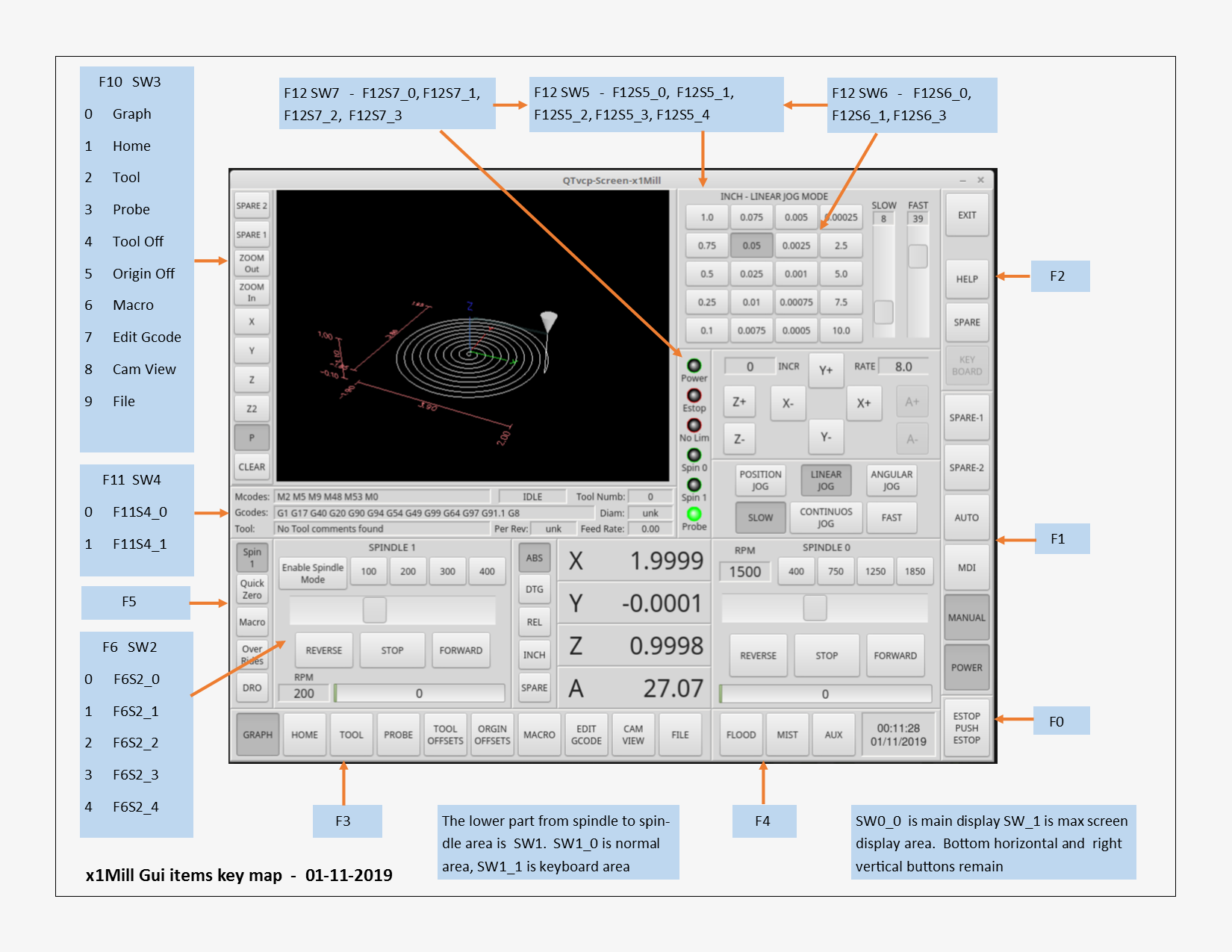
In the gui names for every item has in its name a location key like f12s2_1 to reference it to a location in the gui. f12 would be a the location and the s2 indicates that it is stackedWidget 2, and then the following 1 is the stackedWidget index number. This became necessary since there are about 240 items to deal with right now.
I have attached a map that is meant to be a aid in location items in the gui's handler file. The key can be used to search of a specific group of items to quickly to get to the approximate location of the item to be looked at. The map i have attache is in .png and .pdf formats.
It should be remembered that I developed the code in the handler for use with my own machine to suit my own purposes and that it may not be suitable for other use at the present time. Quite a number of things like probing still need further work, as do the home and tool table pages, along with numerous other small less important items. It is just for status info only right now.
The following user(s) said Thank You: tommylight, emilvv, KCJ
Please Log in or Create an account to join the conversation.
- cmorley
- Offline
- Moderator
-
Less
More
- Posts: 7368
- Thank you received: 2181
7 years 9 months ago #124012
by cmorley
Replied by cmorley on topic qtvcp issues
I thank you for continued work and sharing it. It looks great.
Chris M
Chris M
Please Log in or Create an account to join the conversation.
- KCJ
- Offline
- Platinum Member
-
Less
More
- Posts: 328
- Thank you received: 267
7 years 9 months ago #124013
by KCJ
Replied by KCJ on topic qtvcp issues
Indeed, that is a very nice looking screen. Keep it up!
Cheers,
Kurt
Cheers,
Kurt
Please Log in or Create an account to join the conversation.
Moderators: cmorley
Time to create page: 2.005 seconds