
- Posts: 7368
- Thank you received: 2181
qtvcp issues
- cmorley
- Offline
- Moderator
-

Less
More
7 years 9 months ago #124582
by cmorley
Hey Kurt
I see what you are saying here - took me awhile to clue in - I am working on fixing it.
Thanks!
Replied by cmorley on topic qtvcp issues
KCJ wrote: Chris, this is great news!
Not sure if this is the right place to report errors ...
I just tried running the QtVCP example configs and got an error with this traceback:
Code:Traceback (most recent call last): File "/usr/bin/qtvcp", line 10, in <module> from qtvcp.core import Status, Info File "/usr/lib/python2.7/dist-packages/qtvcp/core.py", line 10, in <module> from qtvcp.qt_istat import _IStat as IStatParent File "/usr/lib/python2.7/dist-packages/qtvcp/qt_istat.py", line 5, in <module> import logger File "/usr/lib/python2.7/dist-packages/qtvcp/logger.py", line 29, in <module> from lib.colored_formatter import ColoredFormatter ImportError: No module named lib.colored_formatter
Looks like it can't find the colored_formatter.py module. Probably a packaging problem (I installed from BuildBot deb).
I had forgotten I added the colored logger to QtVCP, I have a couple of efficiency improvements and minor bug fixes I will port over from QtPyVCP when I get a chance.
Cheers,
Kurt
Hey Kurt
I see what you are saying here - took me awhile to clue in - I am working on fixing it.
Thanks!
The following user(s) said Thank You: KCJ
Please Log in or Create an account to join the conversation.
- cmorley
- Offline
- Moderator
-
Less
More
- Posts: 7368
- Thank you received: 2181
7 years 9 months ago #124583
by cmorley
Hey Phil.
Thanks for checking it out.
It is indeed possible to have per screen preference files. The widget screenOption sets the preference file name. It's also possible to change it in the handler file if you had a good reason to.
I don't think I have documented QtVCP specific INI entries but you could look at the INI parcing file lib/python/qtvcp/qt_istat.py.
In the interest of not stealing this thread, if you have more questions I suggest we open a new thread.
I'll try to fix my spelling mistake too
Chris M
Replied by cmorley on topic qtvcp issues
phillc54 wrote: After a bit of a play around I really like what I see, thanks for all your work on this project.
Using Designer is certainly a step (or more) up from Glade.
I am thinking of making custom screens for each of my machines and I use just one computer to run them.
Is it possible to have per config preference files similar to how Axis uses USER_COMMAND_FILE in the ini file or is it restricted to the one preference file in ~/
Is there some documentation on what ini file settings are relevant to qtvcp, do they need to be read in by the handler file or are they read in by qtvcp in the background.
Cheers, Phill
Edit:
I think you have a typo or two here:and I guess that answers my question about when the ini files are parsed.Code:[QtDesigner.QTVCP.QT_ISTAT][WARNING] INI Parcing Error, No Entry: MIN_ABGULAR_VELOCITY, Using: 1 (qt_istat.py:168)
Hey Phil.
Thanks for checking it out.
It is indeed possible to have per screen preference files. The widget screenOption sets the preference file name. It's also possible to change it in the handler file if you had a good reason to.
I don't think I have documented QtVCP specific INI entries but you could look at the INI parcing file lib/python/qtvcp/qt_istat.py.
In the interest of not stealing this thread, if you have more questions I suggest we open a new thread.
I'll try to fix my spelling mistake too
Chris M
The following user(s) said Thank You: phillc54
Please Log in or Create an account to join the conversation.
- auto-mation-assist
- Offline
- Platinum Member
-

Less
More
- Posts: 425
- Thank you received: 81
7 years 9 months ago #124594
by auto-mation-assist
Replied by auto-mation-assist on topic qtvcp issues
I don’t believe that I have a homing issue with my .ini file since it has worked fine for a number of years. I did see some coding in QTvcp that could perhaps may be limiting some things to 3 axis due to improper status information sharing. I do not have a lot of information yet on how or what GSTAT is sharing between modules.
I did decide to get rid of all the gui specific configuration items in the .ini file today and move them all to: x1Mill_pref.inc and run that as an extended .ini file using the #INCLUDE x1Mill_pref.inc command in the DISPLAY section. The # being required and shows as " /x1Mill/x1Mill.ini.expanded" in the terminal window on start up. This makes it a lot simpler to manage.
All the files including the .ini and .hal files are on my git hub account and anyone can pull them. If I had more time I would try to make a simulation for the gui. The files are updated every two days or so as I progress. They were updated today and the entry point is:
github.com/auto-mation-assist/x1Mill_bra...s/x1Mill_development
I would like to get the files auto functions to work better than they do now. This is perhaps due to some status conflicts between QTvcp it self and my functions that may need to be worked out. I’m working on that but some of the commands needed for some of the buttons below still need to be worked out.
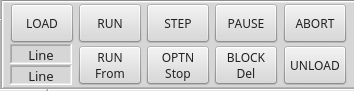
I have also done some work on verser_probe configuration commands from the gui and those are working and are included in the x1Mill_pref.inc configuration file. I did notice that somehow some of the from panel items got skewed a bit and I fixed that. The fixed version is at:
github.com/auto-mation-assist/x1Mill_bra...dgets/versa_probe.ui
I wonder if the associated icon files should not be placed in the image folder for the widgets.
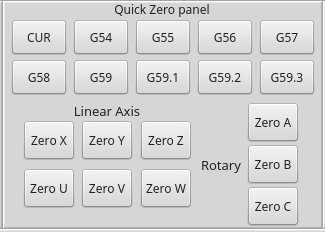
I have most of the quick zero panel working for clearing the G54-G59.1 offsets but still undecided on the commands to use for entering the work offsets to bring those to zero for the X to C axis. I don’t what to be setting the wrong gcode values.
I did decide to get rid of all the gui specific configuration items in the .ini file today and move them all to: x1Mill_pref.inc and run that as an extended .ini file using the #INCLUDE x1Mill_pref.inc command in the DISPLAY section. The # being required and shows as " /x1Mill/x1Mill.ini.expanded" in the terminal window on start up. This makes it a lot simpler to manage.
All the files including the .ini and .hal files are on my git hub account and anyone can pull them. If I had more time I would try to make a simulation for the gui. The files are updated every two days or so as I progress. They were updated today and the entry point is:
github.com/auto-mation-assist/x1Mill_bra...s/x1Mill_development
I would like to get the files auto functions to work better than they do now. This is perhaps due to some status conflicts between QTvcp it self and my functions that may need to be worked out. I’m working on that but some of the commands needed for some of the buttons below still need to be worked out.
I have also done some work on verser_probe configuration commands from the gui and those are working and are included in the x1Mill_pref.inc configuration file. I did notice that somehow some of the from panel items got skewed a bit and I fixed that. The fixed version is at:
github.com/auto-mation-assist/x1Mill_bra...dgets/versa_probe.ui
I wonder if the associated icon files should not be placed in the image folder for the widgets.
I have most of the quick zero panel working for clearing the G54-G59.1 offsets but still undecided on the commands to use for entering the work offsets to bring those to zero for the X to C axis. I don’t what to be setting the wrong gcode values.
Please Log in or Create an account to join the conversation.
- cmorley
- Offline
- Moderator
-
Less
More
- Posts: 7368
- Thank you received: 2181
7 years 9 months ago #124596
by cmorley
I agree i don't think it's a homing problem.
If you could be specific about what coding then perhaps i could confrm/fix.
Chris M
Replied by cmorley on topic qtvcp issues
auto-mation-assist wrote: I don’t believe that I have a homing issue with my .ini file since it has worked fine for a number of years. I did see some coding in QTvcp that could perhaps may be limiting some things to 3 axis due to improper status information sharing. I do not have a lot of information yet on how or what GSTAT is sharing between modules.
I agree i don't think it's a homing problem.
If you could be specific about what coding then perhaps i could confrm/fix.
Chris M
Please Log in or Create an account to join the conversation.
- auto-mation-assist
- Offline
- Platinum Member
-
Less
More
- Posts: 425
- Thank you received: 81
7 years 9 months ago - 7 years 9 months ago #124597
by auto-mation-assist
Replied by auto-mation-assist on topic qtvcp issues
On the graphic area I have most of the available functions working but running into limitations of the present QTvcp version graphic display. The buttons that are working ok are, inch/mm, X,Y,Z,Z2 and P views and clear. The DRO function as Chris has mentioned is not available yet.
I enabled overlay and it just shows a blue box area on the top left of the display but it should likely be transparent. In looking at the code a bit I saw no functions to allow for text yet and wonder it that could just become a separate function in another widget.
Zoom in and out works fine with the mouse wheel. To get the zoom in and out buttons to function will likely need automatic pulses to be generated and routing these to where they will be useful. Grabbing the screen with the mouse pointer allows it to move and dragged. I have not tried to see if the grid function is working.
Normal display
.

Expanded view

I enabled overlay and it just shows a blue box area on the top left of the display but it should likely be transparent. In looking at the code a bit I saw no functions to allow for text yet and wonder it that could just become a separate function in another widget.
Zoom in and out works fine with the mouse wheel. To get the zoom in and out buttons to function will likely need automatic pulses to be generated and routing these to where they will be useful. Grabbing the screen with the mouse pointer allows it to move and dragged. I have not tried to see if the grid function is working.
Normal display
.
Expanded view
Last edit: 7 years 9 months ago by auto-mation-assist. Reason: Added some comments
Please Log in or Create an account to join the conversation.
- cmorley
- Offline
- Moderator
-
Less
More
- Posts: 7368
- Thank you received: 2181
7 years 9 months ago #124599
by cmorley
Replied by cmorley on topic qtvcp issues
you can zoom in with:
self.w.GCODEDISPLAYWIDGETNAME.zoomin()
and zoomout with
self.w.GCODEDISPLAYWIDGETNAME.zoomout()
I should add them as actions to action buttons.
The overlay can be colored - usually you color it the same as the background.
Currently if you enble the DRO, it screws up the display and doesn't show the DRO. Since the DRO is displayed with openGL I don;t think one could add widgets there but could possible add user built openGL commands. There is some hooks in the code for showing user GL commands on the main screen (The idea was for showing chucks etc)
Chris M
self.w.GCODEDISPLAYWIDGETNAME.zoomin()
and zoomout with
self.w.GCODEDISPLAYWIDGETNAME.zoomout()
I should add them as actions to action buttons.
The overlay can be colored - usually you color it the same as the background.
Currently if you enble the DRO, it screws up the display and doesn't show the DRO. Since the DRO is displayed with openGL I don;t think one could add widgets there but could possible add user built openGL commands. There is some hooks in the code for showing user GL commands on the main screen (The idea was for showing chucks etc)
Chris M
Please Log in or Create an account to join the conversation.
Moderators: cmorley
Time to create page: 1.007 seconds