
- Posts: 425
- Thank you received: 81
qtvcp issues
- auto-mation-assist
- Offline
- Platinum Member
-

Less
More
7 years 9 months ago - 7 years 9 months ago #124928
by auto-mation-assist
Replied by auto-mation-assist on topic qtvcp issues
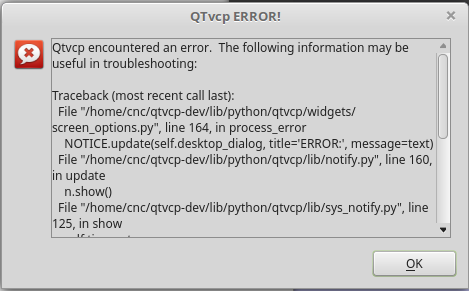
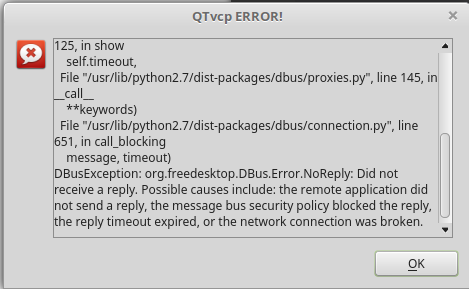
While testing some of my limits I ran the machine into Z into limits and then got flooded with perhaps many thousands of repetitive messages that slowed to computer down to where it became unresponsive and required a reboot. I was not able to get a snap shot of the user qtvcp massages about axis 2 being in limits that were all in 'black' but was able to take some screens shots about the problem it ran into that may be causing such a problem. I had to make the snap shot in two parts since the message I was able to copy is not expandable and wont allow text to be copied. I also attached the configuration file.
Last edit: 7 years 9 months ago by auto-mation-assist. Reason: Added missing file
Please Log in or Create an account to join the conversation.
- cmorley
- Offline
- Moderator
-

Less
More
- Posts: 7368
- Thank you received: 2181
7 years 9 months ago #124940
by cmorley
Replied by cmorley on topic qtvcp issues
I feel this is probably not the core problem - this is called everytime the notify messages are sent, so is more likely that something else blocked the required reply, but of course it is hard to say for sure.
One way to possibly prove this and maybe find another problem, I would suggest that you turn off the notify option in the screenoption widget, at least temporarily.
Then see if you can force the problem again.
I was thinking more on the continuous error message problem, and am now thinking I could have it count the number and if it gets say 5 messages it shuts down
I have another suggestion for your Git commits:
I downloaded your latest work to see if I could notice anything that could cause your error. All your commit meesages say the same thing - the signoff message.
It would be help full if you added a description of what your commit has changed and dropped the signoff.
Chris M
One way to possibly prove this and maybe find another problem, I would suggest that you turn off the notify option in the screenoption widget, at least temporarily.
Then see if you can force the problem again.
I was thinking more on the continuous error message problem, and am now thinking I could have it count the number and if it gets say 5 messages it shuts down
I have another suggestion for your Git commits:
I downloaded your latest work to see if I could notice anything that could cause your error. All your commit meesages say the same thing - the signoff message.
It would be help full if you added a description of what your commit has changed and dropped the signoff.
Chris M
Please Log in or Create an account to join the conversation.
- cmorley
- Offline
- Moderator
-
Less
More
- Posts: 7368
- Thank you received: 2181
7 years 9 months ago #124943
by cmorley
Replied by cmorley on topic qtvcp issues
I pushed work to limit the error dialog to 5 errors.
After that it shuts down and prints the error to the terminal.
Hopefully this is more helpful
Chris M
After that it shuts down and prints the error to the terminal.
Hopefully this is more helpful
Chris M
Please Log in or Create an account to join the conversation.
- auto-mation-assist
- Offline
- Platinum Member
-
Less
More
- Posts: 425
- Thank you received: 81
7 years 9 months ago #125126
by auto-mation-assist
Replied by auto-mation-assist on topic qtvcp issues
Ok that's good. Was commenting out all the message and voice stuff in the .py files. The voice does no good anyway when your next to a noisy machine. It logs everything I need to the terminal window.
I'm in the process of changing my dev computer over to mint 19.1 and qt 5.9.5. Mint 19.1 is installed and QT is busy installing. After it is done I can compile a RT kernel. I will try RT kernel 4.9.146. Will have to wait to see if its workable when done.
I'm in the process of changing my dev computer over to mint 19.1 and qt 5.9.5. Mint 19.1 is installed and QT is busy installing. After it is done I can compile a RT kernel. I will try RT kernel 4.9.146. Will have to wait to see if its workable when done.
Please Log in or Create an account to join the conversation.
- auto-mation-assist
- Offline
- Platinum Member
-
Less
More
- Posts: 425
- Thank you received: 81
7 years 9 months ago - 7 years 9 months ago #125259
by auto-mation-assist
Replied by auto-mation-assist on topic qtvcp issues
RT kernel 4.9.146 was not suitable but I have mint 19.1 running on the 4.14.93-rt53 kernel.
Linux cnc is running fine but I have an issue with the interface to the QT5.9.5 designer which is also appears to be running fine but no linuxcnc widgets show up and /qtvcp/plugins/qtvcp_plugin.py is never executing. The required link to qt5.9 libpyqt5_py2.so is in place and working.
This problem makes me think that there could be a possibility that the /lib/python/qtvcp/designer/x86_64/qt5.9/libpyqt5_py2.so supplied with QTvcp might not be the right one to use with QT5.9.5. There could ofcourse be another issue. Perhaps even a Python version error.
In any case mint 19.1 cinnamon uname -a gives back:
Linux cnc1 4.14.93-rt53 #1 SMP PREEMPT RT Tue Jan 29 01:00:10 AKST 2019 x86_64 x86_64 x86_64 GNU/Linux
Any I have not seen any other problems yet. I do feel that some of the icons they use are a big step backwards from prior versions of mint.
Linux cnc is running fine but I have an issue with the interface to the QT5.9.5 designer which is also appears to be running fine but no linuxcnc widgets show up and /qtvcp/plugins/qtvcp_plugin.py is never executing. The required link to qt5.9 libpyqt5_py2.so is in place and working.
This problem makes me think that there could be a possibility that the /lib/python/qtvcp/designer/x86_64/qt5.9/libpyqt5_py2.so supplied with QTvcp might not be the right one to use with QT5.9.5. There could ofcourse be another issue. Perhaps even a Python version error.
In any case mint 19.1 cinnamon uname -a gives back:
Linux cnc1 4.14.93-rt53 #1 SMP PREEMPT RT Tue Jan 29 01:00:10 AKST 2019 x86_64 x86_64 x86_64 GNU/Linux
Any I have not seen any other problems yet. I do feel that some of the icons they use are a big step backwards from prior versions of mint.
Last edit: 7 years 9 months ago by auto-mation-assist. Reason: Added a note on potential python version error
Please Log in or Create an account to join the conversation.
- cmorley
- Offline
- Moderator
-
Less
More
- Posts: 7368
- Thank you received: 2181
7 years 9 months ago #125261
by cmorley
Replied by cmorley on topic qtvcp issues
In my machine controller, I can not get a compiled kernel to load, i get a 'can't find suitable memory' error on boot. Still working that out.
But using a generic kerenel I have Mint 19 working and with designer finding the libraries.
When Designer is open, if you click on help/about plugins, do you see the libpyqt5_py2 listed?
But using a generic kerenel I have Mint 19 working and with designer finding the libraries.
When Designer is open, if you click on help/about plugins, do you see the libpyqt5_py2 listed?
Please Log in or Create an account to join the conversation.
Moderators: cmorley
Time to create page: 0.250 seconds