
- Posts: 425
- Thank you received: 81
qtvcp issues
- auto-mation-assist
- Offline
- Platinum Member
-

Less
More
7 years 9 months ago #125278
by auto-mation-assist
Replied by auto-mation-assist on topic qtvcp issues
It looks like I grabbed the wrong file to install from a few that I had downloaded.
I removed those and now working with the extracted items from PyQt5_gpl-5.9.zip
to install.
This is the one I had intended to install but some how managed to enter the wrong folder on the PyQ5 installs twice. On the bright side - Summer is getting closer.
I removed those and now working with the extracted items from PyQt5_gpl-5.9.zip
to install.
This is the one I had intended to install but some how managed to enter the wrong folder on the PyQ5 installs twice. On the bright side - Summer is getting closer.
Please Log in or Create an account to join the conversation.
- cmorley
- Offline
- Moderator
-

Less
More
- Posts: 7368
- Thank you received: 2181
7 years 9 months ago #125280
by cmorley
Replied by cmorley on topic qtvcp issues
lol - things happen sometimes 
Please Log in or Create an account to join the conversation.
- auto-mation-assist
- Offline
- Platinum Member
-
Less
More
- Posts: 425
- Thank you received: 81
7 years 9 months ago #125286
by auto-mation-assist
Replied by auto-mation-assist on topic qtvcp issues
To eliminate the last errors I had to install:
python-pyqt5.qtsvg
python-pyqt5.qtopengl
python-pyqt5.qsci
Its working now.
python-pyqt5.qtsvg
python-pyqt5.qtopengl
python-pyqt5.qsci
Its working now.
Please Log in or Create an account to join the conversation.
- auto-mation-assist
- Offline
- Platinum Member
-
Less
More
- Posts: 425
- Thank you received: 81
7 years 9 months ago #125345
by auto-mation-assist
Replied by auto-mation-assist on topic qtvcp issues
With Mint 19.1 I did have to install some dependencies that had minor name changes before linuxcnc would compile beside the usual ones that dpkg-checkbuilddeps would find. I made a list of the ones that I installed which is attached. I think they are all on the list.
There may be duplicates with what dpkg-checkbuilddeps would find for linuxcnc, but perhaps this list will be useful to someone.
It would be nice if linuxcnc had an option to only install the needed texlive files. Most will likely never be used and they take up a lot of space.
There may be duplicates with what dpkg-checkbuilddeps would find for linuxcnc, but perhaps this list will be useful to someone.
It would be nice if linuxcnc had an option to only install the needed texlive files. Most will likely never be used and they take up a lot of space.
Please Log in or Create an account to join the conversation.
- auto-mation-assist
- Offline
- Platinum Member
-
Less
More
- Posts: 425
- Thank you received: 81
7 years 9 months ago - 7 years 9 months ago #125370
by auto-mation-assist
Replied by auto-mation-assist on topic qtvcp issues
Since changing to Mint 19.1 I get indentation error messages even tough I use the same indent and everything visually lines up just fine in the text editor. This is just a inconvenience that can be worked around with a better editor or by copy and paste existing indents. A more important problem that shows up on start up of the gui is a problem.
For some reason on start up the size is reduced as the below picture shows. Once the Gui is loaded and running I notice that the size returns to normal and info messages can be read.
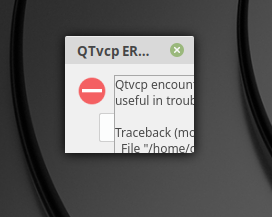
For some reason on start up the size is reduced as the below picture shows. Once the Gui is loaded and running I notice that the size returns to normal and info messages can be read.
Last edit: 7 years 9 months ago by auto-mation-assist.
Please Log in or Create an account to join the conversation.
- cmorley
- Offline
- Moderator
-
Less
More
- Posts: 7368
- Thank you received: 2181
7 years 9 months ago #125405
by cmorley
Replied by cmorley on topic qtvcp issues
Indent problems typically happen if you mix tabs and spaces.
I always set my text editor to use 4 space when the tab button is pressed.
Maybe that is related to the error.
I'll test the error message on my mint 19 system and see If i can see what's going on with the error message.
Chris M
I always set my text editor to use 4 space when the tab button is pressed.
Maybe that is related to the error.
I'll test the error message on my mint 19 system and see If i can see what's going on with the error message.
Chris M
Please Log in or Create an account to join the conversation.
Moderators: cmorley
Time to create page: 0.347 seconds