
Search Results (Searched for: )
- rodw
-

29 Nov 2025 20:41
Replied by rodw on topic Low voltage limit/home switch configuration
You have not said what voltage you are using.
The rationale behind 24 volts being more or less standard for industrial systems is that it is more resistant to triggering from noise because a much greater voltage fluctuation is required to trigger false readings.
I think you have already diagnosed the issue.
Also using an industrial power supply like a Meanwell MDR-60-24 won't break the bank. I have lost count of people reporting issues when they use 5 volt plug packs...
The rationale behind 24 volts being more or less standard for industrial systems is that it is more resistant to triggering from noise because a much greater voltage fluctuation is required to trigger false readings.
I think you have already diagnosed the issue.
Also using an industrial power supply like a Meanwell MDR-60-24 won't break the bank. I have lost count of people reporting issues when they use 5 volt plug packs...
- rasmus
29 Nov 2025 20:27
Replied by rasmus on topic carousel.comp scale questions.
Thank you.
The encoder is not 1:1 to the ATC Carousel, but mounted directly on the carousel shaft.
The relation is more about 43:1but not exactly, I did a hack reprogramming of the carousel.comp, but not nice and maybe not that thought trough, needs to be tested.
If it does not work i will have a look on the counts mode and see if that will work better.
The encoder is not 1:1 to the ATC Carousel, but mounted directly on the carousel shaft.
The relation is more about 43:1but not exactly, I did a hack reprogramming of the carousel.comp, but not nice and maybe not that thought trough, needs to be tested.
If it does not work i will have a look on the counts mode and see if that will work better.
- vibram
29 Nov 2025 20:07 - 29 Nov 2025 20:46
Replied by vibram on topic AX58100
Hello
I bought the following card (still waiting for it) and it seems to have TIM8 CH1 and CH2 available
fr.aliexpress.com/item/1005008473184616....gatewayAdapt=glo2fra
I bought the following card (still waiting for it) and it seems to have TIM8 CH1 and CH2 available
fr.aliexpress.com/item/1005008473184616....gatewayAdapt=glo2fra
- Sekai
29 Nov 2025 19:29
Replied by Sekai on topic Chinese Mesa 7I92 from aliexpress NEW
youre right about the bob, but for now i dont have a bob.
For now i'm new to mesa card in general.
Thanks
For now i'm new to mesa card in general.
Thanks
- Autumn Reign
29 Nov 2025 19:18
Low voltage limit/home switch configuration was created by Autumn Reign
I have finally gotten my first LinuxCNC machine homing! It is a XXYZA machine. I am quite happy with my progress and everything I have learned. The machine appears to be holding tolerances well while jogging and I am very excited to start running gcode here shortly.
However, I am getting an oddity with my home switches while homing. It's a low voltage system for signals and having spent a lot more time with all of this I realize that a 12 or 24 volt communication voltage and some daughter cards would have kept some of my troubles in the realm of programming and less in the realm of electrical engineering. I have a 6i25 running to a bank of CL86Y's and 4 functioning home switches (XYZA) from 0V to GPIO pins that are normally closed, one for each axis. I think I am making some sort of pullup/pulldown or other fundamental signal error in my home switches.
With my attached hal/ini configs while homing if I start with switches depressed everything homes great. X and A homing are disabled while I am playing with settings but they work when enabled. Halshow shows my switches working as expected. Diag goes "yellow" when the switch is hit and resumes "red" when released. Sometimes I have seen an unexpected flicker, and the shielded wire is not yet grounded. All other cables are shielded and grounded so I think EMI is minimal, but I will be grounding the shield shortly regardless. However, if I start off of switches the axis will pulse forward and then stop after a move of no even length and throw an error about not being on a switch when backing up, as if it was transitioning from search_vel to latch_vel.
I don't mind starting the machine homing by hand, but I am concerned my home switches are triggering the 6i25 IO while I would be normally operating. This seems like it cannot be a great thing to be doing, but maybe it would not be relevant.
If you have any suggestions to get more reliable performance, I would appreciate leaning on all of your experience.
However, I am getting an oddity with my home switches while homing. It's a low voltage system for signals and having spent a lot more time with all of this I realize that a 12 or 24 volt communication voltage and some daughter cards would have kept some of my troubles in the realm of programming and less in the realm of electrical engineering. I have a 6i25 running to a bank of CL86Y's and 4 functioning home switches (XYZA) from 0V to GPIO pins that are normally closed, one for each axis. I think I am making some sort of pullup/pulldown or other fundamental signal error in my home switches.
With my attached hal/ini configs while homing if I start with switches depressed everything homes great. X and A homing are disabled while I am playing with settings but they work when enabled. Halshow shows my switches working as expected. Diag goes "yellow" when the switch is hit and resumes "red" when released. Sometimes I have seen an unexpected flicker, and the shielded wire is not yet grounded. All other cables are shielded and grounded so I think EMI is minimal, but I will be grounding the shield shortly regardless. However, if I start off of switches the axis will pulse forward and then stop after a move of no even length and throw an error about not being on a switch when backing up, as if it was transitioning from search_vel to latch_vel.
I don't mind starting the machine homing by hand, but I am concerned my home switches are triggering the 6i25 IO while I would be normally operating. This seems like it cannot be a great thing to be doing, but maybe it would not be relevant.
If you have any suggestions to get more reliable performance, I would appreciate leaning on all of your experience.
- abu
29 Nov 2025 18:52 - 29 Nov 2025 20:27
Replied by abu on topic LinuxCNC latency and jitter improvements with PREEMPT_RT kernel parameter tuning
Warning: I have a machine with a 12-core Intel i7 (numbered 0 to 11). The numbers shown in this answer will vary depending on the number of cores in each machine. Do not use Ctrl+C/Ctrl+V. You must read the articles cited in the thread. The calculations for the numbers are there.
Ladies and gentlemen, this looks promising!
It seems that POSIX realtime (PREEMPT_RT kernels) is finally working decently.
This is my machine (linuxcnc info):
The file: /tmp/linuxcnc_info.txt
can be posted to a forum or a web site like:
pastebin.com
in order to provide information about the linuxcnc
system and configuration.
VIEWER=kate
Date: sáb 29 nov 2025 19:36:45 CET
UTC Date: sáb 29 nov 2025 18:36:45 UTC
this program: /home/xiuser/linuxcnc/scripts/linuxcnc_info
uptime: 19:36:45 up 1:04, 1 user, load average: 0,35, 0,50, 0,79
lsb_release -a: Distributor ID: Debian
Description: Debian GNU/Linux 12 (bookworm)
Release: 12
Codename: bookworm
linuxcnc: /home/xiuser/linuxcnc/scripts/linuxcnc
pwd: /home/xiuser
USER: xiuser
LOGNAME: xiuser
HOME: /home/xiuser
EDITOR:
VISUAL:
LANGUAGE:
TERM: xterm-256color
COLORTERM: truecolor
DISPLAY: :0.0
DESKTOP: lightdm-xsession
display size: 3360x1080 pixels (889x285 millimeters)
PATH: /home/xiuser/linuxcnc/scripts:/home/xiuser/linuxcnc/bin:/home/xiuser/.local/bin:/home/xiuser/linuxcnc/bin:/home/xiuser/linuxcnc/scripts:/home/xiuser/linuxcnc/tcl:/usr/local/bin:/usr/bin:/bin:/usr/local/games:/usr/games
uname items:
nodename -n: HPi7
kernel-name -s: Linux
kernel-vers -v: #1 SMP PREEMPT_RT Debian 6.12.57-1~bpo12+1 (2025-11-17)
machine -m: x86_64
processor -p: unknown
platform -i: unknown
oper system -o: GNU/Linux
/proc items:
cmdline: BOOT_IMAGE=/boot/vmlinuz-6.12.57+deb12-rt-amd64 root=UUID=6dec6435-2cb8-427a-9697-c8d82ce45bdb ro net.ifnames=0 skew_tick=1 nosmt=force kthread_cpus=0-5 irqaffinity=0-5 rcu_nocb_poll rcu_nocbs=6-11 nohz=on nohz_full=6-11 isolcpus=6-11 intel_pstate=disable amd_pstate=disable idle=poll cpufreq.off=1 cpuidle.off=1 intel_idle.max_cstate=0 amd_idle.max_cstate=0 nowatchdog nosoftlockup i915.force_probe=!4680 xe.force_probe=4680
model name: 12th Gen Intel(R) Core(TM) i7-12700
cores: 12
cpu MHz: 3685.961
parport:
serial:
Versions:
gcc: gcc (Debian 12.2.0-14+deb12u1) 12.2.0
python: Python 3.11.2
git: git version 2.39.5
git commit: 2cee0486b4
tcl: 8.6
tk: 8.6
glade: glade 3.40.0
linuxcnc_var all:
LINUXCNCVERSION: 2.10.0~pre0
LINUXCNC_AUX_GLADEVCP: /usr/share/linuxcnc/aux_gladevcp
LINUXCNC_AUX_EXAMPLES: /usr/share/linuxcnc/aux_examples
REALTIME: /home/xiuser/linuxcnc/scripts/realtime
RTS: uspace
HALLIB_DIR: /home/xiuser/linuxcnc/lib/hallib
PYTHON: /usr/bin/python3.11
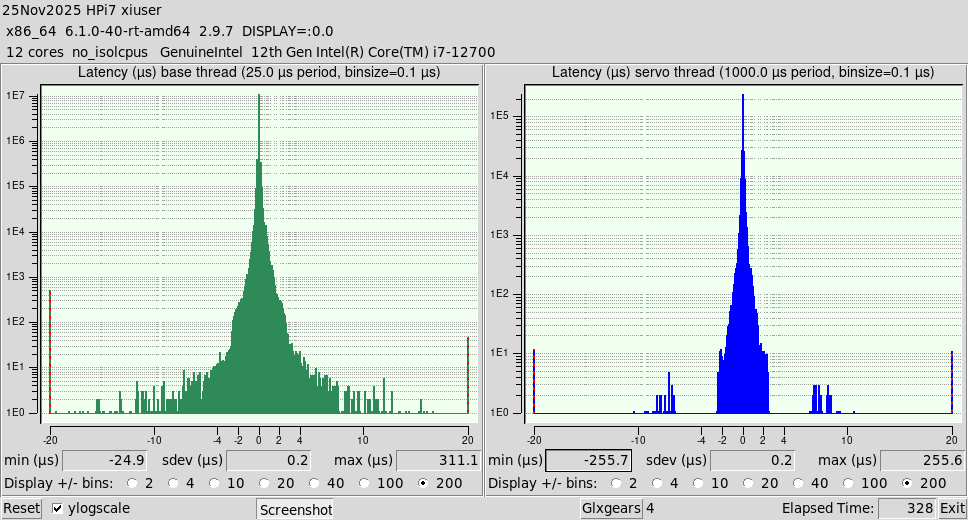
This is the latency histogram before tuning:
And this is the histogram after the changes...
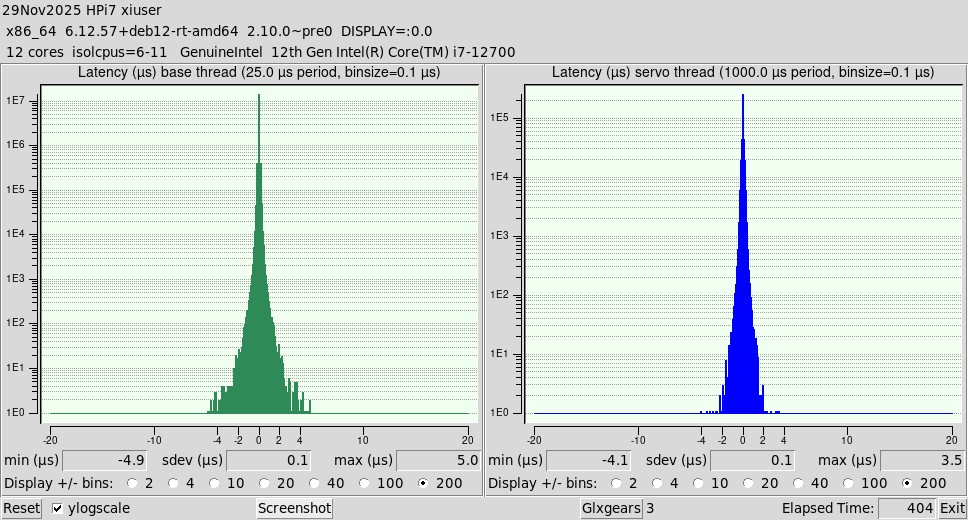
First change: A new kernel that includes the new Intel Xe video driver, which will replace the venerable i915. Xe is in kernels >= 6.12.
kernel-vers -v: #1 SMP PREEMPT_RT Debian 6.12.57-1~bpo12+1 (2025-11-17)
Second change: the GRUB_CMDLINE_LINUX_DEFAULT boot line in Grub. Now cmdline is:
cmdline: BOOT_IMAGE=/boot/vmlinuz-6.12.57+deb12-rt-amd64 root=UUID=6dec6435-2cb8-427a-9697-c8d82ce45bdb ro net.ifnames=0 skew_tick=1 nosmt=force kthread_cpus=0-5 irqaffinity=0-5 rcu_nocb_poll rcu_nocbs=6-11 nohz=on nohz_full=6-11 isolcpus=6-11 intel_pstate=disable amd_pstate=disable idle=poll cpufreq.off=1 cpuidle.off=1 intel_idle.max_cstate=0 amd_idle.max_cstate=0 nowatchdog nosoftlockup i915.force_probe=!4680 xe.force_probe=4680
Note: force_probe => i915 OFF and Xe ON. My video device ID is 4680. Yours may be different. lspci gives the ID for each machine.
Third change: Modifying kernel parameters at runtime:
sudo sysctl kernel.timer_migration=0
sudo sysctl kernel.sched_rt_runtime_us=-1
Ladies and gentlemen, this looks promising!
It seems that POSIX realtime (PREEMPT_RT kernels) is finally working decently.
This is my machine (linuxcnc info):
The file: /tmp/linuxcnc_info.txt
can be posted to a forum or a web site like:
pastebin.com
in order to provide information about the linuxcnc
system and configuration.
VIEWER=kate
Date: sáb 29 nov 2025 19:36:45 CET
UTC Date: sáb 29 nov 2025 18:36:45 UTC
this program: /home/xiuser/linuxcnc/scripts/linuxcnc_info
uptime: 19:36:45 up 1:04, 1 user, load average: 0,35, 0,50, 0,79
lsb_release -a: Distributor ID: Debian
Description: Debian GNU/Linux 12 (bookworm)
Release: 12
Codename: bookworm
linuxcnc: /home/xiuser/linuxcnc/scripts/linuxcnc
pwd: /home/xiuser
USER: xiuser
LOGNAME: xiuser
HOME: /home/xiuser
EDITOR:
VISUAL:
LANGUAGE:
TERM: xterm-256color
COLORTERM: truecolor
DISPLAY: :0.0
DESKTOP: lightdm-xsession
display size: 3360x1080 pixels (889x285 millimeters)
PATH: /home/xiuser/linuxcnc/scripts:/home/xiuser/linuxcnc/bin:/home/xiuser/.local/bin:/home/xiuser/linuxcnc/bin:/home/xiuser/linuxcnc/scripts:/home/xiuser/linuxcnc/tcl:/usr/local/bin:/usr/bin:/bin:/usr/local/games:/usr/games
uname items:
nodename -n: HPi7
kernel-name -s: Linux
kernel-vers -v: #1 SMP PREEMPT_RT Debian 6.12.57-1~bpo12+1 (2025-11-17)
machine -m: x86_64
processor -p: unknown
platform -i: unknown
oper system -o: GNU/Linux
/proc items:
cmdline: BOOT_IMAGE=/boot/vmlinuz-6.12.57+deb12-rt-amd64 root=UUID=6dec6435-2cb8-427a-9697-c8d82ce45bdb ro net.ifnames=0 skew_tick=1 nosmt=force kthread_cpus=0-5 irqaffinity=0-5 rcu_nocb_poll rcu_nocbs=6-11 nohz=on nohz_full=6-11 isolcpus=6-11 intel_pstate=disable amd_pstate=disable idle=poll cpufreq.off=1 cpuidle.off=1 intel_idle.max_cstate=0 amd_idle.max_cstate=0 nowatchdog nosoftlockup i915.force_probe=!4680 xe.force_probe=4680
model name: 12th Gen Intel(R) Core(TM) i7-12700
cores: 12
cpu MHz: 3685.961
parport:
serial:
Versions:
gcc: gcc (Debian 12.2.0-14+deb12u1) 12.2.0
python: Python 3.11.2
git: git version 2.39.5
git commit: 2cee0486b4
tcl: 8.6
tk: 8.6
glade: glade 3.40.0
linuxcnc_var all:
LINUXCNCVERSION: 2.10.0~pre0
LINUXCNC_AUX_GLADEVCP: /usr/share/linuxcnc/aux_gladevcp
LINUXCNC_AUX_EXAMPLES: /usr/share/linuxcnc/aux_examples
REALTIME: /home/xiuser/linuxcnc/scripts/realtime
RTS: uspace
HALLIB_DIR: /home/xiuser/linuxcnc/lib/hallib
PYTHON: /usr/bin/python3.11
This is the latency histogram before tuning:
And this is the histogram after the changes...
First change: A new kernel that includes the new Intel Xe video driver, which will replace the venerable i915. Xe is in kernels >= 6.12.
kernel-vers -v: #1 SMP PREEMPT_RT Debian 6.12.57-1~bpo12+1 (2025-11-17)
Second change: the GRUB_CMDLINE_LINUX_DEFAULT boot line in Grub. Now cmdline is:
cmdline: BOOT_IMAGE=/boot/vmlinuz-6.12.57+deb12-rt-amd64 root=UUID=6dec6435-2cb8-427a-9697-c8d82ce45bdb ro net.ifnames=0 skew_tick=1 nosmt=force kthread_cpus=0-5 irqaffinity=0-5 rcu_nocb_poll rcu_nocbs=6-11 nohz=on nohz_full=6-11 isolcpus=6-11 intel_pstate=disable amd_pstate=disable idle=poll cpufreq.off=1 cpuidle.off=1 intel_idle.max_cstate=0 amd_idle.max_cstate=0 nowatchdog nosoftlockup i915.force_probe=!4680 xe.force_probe=4680
Note: force_probe => i915 OFF and Xe ON. My video device ID is 4680. Yours may be different. lspci gives the ID for each machine.
Third change: Modifying kernel parameters at runtime:
sudo sysctl kernel.timer_migration=0
sudo sysctl kernel.sched_rt_runtime_us=-1
- Muzzer
29 Nov 2025 18:46
Replied by Muzzer on topic Updating from LINUXCNC - 2.8.4-23, Mint 20.3 - gmoccapy lathe structure
Aha. Many thanks - commenting out that duplicated line did the trick, so I now have the machine moving in closed loop, homing correctly and e-stopping safely. That's a great step forward and it feels as if I'm getting close to getting this sorted out.
I now have to get the xhc-whb04b-6 MPG connected up (currently commented out) and the spindle vfd doesn't respond, so I'll need to check that out too.
Andy Pugh's macros don't show up in my GUI. I have the tab showing up but clicking on it does nothing - none of the graphics appear. There are several gmoccapy lathe sims that work but something's not right in my setup. Again, I'm not clear what files need to be where and what configs need to be set up. Is there any documentation for the lathe macros that I can refer to?
Many thanks
I now have to get the xhc-whb04b-6 MPG connected up (currently commented out) and the spindle vfd doesn't respond, so I'll need to check that out too.
Andy Pugh's macros don't show up in my GUI. I have the tab showing up but clicking on it does nothing - none of the graphics appear. There are several gmoccapy lathe sims that work but something's not right in my setup. Again, I'm not clear what files need to be where and what configs need to be set up. Is there any documentation for the lathe macros that I can refer to?
Many thanks
- endian
29 Nov 2025 18:17 - 30 Nov 2025 13:27
Replied by endian on topic Reduce read-all timing 7i76e + 7i77
hello PCW,
base thread or servo thread latency is way under 6us ...
here are statistics
user@debian:~$ sudo systemctl restart irqbalance
user@debian:~$ ping 192.168.1.10
PING 192.168.1.10 (192.168.1.10): 56 data bytes
64 bytes from 192.168.1.10: icmp_seq=0 ttl=64 time=0.033 ms
64 bytes from 192.168.1.10: icmp_seq=1 ttl=64 time=0.048 ms
64 bytes from 192.168.1.10: icmp_seq=2 ttl=64 time=0.043 ms
64 bytes from 192.168.1.10: icmp_seq=3 ttl=64 time=0.042 ms
64 bytes from 192.168.1.10: icmp_seq=4 ttl=64 time=0.048 ms
64 bytes from 192.168.1.10: icmp_seq=5 ttl=64 time=0.035 ms
64 bytes from 192.168.1.10: icmp_seq=6 ttl=64 time=0.034 ms
64 bytes from 192.168.1.10: icmp_seq=7 ttl=64 time=0.034 ms
64 bytes from 192.168.1.10: icmp_seq=8 ttl=64 time=0.033 ms
64 bytes from 192.168.1.10: icmp_seq=9 ttl=64 time=0.033 ms
64 bytes from 192.168.1.10: icmp_seq=10 ttl=64 time=0.034 ms
64 bytes from 192.168.1.10: icmp_seq=11 ttl=64 time=0.033 ms
64 bytes from 192.168.1.10: icmp_seq=12 ttl=64 time=0.041 ms
64 bytes from 192.168.1.10: icmp_seq=13 ttl=64 time=0.036 ms
64 bytes from 192.168.1.10: icmp_seq=14 ttl=64 time=0.035 ms
64 bytes from 192.168.1.10: icmp_seq=15 ttl=64 time=0.034 ms
64 bytes from 192.168.1.10: icmp_seq=16 ttl=64 time=0.034 ms
64 bytes from 192.168.1.10: icmp_seq=17 ttl=64 time=0.034 ms
64 bytes from 192.168.1.10: icmp_seq=18 ttl=64 time=0.035 ms
64 bytes from 192.168.1.10: icmp_seq=19 ttl=64 time=0.033 ms
64 bytes from 192.168.1.10: icmp_seq=20 ttl=64 time=0.051 ms
64 bytes from 192.168.1.10: icmp_seq=21 ttl=64 time=0.034 ms
64 bytes from 192.168.1.10: icmp_seq=22 ttl=64 time=0.042 ms
64 bytes from 192.168.1.10: icmp_seq=23 ttl=64 time=0.034 ms
64 bytes from 192.168.1.10: icmp_seq=24 ttl=64 time=0.034 ms
64 bytes from 192.168.1.10: icmp_seq=25 ttl=64 time=0.034 ms
64 bytes from 192.168.1.10: icmp_seq=26 ttl=64 time=0.034 ms
64 bytes from 192.168.1.10: icmp_seq=27 ttl=64 time=0.034 ms
64 bytes from 192.168.1.10: icmp_seq=28 ttl=64 time=0.034 ms
linuxcnc on
^C--- 192.168.1.10 ping statistics ---
29 packets transmitted, 29 packets received, 0% packet loss
round-trip min/avg/max/stddev = 0.033/0.037/0.051/0.000 ms
linuxcnc off
user@debian:~$ sudo chrt 99 ping -i 0.001 -q -c 60000 192.168.1.10
PING 192.168.1.10 (192.168.1.10): 56 data bytes
--- 192.168.1.10 ping statistics ---
60000 packets transmitted, 60000 packets received, 0% packet loss
round-trip min/avg/max/stddev = 0.013/0.016/0.032/0.000 ms
user@debian:~$ sudo chrt 99 ping -i 0.001 -q -c 60000 192.168.1.10
PING 192.168.1.10 (192.168.1.10): 56 data bytes
--- 192.168.1.10 ping statistics ---
60000 packets transmitted, 60000 packets received, 0% packet loss
round-trip min/avg/max/stddev = 0.013/0.016/0.032/0.000 ms
user@debian:~$ sudo chrt 99 ping -i 0.001 -q -c 60000 192.168.1.10
PING 192.168.1.10 (192.168.1.10): 56 data bytes
--- 192.168.1.10 ping statistics ---
60000 packets transmitted, 60000 packets received, 0% packet loss
round-trip min/avg/max/stddev = 0.013/0.016/0.031/0.000 ms
user@debian:~$ sudo chrt 99 ping -i 0.001 -q -c 60000 192.168.1.10
PING 192.168.1.10 (192.168.1.10): 56 data bytes
--- 192.168.1.10 ping statistics ---
60000 packets transmitted, 60000 packets received, 0% packet loss
round-trip min/avg/max/stddev = 0.013/0.016/0.032/0.000 ms
user@debian:~$ sudo chrt 99 ping -i 0.001 -q -c 60000 192.168.1.10
PING 192.168.1.10 (192.168.1.10): 56 data bytes
--- 192.168.1.10 ping statistics ---
60000 packets transmitted, 60000 packets received, 0% packet loss
round-trip min/avg/max/stddev = 0.013/0.014/0.031/0.000 ms
user@debian:~$ sudo chrt 99 ping -i 0.001 -q -c 60000 192.168.1.10
PING 192.168.1.10 (192.168.1.10): 56 data bytes
--- 192.168.1.10 ping statistics ---
60000 packets transmitted, 60000 packets received, 0% packet loss
round-trip min/avg/max/stddev = 0.013/0.014/0.037/0.000 ms
user@debian:~$ sudo chrt 99 ping -i 0.001 -q -c 60000 192.168.1.10
PING 192.168.1.10 (192.168.1.10): 56 data bytes
--- 192.168.1.10 ping statistics ---
60000 packets transmitted, 60000 packets received, 0% packet loss
round-trip min/avg/max/stddev = 0.013/0.014/0.036/0.000 ms
user@debian:~$ sudo chrt 99 ping -i 0.001 -q -c 60000 192.168.1.10
PING 192.168.1.10 (192.168.1.10): 56 data bytes
--- 192.168.1.10 ping statistics ---
60000 packets transmitted, 60000 packets received, 0% packet loss
round-trip min/avg/max/stddev = 0.013/0.014/0.036/0.000 ms
user@debian:~$ sudo chrt 99 ping -i 0.001 -q -c 60000 192.168.1.10
PING 192.168.1.10 (192.168.1.10): 56 data bytes
--- 192.168.1.10 ping statistics ---
60000 packets transmitted, 60000 packets received, 0% packet loss
round-trip min/avg/max/stddev = 0.013/0.014/0.037/0.000 ms
user@debian:~$ sudo chrt 99 ping -i 0.001 -q -c 60000 192.168.1.10
PING 192.168.1.10 (192.168.1.10): 56 data bytes
--- 192.168.1.10 ping statistics ---
60000 packets transmitted, 60000 packets received, 0% packet loss
round-trip min/avg/max/stddev = 0.013/0.014/0.037/0.000 ms
user@debian:~$ sudo chrt 99 ping -i 0.001 -q -c 60000 192.168.1.10
[sudo] password for user:
Sorry, try again.
[sudo] password for user:
PING 192.168.1.10 (192.168.1.10): 56 data bytes
--- 192.168.1.10 ping statistics ---
60000 packets transmitted, 60000 packets received, 0% packet loss
round-trip min/avg/max/stddev = 0.013/0.014/0.041/0.000 ms
what to do next please? regards and thanks
base thread or servo thread latency is way under 6us ...
here are statistics
Warning: Spoiler!
user@debian:~$ sudo systemctl restart irqbalance
user@debian:~$ ping 192.168.1.10
PING 192.168.1.10 (192.168.1.10): 56 data bytes
64 bytes from 192.168.1.10: icmp_seq=0 ttl=64 time=0.033 ms
64 bytes from 192.168.1.10: icmp_seq=1 ttl=64 time=0.048 ms
64 bytes from 192.168.1.10: icmp_seq=2 ttl=64 time=0.043 ms
64 bytes from 192.168.1.10: icmp_seq=3 ttl=64 time=0.042 ms
64 bytes from 192.168.1.10: icmp_seq=4 ttl=64 time=0.048 ms
64 bytes from 192.168.1.10: icmp_seq=5 ttl=64 time=0.035 ms
64 bytes from 192.168.1.10: icmp_seq=6 ttl=64 time=0.034 ms
64 bytes from 192.168.1.10: icmp_seq=7 ttl=64 time=0.034 ms
64 bytes from 192.168.1.10: icmp_seq=8 ttl=64 time=0.033 ms
64 bytes from 192.168.1.10: icmp_seq=9 ttl=64 time=0.033 ms
64 bytes from 192.168.1.10: icmp_seq=10 ttl=64 time=0.034 ms
64 bytes from 192.168.1.10: icmp_seq=11 ttl=64 time=0.033 ms
64 bytes from 192.168.1.10: icmp_seq=12 ttl=64 time=0.041 ms
64 bytes from 192.168.1.10: icmp_seq=13 ttl=64 time=0.036 ms
64 bytes from 192.168.1.10: icmp_seq=14 ttl=64 time=0.035 ms
64 bytes from 192.168.1.10: icmp_seq=15 ttl=64 time=0.034 ms
64 bytes from 192.168.1.10: icmp_seq=16 ttl=64 time=0.034 ms
64 bytes from 192.168.1.10: icmp_seq=17 ttl=64 time=0.034 ms
64 bytes from 192.168.1.10: icmp_seq=18 ttl=64 time=0.035 ms
64 bytes from 192.168.1.10: icmp_seq=19 ttl=64 time=0.033 ms
64 bytes from 192.168.1.10: icmp_seq=20 ttl=64 time=0.051 ms
64 bytes from 192.168.1.10: icmp_seq=21 ttl=64 time=0.034 ms
64 bytes from 192.168.1.10: icmp_seq=22 ttl=64 time=0.042 ms
64 bytes from 192.168.1.10: icmp_seq=23 ttl=64 time=0.034 ms
64 bytes from 192.168.1.10: icmp_seq=24 ttl=64 time=0.034 ms
64 bytes from 192.168.1.10: icmp_seq=25 ttl=64 time=0.034 ms
64 bytes from 192.168.1.10: icmp_seq=26 ttl=64 time=0.034 ms
64 bytes from 192.168.1.10: icmp_seq=27 ttl=64 time=0.034 ms
64 bytes from 192.168.1.10: icmp_seq=28 ttl=64 time=0.034 ms
linuxcnc on
^C--- 192.168.1.10 ping statistics ---
29 packets transmitted, 29 packets received, 0% packet loss
round-trip min/avg/max/stddev = 0.033/0.037/0.051/0.000 ms
linuxcnc off
user@debian:~$ sudo chrt 99 ping -i 0.001 -q -c 60000 192.168.1.10
PING 192.168.1.10 (192.168.1.10): 56 data bytes
--- 192.168.1.10 ping statistics ---
60000 packets transmitted, 60000 packets received, 0% packet loss
round-trip min/avg/max/stddev = 0.013/0.016/0.032/0.000 ms
user@debian:~$ sudo chrt 99 ping -i 0.001 -q -c 60000 192.168.1.10
PING 192.168.1.10 (192.168.1.10): 56 data bytes
--- 192.168.1.10 ping statistics ---
60000 packets transmitted, 60000 packets received, 0% packet loss
round-trip min/avg/max/stddev = 0.013/0.016/0.032/0.000 ms
user@debian:~$ sudo chrt 99 ping -i 0.001 -q -c 60000 192.168.1.10
PING 192.168.1.10 (192.168.1.10): 56 data bytes
--- 192.168.1.10 ping statistics ---
60000 packets transmitted, 60000 packets received, 0% packet loss
round-trip min/avg/max/stddev = 0.013/0.016/0.031/0.000 ms
user@debian:~$ sudo chrt 99 ping -i 0.001 -q -c 60000 192.168.1.10
PING 192.168.1.10 (192.168.1.10): 56 data bytes
--- 192.168.1.10 ping statistics ---
60000 packets transmitted, 60000 packets received, 0% packet loss
round-trip min/avg/max/stddev = 0.013/0.016/0.032/0.000 ms
user@debian:~$ sudo chrt 99 ping -i 0.001 -q -c 60000 192.168.1.10
PING 192.168.1.10 (192.168.1.10): 56 data bytes
--- 192.168.1.10 ping statistics ---
60000 packets transmitted, 60000 packets received, 0% packet loss
round-trip min/avg/max/stddev = 0.013/0.014/0.031/0.000 ms
user@debian:~$ sudo chrt 99 ping -i 0.001 -q -c 60000 192.168.1.10
PING 192.168.1.10 (192.168.1.10): 56 data bytes
--- 192.168.1.10 ping statistics ---
60000 packets transmitted, 60000 packets received, 0% packet loss
round-trip min/avg/max/stddev = 0.013/0.014/0.037/0.000 ms
user@debian:~$ sudo chrt 99 ping -i 0.001 -q -c 60000 192.168.1.10
PING 192.168.1.10 (192.168.1.10): 56 data bytes
--- 192.168.1.10 ping statistics ---
60000 packets transmitted, 60000 packets received, 0% packet loss
round-trip min/avg/max/stddev = 0.013/0.014/0.036/0.000 ms
user@debian:~$ sudo chrt 99 ping -i 0.001 -q -c 60000 192.168.1.10
PING 192.168.1.10 (192.168.1.10): 56 data bytes
--- 192.168.1.10 ping statistics ---
60000 packets transmitted, 60000 packets received, 0% packet loss
round-trip min/avg/max/stddev = 0.013/0.014/0.036/0.000 ms
user@debian:~$ sudo chrt 99 ping -i 0.001 -q -c 60000 192.168.1.10
PING 192.168.1.10 (192.168.1.10): 56 data bytes
--- 192.168.1.10 ping statistics ---
60000 packets transmitted, 60000 packets received, 0% packet loss
round-trip min/avg/max/stddev = 0.013/0.014/0.037/0.000 ms
user@debian:~$ sudo chrt 99 ping -i 0.001 -q -c 60000 192.168.1.10
PING 192.168.1.10 (192.168.1.10): 56 data bytes
--- 192.168.1.10 ping statistics ---
60000 packets transmitted, 60000 packets received, 0% packet loss
round-trip min/avg/max/stddev = 0.013/0.014/0.037/0.000 ms
user@debian:~$ sudo chrt 99 ping -i 0.001 -q -c 60000 192.168.1.10
[sudo] password for user:
Sorry, try again.
[sudo] password for user:
PING 192.168.1.10 (192.168.1.10): 56 data bytes
--- 192.168.1.10 ping statistics ---
60000 packets transmitted, 60000 packets received, 0% packet loss
round-trip min/avg/max/stddev = 0.013/0.014/0.041/0.000 ms
what to do next please? regards and thanks
- Aciera
29 Nov 2025 18:09
Looks like you are trying to load the kinematics module twice.
I can see one in your screen shot:
'loadrt [KINS] KINEMATICS'
Generally a bit difficult to help with just snippets of information.
Replied by Aciera on topic StepperOnline A6 Servo
Code:
trivkins: already exists
I can see one in your screen shot:
'loadrt [KINS] KINEMATICS'
Generally a bit difficult to help with just snippets of information.
- mooser
29 Nov 2025 17:20
Replied by mooser on topic 7i84u probably toasted
With the jumper removed, connected to field power and the 7i96s connected:
Nothing between 1 and 3 pins on W1
22.8v between 1 and 2, nothing between 2 and 3
carefully removed the IC, still nothing between 1 and 3 and the status lights are still the same.
Ah well, it was an expensive evening
M
Nothing between 1 and 3 pins on W1
22.8v between 1 and 2, nothing between 2 and 3
carefully removed the IC, still nothing between 1 and 3 and the status lights are still the same.
Ah well, it was an expensive evening
M
- DemonClaW
29 Nov 2025 17:14
Replied by DemonClaW on topic StepperOnline A6 Servo
I just got my first servo, too. But even after all Iread here i wasnt able to get it running maybe one of you already had the same problem or im just doing the same mistake over and over again.
Thanks for your help
Thanks for your help
- PCW
29 Nov 2025 16:32
Replied by PCW on topic Is there any way to use Pncconf Wizard to set up 7i97T with 7i73 pendant board?
Adding a simple probe input does not require adding any components, basically just
making some connections in the hal file, something like:
net probe hm2_7i97.inmux.00.input-15 => motion.probe-input
or perhaps
net probe hm2_7i97.inmux.00.input-15-not => motion.probe-input
depending on the probe polarity.
Adding a MPG will typically require at least one components as a mux component
is often used to select between jog increments.
Searching the forum for MPG will finds a number of MPG implementations and hal file examples.
making some connections in the hal file, something like:
net probe hm2_7i97.inmux.00.input-15 => motion.probe-input
or perhaps
net probe hm2_7i97.inmux.00.input-15-not => motion.probe-input
depending on the probe polarity.
Adding a MPG will typically require at least one components as a mux component
is often used to select between jog increments.
Searching the forum for MPG will finds a number of MPG implementations and hal file examples.
- PCW
29 Nov 2025 16:21
Replied by PCW on topic Chinese Mesa 7I92 from aliexpress NEW
With a 7I92, you would normally chose firmware that matches the
pinout of the breakout board you use. The G540x2 firmware is made
to match the pinout of the Gecko G540 4 Axis step/dir drive.
A commonly use breakout board (BOB) is the Sainsmart "Mach 5 Axis CNC" breakout
For the, you would use "5ABOB" firmware
pinout of the breakout board you use. The G540x2 firmware is made
to match the pinout of the Gecko G540 4 Axis step/dir drive.
A commonly use breakout board (BOB) is the Sainsmart "Mach 5 Axis CNC" breakout
For the, you would use "5ABOB" firmware
- zz912
29 Nov 2025 16:20 - 29 Nov 2025 18:20
Replied by zz912 on topic GTK little probe screen
Little probe screen was added to master branch.
github.com/LinuxCNC/linuxcnc/pull/3643
I will be happy for feedback.


github.com/LinuxCNC/linuxcnc/pull/3643
I will be happy for feedback.
- Tinker
29 Nov 2025 16:16
Replied by Tinker on topic Is there any way to use Pncconf Wizard to set up 7i97T with 7i73 pendant board?
I really don't even need to use the 7i73, all I am really trying to do is add a probe input and set up this MPG for my 7i97T. I really don't know how to add custom components to hal and ini files from scratch. I will admit that I do need to read up on the process...
Time to create page: 0.195 seconds