Search Results (Searched for: )

  • 0x2102
14 Apr 2026 22:11 - 15 Apr 2026 11:16
Replied by 0x2102 on topic Ethercat, CIA402, Yaskawa Sigma-X
This might be still related to the fact the Yaskawa does not support LRW

github.com/sittner/linuxcnc-ethercat/issues/121

forum.linuxcnc.org/ethercat/48110-etherc...-responding?start=20 (there seems to be a patch / experimental code further in the thread)

Not sure if this was ever resolved in any linuxcnc-ethercat version.
  • jetbadger
14 Apr 2026 22:03
Replied by jetbadger on topic Lathe C axis homing
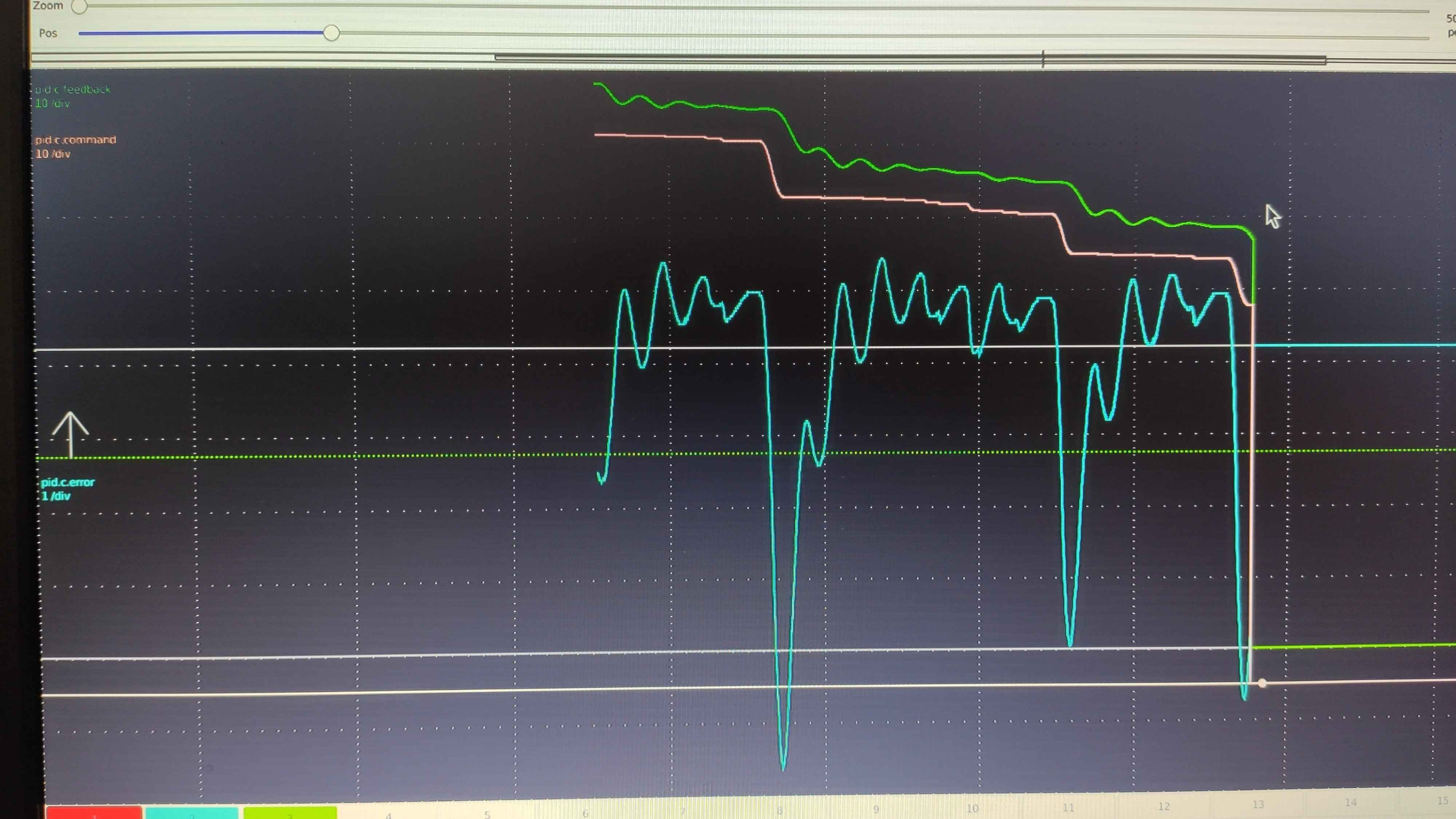
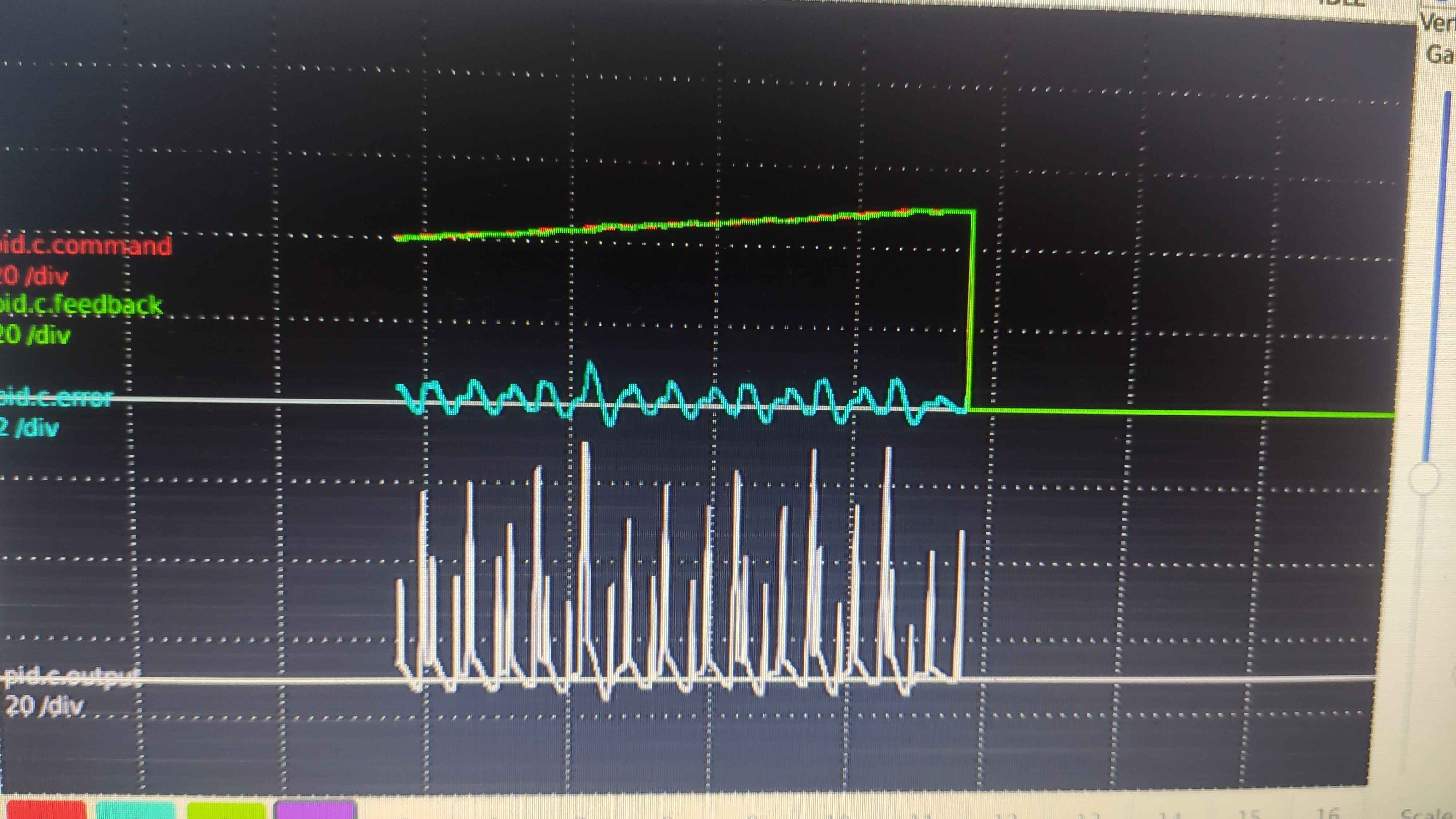
I have these snippets right now. The first is the original behaviour and the next one is after a full day of tweaking the PID values and acceleration. In both the axis moves very slowly.   
  • spumco
14 Apr 2026 21:55
Replied by spumco on topic In Need of 3 axis mill sample program
You could send them one of the sample programs that is installed with LCNC.  Like chips.ngc.

Keep in mind that your tool changer is going to be specific to your machine and LCNC configuration, especially if the tool change sequence requires anything beyond "M6 Tn G43" in it.

Example - does your machine require the post to raise the head to a safe point before the tool change M-code is commanded, or is that part of the internal change sequence?

Same for any custom or machine-specific M-codes.
  • 0x2102
14 Apr 2026 21:07 - 14 Apr 2026 21:08
Replied by 0x2102 on topic spindle-at-speed
Ich wuerde sagen du schaust dir Parameter P04.04 an. Laut Chinglischer Anleitung steht da sowas wie: "3 : When any frequency arrives, it will be powered, otherwise it will lose power (related to the setting of P02-10)"

Frei Plattdeutsch bedeutet das soviel wie:

Wenn P04.04 = 3 (Frequenzvorgabe erreicht) dann schaltet das Relay.

Verdrahtung:

Du nutzt NO (normally open):
• VFD CM → 24V Versorgung (+) anlegen
• VFD NO → Mesa Input (z.B. IN05)
• Mesa GND bleibt wie gehabt

Waehle einen freien Input an der Mesa und verdrahte.

In deiner HAL kannst du das dann verbinden:

net spindle-at-speed hm2_7i96.0.7i96.0.0.input-05 => spindle.0.at-speed

Der Input ist nur ein Beispiel. Schau was du frei hast bzw. wie genau der Input bei der 7i96 heisst. 
  • PCW
14 Apr 2026 20:43
Replied by PCW on topic Lathe C axis homing
Can you plot (with halscope) the C axis commanded and feedback positions?

That would help diagnose the issue.
  • tommylight
14 Apr 2026 19:00 - 14 Apr 2026 19:35
Replied by tommylight on topic spindle-at-speed
Die 10V muss auf dem FU an Mesa 7i96S gehen, da sind klemme fuhr GND, AI, und +10V an die FU.
Edit:
My bad, missed the part where spindle works, sorry.
  • Sierevello
14 Apr 2026 17:56
In Need of 3 axis mill sample program was created by Sierevello
Good Afternoon,

I am in need of a 3 axis milling sample program. I am converting my Anilam Crusader M 3 axis mill to LinuxCNC. I use Gibbscam and in order to help me with the post processor they need a sample program that contains gcode that generate lines, circles, tool changes, etc. I sent them a link to the LinuxCNC G Code catalog. Any help is greatly appreciated.

Thank You,
Steve in Indy
  • jetbadger
14 Apr 2026 17:17
Replied by jetbadger on topic Lathe C axis homing
I was thinking that 1:1.45 overdrive of the spindle could be an issue, but it just doesn't make sense that it would also misbehave without encoder feedback, when it's just an open loop system.

The motor is rated 5.5kW. It's on the slower side but the torque should be plenty I'd think. I've spent the last night rolling around thinking of this and I'm pretty sure it must be something to do with step scaling, accel values or something like that. Maybe there is too many steps? 10k per revolution and it's causing issues for unknown (to me) reason. I will try to test that next and see if that makes any difference.
  • Dudelbert
14 Apr 2026 16:42
Replied by Dudelbert on topic My Z-axis stopped moving
Thank you, it was the analog line of the Z axis, it was switched around. Switching it and inverting the output scale from 60 to -60 did the trick.

Now I wonder how it worked in the first place. I think the GND of that connection must have been bad, and when I added the index lines, it got connected.
  • LukeST
14 Apr 2026 15:44
spindle-at-speed was created by LukeST
Hallo, zusammen. Ich bin Anfänger und habe mir gleich bei meiner ersten Fräse (Volksfräse mit Chinaspindel und YL620-A FU an einer Mesa 7i96s) LinuxCNC vorgenommen. Ich kämpfe mich nur langsam Schritt für Schritt vor und würde mich über Unterstützung freuen.
Ich bin jetzt so weit, dass die Fräse per Hand alles macht, was sie machen soll (Fahren in alle Richtungen und auch die Spindel läuft). Wenn ich ein Programm (GCode) ablaufen lassen möchte, bleibt LinuxCNC stehen, wenn ein G1-Code kommt, wenn er also losfräsen soll. Ich gehe davon aus, dass LinuxCNC nun darauf wartet, dass spindle-at-speed signalisiert, dass die Spindel ihre Sollgeschwindigkeit erreicht hat. Und da stehe ich auf dem SChlauch und bitte um eure Hilfe: Laut Anleitung müsste mir der AO-Port des FU die tatsächliche Drehgeschwindigkeit anzeigen (proportional als Spannung 0-10V). Zwischen GND und AO bekomme ich aber keine Spannung, die proportional zur Drehgeschwindigkeit ist. Wenn ich langsam die Geschwindigkeit hochdrehe steigt dort die Spannung leicht an (in Richtung 90mV) und fällt dann sogar wieder ab. Ist also nicht das gewünschte Verhalten. Ich habe P03.18 auf 0 gelassen und P3.19 und P04.00 ebenfalls so gelassen wie es war (100 und 10). Muss ich noch irgendwas machen? Oder hab ich das alles falsch verstanden?
Wenn ich dann ein sinnvolles Signal bekomme: Was genau muss ich dann tun, damit LinuxCNC das als spindle-at-speed annimmt? Ich habe (als Anfänger) bisher nur mit dem Wizard herumgespielt. Wahrscheinlich muss ich in die HAL gehen? Was dort genau wo einstellen? 
Danke für die Unterstützung.
 
  • Lcvette
14 Apr 2026 15:35 - 14 Apr 2026 15:35
Replied by Lcvette on topic Probe Basic and XHC-WHB04B-6 jogging issue
That's great news, glad you got it sorted out!
  • spumco
14 Apr 2026 14:28
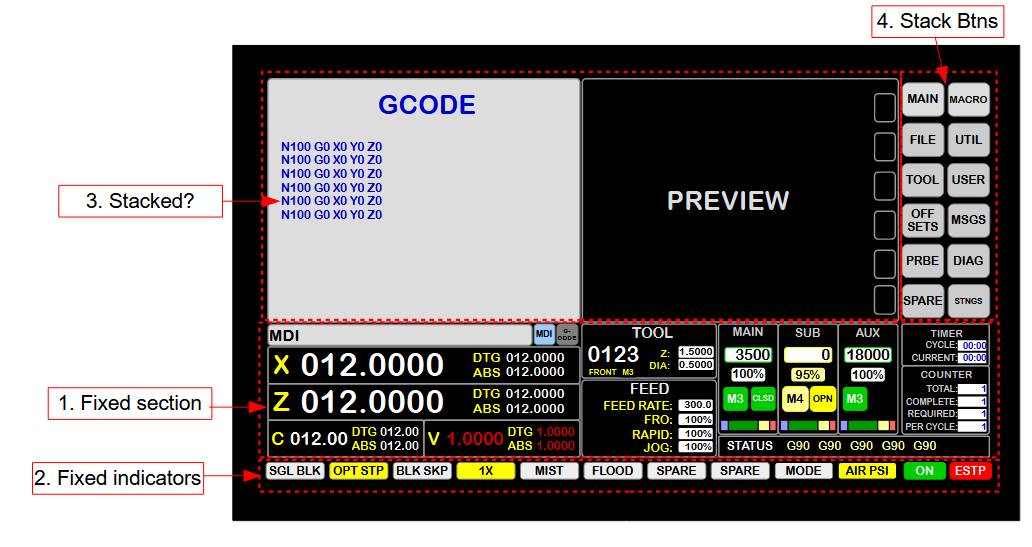
Just getting started with Flex; I've never really done a GUI from scratch so I haven't internalized any 'best practices' or anything.

Goal is something like below.  I started fiddling last night but quickly realized I needed some experienced advice on how to organize & lay-out this thing.

Details aren't set in stone now, but I want a GUI with no on-screen controls/jogging on the main page.  Will be used with 15.6" touchscreen 1920x1080p monitor - so I can't cram lots of small stuff in.

Maybe something like:
  • Main window
    • Horizontal layout
      • Frame (variable displays top)
        • Vertical layout
          • Stacked widget (left)
          • Frame for stacked widget buttons (right)
      • Frame (fixed displays middle)
        • Vertical layout
          • Frames across for each 'section'
      • Frame (fixed indicators btm)
        • Vertical layout
          • indicators + estop/on btns
Or is there a better way of laying this out that doesn't wind up with me painting myself in to a corner?  I don't like tabs, so no tabbed widgets.

Thx
 
  • tommylight
14 Apr 2026 13:52
Replied by tommylight on topic My Z-axis stopped moving
Make a new config and give it a try.
If that does not work:
-make sure the analog wires are properly making contact inside the connectors
-check if analog is correctly wired as reversing polarity of those two wires can cause most of the issues you have
  • rodw
14 Apr 2026 12:39
Replied by rodw on topic Hello to all, I am new here
all you need to do is type
sudo apt-get install linuxcnc-uspace linuxcnc-uspace-dev

This will get you 2.94 which is  a couple of bug fixes behind the current 2.98 version

If you want to get to 2.98 (which is probably not a big issue  for now), follow the directions here
linuxcnc.org/docs/stable/html/getting-st...th_preempt_rt_kernel

Laptops are not good candidates for linuxCNC because of all the latency inducing features in them but its worth trying. If you do need a better PC, go to 2.98 then. Install with the ISO on the downloads page
linuxcnc.org/downloads/

I have a few installation videos on my @MrRodW YouTube channel
  • erikfriesen
14 Apr 2026 12:28
Custom widget management was created by erikfriesen
Is there a way to create custom widgets without directly editing /usr/lib/python3/dist-packages/qtvcp/ items?

I'd prefer to store these custom widgets in user directory to track modifications easier.  Otherwise I have to edit as root.

I've tried and failed to pinpoint where the include directory is defined.
Displaying 4546 - 4560 out of 11376 results.
Time to create page: 0.255 seconds
Powered by Kunena Forum