Search Results (Searched for: )

  • tommylight
14 Feb 2026 16:24

When i run my program, the IHS happens perfectly but when the the THC takes control the torch just gets the down signal and never goes up. Kindly help with any formulas with these three parameters.
-Cutting voltage set to low
-Voltage readings to high
-Voltage scaling and offsets not set correctly
-No arc voltage reading at all, can be from inverted polarity into THC, wrong wiring from THC, THC input for high voltage while output from plasma is divided
-voltage divider in plasma/resistors set incorrectly
-broken wires from plasma to THC input
-etc
  • tommylight
14 Feb 2026 16:19
Replied by tommylight on topic Hurco BMC 30 AP

The last time the machine was running (the video is a few pages back), I only updated the firmware of the 7I97, from Debian10 to Debian13, and the LinuxCNC software. There were no changes to the wiring, hardware, or the HAL/INI files.
Yet it always, always ends up something was changed.

As soon as the limit switch moves to the cam, the axis stops, and after a few seconds, an error message appears.
What error? We can not help you if you keep holding important information from us.

The settings for all three axes are the same; you can see them in my latest .ini file.
They can NOT be the same, Z axis is almost always moving in negative space, not in positive as X and Y.
  • PCW
14 Feb 2026 16:12
Replied by PCW on topic Hurco BMC 30 AP
As soon as the limit switch moves to the cam, the axis stops, and after a few seconds, an error message appears. The X, Y, and Z home contacts are displayed correctly.

What error message?

Do the drives have any direct connection to the limit/home switches?
(some systems disable the drives directly when limits are reached)

Can you do a halscope plot of the say X position and X home switch state while homing?


  • decor82
14 Feb 2026 15:59
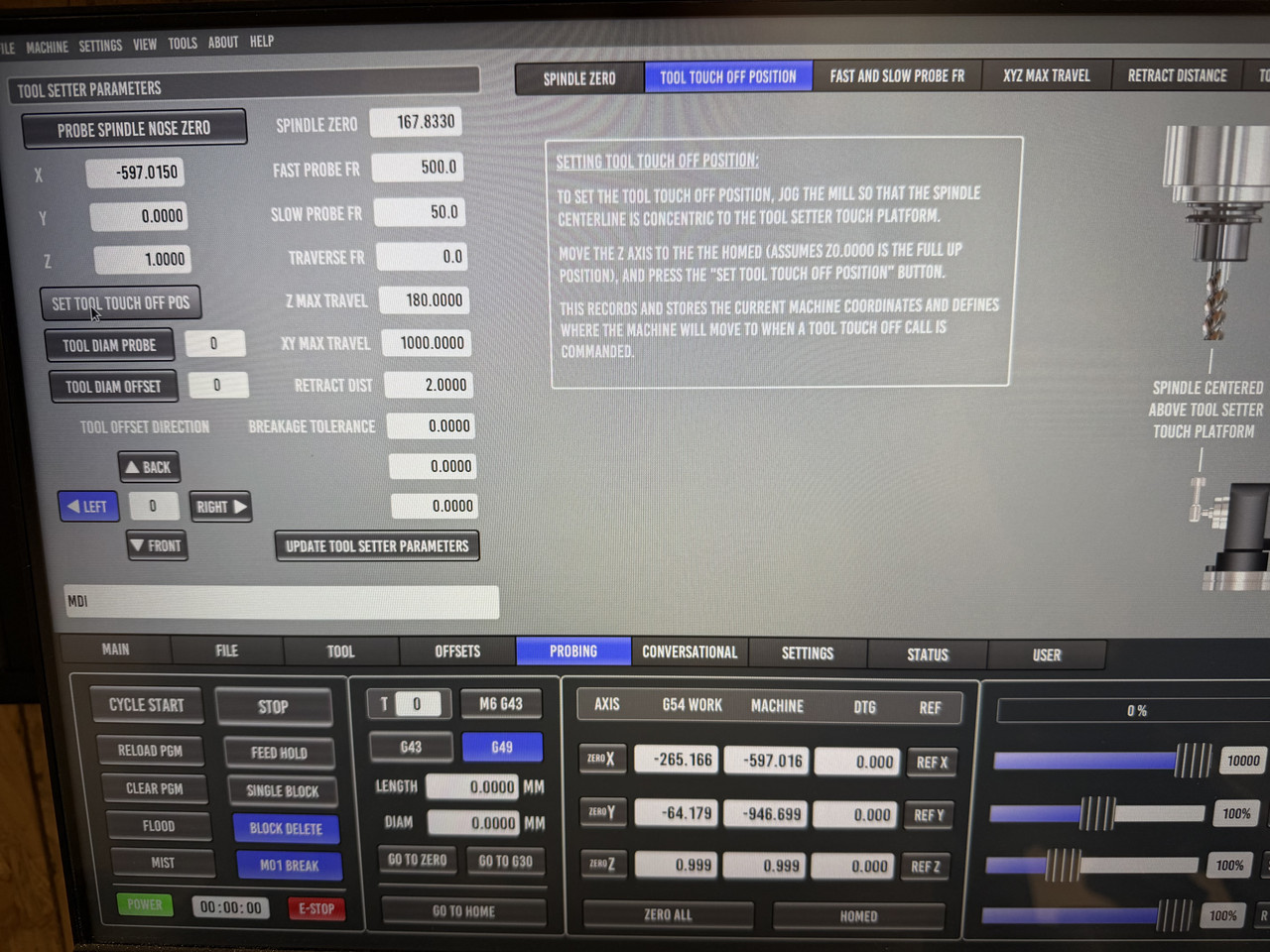
Hello, i updatet my LinuxCNC and Probe Basic to the latest Version and edited my config and copied the files and folders to my config folder. Everything works fine expect of the tool setter settings.When i jog to the tool setter position and click on "SET TOOL TOUCH OFF POS" the X value will be set but the Y value is 0. What can be the problem here?
  • Lcvette
14 Feb 2026 15:49
Replied by Lcvette on topic QtPyVCP Mill Touch Screen
this is a really old ui for qtpyvcp from JT, it may no longer be compatible as it likely did not get updated and tested when we moved to python3 and I think JT has moved on to flexgui, may want o see what he has there if that is your style flavor preference.
  • Lcvette
14 Feb 2026 15:31
Replied by Lcvette on topic Some problems with probe basic lathe
ok i found the resolution issue again it was another rogue widget with an expanding policy. I have capped max height for all tab widget pages now so that shoud never happen again and the height will display correctly . I am getting ready to push the latest changes.

as for buttons working im not sure, the machine must be out of estop (estop button showing red is out of estop ( so its easy to find if you need to hit it).

power button must be on Green lit

and the machine must be homed in order for buttons to be available in the sim

report back on those.
  • Hakan
14 Feb 2026 15:20
This was a complete new install from ISO, wasn't it?
Did you install the r8168-dkms driver again?
 
  • 5_Zylinder
14 Feb 2026 15:09
Replied by 5_Zylinder on topic Hurco BMC 30 AP
Thanks for your feedback.

The last time the machine was running (the video is a few pages back), I only updated the firmware of the 7I97, from Debian10 to Debian13, and the LinuxCNC software. There were no changes to the wiring, hardware, or the HAL/INI files.

In any case, the handwheel on the machine works, for example.

However, there's still a problem with the homing function, and that also worked the last time the machine was running. The Z-axis moves correctly. The limit switch moves to the cam and then releases itself, reporting a successful homing. Unfortunately, this isn't the case with the X and Y axes. As soon as the limit switch moves to the cam, the axis stops, and after a few seconds, an error message appears. The X, Y, and Z home contacts are displayed correctly.

I then tried manually homing the X and Y axes. I manually pressed the switch, and the machine recognized the command and performed the referencing by moving freely and reporting a successful referencing.

The settings for all three axes are the same; you can see them in my latest .ini file.

Does anyone have any other suggestions?
  • Nathan40
14 Feb 2026 14:55 - 14 Feb 2026 15:26
Hi All

Thanks for the help with this. But I am truly stuck up in calculation of the below.: 22900 and 23900 & 930000.0
 If the head is away I am getting a safe value of about 24000 for capacitive-sense-velocity in the halshow
My hm2_7c81.0.encoder.00.velocity-rpm is about 1440000 in the halshow.

When i run my program, the IHS happens perfectly but when the the THC takes control the torch just gets the down signal and never goes up. Kindly help with any formulas with these three parameters. Thanks!

# Configure a limit component for the capacitive sensor output since it is scaled
loadrt limit1
addf limit1.0 servo-thread
net capacitive-sense-velocity limit1.0.in
setp limit1.0.min 22900
setp limit1.0.max 23900
# hook up the limited signal to the plasmac arc voltage
net plasmac:arc-voltage-in <= limit1.0.out

and 

# Make a fake Ohmic probe based on the capacitive sensor
# Use the .velocity-rpm so the .velocity can be left unused for arc_ok
loadrt comp count=1
addf comp.0 servo-thread
net fake-ohmic-probe-in hm2_7c81.0.encoder.00.velocity-rpm comp.0.in0
setp comp.0.in1 930000.0
net plasmac:ohmic-probe comp.0.out
# ohmic output is comp.0.out


  • Aciera
14 Feb 2026 14:55
Replied by Aciera on topic socket raw Eth.
@BIBIGUL
No double posting please.
  • Mr. Mass
14 Feb 2026 13:49 - 14 Feb 2026 15:47
Replied by Mr. Mass on topic Control panel
I finally finished a project I had been working on for over a year (not every day, of course, but still). It is a control panel with a vertical 22" touchscreen monitor, an industrial keyboard, and a built-in computer. The frame is made of 20 series aluminum profile, with 1mm HIPS overlays. The interface is a modified Qtdragon_hd. The buttons and keyboard are connected via Arduino. Many thanks to everyone on this forum whose thoughts and ideas I have used. But a special thanks to cmorley, without whose help I would never have been able to achieve the functionality that it has. Thank you, Chris.
Short video of the work: youtube.com/shorts/eyDQwiEkxz0
  • tar_san
14 Feb 2026 12:58
I upgraded to ver 2.9.8 and I did disable eoe procedure again.
But then I cound not move EtherCAT servo motor (YASKAWA). ( I could not reset error )

I have attached files about dmesg and procedure to disable eoe.

Please help me solve this problem.
 
  • BIBIGUL
14 Feb 2026 11:51
Replied by BIBIGUL on topic socket raw Eth.
A question about compilation. Wrote such a makefile - "MODULE_NAME := ABMIO44 MODINC := /usr/share/linuxcnc/Makefile.modinc SRC_DIR := SrcINC_DIR := Inc SRC_FILES := $(wildcard $(SRC_DIR)/*.c)OBJ_FILES := $(notdir $(SRC_FILES:.c=.o)) $(MODULE_NAME)-objs := $(OBJ_FILES)obj-m += $(MODULE_NAME).o export BUILD_VERBOSE := 1 include $(MODINC) EXTRA_CFLAGS += -I$(shell pwd)/$(SRC_DIR)EXTRA_CFLAGS += -I$(shell pwd)/$(INC_DIR) EXTRA_CFLAGS += -O2 EXTRA_CFLAGS += -march=x86-64 EXTRA_CFLAGS += -mtune=generic EXTRA_CFLAGS += -fno-fast-math EXTRA_CFLAGS += -fno-unsafe-math-optimizations  %.o: $(SRC_DIR)/%.c$(CC) $(EXTRA_CFLAGS) -c $< -o $@ all:make -S modules  clean:rm -f *.ko *.so *.o *.tmp *.ver *.order"the flags that I use do not violate the rtapi rules? Will this affect the operation of Linux cnc? Is it redundant and unnecessary?
  • tar_san
14 Feb 2026 10:03
Replied by tar_san on topic Cannot JOG Plus/Minus move in TeleOp mode
Thanks !

I was using LinuxCNC Ver 2.4.5 at that time.
But Today, after I just upgraded to Ver 2.4.8, everything works well.
  • andrax
14 Feb 2026 10:01
@rodw Yes, I would have implemented it in the same way in a PLC. The only thing missing is the safety timer from start homing to axis in motion. Then the homing would be practically monitored. Regarding the axis jumping, you could set the feed rates to minimum after completion until Linuxcnc has synchronized.

@Hakan, aren't the csp csv and pv modes managed by the driver? I believe that torque mode is not supported by the A6 during homing. However, it would be an option if you let Linuxcnc manage homing again. Since the Z pulse is not output by the A6, you could perform the torque search. 

 
Displaying 6946 - 6960 out of 11383 results.
Time to create page: 0.915 seconds
Powered by Kunena Forum